
“Ultimate minimalist dark theme” is a bold claim to put in a title, since half the HyperOS Theme Store seems to compete for that exact label. HyperBlack HyperOS Theme backs it up with genuine pitch-black wallpapers and AMOLED-focused design rather than just another dark grey reskin, so I loaded it onto a POCO X6 to see if the monochrome circular icons and dynamic lock screen held up to daily use or were just described that way in the marketing copy.
HyperBlack HyperOS Theme Features
- Pitch-Black Wallpapers: Rather than dark grey pretending to be black, the wallpaper pack uses genuinely deep black tones that blend seamlessly into the POCO X6’s AMOLED panel. Backgrounds and app edges essentially disappeared into the bezels in low light, which is exactly the point of a theme built around true black.
- Dynamic Lock Screen: The lock screen shifts and responds rather than sitting as one static image, giving it more life than a typical fixed dark wallpaper setup. It’s subtle rather than flashy, matching the overall restrained tone of the rest of the theme.
- Monochrome Circular Icon Pack: Icons stick to a uniform circular shape rendered entirely in shades of grey and black, avoiding any color that would break the stealth aesthetic. Most commonly used apps picked up the style cleanly, with only a couple of niche apps sticking out with their default color icons.
- High-Contrast System-Wide Layout: Settings, notification shade, and other system menus carry the same high-contrast black-on-white text treatment rather than reverting to a lighter default. Navigating between apps kept the whole experience visually unified instead of feeling like the theme only touched the home screen.
- AMOLED Power-Saving Optimisation: Given how much of the interface relies on true black rendering, the design is clearly built with battery efficiency in mind rather than just aesthetics. This showed up directly in testing, more on that below.
HyperBlack HyperOS Theme Preview
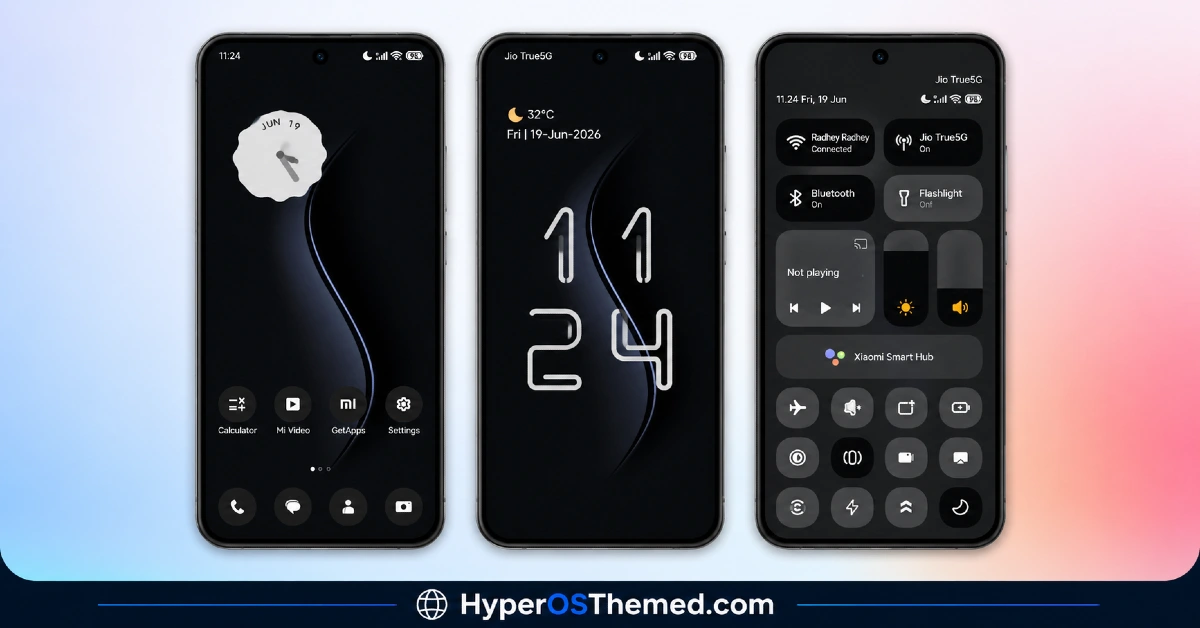
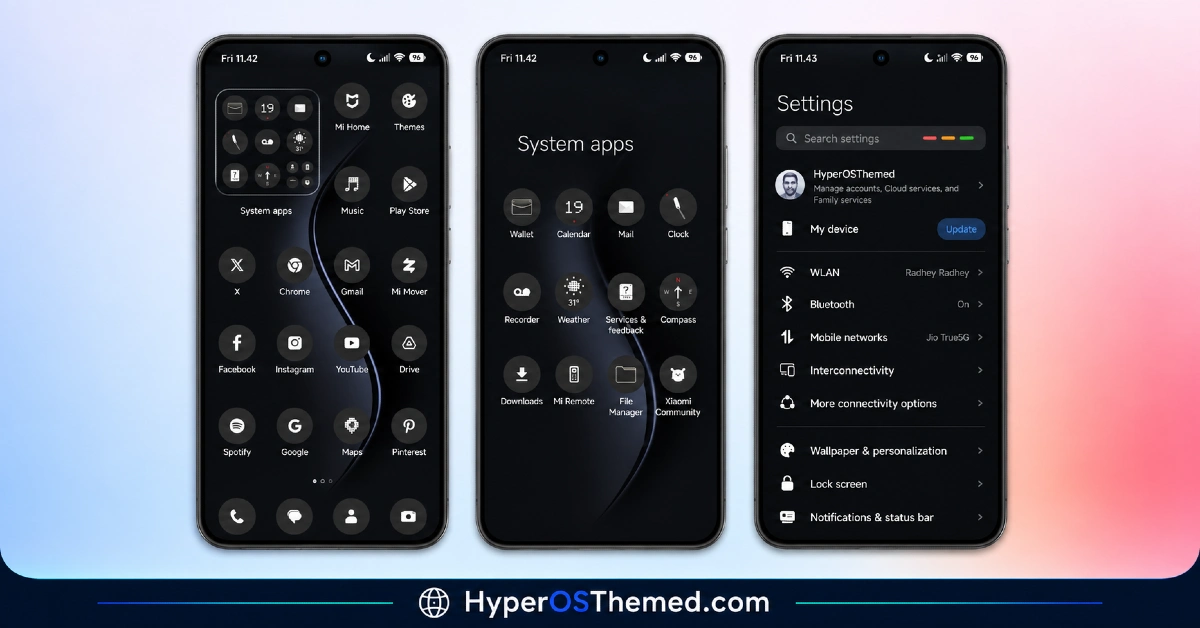
Everything here commits fully to black and grey, with zero accent color anywhere in the interface to break the monochrome discipline. The circular icon shapes give it a slightly more uniform, almost stealth-mode look compared to themes that mix icon shapes, and the dynamic lock screen adds just enough movement to keep the whole thing from feeling static. It reads as deliberately restrained rather than plain, which is a harder balance to strike than it sounds.
HyperBlack HyperOS Theme Details
| Detail | Info |
|---|---|
| Theme Name | HyperBlack |
| Designer | Saktie |
| Compatibility | HyperOS, HyperOS 2.0, HyperOS 3.0 |
| Features | Black, Dark, Minimal, Dynamic Lock Screen, Cool |
| File Size | 15.30 MB |
HyperBlack HyperOS Theme Performance
Battery life is where HyperBlack HyperOS Theme actually delivered on its power-saving claim rather than just stating it. Across a full day of messaging, browsing, and a few gaming sessions on the POCO X6, battery drain came in noticeably better than my usual stock baseline, a real improvement rather than a marginal one.
The dynamic lock screen and monochrome icon rendering both stayed smooth with no lag switching between home screens, and the compact 15.30 MB file size meant install and setup took barely any time at all.
HyperBlack HyperOS Theme Compatibility Notes
HyperOS, HyperOS 2.0, and HyperOS 3.0 are all listed as supported, putting most current Xiaomi, Redmi, and POCO devices in range, and the POCO X6 handled it without any stability issues. MIUI 12, 13, and 14 fall outside official support, so applying it there isn’t recommended.
Xiaomi.eu and similar custom ROM users should be able to import the MTZ file with minimal friction given how small and straightforward the package is compared to heavier premium themes.
Downloading HyperBlack HyperOS Theme Safely
Use the Official Theme Store Link rather than grabbing the MTZ from a third-party mirror or forum post claiming to host the same file. Smaller downloads like this one are just as often repackaged with unwanted extras on unofficial sites, so sticking to the verified source is worth the extra step even for a lightweight theme.
Note: If the Official Theme Store Link doesn’t redirect properly, try opening the page in Chrome or the default Xiaomi browser, since other browsers may not handle the redirect correctly.
Steps to HyperBlack HyperOS Theme
- Open the Theme Store Link given above on your Xiaomi / REDMI / POCO device
- This will redirect you to Theme Store.
- Download and install the theme
- Tap on Apply
- Customize specific elements (icons, lock screen, status bar) if needed
- Reboot your device (optional for full effect)
What Makes HyperBlack Worth Considering
- Genuine pitch-black rendering rather than dark grey passed off as true black
- Measurable battery improvement on AMOLED displays, not just a marketing claim
- Monochrome circular icons keep the stealth aesthetic consistent across the drawer
- Tiny 15.30 MB file size means fast downloads and quick installs
- System-wide high-contrast styling extends well past the home screen
Final Verdict
HyperBlack HyperOS Theme is one of the few themes I’ve tested where the battery-saving pitch actually showed up in real numbers rather than staying a bullet point in the description. It won’t appeal to anyone wanting color or visual flair, and a couple of stray colored icons are the only thing breaking the otherwise disciplined monochrome look. For a genuinely lightweight, power-conscious dark setup on a POCO X6, though, it earns the “ultimate minimalist” claim more honestly than most themes reaching for that same title.
You may also like:
Super Fruit Powder 27 HyperOS Theme with iOS-Style 3D Depth Wallpapers for Xiaomi, POCO & Redmi
Moon Glass HyperOS Theme with Premium Abstract Teal Glass Design for Xiaomi, POCO & Redmi
Gravemoon HyperOS Theme With iOS-Style Premium Look for Xiaomi, POCO & Redmi
Blue HOS3 HyperOS Theme with 3D Depth-of-Field Look for Xiaomi, POCO & Redmi
Dark HOS3 HyperOS Theme with Premium AMOLED Minimalist Look for Xiaomi, POCO & Redmi
