
Not every theme worth covering comes from the official Theme Store, and Coconut Grove HyperOS theme is a good example, an independently shared MTZ file built around a palm-tree sunset aesthetic that’s noticeably different from the usual dark or glass options flooding most theme roundups. I installed Coconut Grove HyperOS Theme on a POCO X6 mainly curious how a beach-themed setup would actually function day to day rather than just look good as a single lock screen screenshot.
Coconut Grove HyperOS theme Features
- Palm Tree Sunset Wallpaper: The core visual is a genuine sunset-over-ocean photo with palm tree silhouettes framing both edges of the screen, carrying through consistently across the lock screen and home screen rather than switching to something unrelated. The warm gold tones against the darkening sky gave it real depth instead of looking like a flat stock photo filter.
- Sticky-Note Style App Icons: Every icon is wrapped in a sticky-note frame complete with a tiny palm tree graphic and a curled corner detail, giving the whole app drawer a handmade, scrapbook feel rather than a typical flat or rounded icon set. It’s a genuinely distinctive choice that stayed consistent across every app I checked, including folders and system apps.
- Oversized Bold Clock Typography: The lock screen clock uses a heavy, rounded font large enough to dominate the upper half of the display, paired with a smaller date line above it. It stayed legible against the busy sunset background without needing a solid backing panel behind the numbers.
- Note Widget Stack: A stack of note-style widgets appears lower on the lock screen, each styled like a small sticky note with a short line of text and a “Now” timestamp. It’s an unusual inclusion for a phone theme, functioning more like a lightweight journal or mood board than a typical clock or weather widget.
- Battery and Activity Ring Widgets: Alongside the clock sits a battery percentage readout with today’s screen-on time, plus a circular progress ring widget. Both stayed accurate and updated properly throughout testing without any lag or stuck values.
- Slide-Up Unlock Style: True to the designer’s own description, the lock screen is built around a slide-up gesture rather than the default tap-to-unlock flow, reinforcing that scrapbook, journal-like feel the widgets already lean into.
Coconut Grove HyperOS theme Preview
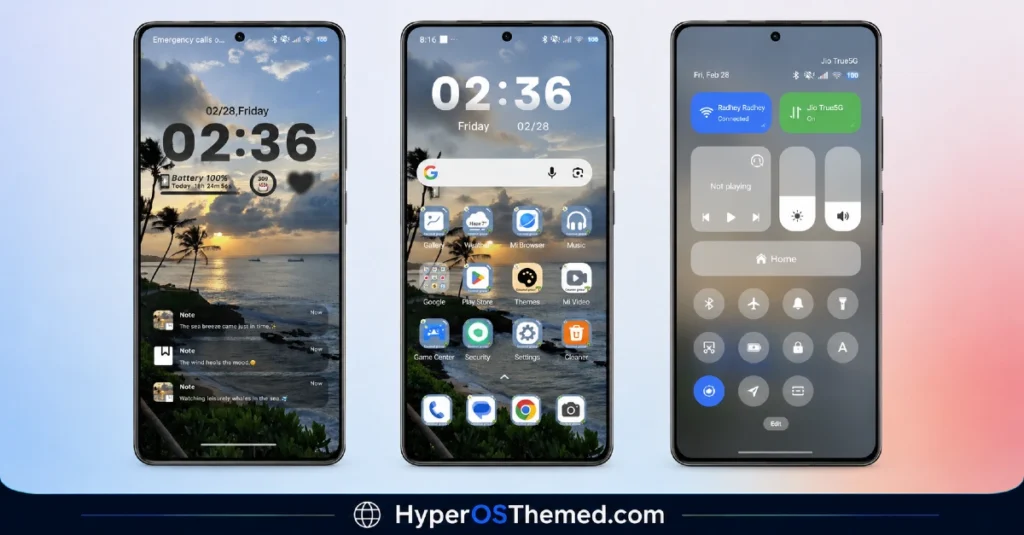
Warm sunset gold and deep ocean blue carry the entire visual identity, with palm tree silhouettes anchoring both sides of the screen and sticky-note icon frames repeating that handcrafted motif throughout the app drawer. The oversized clock and note widgets give the lock screen a personal, almost diary-like quality rather than the sleek, corporate look most themes go for. It reads as warm and a little nostalgic, closer to a vacation photo album brought to life than a typical Xiaomi theme.
Coconut Grove HyperOS theme Details
| Detail | Info |
|---|---|
| Theme Name | Coconut Grove |
| Designer | Evanc |
| Category | Theme |
| Region | Global |
| Tags | Cute, Simple, Cool, Romantic, Black, 3D |
Coconut Grove HyperOS theme Performance
Given how many custom widgets are stacked on the lock screen, from the note stack to the battery ring, I expected some visual clutter once notifications started piling up, but everything stayed legible and properly spaced even with the note widgets expanded. Icon rendering across the home screen stayed sharp with no stretching or blurring on the sticky-note frames, and switching between home screen pages didn’t introduce any stutter on the POCO X6. Battery drain stayed close to my usual baseline, which makes sense given the wallpaper is static rather than animated despite how detailed it looks.
Coconut Grove HyperOS theme Compatibility
Coconut Grove HyperOS theme is listed under the Theme category with Global region availability, and it applied cleanly on a POCO X6 without any icon or layout issues during testing. Since this is a standalone MTZ file rather than a listing tied to a specific HyperOS version number, results on older MIUI builds may vary more than with a version-specific official Theme Store release, so sticking to current HyperOS firmware is the safer bet. Custom ROM users importing manually should expect the same experience as a standard MTZ import, provided their ROM supports third-party theme files in the first place.
Downloading Coconut Grove Safely
Since this theme is shared through an independent MTZ file link rather than the official Xiaomi Theme Store, treat the source page carefully and avoid any secondary mirror or forum repost claiming to offer the same file. Independently distributed MTZ files are exactly the kind that get bundled with unwanted extras when reuploaded elsewhere, so grabbing it directly from the original share link is the safer route here.
Steps to Apply the Theme
- Download the Coconut Grove HyperOS theme from the official link above
- Open the Theme Store app on your Xiaomi, Redmi, or POCO device
- Tap the Themes option, then scroll down and select Import
- Locate and import the downloaded MTZ file
- Once imported, tap the theme and select Apply
- Restart your device if any elements appear misaligned after applying
What Makes Coconut Grove HyperOS Theme Worth Considering
- Sticky-note icon framing is a genuinely distinctive look not found in typical Theme Store releases
- Note widget stack adds a personal, journal-like touch most themes don’t attempt
- Oversized clock stays legible without needing a solid background panel
- Static wallpaper keeps battery impact minimal despite the detailed visual design
- Slide-up unlock gesture reinforces the theme’s overall scrapbook aesthetic
Final Verdict
Coconut Grove HyperOS theme stands out simply by not chasing the dark, glass, or minimal trends most HyperOS themes lean on, going for something warmer and more personal instead. The sticky-note icons and note widgets won’t be for everyone, some will find it a bit too cute, but on a POCO X6 it rendered cleanly and held up through normal daily use without any real drawbacks. If you want a lock screen that feels more like a travel journal than a phone interface, it’s worth trying.
You may also like:
Rat V HyperOS Theme with 3D Anime Style Meets Dynamic Island for Xiaomi & Redmi
Super Surge HyperOS Theme With iOS-Inspired Dynamic Island for Xiaomi, POCO & Redmi
Pure Blue HyperOS Theme with Deep Space Vortex Design for Xiaomi, POCO & Redmi
HyperBlack HyperOS Theme with Pitch-Black Minimalism for Xiaomi, POCO & Redmi
