
I found Wanyoui HyperOS Theme while searching for a way to make my POCO X6 look less like a POCO and more like the Samsung phone my coworker carries around. A lot of “One UI style” themes I’ve tried before end up being a half-hearted icon swap with nothing else changed, so I went in expecting the same here. I kept it installed for nine days as my daily theme just to see how far the Samsung resemblance actually went beyond the preview images.
Wanyoui HyperOS Theme Features
- One UI Style Icon Pack: The icons closely mimic Samsung’s One UI icon shapes and spacing, which is the whole selling point of this theme. Coverage across my commonly used apps was decent, though a few icons for regional apps clearly didn’t get the same treatment and stuck out against the rest.
- Black and Minimal Color Scheme: The overall palette sticks to black with minimal accent color, keeping things visually calm rather than busy. It reads more like a functional Samsung-style skin than a decorative theme, which fits what it’s going for.
- Simple Status Bar Layout: The status bar icons are clean and stripped down, similar to how One UI handles notification icons. Nothing flashy here, but it’s consistent and easy to read at a glance on my Redmi’s display.
- Lightweight File Size: At 7.68 MB, Wanyoui installed in just a few seconds on my POCO X6. It’s noticeably smaller than glass or wallpaper-heavy themes I’ve tested, which makes sense given there’s no elaborate wallpaper pack involved.
- Compact Feature Set: This theme doesn’t try to reinvent the lock screen or Always-on Display, it focuses almost entirely on the icon pack and basic color scheme. That’s either a plus or a minus depending on what you’re looking for, personally I would’ve liked at least one alternate lock screen option.
Wanyoui HyperOS Theme Preview
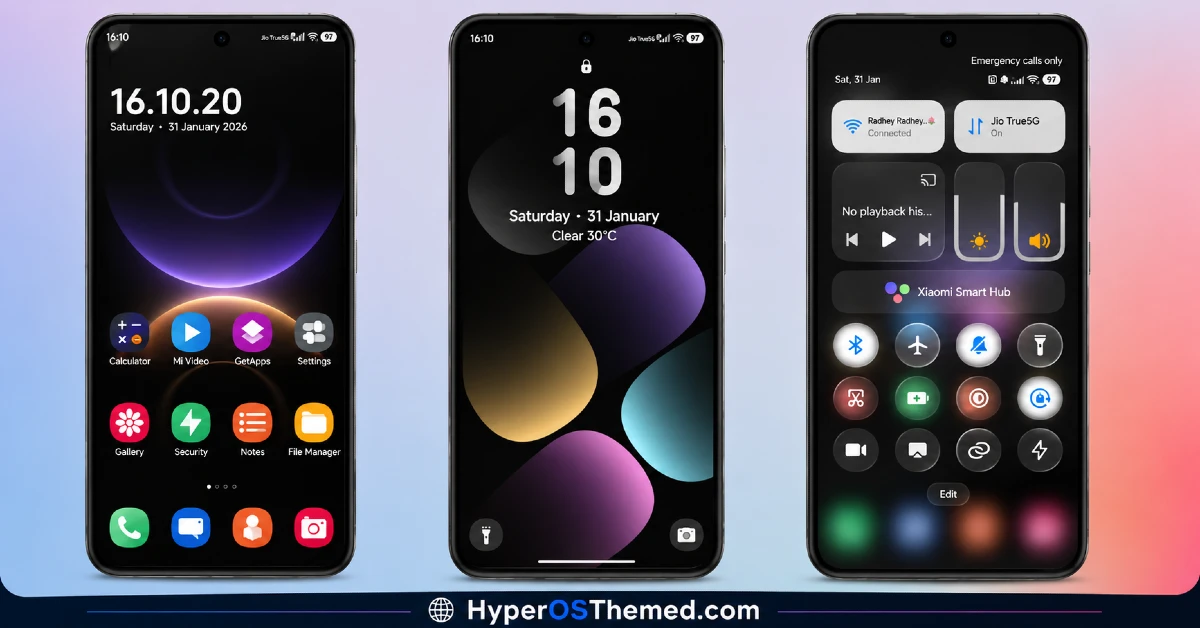
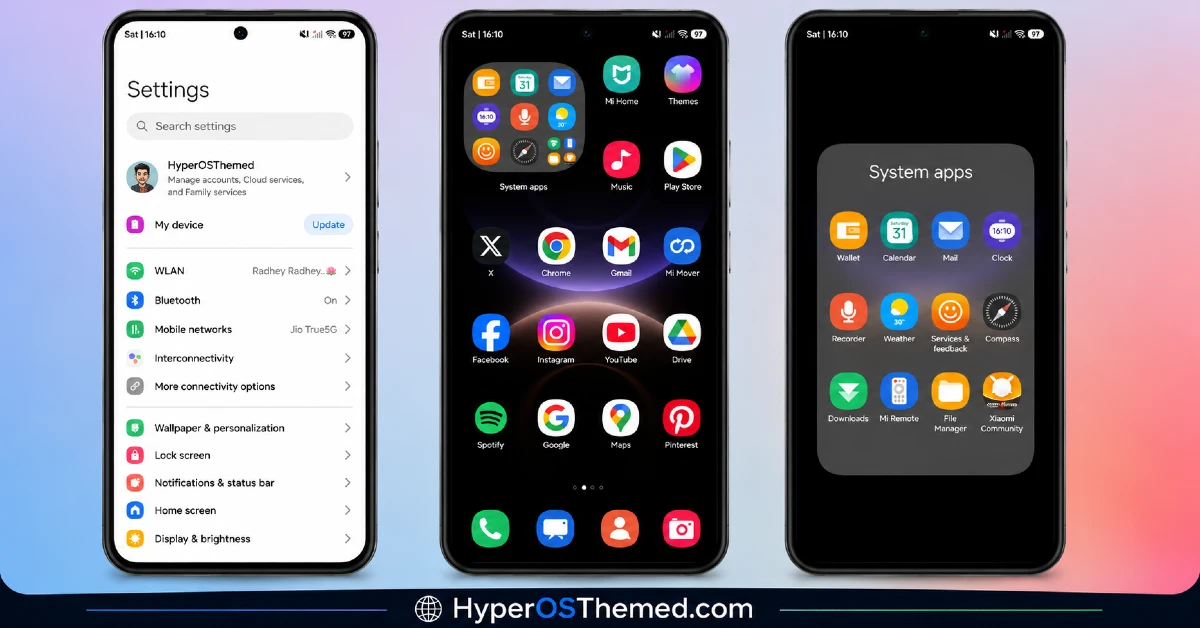
The look is dominated by black backgrounds paired with a Samsung-inspired icon shape language, giving the whole home screen a slightly rounder, more rectangular icon silhouette than typical HyperOS themes.
There’s no elaborate wallpaper pack or glass effect involved, so the visual focus stays entirely on how convincingly the icons pass for One UI. It’s simple rather than showy, closer to a functional reskin than an artistic theme.
Wanyoui HyperOS Theme Details
| Detail | Info |
|---|---|
| Theme Name | Wanyoui |
| Designer | Eto’mox |
| Compatibility | HyperOS, HyperOS 2.0, HyperOS 3 |
| Features | Simple, Samsung Style, One UI Icons, Black |
| File Size | 7.68 MB |
Wanyoui HyperOS Theme Performance
I used Wanyoui HyperOS theme on a POCO X6 running HyperOS 3.0 for nine days, through normal daily use with no heavy gaming sessions since the phone itself isn’t built for that. Given how small and simple the theme package is, performance was exactly what I expected, no lag, no delayed icon loading, nothing worth reporting.
Battery life stayed identical to my stock theme baseline, which makes sense since there’s no AOD customization or transparency effects putting extra strain on the display. The only real annoyance was cosmetic rather than functional, a couple of icons that didn’t match the One UI style broke the illusion slightly whenever I opened the app drawer.
Wanyoui HyperOS Theme Compatibility
Wanyoui HyperOS theme supports HyperOS and HyperOS 2.0, and HyperOS 3.0. It’s built for relatively current Xiaomi, Redmi, and POCO devices rather than older MIUI builds. I tested it on a POCO X6 without any problems, and given how lightweight and icon-focused the theme is, it’s unlikely to cause issues on other HyperOS 2.0 and HyperOS 3.0 devices either. Custom ROM users on Xiaomi.eu or similar builds should have no trouble importing the MTZ file, since the package itself is small and doesn’t rely on complex system-wide skinning.
Get Wanyoui HyperOS Theme
Get Wanyoui HyperOS Theme through the official Xiaomi Theme Store link rather than random third-party APK sites offering the same file. Sideloaded theme installers from unverified sources are a common way people end up with unnecessary permissions or bundled software, so the official Theme Store route is the safer option even for a small file like this one.
Note: If the Official Theme Store Link doesn’t redirect properly, try opening the page in Chrome or the default Xiaomi browser, since other browsers may not handle the redirect correctly.
How to Apply Wanyoui HyperOS theme
Follow the steps below to apply the theme:
- Open the Theme Store Link given above on your Xiaomi / REDMI / POCO device
- This will redirect you to Theme Store.
- Download and install the theme
- Tap on Apply
- Customize specific elements (icons, lock screen, status bar) if needed
- Reboot your device (optional for full effect)
Why Choose Wanyoui HyperOS Theme?
- One of the more convincing One UI style icon packs available for HyperOS right now
- Tiny 7.68 MB file size means fast downloads even on a weak connection
- Zero noticeable battery impact since there’s no heavy visual effects involved
- Black and minimal palette works well if you want a Samsung look without the clutter
- Simple enough to apply and forget, no complicated customization needed
Conclusion
After nine days on my POCO X6, Wanyoui HyperOS theme did what it set out to do, it made my phone look convincingly closer to a Samsung device without needing to change anything beyond icons and color scheme. It’s not going to compete with more elaborate themes on visual creativity, and the handful of mismatched icons kept reminding me it’s still a HyperOS theme underneath.
But compared to other Samsung-style icon packs I’ve tried, this one nails the shape and spacing better than most, and the small file size makes it an easy, low-commitment download. If you specifically want that One UI aesthetic, it’s one of the better options currently out there.
You may also like:
