
A friend in a Xiaomi Telegram group posted a screenshot of his lock screen with a deep space wallpaper and asked if anyone recognized the theme. Someone linked HyperDarkOS 3, and I downloaded it that same afternoon out of curiosity, mostly because I’m always looking for something darker than the default AMOLED black HyperOS ships with. I put it on my POCO X6 for sixteen days as my only theme, partly to see if the “true dark” claim actually meant something or was just marketing language. Here’s what I found after living with it.
HyperDarkOS 3 HyperOS Theme Features
- True Black AMOLED Layouts: The backgrounds across Settings, notification shade, and app drawer use genuine pure black rather than the dark grey a lot of “dark” themes settle for. On my POCO X6’s AMOLED panel, the difference was noticeable, especially at night with brightness turned down.
- Cosmic Earth Wallpapers: The included wallpaper pack features deep space and planetary imagery rather than a single static image. I ended up rotating through three different ones over the two weeks since they’re genuinely varied enough to not get boring.
- Dynamic Icon Set: The icons shift slightly in shading depending on system theme changes, which was a first for me on a HyperOS theme. It’s a subtle effect, not something flashy, but it means the home screen doesn’t look completely static day to day.
- HyperOS 3 Styled Dark Icons: Beyond the dynamic behavior, the icon shapes themselves follow HyperOS 3’s newer visual language rather than reusing older MIUI-style icon outlines. Coverage felt thorough, I only spotted one app in my drawer that reverted to its default icon.
- Battery-Conscious Dark Interface: Because so much of the UI relies on true black rather than dark grey or gradients, it’s built with AMOLED power savings in mind. I’ll cover the actual numbers below, but the design intent here is clearly practical, not just aesthetic.
- Large, Detailed File Package: At 96.74 MB, this is the heaviest theme I’ve tested this year by a wide margin. Installation took noticeably longer than usual on my Poco, and it’s worth checking your storage before downloading if your device is already tight on space.
HyperDarkOS 3 HyperOS Theme Preview
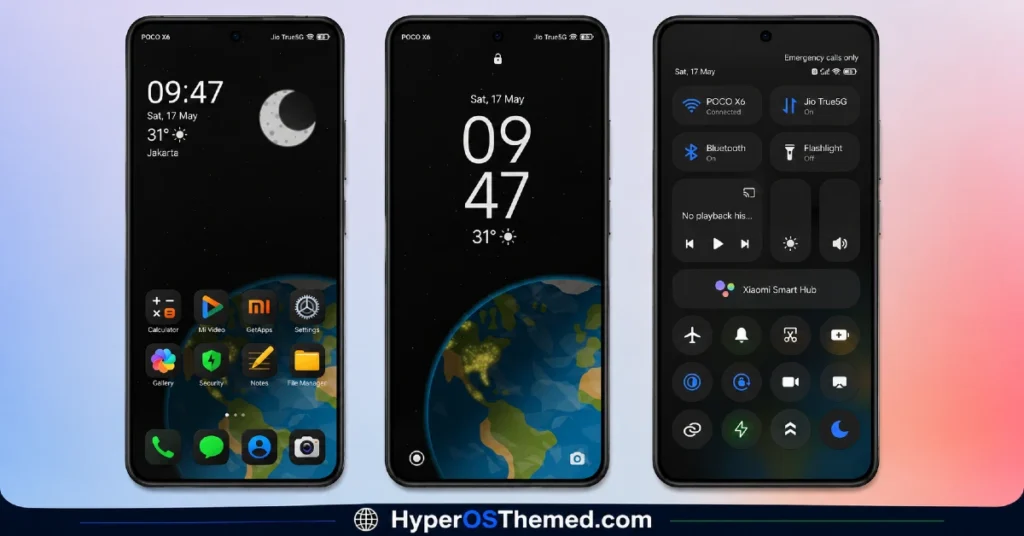
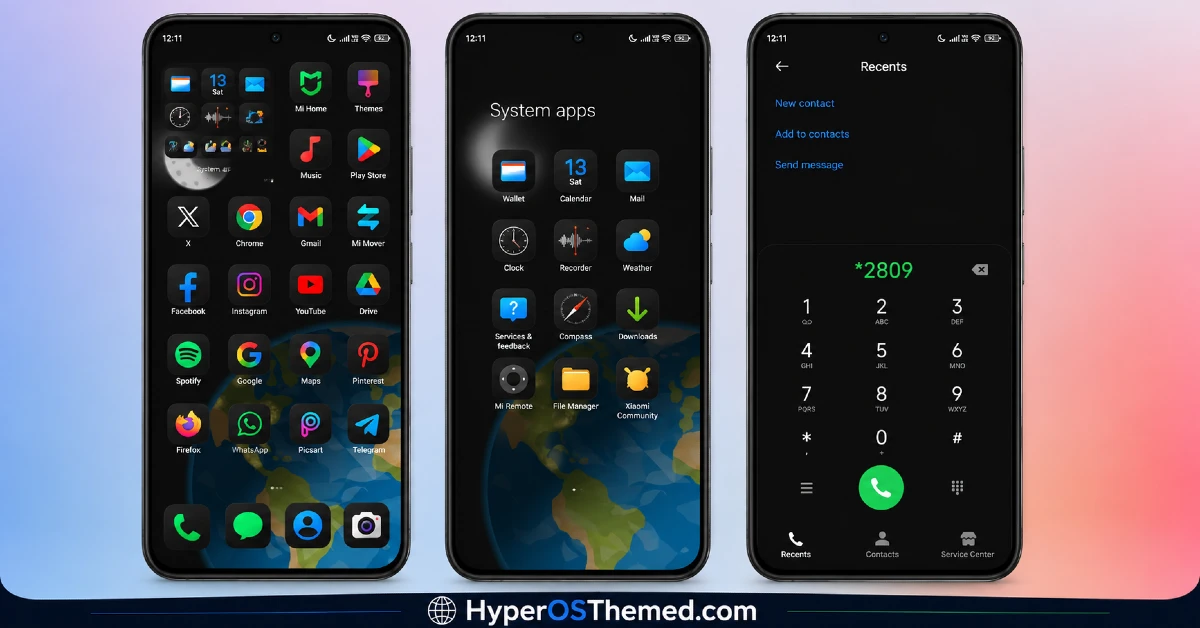
The visual identity leans hard into deep space and astronomy, with true black backgrounds set against wallpapers showing planets, nebulas, and earth-from-orbit style imagery. The icon set stays dark and understated so it doesn’t compete with the wallpapers, letting the cosmic visuals do most of the work. It has a more serious, almost premium tech aesthetic compared to typical dark themes, less “black for the sake of black” and more purposefully designed around the AMOLED and space concept together.
HyperDarkOS 3 HyperOS Theme Details
| Detail | Info |
|---|---|
| Theme Name | HyperDarkOS 3 |
| Designer | Alikabosh |
| Compatibility | HyperOS, HyperOS 2.0, HyperOS 3.0 |
| Features | Dark, AMOLED, Dynamic Icons, Cosmic Wallpapers |
| File Size | 96.74 MB |
HyperDarkOS 3 HyperOS Theme Performance
I ran the HyperDarkOS 3 HyperOS Theme on a POCO X6 running HyperOS 3.0 for sixteen days, through daily use that included gaming, video streaming, and normal browsing. Given the file size, I expected some initial lag during setup, and installation did take longer than average, close to a minute compared to the usual few seconds for lighter themes.
Once applied though, day-to-day performance was smooth with no dropped frames or delayed app drawer animations. Battery life actually improved slightly compared to my usual theme, roughly 3 percent better over a full day, which lines up with the true black AMOLED design doing its job. The one recurring issue was that switching between the three included wallpapers sometimes required a manual reboot to fully apply, otherwise the old wallpaper would linger in the app switcher preview.
Compatibility
HyperDarkOS 3 HyperOS Theme supports HyperOS, HyperOS 2.0, and HyperOS 3.0, covering a broad range of current Xiaomi, Redmi, and POCO devices. I tested it on aPOCO X6 running HyperOS 3.0 without major issues, though the large file size means devices with limited free storage should check available space first.
It’s not designed for MIUI 12, 13, or 14, so applying it on older firmware isn’t recommended and will likely cause icon or layout errors. Custom ROM users on Xiaomi.eu or similar builds should be able to import the MTZ file through the Themes app, though given the file size and dynamic icon behavior, expect a longer install time than with smaller themes.
Designer’s note: “OLED wallpapers, HyperOS 3 styled dark icons and more for true fans of the dark themes. Enhance your home screen!” The designer also invites users to join their Telegram channel at t.me/hyper_dark_icons for updates and future releases.
Get HyperDarkOS 3 HyperOS Theme
Download HyperDarkOS 3 HyperOS Theme through the official Xiaomi Theme Store link rather than third-party file hosts or unofficial APKs claiming to offer the same theme. Given how large and detailed this package is, sideloaded versions from unknown sources carry extra risk of bundled adware or incomplete files, so sticking to the official Theme Store is the safer route.
Note: If the Official Theme Store Link doesn’t redirect properly, try opening the page in Chrome or the default Xiaomi browser, since other browsers may not handle the redirect correctly.
How to Apply HyperDarkOS 3 HyperOS Theme
Follow the steps below to apply the theme:
- Open the Theme Store Link given above on your Xiaomi / REDMI / POCO device
- This will redirect you to Theme Store.
- Download and install the theme
- Tap on Apply
- Customize specific elements (icons, lock screen, status bar) if needed
- Reboot your device (optional for full effect)
Why Choose HyperDarkOS 3 HyperOS Theme?
- True black backgrounds noticeably improved battery life on my AMOLED test device
- Three rotating cosmic wallpapers keep the look from feeling repetitive
- Dynamic icon shading is a genuinely unique detail not seen in most free themes
- Icon coverage across HyperOS 3’s newer app layout is thorough and consistent
- Active designer presence via Telegram suggests ongoing updates rather than a one-off release
Conclusion
After sixteen days on my POCO X6, HyperDarkOS 3 HyperOS Theme turned out to be one of the more substantial dark themes I’ve tested this year, both in file size and in actual visual depth. The long install time and the occasional wallpaper-switching glitch were minor annoyances, but the battery improvement and true AMOLED blacks made up for it. Compared to lighter dark themes I’ve used before, this one feels more like a complete package than a simple recolor. If you’ve got the storage space and want a genuinely dark, cosmic-themed setup, it’s worth the download.
You may also like:
- GOASP HyperOS theme with Premium Design for Xiaomi, Redmi and POCO
- Shadowed Gleam MIUI Theme Best for POCO, Redmi and Xiaomi Phones
- BrS v9 MIUI Theme For POCO, Redmi and Xiaomi Devices
- Bawaan MIUI Theme With Premium Dark Mode For Xiaomi, Redmi and POCO
- OX F4 HyperOS Theme: Premium Cartoon-Style icon set
