
I saw a friend’s POCO X8 Pro lock screen light up at a cafe and genuinely thought he’d switched phones. That layered glass clock sitting over a soft blue background didn’t look like any HyperOS theme I’d used before, so I asked him for the name and downloaded Glass 26M HyperOS Theme that night.
I ran it on my own Redmi Note 13 for twelve days, mostly because I wanted to see if a light theme this glossy would actually hold up outside of promotional screenshots. It mostly did, though not without a few quirks worth mentioning.
Glass 26M HyperOS Theme Features
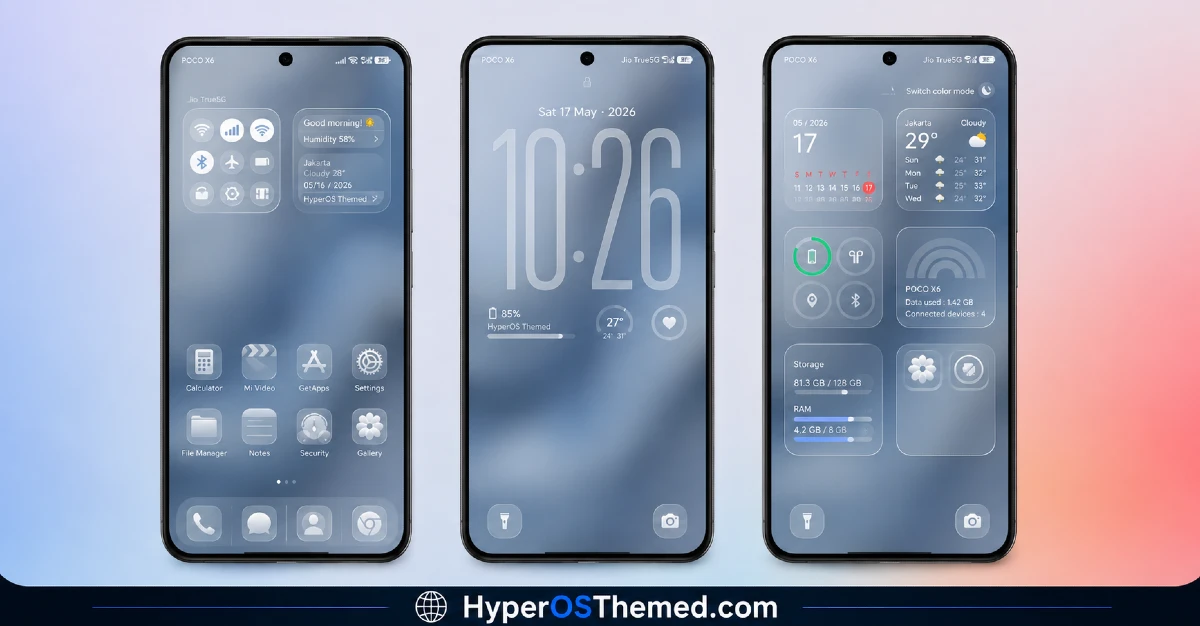
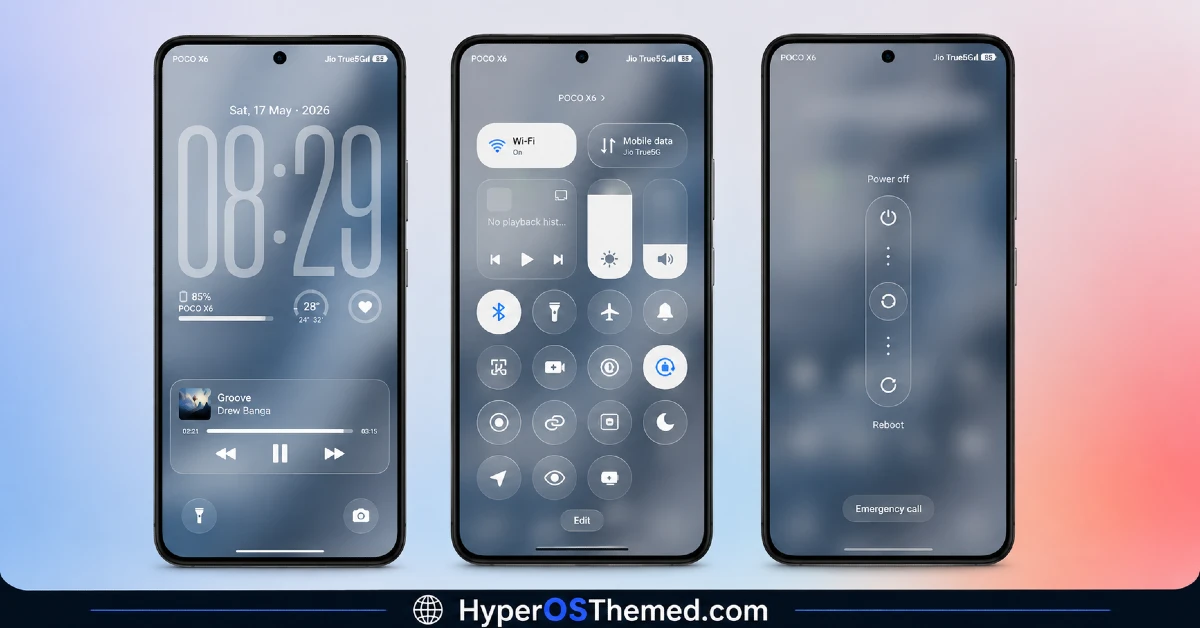
- Frosted Glass Lock Screen Clock: The centerpiece is a layered glass clock widget that sits over a fluid, abstract blue-white background. It genuinely looks different depending on the time of day and ambient light hitting your screen, which is more than I can say for most static lock screen clocks.
- Ice-Blue Ambient Glow Accents Instead of flat white everywhere, there’s a soft blue glow worked into panels, toggles, and widget edges. It’s subtle rather than overpowering, and it kept the interface from feeling sterile the way pure white themes sometimes do.
- Glassy Icon Pack: The icon set uses translucent glass-style enclosures with clean, minimal detailing inside each one. Coverage across my installed apps was solid, though a couple of icons for less mainstream apps looked slightly flatter than the rest, breaking the glass effect just a bit.
- Translucent Control Centre: Swiping down for the control center gives a properly crystalline, see-through panel rather than a plain white box. Toggle icons stayed easy to read even with the transparency, which isn’t always guaranteed with light glass themes.
- Streamlined Light System App Skins: Settings, dialer, and other system apps get a consistent light theme treatment, so nothing suddenly jumps to a mismatched dark or default look. It felt cohesive moving between apps, more so than a couple of other light themes I’ve tried this year.
- Large File Size for the Detail Level: At just over 91 MB, this is one of the heavier HyperOS themes I’ve installed. It took noticeably longer to download and apply on my Redmi compared to lighter themes, so it’s worth knowing upfront if you’re on limited storage or a slower connection.
Glass 26M HyperOS Theme Preview
The overall look is bright and airy, built around white and light grey surfaces layered with translucent glass panels and a cool ice-blue glow running through the edges.
The lock screen’s fluid abstract background gives it some movement and depth rather than sitting flat, and the icon pack’s glassy enclosures keep the home screen looking uniform. It leans more toward a premium, almost app-store-preview aesthetic than a typical light theme.
Glass 26M HyperOS Theme Details
| Detail | Info |
|---|---|
| Theme Name | Glass 26M |
| Designer | Oxfury |
| Compatibility | HyperOS, HyperOS 2.0, HyperOS 3.0 |
| Features | Frosted Glass, White, Light, Blue |
| File Size | 91.21 MB |
Glass 26M HyperOS Theme Performance
I tested Glass 26M HyperOS Theme on a Redmi Note 13 running HyperOS 2.0 for twelve days as my main theme, covering regular daily use plus some longer browsing and camera sessions. Given the file size, I expected some lag when switching home screens, but I didn’t run into any noticeable slowdown.
Battery drain was slightly higher than my usual baseline, around 4 to 5 percent over a full day, which tracks given how many transparency and glow effects are running constantly. The main annoyance was install time itself, since the larger MTZ file took a fair bit longer to apply compared to smaller themes I’ve used.
Glass 26M HyperOS Theme Compatibility
Glass 26M HyperOS Theme supports HyperOS, HyperOS 2.0, and HyperOS 3.0, covering most current Xiaomi, Redmi, and POCO devices. I tested it specifically on a Redmi Note 13, and it applied without issues, though the large file size means older or lower-storage devices should double check available space before downloading.
It is not intended for MIUI 12, 13, or 14 devices, so expect visual problems if applied outside of HyperOS. Custom ROM users on builds like Xiaomi.eu should still be able to import the MTZ file through the Themes app, though given the file’s size and detail level, installation may take longer than usual on those setups too.
Note from the designer: “The creator of this theme is OXFURY. Do not try to copy. If so, it will be reported.” Icons are credited to @EatosApps, with feedback directed to @englishthemesoxfury on Telegram.
Get Glass 26M HyperOS Theme
Download Glass 26M only through the official Xiaomi Theme Store link rather than third-party APK sites or random file hosts. Given the designer’s explicit note against copying and redistributing this theme, sticking to the official Theme Store also respects that request while keeping your installation clean and free of bundled adware or unnecessary permissions.
Note: If the Official Theme Store Link doesn’t redirect properly, try opening the page in Chrome or the default Xiaomi browser, since other browsers may not handle the redirect correctly.
How to Apply Glass 26M HyperOS Theme
Follow the steps below to apply the theme:
- Open the Theme Store Link given above on your Xiaomi / REDMI / POCO device
- This will redirect you to Theme Store.
- Download and install the theme
- Tap on Apply
- Customize specific elements (icons, lock screen, status bar) if needed
- Reboot your device (optional for full effect)
Why Choose Glass 26M HyperOS Theme?
- The layered glass lock screen clock is genuinely one of the more detailed widgets I’ve seen on a free theme
- Ice-blue accents keep the light design from feeling flat or clinical
- System apps stay visually consistent, avoiding the mismatched look some light themes have
- Icon pack coverage is strong across mainstream apps despite the glassy detail work
- Designer credits and feedback channels are clearly listed, which says something about how actively maintained it is
Conclusion
After twelve days on my Redmi Note 13, Glass 26M HyperOS Theme ended up being the most detailed light theme I’ve tested this year, mainly thanks to that lock screen clock and the consistent glass styling throughout. The large file size and slightly higher battery drain are real trade-offs, and I wouldn’t recommend it if you’re tight on storage.
But compared to other white or glass-style themes I’ve tried, this one feels more finished and less like a basic recolor. If you’ve got the space for it, it’s one of the better light theme options currently available for HyperOS.
You may also like:
- Latest Breaking_V9 HyperOS Theme For Redmi, POCO And Xiaomi Phones
- HyperMax HyperOS Theme & MIUI Theme For Xiaomi, Redmi and POCO
- Colorful 26S HyperOS Theme with Cool Blue Abstract design And Dynamic Lock Screen
- Best iOS Style HyperOS theme Black for POCO, Xiaomi and Redmi Devices
- Super 26 Pro HyperOS Theme for POCO, Redmi and Xiaomi Devices
