
I came across the Black-3 HyperOS Theme for Xiaomi, POCO & REDMI Phones in a Xiaomi theming forum thread, where someone posted a screenshot of the lock screen and asked what theme it was.
The oversized rounded clock outline looked unlike anything I’d seen on HyperOS before, so I downloaded it that same evening and put it on my Redmi Note 12 for two weeks.
Most monochrome themes I’ve tried end up looking like someone just desaturated the default UI, but this one felt more deliberate. Here’s what stood out once I actually lived with it day to day.
Black-3 HyperOS Theme Features
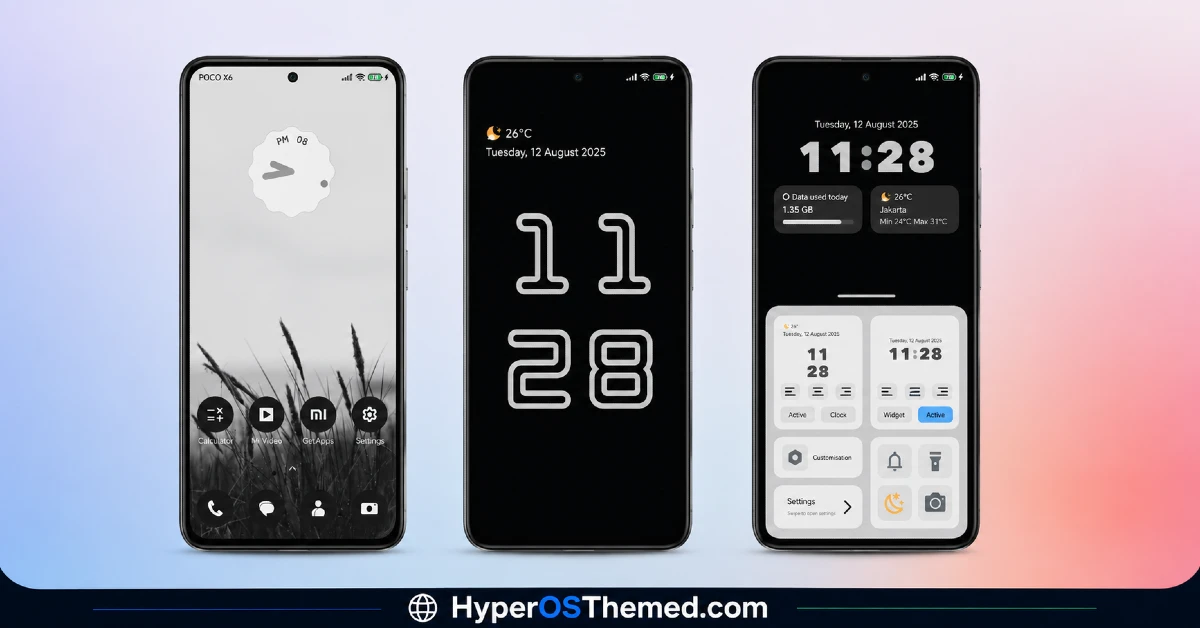
- Black and White Grass Field Wallpaper: The default home screen wallpaper is a high-contrast black-and-white field of grass, which sounds plain on paper but looks genuinely sharp against the dark icon layout. It held up well as a background even with several rows of icons on top, which isn’t always true with busier wallpapers.
- Handwritten-Style Analog Clock Widget: The home screen clock uses a handwritten font style that I didn’t expect from a “minimal” theme. It’s a small detail, but it’s the kind of thing that made me stop and actually notice the design instead of scrolling past it.
- Oversized Rounded Rectangle Lock Screen Clock: This is the standout feature. The default lock screen clock is a massive rounded outline that takes up most of the screen, which looks striking but does mean less room for notification previews if you get a lot of them at once.
- Alternate Practical Lock Screen Layout: There’s a second lock screen option with a standard digital clock plus battery and weather cards, which I ended up switching to for weekdays since the oversized clock ate into notification space. Having both options built in was a nice touch I didn’t see mentioned upfront.
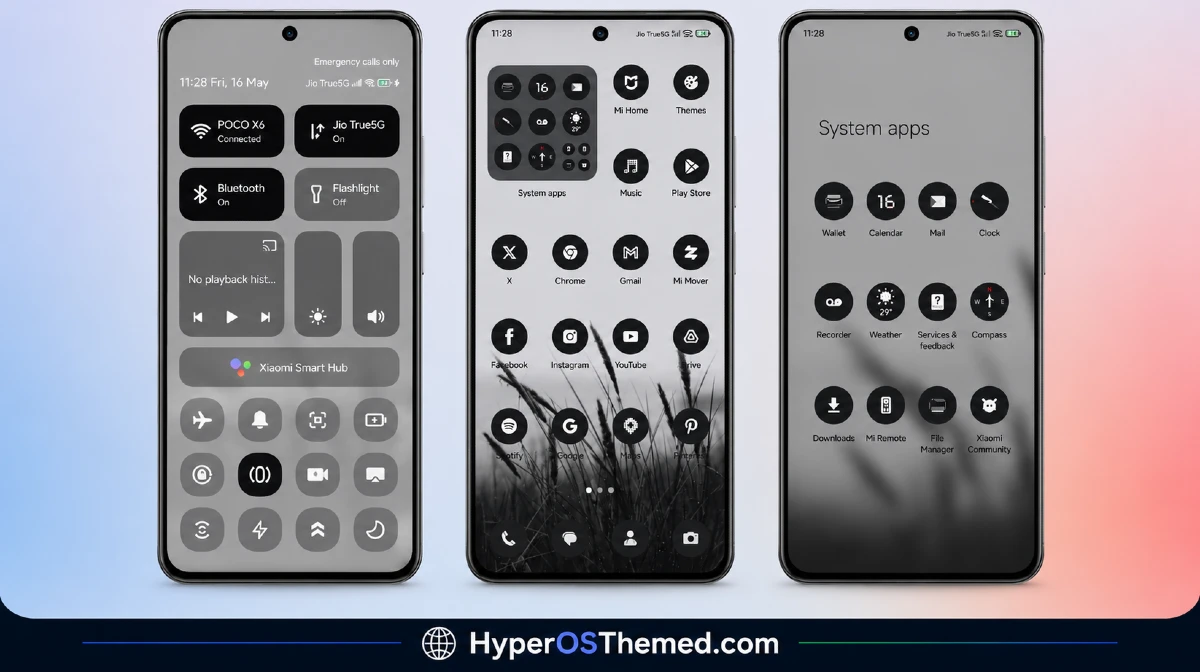
- Custom Dark Circular Icon Pack: The icons are uniform dark circles applied consistently across my home screen, app drawer, and folders. Coverage was solid, though two less common apps I use for work kept their default icons, similar to what I’ve seen with other custom icon packs.
- Light Grey Settings and Themed Dialer: Instead of matching the pure black home screen, the Settings menu uses a lighter grey tone, which actually made it easier to read menu text compared to some all-black themes I’ve used. The dialer and messaging app carry the same grey and black palette, so nothing feels mismatched.
Black-3 HyperOS Theme Details
| Detail | Info |
|---|---|
| Theme Name | Black-3 |
| Designer | Eto’o |
| Compatibility | HyperOS, HyperOS 2.0, HyperOS 3.0 |
| Features | Minimal, Pure, Black, Monochrome |
| File Size | 15.77 MB |
Black-3 HyperOS Theme Preview
The palette is strictly black, white, and grey with no accent colors anywhere in the interface. The grass field wallpaper adds texture without introducing any color, and the icon set keeps that same restrained tone across every screen. It has a slightly editorial, almost print-magazine feel rather than looking like a typical phone theme, mostly thanks to that oversized lock screen clock treatment.
Black-3 HyperOS Theme Performance
I ran Black-3 on a Redmi Note 12 on HyperOS 2.0 for fourteen days, using it through normal daily tasks along with a few longer gaming sessions to see if the wallpaper or widgets caused any lag. I didn’t notice any slowdown in home screen transitions or app drawer scrolling.
Battery usage stayed close to my stock theme baseline, maybe 2 percent higher at most, which I’d chalk up to the always-on widget rather than anything theme-heavy. The one recurring annoyance was that the oversized lock screen clock sometimes overlapped with the fingerprint icon on my specific device, which meant occasionally tapping slightly off-center to unlock.
Black-3 HyperOS Theme Compatibility
Black-3 HyperOS Theme lists support across HyperOS, HyperOS 2.0, and HyperOS 3.0, so it covers a wide range of current Xiaomi, Redmi, and POCO devices. I tested it on a Redmi Note 12 without issues, though the fingerprint icon overlap I mentioned may vary depending on where your device places its in-display sensor, so results could differ slightly on other models.
It is not built for MIUI 12, 13, or 14, so anyone still on those older builds should expect icon or layout problems if they try to force it. Custom ROM users on Xiaomi.eu or similar builds should be able to import the MTZ file through the Themes app without trouble, based on how cleanly it installed on my test device.
Get Black-3 HyperOS Theme
Download Black-3 HyperOS Theme through the official Xiaomi Theme Store link rather than pulling it from random file-sharing sites or unofficial APKs. Sideloaded theme installers from unknown sources are a common way people end up with unwanted permissions or bundled software on their phone, so sticking to the official Theme Store keeps things clean. If the Theme Store link doesn’t redirect properly, try opening it in Chrome or the default Xiaomi browser instead.
How to Apply Black-3 HyperOS Theme
Follow the steps below to apply the theme:
- Open the Theme Store Link given above on your Xiaomi / REDMI / POCO device
- This will redirect you to Theme Store.
- Download and install the theme
- Tap on Apply
- Customize specific elements (icons, lock screen, status bar) if needed
- Reboot your device (optional for full effect)
Why Choose Black-3 HyperOS Theme?
- Two different lock screen layouts give you a choice between bold style and daily practicality
- The circular icon pack covers nearly all mainstream apps with a consistent look
- Light grey Settings menu is easier to read than the pure black approach some themes use
- Battery impact stayed minimal even with the always-on widget running
- The grass field wallpaper and handwritten clock give it a distinct look you won’t mistake for another theme
Conclusion
After two weeks on my Redmi Note 12, Black-3 HyperOS Theme turned out to be one of the more visually distinct themes I’ve tested this year, mostly because of that oversized lock screen clock and the handwritten widget font. It’s not without quirks, the clock overlapping with my fingerprint sensor got old by the second week, and I ended up switching to the alternate lock screen layout for practical reasons.
Compared to other monochrome themes I’ve tried, though, this one actually commits to a design idea instead of just draining the color out of the default UI. If you want something that looks different from every other black theme on the Theme Store, it’s worth trying.
You may also like:
- Super26 HyperOS Theme iOS Style Skins For POCO, Redmi and Xiaomi Devices
- DwBlinOS3 HyperOS Theme Gradient UI For Xiaomi, Redmi and POCO
- iP27 Super Capsule iOS 27 Style HyperOS Theme For Redmi, Poco and Xiaomi
- Lovely HOS3 HyperOS Theme – Pink Floral Design for Xiaomi, Redmi and POCO
- Liquid Beauty iOS 26 HyperOS Theme: Premium Apple-Inspired Theme
