
Some lock screens try to do too much. Beyond Blue HyperOS Theme goes the opposite route, one bold visual idea, executed cleanly, and it works. Designed by Ericson Padayao, this theme centers around a single glowing beam of light cutting through shades of blue and purple, and after seeing it in action, I get why it’s earned a spot on the site.
What Makes Beyond Blue HyperOS Theme Work
The lock screen is really the star of the show here. A massive “11:11” clock display is split diagonally, half rendered in a soft frosted blue gradient, half left as clean outlined numerals, with a sharp diamond-shaped beam of light cutting across the middle where the two halves meet. Two small glowing orbs sit along that diagonal line, adding a subtle sci-fi touch without overcrowding the design. Below all that, the weather widget keeps things simple and readable, current temperature, sunrise and sunset times, laid out cleanly against the same blue-to-black gradient.
That same diagonal light-beam concept carries onto the home screen too. The app icons sit in a translucent dark overlay against the gradient backdrop, keeping the wallpaper as the visual centerpiece rather than competing with a busy icon set. It’s a smart choice, the wallpaper is genuinely the reason to install this theme, so letting it breathe makes sense.
Beyond Blue HyperOS Theme Preview
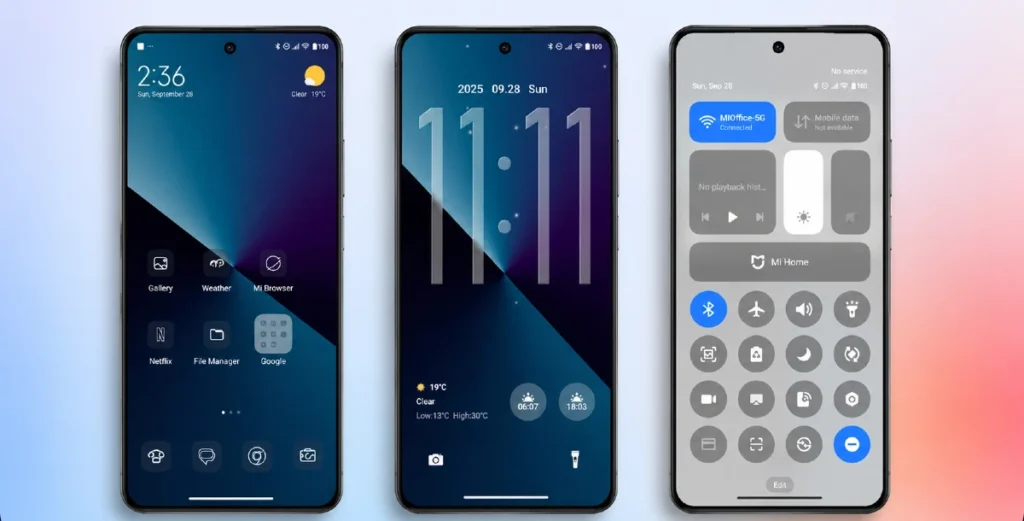
Why It’s Worth Trying
- A genuinely eye-catching lock screen — that diagonal glow and split-number clock design isn’t something you see often
- A cohesive blue and purple gradient — carried consistently from lock screen to home screen to the quick settings panel
- Clean, minimal icon treatment — icons stay out of the way so the wallpaper does the talking
- A calm, abstract aesthetic — no clutter, no unnecessary elements, just one strong visual idea done well
If you want your Xiaomi or Redmi device to have a striking, almost artistic lock screen that people will actually stop and ask about, Beyond Blue HyperOS Theme delivers exactly that.
Beyond Blue HyperOS Theme Details
| Detail | Info |
|---|---|
| Theme Name | Beyond Blue |
| Designer | Ericson Padayao |
| Category | Theme |
| Region | Global |
| Compatibility | HyperOS, HyperOS 2.0, HyperOS 3 |
Getting the Theme
Installing Beyond Blue HyperOS ThemeGlobal Stable ROM
Here’s the straightforward process for getting this installed:
- In the Download Links section, tap the Official Theme Store Link.
- You’ll be prompted to choose which app opens the link.
- Select the Themes app.
- This redirects you into the Theme Store, where the download begins.
- Download the theme and apply it.
One thing worth remembering: restart your device if you notice any overlapping elements or visibility issues after applying. This theme has been thoroughly tested and worked flawlessly.
Final Thoughts
The Beyond Blue HyperOS theme proves that a single well executed idea can outshine a theme packed with a dozen features. Between that glowing diagonal lock screen and the consistent gradient carried through every screen, Ericson Padayao built something visually memorable without overcomplicating it. If a bold, abstract blue aesthetic sounds like your kind of upgrade, this one’s absolutely worth the download.
You may Also Like:
- Best HyperUI V4 HyperOS Theme For Poco, Redmi and Xiaomi Devices
- Latest Breaking_V9 HyperOS Theme For Redmi, POCO And Xiaomi Phones
- GOD7V2 Theme Xiaomi For HyperOS And MIUI
- Black Flower HyperOS Theme Best For POCO, Redmi & Xiaomi
- Super26 HyperOS Theme iOS Style Skins For POCO, Redmi and Xiaomi Devices
