
Hey Redmi Fans, if deep ocean tones and a moody dark palette sound more appealing than another bright icon pack, JellyB is worth checking out. Designed by BK, this HyperOS theme leans into a “dark sea” concept, pairing black icon styling with deep, oceanic color tones and a dynamic lock screen that adds a bit of movement to the whole experience. At 40.28 MB and compatible with HyperOS and HyperOS 2.0, it’s a mid-sized download built for Xiaomi, Redmi and POCO devices that keeps things atmospheric without going overboard on effects.
JellyB HyperOS Theme key Features
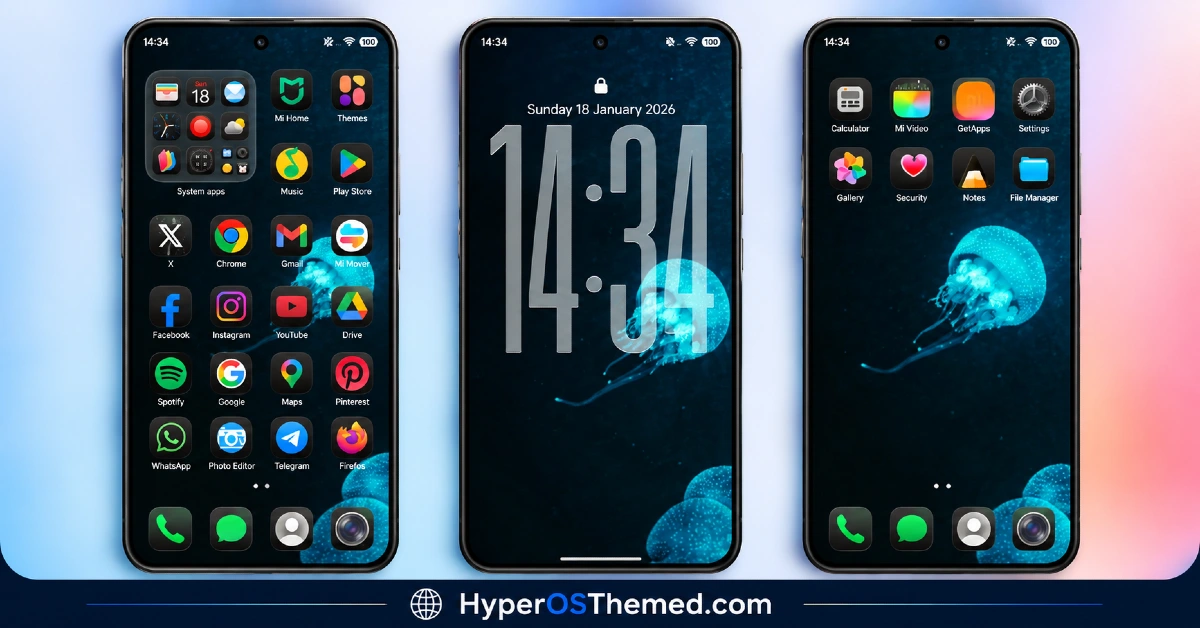
- Dark Sea Color Palette: JellyB uses deep, oceanic tones as its core visual identity rather than a flat black or generic dark theme approach. This gives the wallpaper and overall color scheme a bit more depth and character compared to standard dark mode styling.
- Black Icon Design: Icons follow a consistent black styling that ties into the dark sea theme rather than sitting as a mismatched afterthought. This kind of unified icon treatment helps the home screen feel cohesive against the darker wallpaper backdrop.
- Dynamic Lock Screen The lock screen incorporates movement and shifting visual elements instead of a static, fixed layout. It’s one of the more noticeable features once applied and adds a bit of extra polish to the overall dark sea aesthetic.
- AMOLED-Friendly Dark Tones: Given the heavy use of black and deep colors throughout, JellyB tends to pair well with AMOLED displays where darker pixels can help with battery efficiency. This makes it a practical pick for anyone who already favors dark mode for that reason.
- Consistent Visual Theme: Rather than mixing multiple unrelated design elements, JellyB commits fully to its dark sea concept across icons, wallpaper and lock screen styling. This kind of focused design tends to feel more intentional than themes that try to combine too many separate ideas.
- Compact Compatibility Range: JellyB HyperOS Theme is built specifically for HyperOS and HyperOS 2.0 rather than stretching across every available version. This more focused compatibility range can mean a slightly more polished experience on the versions it does support.
JellyB HyperOS Theme Preview
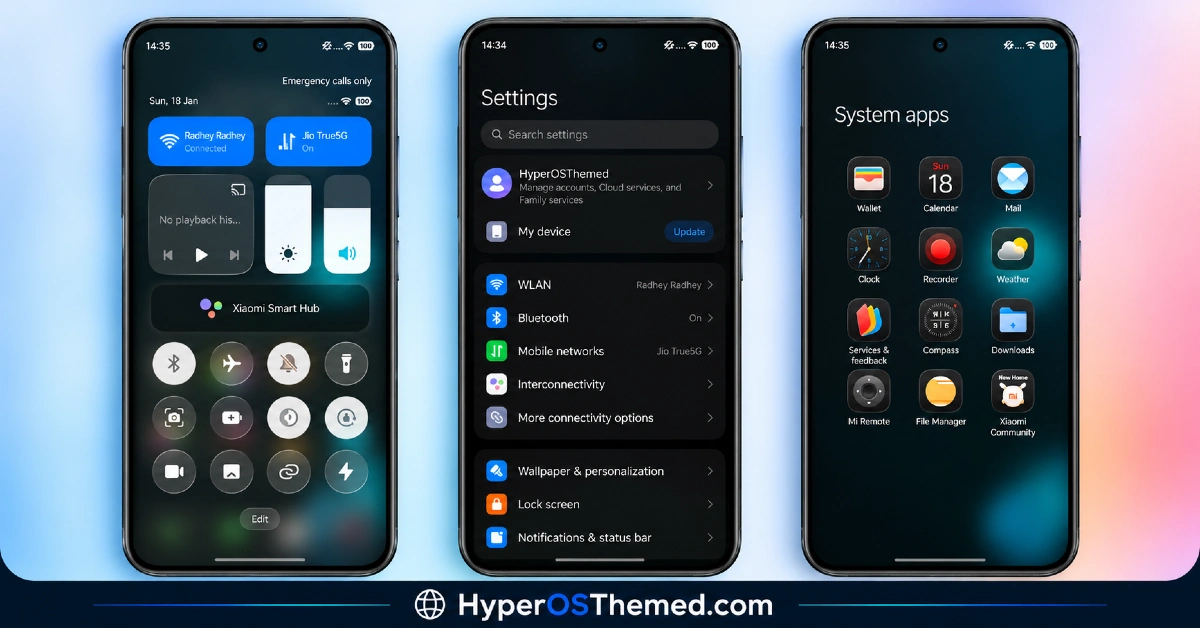
The screenshots below show the dark sea color palette, the black icon set and how the dynamic lock screen looks once the theme is applied. Since dark, atmospheric themes like this one can look quite different depending on screen brightness and panel type, it’s worth looking through the preview to get a realistic sense of how the colors will actually appear.
JellyB HyperOS Theme Overview
| Attribute | Details |
|---|---|
| Availability | Free, via Xiaomi Theme Store |
| Supported Devices | Xiaomi, Redmi and POCO phones running HyperOS |
| Theme Name | JellyB |
| Designer | BK |
| Compatibility OS | HyperOS, HyperOS 3.0 and HyperOS 2.0 |
| Features | Dark sea color palette, black icon design, dynamic lock screen, AMOLED-friendly tones |
| File Size | 40.28 MB |
JellyB Theme Compatibility
JellyB is built for HyperOS, HyperOS 2.0. and HyperOS 3.0, giving it solid coverage across Xiaomi, Redmi and POCO devices running either version. Since the theme relies on a dynamic lock screen, older or lower-powered devices may render the animation with slightly less smoothness compared to current flagship hardware.
Custom ROM users on setups like Xiaomi EU ROM or MIUIRoom can still install the theme manually through the MTZ file, though the dark sea color rendering and lock screen animation may look a touch different outside the official global stable ROM. Anyone specifically on HyperOS 3.0 should keep in mind this theme wasn’t built with that version in focus, so results may vary until support is extended.
Get JellyB HyperOS Theme
Download JellyB HyperOS Theme only through the official Theme Store link rather than random third-party file hosts or unofficial APK uploads. Files sourced outside verified channels are difficult to confirm as unaltered and may not reflect what BK actually released. Sticking to the official Theme Store link keeps the installed version consistent with the intended design and ensures any future updates remain accessible.
How to Apply JellyB HyperOS Theme
Follow the steps below to apply the theme:
- Open the Theme Store link given above on your Xiaomi, Redmi or POCO device.
- This will redirect you to the Theme Store.
- Download and install the theme.
- Tap on Apply.
- Customize specific elements such as icons, lock screen or status bar if needed.
- Reboot your device for the full effect, though this step is optional.
Note: If anything looks overlapped or doesn’t display correctly right after installing, restarting the device usually clears it up without further steps. This theme has been checked on its supported HyperOS versions without any major issues turning up. Still, if something looks off on a specific device once it’s applied, leaving a comment with the details helps get it looked into.
Installing JellyB HyperOS Theme on Custom ROM Devices
Devices running MIUI 11 through 14 or HyperOS based Custom ROMs such as Xiaomi EU ROM or MIUIRoom aren’t able to use the direct Theme Store link, so the MTZ file needs to be brought in manually instead. Here’s how that works:
- Grab the MTZ file for JellyB HyperOS Theme from the download section.
- Open the Theme Store app.
- Go into the Themes tab.
- Scroll down to find the Import option, then tap it.
- Use the file manager to locate the downloaded .mtz file.
- Wait for the import process to finish.
- Tap the theme once it appears in the list to apply it.
Why Choose JellyB HyperOS Theme?
- Distinctive dark sea aesthetic — deep oceanic tones offer more character than a standard flat dark theme.
- Cohesive black icon styling — icons and wallpaper work together rather than feeling mismatched.
- Dynamic lock screen — subtle movement adds personality beyond a static layout.
- AMOLED battery friendliness — heavy dark tones suit OLED displays well.
- Focused compatibility range — built specifically for HyperOS and HyperOS 2.0 for a more tailored experience.
- Consistent design theme — commits fully to one visual concept instead of mixing unrelated styles.
- Reasonable file size — 40.28 MB keeps the download manageable without feeling too light on detail.
- Free official download — no cost involved and distributed through a legitimate Theme Store link.
Conclusion
JellyB HyperOS Theme commits fully to its dark sea concept, giving Xiaomi, Redmi and POCO users a genuinely atmospheric alternative to standard flat dark themes, backed by a dynamic lock screen that adds a bit of extra life to the experience. It doesn’t yet extend official support to HyperOS 3.0, so it’s best suited to those still on HyperOS or HyperOS 2.0. For anyone drawn to deep, oceanic dark tones over the usual black-and-white dark mode look, JellyB HyperOS Theme is worth trying.
You may also like:
Gaze of Night HyperOS Theme with Premium Black for Xiaomi, POCO and REDMI Phones
Tokio HyperOS Theme for Xiaomi, POCO and REDMI Phones
HyperV3 Theme with Glossy Black Icons and Dynamic Lock Screen for HyperOS
G2redcc HyperOS Theme for Xiaomi, POCO and REDMI Phones
Starry Star UI HyperOS Theme with One UI Look for Xiaomi, POCO and Redmi Phones
