
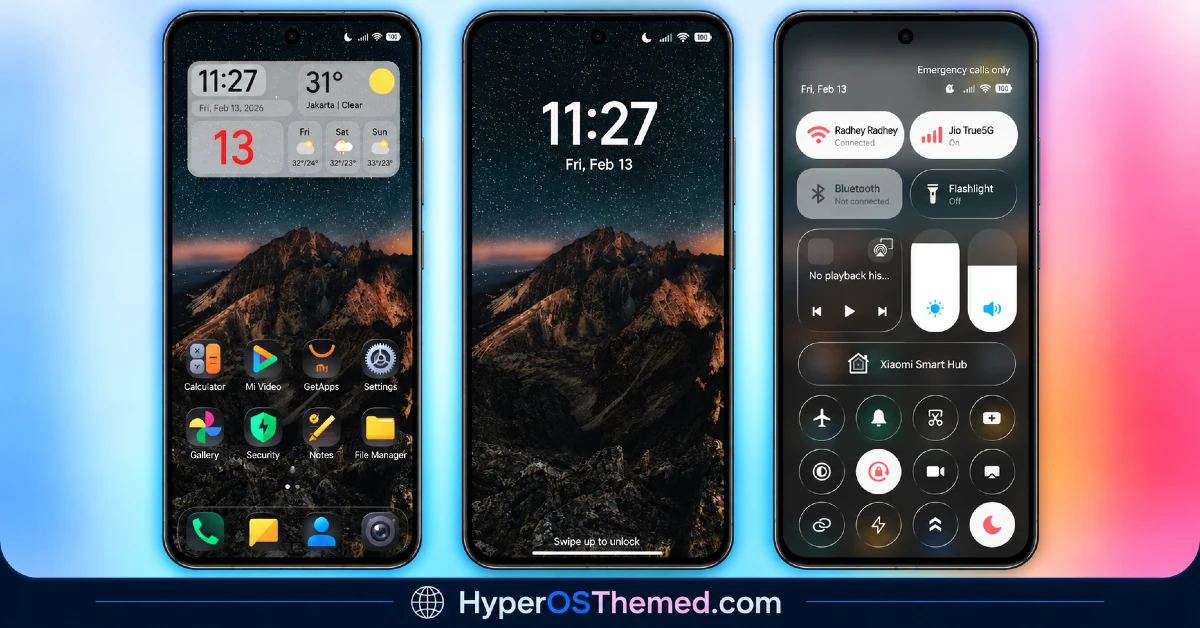
Hey Redmi Fans, sometimes a theme doesn’t need to reinvent anything to feel worth downloading, it just needs to nail the basics well. G2redcc HyperOS Theme, designed by SabriTN, does exactly that with a starry mountain landscape wallpaper paired against minimal grey widget containers and dark, round icons with a subtle neon edge.
It’s a straightforward, no-frills package for Xiaomi, Redmi, and POCO devices that prioritises dark-mode legibility over flashy animations. At 31.88 MB and compatible across HyperOS, HyperOS 2.0 and HyperOS 3.0, it’s an easy, low-commitment theme to try if you want something calm rather than showy.
G2redcc Theme Key Features
- Starry Mountain Landscape Wallpaper: The centerpiece wallpaper features a mountain scene set against a starry night sky, giving the theme a moody, atmospheric backdrop rather than an abstract or gradient design. It sets the tone for the rest of the dark, minimal styling that follows across the interface.
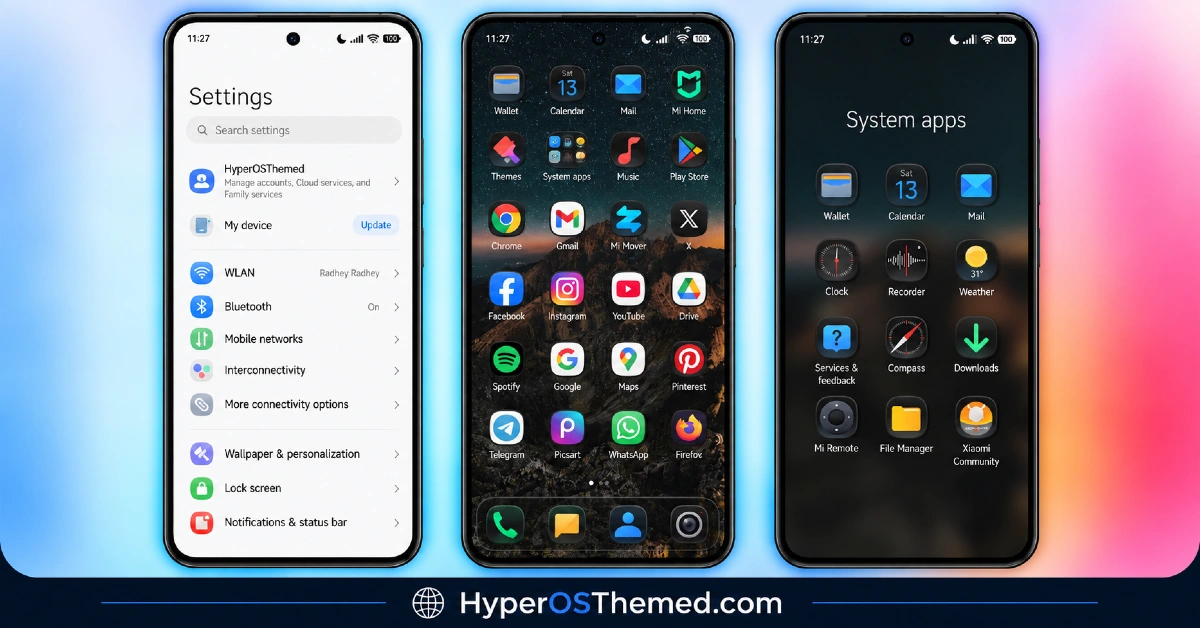
- Neon-Edged Dark Icons: Icons use a dark, rounded design with a subtle neon outline rather than flat solid colors. This small detail helps icons stand out slightly against the dark wallpaper without looking overly bright or distracting.
- Minimal Grey Widget Containers: Home screen widgets sit inside simple grey containers designed for easy tracking of information like time or system status. The understated container style keeps focus on the wallpaper and icons rather than pulling attention toward the widgets themselves.
- Frosted Control Centre: The control center gets a frosted, semi-transparent treatment that fits with the overall dark and minimal theme. It’s a smaller visual touch, but one that adds a bit of depth without going overboard on effects.
- Optimized Dark Mode Legibility: The color choices throughout the theme are built with dark mode readability in mind, keeping text and icons clear against the darker background elements. This makes it a practical pick for anyone who keeps their phone in dark mode most of the time.
- Straightforward, No-Frills Design: Unlike many themes packed with animations or heavy customization options, G2redcc HyperOS Theme keeps things simple and to the point. The designer’s own description notes this is meant as a basic theme with room for improvement in future updates, which sets realistic expectations from the start.
G2redcc Theme Xiaomi Preview
The screenshots below show the starry mountain wallpaper, the neon-edged icon set and how the frosted control center looks once the theme is applied. Since the appeal here is more about mood and simplicity than flashy effects, the preview gives a fairly accurate sense of what to expect on the actual device.
G2redcc HyperOS Theme Details
| Attribute | Details |
|---|---|
| Availability | Free, via Xiaomi Theme Store |
| Supported Devices | Xiaomi, Redmi and POCO phones running HyperOS |
| Theme Name | G2redcc |
| Designer | SabriTN |
| Compatibility OS | HyperOS, HyperOS 2.0 and HyperOS 3.0 |
| Features | Starry mountain wallpaper, neon-edged dark icons, minimal grey widgets, frosted control center, dark mode optimized |
| File Size | 31.88 MB |
G2redcc HyperOS Theme Compatibility
G2redcc supports HyperOS, HyperOS 2.0 and HyperOS 3.0, giving it solid reach across Xiaomi, Redmi and POCO devices running any of those versions. Since the designer describes this as a simple, ordinary theme with room for future improvement, expectations should be set accordingly, this isn’t a theme built around elaborate animations or advanced customization options.
Custom ROM users on setups like Xiaomi EU ROM or MIUIRoom can still install the theme manually through the MTZ file, and given how minimal the visual changes are, compatibility issues tend to be less likely than with themes relying on transparency or 3D effects. As with most themes, restarting the device after installation is worth doing if anything looks slightly off on the first try.
Get G2redcc HyperOS Theme
Download G2redcc HyperOS Theme Xiaomi only through the official Theme Store link rather than random third-party file hosts or unofficial APK uploads. Files sourced outside verified channels are difficult to confirm as unaltered and may not reflect what SabriTN actually released. Sticking to the official Theme Store link keeps the installed version consistent with the intended design and ensures any future updates remain accessible.
How to Apply G2redcc HyperOS Theme
Follow the steps below to apply the theme:
- Open the Theme Store link given above on your Xiaomi, Redmi or POCO device.
- This will redirect you to the Theme Store.
- Download and install the theme.
- Tap on Apply.
- Customize specific elements such as icons, lock screen or status bar if needed.
- Reboot your device for the full effect, though this step is optional.
Note: If anything looks overlapped or doesn’t display correctly right after installing, restarting the device usually clears it up without further steps. This theme has been checked on its supported HyperOS versions without any major issues turning up. Still, if something looks off on a specific device once it’s applied, leaving a comment with the details helps get it looked into.
Installing G2redcc HyperOS Theme on Custom ROM Devices
Devices running MIUI 11 through 14 or HyperOS based Custom ROMs such as Xiaomi EU ROM or MIUIRoom aren’t able to use the direct Theme Store link, so the MTZ file needs to be brought in manually instead. Here’s how that works:
- Grab the MTZ file for G2redcc from the download section.
- Open the Theme Store app.
- Go into the Themes tab.
- Scroll down to find the Import option, then tap it.
- Use the file manager to locate the downloaded .mtz file.
- Wait for the import process to finish.
- Tap the theme once it appears in the list to apply it.
Why Choose G2redcc Theme?
- Atmospheric starry mountain wallpaper — a moody, distinctive backdrop instead of a generic gradient or pattern.
- Subtle neon icon accents — dark icons with a soft neon edge that stand out without being loud.
- Dark mode friendly design — colors and contrast are chosen with dark mode readability in mind.
- Minimal, unobtrusive widgets — simple grey containers keep the home screen calm and easy to read.
- Frosted control center touch — a small depth effect that adds polish without overcomplicating the design.
- Broad HyperOS compatibility — works across HyperOS, HyperOS 2.0 and HyperOS 3.0.
- Straightforward installation — the simple design tends to mean fewer setup quirks or compatibility issues.
- Free official download — no cost involved and distributed through a legitimate Theme Store link.
Conclusion
G2redcc doesn’t try to be more than what it is, a simple, atmospheric dark theme built around a striking mountain wallpaper and clean, minimal icon design. The designer’s own honesty about future improvements sets fair expectations, and what’s here already works well for anyone who prefers understated customization over heavy effects. For Xiaomi, Redmi and POCO users who want a calm, dark-mode-friendly look without complexity, G2redcc is worth trying.
You may also like:
Starry Star UI HyperOS Theme with One UI Look for Xiaomi, POCO and Redmi Phones
Vibgyor HyperOS Theme with Depth Effect Wallpapers for Xiaomi, POCO and REDMI
TNV-4 Theme with Transparent White Icons and a Clean, Minimal Design for HyperOS
Vibria HyperOS Theme: Customizable Glass Clock, Nature Wallpapers, Liquid Glass UI
