
A calm camping scene paired with vivid mountain colors isn’t the usual combination you’d expect from a “dynamic lock screen” theme, most go for drama rather than stillness, but Sky Suhel HyperOS Theme leans into that quieter outdoor mood while still packing in genuine interactivity underneath.
Sky Suhel HyperOS Theme is designed by Suhel, the lock screen lets you change clock colors, hide specific modules, and switch between wallpapers with a simple double tap, rather than locking users into one fixed layout. Smooth gradients and glossy icons keep the home screen itself clean and modern. At 39.93 MB, it’s built for Xiaomi, Redmi and POCO devices, covering HyperOS, HyperOS 2.0 and HyperOS 3.0.
Sky Suhel HyperOS Theme Key Features
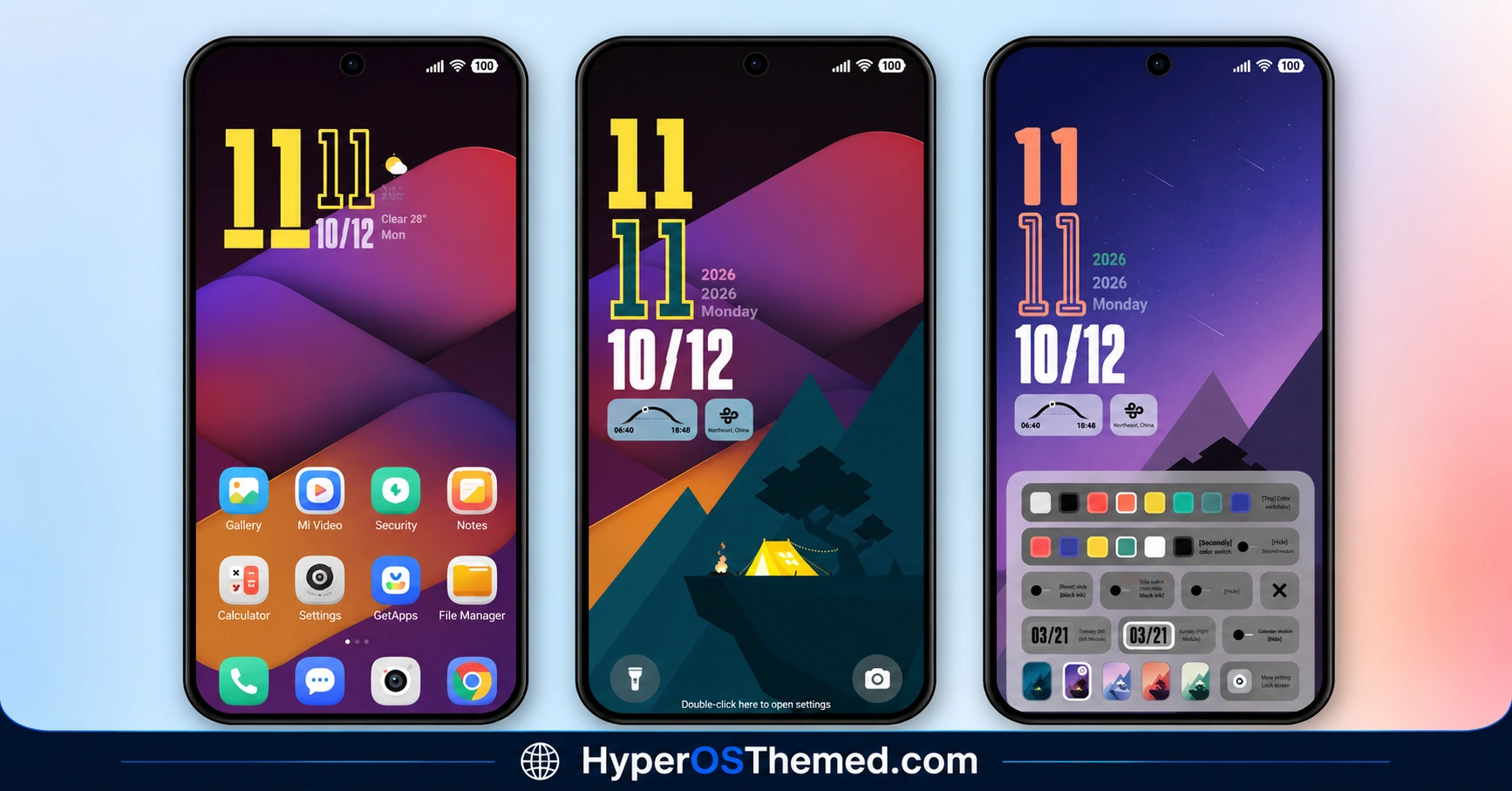
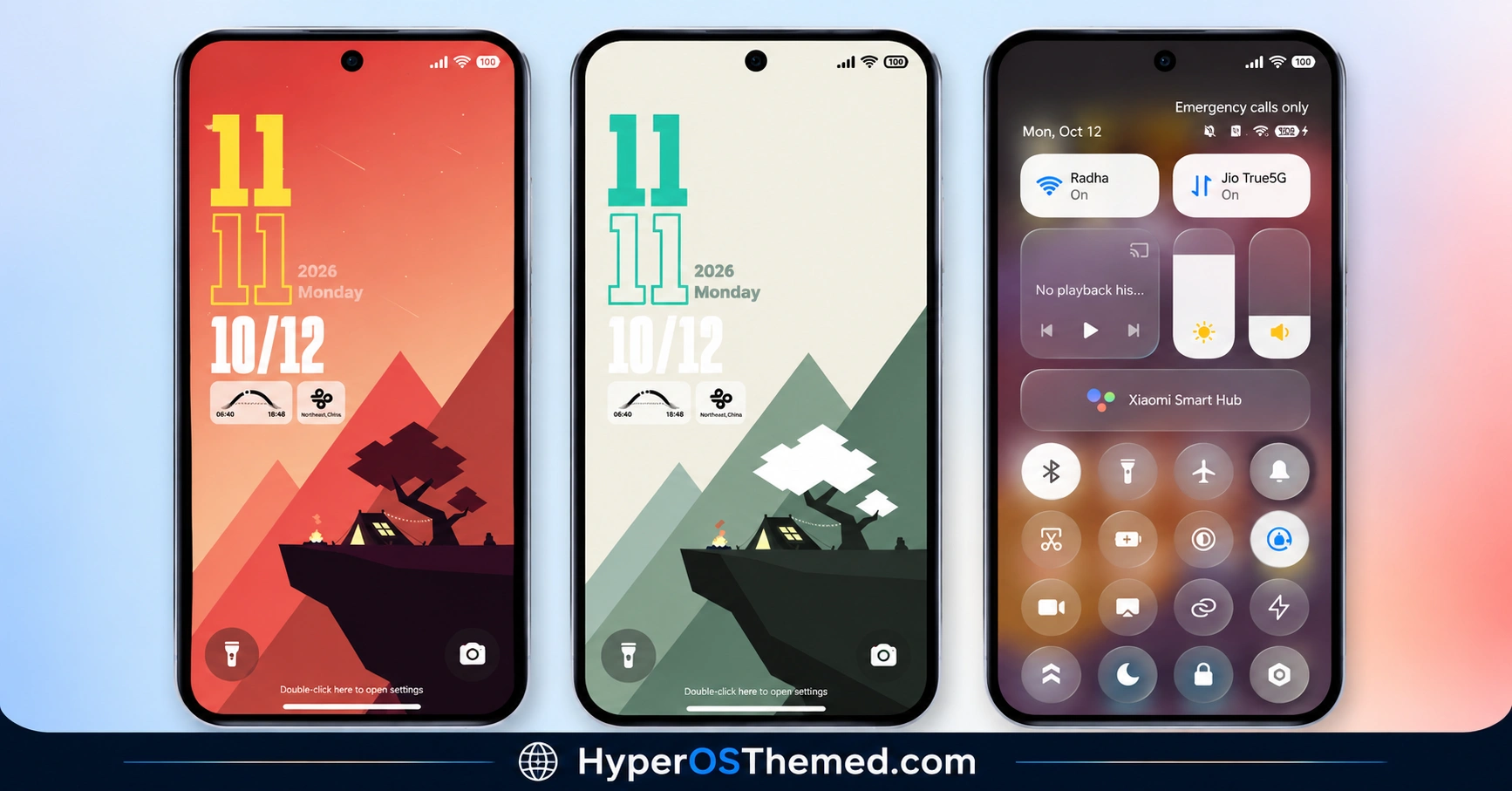
- Camping Scene Wallpaper Collection: The wallpaper work centers on a calm outdoor camping aesthetic with vivid mountain coloring, giving Sky Suhel a distinct, grounded feel rather than the usual abstract gradient or glass-effect visuals most themes default to.
- Double-Tap Wallpaper Switching: A double tap on the lock screen cycles between wallpaper options, letting you change the visual mood without digging through a separate settings menu each time.
- Adjustable Clock Colors: The lock screen clock’s color can be changed directly, giving a level of personalization that goes beyond the fixed typography most themes ship with.
- Hideable Lock Screen Modules: Specific lock screen elements can be hidden entirely if you’d rather keep things simpler, which is a practical touch for anyone who prefers a cleaner unlock screen without extra widgets cluttering the view.
- Smooth Gradient Styling: Gradients run through the home screen design, helping tie the icons and wallpaper together into one cohesive visual package rather than feeling like separate elements stacked on top of each other.
- Glossy Icon Pack: Icons use a glossy finish that keeps the home screen looking clean and modern, complementing the calmer camping-inspired aesthetic rather than clashing with it.
- Broad HyperOS Version Support: Sky Suhel covers HyperOS, HyperOS 2.0 and HyperOS 3.0, giving it solid reach across both newer and slightly older Xiaomi, Redmi and POCO devices rather than being locked to a single release.
Sky Suhel HyperOS Theme Preview
The screenshots below show the camping-inspired wallpaper, the glossy icon pack and how the dynamic lock screen customization options look once the theme is applied. Since the double-tap wallpaper switching and clock color adjustments are genuinely interactive features, it’s worth trying them out directly after installing rather than judging the theme purely from static screenshots.
Sky Suhel HyperOS Theme Overview
| Attribute | Details |
|---|---|
| Availability | Free, via Xiaomi Theme Store |
| Supported Devices | Xiaomi, Redmi and POCO phones running HyperOS |
| Theme Name | Sky Suhel |
| Designer | suhel |
| Region | Global |
| Compatibility OS | HyperOS, HyperOS 2.0 and HyperOS 3.0 |
| Features | Camping scene wallpapers, double-tap wallpaper switching, adjustable clock colors, hideable lock screen modules, gradient styling, glossy icons |
| File Size | 39.93 MB |
Sky Suhel HyperOS Theme Compatibility
Sky Suhel HyperOS Theme supports HyperOS, HyperOS 2.0 and HyperOS 3.0, giving it solid reach across Xiaomi, Redmi and POCO devices running any of those versions. Given the genuine interactivity built into the lock screen, double-tap switching, color adjustment, module hiding, older or lower-powered devices may handle these features with slightly less responsiveness compared to current flagship hardware.
Custom ROM users on setups like Xiaomi EU ROM or MIUIRoom can still install the theme manually through the MTZ file, and if you’re specifically on MIUI 14, there’s a separate video guide worth following instead of the standard steps.
Get Sky Suhel HyperOS Theme
Download Sky Suhel HyperOS Theme only through the official Theme Store link or the direct MTZ file rather than random third-party file hosts or unofficial APK uploads. Files sourced outside verified channels are difficult to confirm as unaltered and may not reflect what suhel actually released. Sticking to the official links keeps the installed version consistent with the intended design and ensures any future updates remain accessible.
A note from the designer: Suhel credits himself directly for this release and runs a Telegram channel for following more theme drops and updates. Worth joining if you’d like to catch future releases from the same designer early.
Credits – Suhel
A follow me telegram and mor themes.
https://t.me/themesmtz
How to Apply Sky Suhel HyperOS Theme
Follow the steps below to apply the theme:
- Open the Theme Store link given above on your Xiaomi, Redmi or POCO device.
- This will redirect you to the Theme Store.
- Download and install the theme.
- Tap on Apply.
- Customize specific elements such as icons, lock screen or status bar if needed.
- Reboot your device for the full effect, though this step is optional.
Note: If the Official Theme Store link doesn’t open properly, try switching to Chrome or your device’s default Xiaomi browser, since other browsers have been reported not to work reliably with this link. If you’re on MIUI 14 specifically, there’s a separate video walkthrough worth following instead of the standard steps. If anything looks overlapped or fails to display correctly right after installing, restarting the device usually clears it up, and leaving a comment with the details helps if the problem persists.
Installing Sky Suhel HyperOS Theme on Custom ROM Devices
Devices running MIUI 11 through 14 or HyperOS based Custom ROMs such as Xiaomi EU ROM or MIUIRoom aren’t able to use the direct Theme Store link, so the MTZ file needs to be brought in manually instead. Here’s how that works:
- Grab the MTZ file for Sky Suhel HyperOS Theme from the download section.
- Open the Theme Store app.
- Go into the Themes tab.
- Scroll down to find the Import option, then tap it.
- Use the file manager to locate the downloaded .mtz file.
- Wait for the import process to finish.
- Tap the theme once it appears in the list to apply it.
Why Choose Sky Suhel HyperOS Theme?
- Genuinely interactive lock screen — double-tap wallpaper switching and adjustable clock colors, not just visual styling.
- Distinct camping-inspired aesthetic — calm, grounded scenery that stands apart from typical gradient or glass themes.
- Hideable lock screen modules — practical control over how cluttered or minimal the unlock screen feels.
- Smooth gradient and glossy icon pairing — a clean, modern home screen look.
- Broad HyperOS compatibility — works across HyperOS, HyperOS 2.0 and HyperOS 3.0.
- Active designer presence — a Telegram channel available for future updates and releases.
- Free official download — no cost involved through a legitimate Theme Store link.
Conclusion
Sky Suhel HyperOS Theme pairs a genuinely calming camping aesthetic with real lock screen interactivity, the double-tap wallpaper switching and adjustable clock colors go well beyond what most themes at this file size bother offering. The glossy icons and gradient styling keep the home screen feeling clean and current without clashing with the outdoor visual theme. For Xiaomi, Redmi and POCO users who want a theme that’s both visually calming and genuinely customizable, Sky Suhel HyperOS Theme is well worth trying.
Also Check These Themes:
- Better HyperOS Theme for Xiaomi, POCO, Redmi
- Twilight HyperOS Theme with Minimalist Dark Wallpapers for Xiaomi, Redmi and POCO
- VKOS HyperOS Theme For Xiaomi, POCO & Redmi
- Flowing Star Trail HyperOS Theme For Xiaomi, Redmi and POCO
- Super Mi Duo HyperOS Theme with iOS-Style Icons, Redesigned Lock Screen
- GIN SAND v2 HyperOS Theme for Xiaomi, POCO, Redmi
