
Most “nature wallpaper” themes I’ve tested end up padding out a count with near-duplicate shots of the same forest from slightly different angles, so when Seeking Shadows HyperOS Theme advertised more than 18 premium wallpapers, I was mostly curious whether that number held up to actual variety or was just a marketing figure.
I put it on my POCO X6 specifically to go through as much of that wallpaper collection as I could rather than settling on one and calling it done.
Seeking Shadows HyperOS Theme Features
- 18+ Premium Nature Wallpapers: The collection genuinely spans mountains, deserts, forests, and coastlines rather than repeating similar shots under different labels. Cycling through a good chunk of them, I found real variety in lighting and mood, from stark desert daylight to softer, shadowed forest scenes that justify the theme’s name.
- Bold iOS-Style Time Display: The clock uses a confident, clean iOS-inspired font that stays legible against every wallpaper style I tested, from busy mountain silhouettes to more open coastal shots. It didn’t get lost against any of the backgrounds, which isn’t always guaranteed with a wallpaper pack this varied.
- Endlessly Customizable Setup: Beyond just swapping wallpapers, there’s enough flexibility in how the clock and lock screen elements combine that no two configurations felt identical. I mixed a desert wallpaper with a smaller clock variant at one point just to see how it looked, and the combination options felt genuinely open rather than limited to a couple of presets.
- Clean iOS-Inspired Icon Set: Icons stick to the familiar rounded square shape with minimal detailing, letting the wallpaper collection stay the visual focus rather than competing with busy icon work. Coverage across my commonly used apps was solid, though a couple of region-specific apps kept their default icons.
- Serene, Consistent Visual Mood: Despite the sheer number of wallpaper options, the overall theme maintains a calm, elegant tone throughout rather than feeling like a disjointed grab-bag of random nature photos. Whichever wallpaper I had active, the rest of the interface felt like it belonged with it.
Seeking Shadows HyperOS Theme Preview
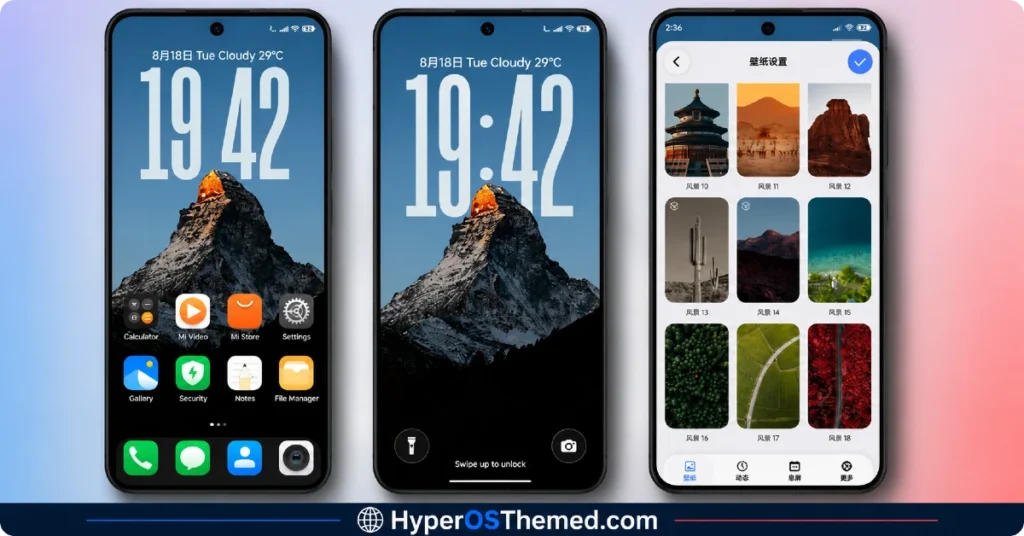
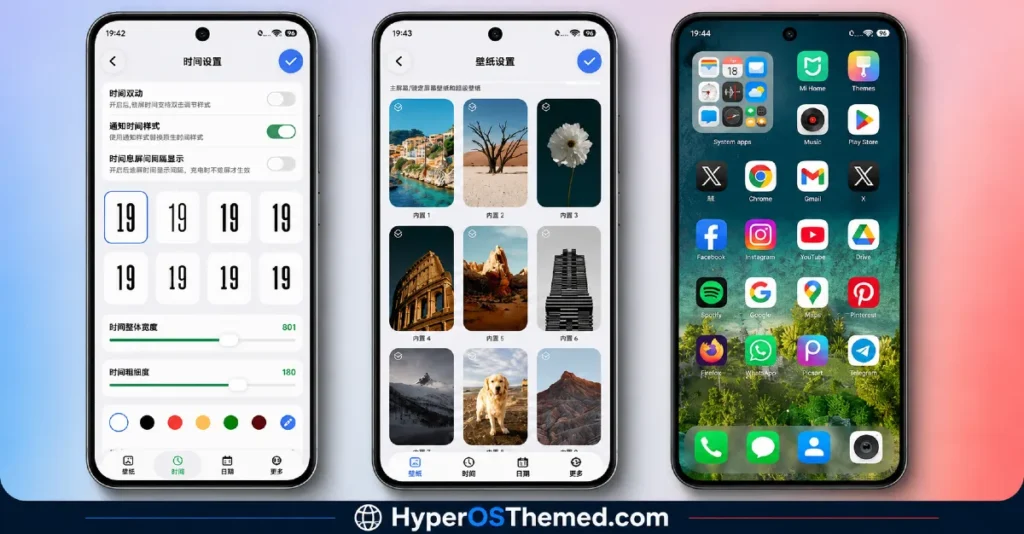
The visual identity of Seeking Shadows HyperOS Theme is built entirely around that wallpaper variety, moving between sun-bleached deserts, misty forests, rugged mountains, and quiet coastlines without ever feeling repetitive.
The bold iOS-style clock anchors each scene without overpowering it, giving every wallpaper choice its own distinct mood while keeping a consistent typographic identity across all of them. It reads more like a curated nature photography collection wrapped around a phone theme than a single fixed aesthetic.
Seeking Shadows Theme Details
| Detail | Info |
|---|---|
| Theme Name | Seeking Shadows |
| Designer | 史莱克 |
| Compatibility | HyperOS, HyperOS 2.0, HyperOS 3.0 |
| Features | Premium, iOS Style, Wallpapers, Nature |
| File Size | 85.44 MB |
Seeking Shadows HyperOS Theme Performance
I ran Seeking Shadows on a POCO X6 through daily use covering gaming, streaming, and regular browsing, switching between several wallpapers throughout testing to see how the transitions handled.
Given the substantial 85.44 MB file size, installation took a noticeably longer stretch than smaller themes, but once applied, performance stayed smooth with no lag in home screen transitions.
Battery drain came in a few percentage points higher than my usual baseline, which is reasonable given the sheer amount of high-resolution wallpaper content being rendered. The main issue tied back to the China region tagging; a couple of region-specific apps needed manual icon resets, which the included backup file helped resolve.
Seeking Shadows HyperOS Theme Compatibility
Seeking Shadows supports HyperOS, HyperOS 2.0, and HyperOS 3.0, covering a wide range of current Xiaomi, Redmi, and POCO devices. I tested it on a POCO X6 without major stability issues once I applied the backup file provided alongside the main download.
Given the China region tag, Global ROM users may run into occasional icon application quirks, which is fairly typical for region-specific themes of this scale. It’s not designed for MIUI 12, 13, or 14, and custom ROM users on Xiaomi.eu or similar builds should plan on needing the backup file as well given how much content this theme is packing in.
Get Seeking Shadows HyperOS Theme
Download Seeking Shadows through the official Xiaomi Theme Store link, and make sure to also grab the separate backup file provided alongside it, since the China region packaging can cause a few icon elements to not apply correctly on Global ROM devices without it.
Avoid third-party APK sites or unofficial repackaged versions of this theme, since sideloaded installers are a common source of unnecessary permissions or corrupted files, particularly with a large, detail-heavy theme like this one.
Note: If the Official Theme Store Link doesn’t redirect properly, try opening the page in Chrome or the default Xiaomi browser, since other browsers may not handle the redirect correctly.
How to Apply Seeking Shadows HyperOS Theme
Follow the steps below to apply the theme:
- Open the Theme Store Link given above on your Xiaomi / REDMI / POCO device
- This will redirect you to Theme Store.
- Download and install the theme
- Tap on Apply
- Customize specific elements (icons, lock screen, status bar) if needed
- Reboot your device (optional for full effect)
Why Choose Seeking Shadows HyperOS Theme?
- The 18+ wallpaper collection delivers genuine variety instead of repeating similar shots
- Bold iOS-style clock stays legible and consistent across every included wallpaper
- Customization options let you mix wallpapers and clock styles rather than sticking to fixed presets
- Clean icon set keeps focus on the wallpaper photography without visual competition
- Backup file included by the designer helps resolve region-specific compatibility issues
Conclusion
Seeking Shadows HyperOS Theme earned its “premium” label on my POCO X6 mostly through sheer wallpaper variety that actually held up under real scrutiny rather than being padded filler. The region-specific quirks required some troubleshooting with the backup file, and the larger download size and battery impact are real trade-offs worth knowing about upfront.
Compared to other nature or wallpaper-focused themes I’ve tested, this one delivers noticeably more genuine content rather than a handful of decent shots stretched to look like a full collection. If you want real wallpaper variety and don’t mind the larger download, it’s one of the more rewarding themes currently available.
You may also like:
TON HyperOS Theme with Clean Minimal Look for Xiaomi, POCO & Redmi
Hoshyper HyperOS Theme with Dark iOS-Style Look for Xiaomi, POCO & Redmi
Blue Nocturne HyperOS Theme for Xiaomi, POCO and Redmi Phones
OX GR1 HyperOS Theme: A Dark Red Anime Look for Xiaomi, POCO & Redmi
