
Skeuomorphic design mostly died out on phones years ago, so seeing it listed as a feature for CuteM caught me off guard enough to actually download it and see whether it looked charming or just dated. I put it on my POCO X6 expecting it to feel like a throwback in a bad way, and came away more surprised than I anticipated by how deliberately the whole aesthetic was pulled together.
CuteM HyperOS Theme Features
- Frosted Glass Icon Pack: Icons use a soft, semi-translucent glass effect rather than the flat or sharply defined shapes most themes go with. It gives the home screen a gentle, almost tactile quality, and coverage across my main apps was solid, though a couple of niche apps kept their default icons.
- Skeuomorphic Detailing: Rather than pure flat design, several icons and widgets carry subtle depth and texture reminiscent of older, more physical-feeling UI design. It’s a deliberate throwback rather than an accident, and it actually worked better in motion than I expected from static screenshots.
- Cloud-Over-Meadow Wallpaper: The default wallpaper shows soft clouds drifting over a green meadow, giving the whole setup a calm, storybook-like quality. It held up well behind icons without feeling too busy, and paired naturally with the frosted glass icon style layered on top.
- Cute Control Center: Pulling down the Control Center reveals a genuinely playful redesign, with rounded toggles and soft styling that matches the rest of the theme’s tone. Rapid-toggling Wi-Fi and Bluetooth a few times showed everything staying responsive despite the more decorative visual treatment.
- Minimalist Clock Widget: Despite how much visual personality the rest of the theme carries, the clock widget stays simple and understated, avoiding clutter on the home screen. It’s a nice balance, letting the icons and wallpaper do the heavy lifting while the clock stays out of the way.
CuteM HyperOS Theme Preview
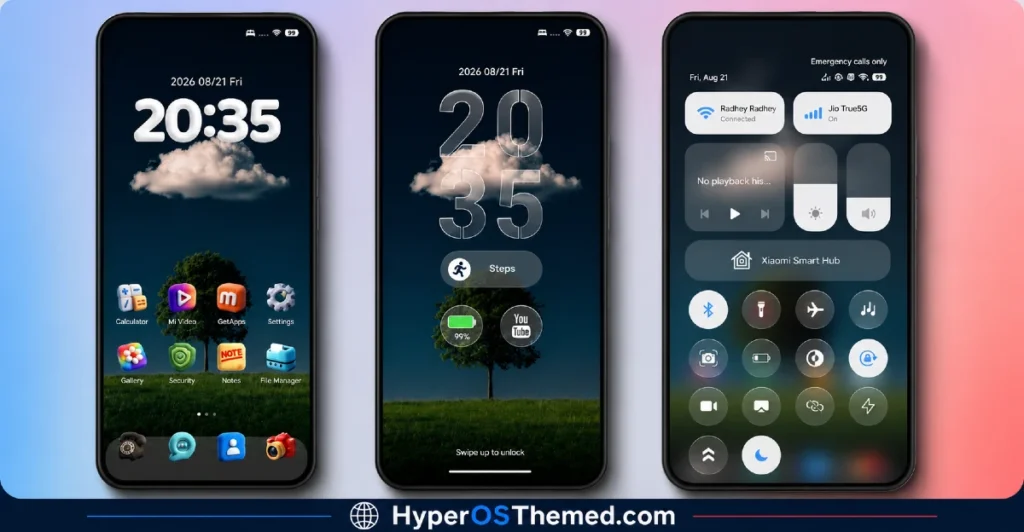
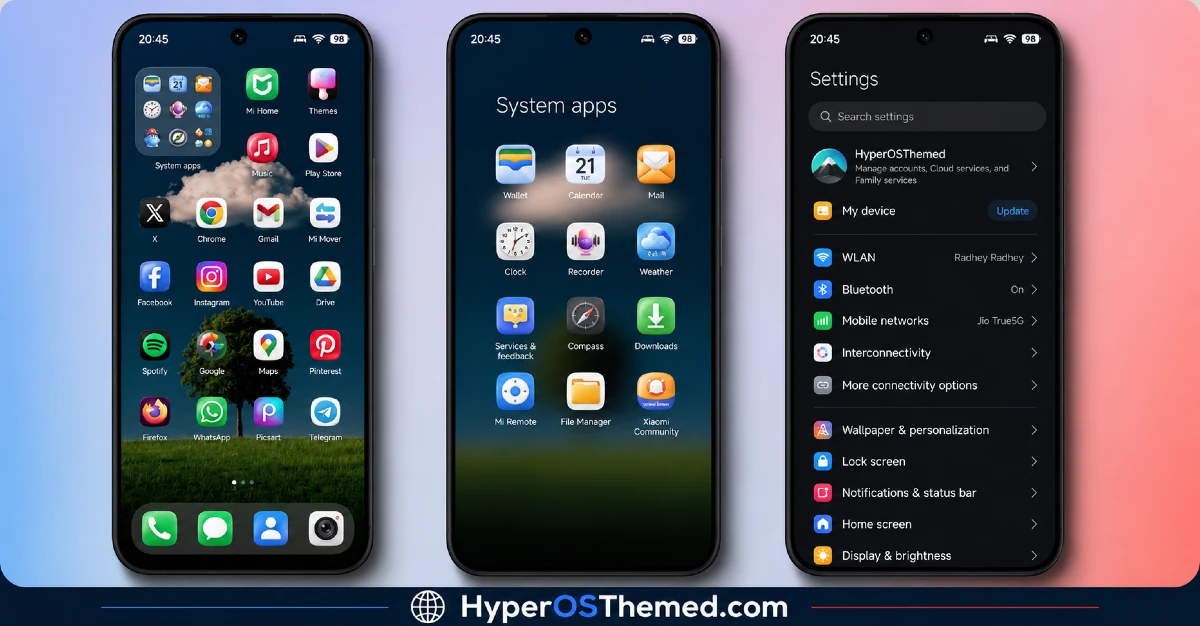
The visual identity leans fully into a soft, cozy aesthetic, with frosted glass icons and skeuomorphic touches set against a gentle cloud-and-meadow backdrop.
Nothing about it feels sharp or aggressive, everything from the Control Center to the icon shapes carries a rounded, approachable quality. It reads more like a dreamy, nature-inspired scrapbook than a typical phone theme, which is a genuinely different visual lane compared to the dark, glass, or minimal themes that dominate most Theme Store listings.
CuteM HyperOS Theme Details
| Detail | Info |
|---|---|
| Theme Name | CuteM |
| Designer | Maidul Islam |
| Compatibility | HyperOS, HyperOS 2.0, HyperOS 3.0 |
| Features | Cute, Nature, Skeuomorphism, Frosted Glass, Minimalist |
| File Size | 89.41 MB |
CuteM HyperOS Theme Performance
I ran CuteM on a POCO X6 through daily use covering messaging, gaming, and regular browsing to see how the more decorative skeuomorphic elements held up under normal conditions.
Given the substantial 89.41 MB file size, installation took noticeably longer than smaller themes, but once applied, performance stayed smooth with no lag in the app drawer or Control Center. Battery drain came in a few percentage points higher than my usual baseline, which tracks given the amount of detailed icon rendering and frosted glass effects running throughout the interface.
I didn’t run into any major bugs, though the couple of unthemed niche app icons stood out visually against the otherwise cohesive glass and skeuomorphic set.
CuteM HyperOS Theme’s Compatibility
CuteM HyperOS Theme supports HyperOS, HyperOS 2.0, and HyperOS 3.0, covering a wide range of current Xiaomi, Redmi, and POCO devices. I tested it on a POCO X6 without any stability issues.
It’s not built for MIUI 12, 13, or 14, so applying it on older firmware isn’t recommended. Custom ROM users on Xiaomi.eu or similar HyperOS-based builds should be able to import the MTZ file without much trouble, though given the file size and detailed skeuomorphic rendering, installation may take longer than with simpler, flatter themes.
Designer’s note: The designer welcomes feedback and bug reports through Telegram at t.me/HyperosSignals or t.me/CNThemes.
Get CuteM HyperOS Theme
Download CuteM through the official Xiaomi Theme Store link rather than third-party APK sites or unofficial file hosts claiming to offer the same theme.
Given the file size and detailed icon work involved, downloading from unverified sources risks getting an incomplete file that doesn’t render the frosted glass and skeuomorphic effects correctly, so sticking with the official Theme Store is the safer choice.
Note: If the Official Theme Store Link doesn’t redirect properly, try opening the page in Chrome or the default Xiaomi browser, since other browsers may not handle the redirect correctly.
How to Apply CuteM HyperOS Theme
Follow the steps below to apply the theme:
- Open the Theme Store Link given above on your Xiaomi / REDMI / POCO device
- This will redirect you to Theme Store.
- Download and install the theme
- Tap on Apply
- Customize specific elements (icons, lock screen, status bar) if needed
- Reboot your device (optional for full effect)
Why Choose CuteM HyperOS Theme?
- Frosted glass and skeuomorphic icon design brings back a genuinely distinct aesthetic most themes have abandoned
- Cloud-over-meadow wallpaper gives it a calm, storybook quality rare among HyperOS themes
- Control Center redesign stays playful without sacrificing responsiveness
- Minimalist clock widget balances out the more decorative elements elsewhere
- Active designer support through Telegram for feedback and bug fixes
Conclusion
CuteM HyperOS Theme turned out to be a genuinely charming surprise on my POCO X6, taking a design approach most modern themes have moved away from and making it feel intentional rather than dated.
The larger file size and slightly higher battery drain are real trade-offs, and the couple of unthemed niche icons broke the cohesive look here and there.
Compared to other nature or soft-aesthetic themes I’ve tried, CuteM commits more fully to a distinct visual identity instead of playing it safe with a generic pastel palette. If you want something warm and different from the usual dark or glass options, it’s worth trying.
You may also like:
TON HyperOS Theme with Clean Minimal Look for Xiaomi, POCO & Redmi
Hoshyper HyperOS Theme with Dark iOS-Style Look for Xiaomi, POCO & Redmi
Blue Nocturne HyperOS Theme for Xiaomi, POCO and Redmi Phones
OX GR1 HyperOS Theme: A Dark Red Anime Look for Xiaomi, POCO & Redmi
