
Purple isn’t a color HyperOS themes reach for very often, most dark themes default straight to black or deep red, so Purple G HyperOS Theme stands out just by picking a less obvious lane. Designed by Mimori Touka, it pairs a purple-toned gradient wallpaper with a depth effect finish and a genuinely well-crafted icon set, all built specifically to be used alongside system Dark Mode rather than as a standalone light theme. At a compact 13.5 MB, it’s one of the lighter downloads in this category, built for Xiaomi, Redmi and POCO devices running HyperOS.
Purple G HyperOS Theme Features
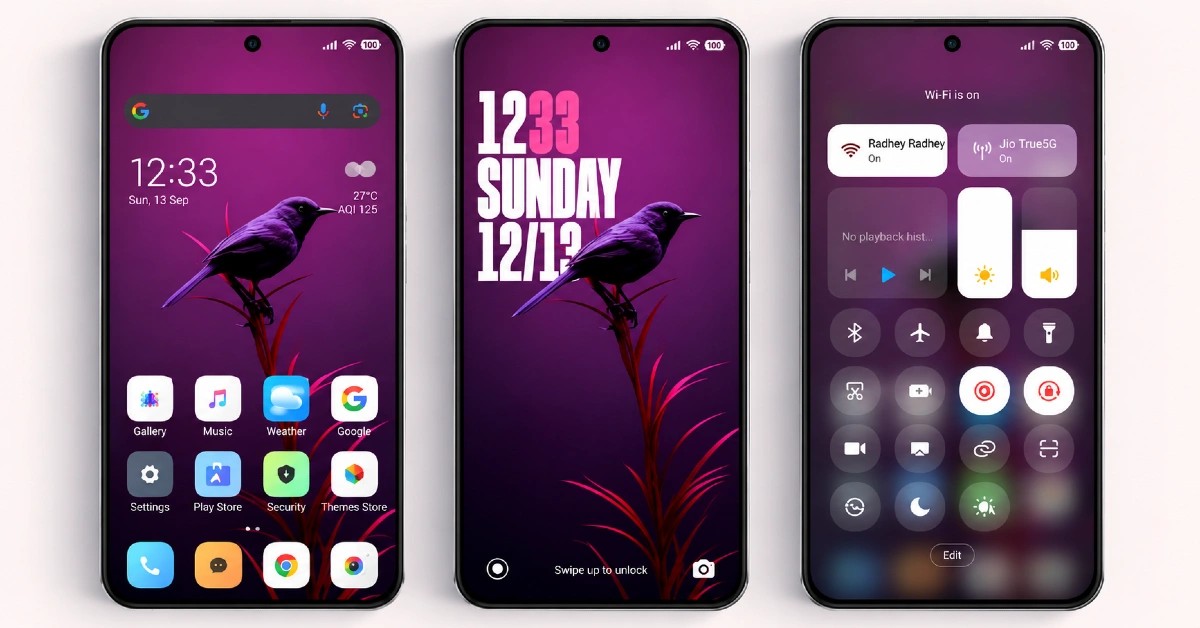
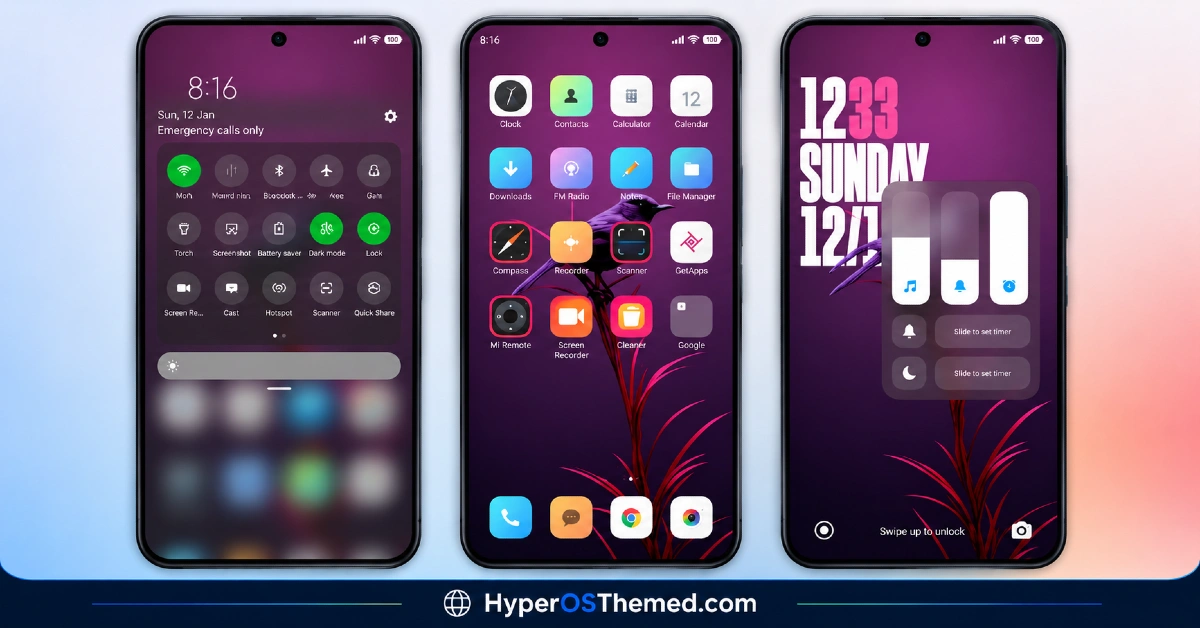
- Purple Gradient Wallpaper: The signature visual here is a smooth purple gradient wallpaper that gives the theme its identity, rather than relying on a generic dark backdrop. It’s distinct enough to be recognizable at a glance without tipping into anything too loud or garish.
- Depth Effect Rendering: Beyond just the gradient color, the wallpaper uses a depth effect technique that adds some layered dimension rather than sitting completely flat. This gives the home screen a bit more visual interest than a plain solid-color background would offer.
- Beautifully Crafted Icon Set: Icons are custom-designed with genuine attention to detail rather than being a quick recolor of stock assets, which is worth noting since this theme is filed specifically under a “Beautiful Icons” category by its own listing. That extra design care tends to be the difference between a theme that feels considered and one that feels thrown together.
- Built for Dark Mode Specifically: Purple G is designed to be used with system Dark Mode turned on, and the listing specifically recommends enabling it before installing for the intended look. That’s a detail worth following closely, since applying it without Dark Mode active is likely to leave some elements looking mismatched.
- Genuinely Compact File Size: At 13.5 MB, this is a notably light theme for what it includes, particularly given the depth effect rendering involved. It downloads quickly and shouldn’t put much strain on storage even on older or budget devices.
- Separate Downloadable Wallpaper: Beyond the theme file itself, the purple gradient wallpaper is also available as a standalone download. That’s a nice option for anyone who likes the visual style but wants to apply just the wallpaper without the full icon and UI overhaul.
Purple G HyperOS Theme Preview
The screenshots below show the purple gradient wallpaper with its depth effect and how the custom icon set looks once the theme is applied. Since the gradient and depth combination is really the centerpiece here, it’s worth turning on Dark Mode on your own device before comparing it against the preview, as the effect is built specifically around that setting.
Purple G Theme Details
| Attribute | Details |
|---|---|
| Availability | Free, via Xiaomi Theme Store |
| Supported Devices | Xiaomi, Redmi and POCO phones running HyperOS |
| Theme Name | Purple G |
| Designer | Mimori Touka |
| Compatibility OS | HyperOS |
| Features | Purple gradient wallpaper, depth effect rendering, custom icon set, standalone wallpaper download |
| File Size | 13.5 MB (theme), 13.4 MB (MTZ), 2.2 MB (wallpaper only) |
Purple G HyperOS Theme Compatibility
Purple G is built for HyperOS and works across Xiaomi, Redmi and POCO devices running that version. Since the theme is specifically designed around Dark Mode, applying it without switching that setting on first is likely to result in some visual inconsistency, so it’s worth turning on Dark Mode and restarting the device before or immediately after installing for the intended effect.
Custom ROM users on setups like Xiaomi.eu, MIUIRoom, MIUI SR or HyperOS CN can still bring the theme in manually through the MTZ file, and given the theme’s modest file size and straightforward gradient design, compatibility issues tend to be minimal compared to more effect-heavy themes.
Get Purple G HyperOS Theme
Download Purple G only through the official Theme Store link rather than random third-party file-sharing sites or unofficial APK sources. Files circulating outside official channels are difficult to verify and may not match the version Mimori Touka actually released. Sticking to the official Theme Store keeps the installed version consistent with the intended design and ensures future updates remain accessible.
How to Apply Purple G HyperOS Theme
Follow the steps below to apply the theme:
- Open the Theme Store link given above on your Xiaomi, Redmi or POCO device.
- This will redirect you to the Theme Store.
- Download and install the theme.
- Tap on Apply.
- Customize specific elements such as icons, lock screen or status bar if needed.
- Reboot your device for the full effect, though this step is optional.
Note: Turning on Dark Mode before or right after installing is worth doing here specifically, since the theme is built around that setting and skipping it can leave some elements looking mismatched. If anything looks overlapped or fails to display correctly right after installing, restarting the device usually clears it up. This theme has gone through checks on HyperOS without any major issues turning up, but if something still looks off on a specific device once it’s applied, leaving a comment with the details helps get it looked into.
Installing Purple G HyperOS Theme on Custom ROM Devices
Devices running a Custom ROM such as Xiaomi.eu, MIUIRoom, MIUI SR or HyperOS CN aren’t able to use the direct Theme Store link, so the MTZ file needs to be brought in manually through the Theme Store app. Here’s how that works:
- Grab the MTZ file for Purple G from the download section.
- Open the Theme Store app.
- Go into the Themes tab.
- Scroll down to find the Import option, then tap it.
- Use the file manager to locate the downloaded .mtz file.
- Wait for the import process to finish.
- Tap the theme once it appears in the list to apply it.
Why Choose Purple G HyperOS Theme?
- Distinct purple gradient identity — a less common color choice than the usual black or red dark themes.
- Genuine depth effect — the wallpaper has real layered dimension rather than sitting flat.
- Thoughtfully designed icons — crafted with real detail rather than a quick recolor job.
- Built specifically for Dark Mode — designed to look its best with that setting enabled.
- Extremely lightweight — 13.5 MB is small even by icon-pack standards.
- Standalone wallpaper option — the wallpaper alone can be downloaded separately if preferred.
- Free official download — no cost involved through a legitimate Theme Store link.
Conclusion
Purple G HyperOS Theme Xiaomi makes a strong case for itself simply by picking a less crowded color lane and executing it with genuine care, from the depth-effect gradient down to the icon detailing. Its small file size and Dark Mode-specific design make it an easy, low-commitment theme to try, provided that one setting gets switched on first. For Xiaomi, Redmi and POCO users who want a dark theme that doesn’t default to black or red, Purple G Xiaomi Theme HyperOS is well worth trying.
You may also like:
Lake Frame HyperOS Theme with Gradient Icons For Xiaomi, POCO, Redmi
OX F3 V2 HyperOS Theme with Cartoon One UI Style with Dynamic Lock Screen for Xiaomi, POCO, Redmi
Bitcoin HyperOS Theme with Cartoon 3D Depth of Field for Xiaomi, POCO, Redmi
LTC HyperOS Theme – Depth Effect Lock Screen for Xiaomi, POCO, Redmi
