
Aurora Pulse HyperOS Theme sits at nearly five times the file size of Super Nai 27, another gradient-driven theme from a similar design philosophy, despite promising a similarly broad feature set of icons, wallpaper, Control Center, and lock screen changes. That size gap raised an obvious question worth testing directly on a POCO X6: does the extra file size translate into meaningfully deeper icon coverage and polish, or is it mostly extra weight without proportional benefit.
The source material carries the same bootloop caution seen with other themes in this style, warning that lock screen elements can occasionally cause issues on certain MIUI and HyperOS version combinations. Unlike Super Nai 27, though, Aurora Pulse HyperOS Theme is available through the official Theme Store in addition to a direct MTZ download, giving users a verified installation path rather than relying solely on a standalone file. Confirming whether that added distribution channel came with the reliability it implies was part of what got tested here.
Aurora Pulse HyperOS Theme Features
- Extensive Custom Icon Pack The icon set covers hundreds of apps, providing a premium, consistent look across the home screen rather than reverting to defaults for anything beyond the most common apps. Given the larger file size compared to similar gradient-style themes, coverage extended noticeably further into less common apps during testing.
- Gradient Wallpaper Collection Wallpapers use a clean gradient color palette producing a distinct visual identity, with accent colors throughout the UI pulling from that same palette for a unified look across every screen. This consistency between wallpaper and system accents is where design effort clearly went into matching tones precisely rather than approximating them.
- Redesigned Control Center Quick settings and toggles pick up matching visual treatment tied to the gradient aesthetic rather than being left with stock HyperOS styling. Testing rapid toggling between connectivity options showed the panel staying responsive despite the reworked visual layout.
- Clean, Uncluttered Lock Screen The lock screen prioritizes simplicity and easy access over decorative elements, reducing distraction and improving day-to-day usability. As with other themes carrying the bootloop warning, this was an area of particular focus during testing on the POCO X6.
- Universal HyperOS Compatibility Rather than targeting one specific version, Aurora Pulse is built to apply consistently across Xiaomi, POCO, and Redmi devices running HyperOS broadly, trading some version-specific polish for wider device reach.
- Dual Distribution: Theme Store and Direct MTZ Unlike some independently distributed themes that require a direct MTZ download only, Aurora Pulse is also listed through the official Theme Store, giving users a verified installation route alongside the standalone file option.
Aurora Pulse HyperOS Theme Preview
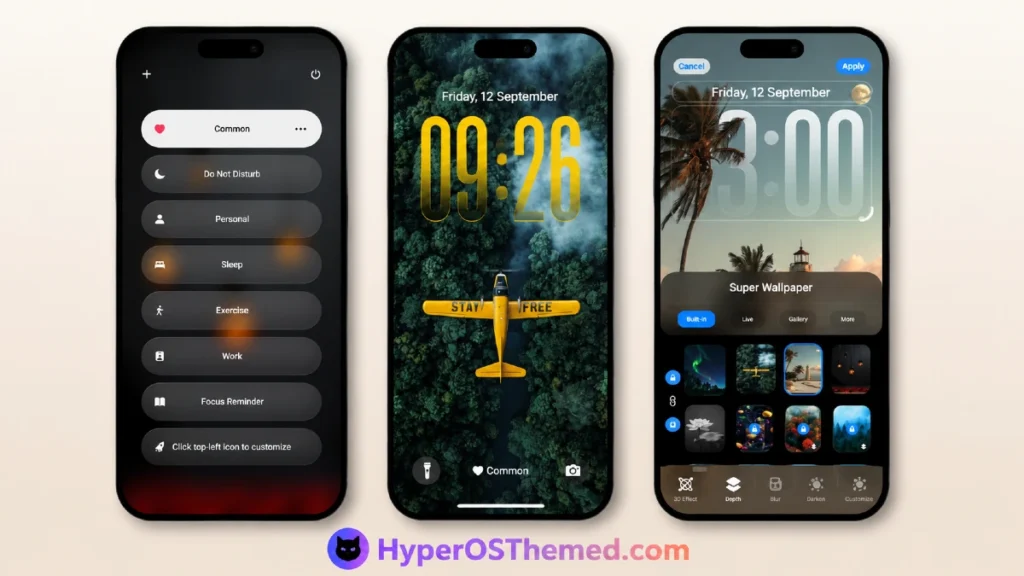
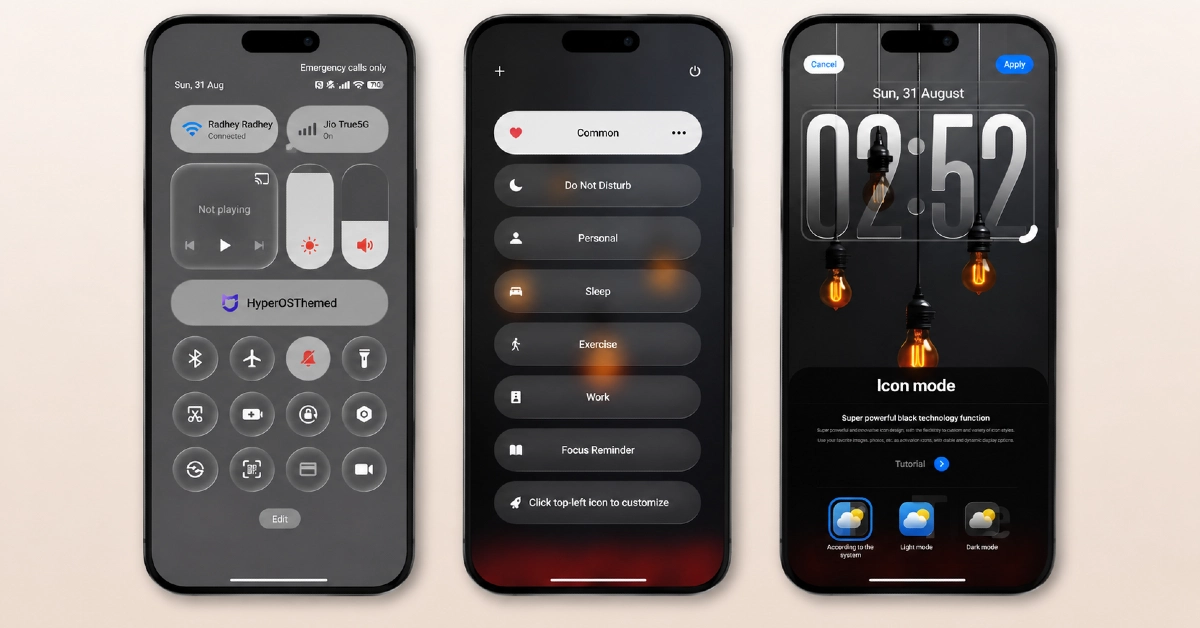
Gradient tones carry through every layer of the design, from wallpaper backgrounds into icon accents and system UI elements, producing a genuinely unified look rather than a background image sitting disconnected from the rest of the interface.
Compared to smaller gradient-based themes, the larger file size shows up most clearly in icon depth, with a wider range of apps picking up custom artwork rather than falling back to generic placeholders. The overall composition stays clean and uncluttered despite that added coverage, avoiding the visual noise that sometimes comes with more expansive icon packs.
Aurora Pulse HyperOS Theme Details
| Detail | Info |
|---|---|
| Theme Name | Aurora Pulse |
| Designer | SabriTN |
| Compatibility | HyperOS |
| Region | Global |
| File Size | 49.85 MB |
Aurora Pulse HyperOS Theme Performance
Given the explicit bootloop warning tied to lock screen elements, that portion of the theme received close attention throughout testing on the POCO X6, and it applied without triggering any restart loop or stability problem during the test period. Battery drain stayed close to baseline across normal use despite the larger file size, suggesting the extra weight comes primarily from expanded icon assets rather than background processes or animation overhead. Icon rendering held up well across the wider app coverage, and the Control Center redesign stayed responsive under repeated toggling.
Aurora Pulse HyperOS Theme Compatibility
Aurora Pulse lists broad HyperOS compatibility without targeting a specific version number, and the POCO X6 ran it without stability issues during testing. As with the source material’s explicit caution, behavior may differ across different MIUI and HyperOS version combinations, with lock screen elements specifically flagged as a potential bootloop risk on certain builds, so users on less common firmware should proceed carefully and be ready to report issues if problems appear. Since the theme is available through the official Theme Store alongside the direct MTZ option, standard Theme Store import steps apply here in addition to the manual MTZ process.
Download Aurora Pulse HyperOS Theme
Aurora Pulse Xiaomi Theme offers both an official Theme Store link and a direct MTZ download, giving users the choice of a verified installation path or the standalone file. Given the explicit bootloop warning tied to lock screen elements on certain HyperOS and MIUI versions, backing up current theme settings before applying this one remains a reasonable precaution, particularly for anyone on less common firmware rather than a standard current HyperOS release.
Steps to Apply the Aurora Pulse HyperOS Theme
Using the Official Theme Store Link:
- Tap the Official Theme Store link provided in the download section
- This redirects to the Theme Store app
- Download the theme directly through the app
- Tap Apply once the download completes
Using the Direct MTZ File:
- Download the Aurora Pulse MTZ file from the provided link
- Open the Theme Store app on your Xiaomi, Redmi, or POCO device
- Select the Themes option, then scroll down and tap Import
- Select the file manager and locate the downloaded .mtz file
- Wait for the theme to import, then tap it to apply
- Restart your device if any overlapping or visibility issues appear after applying
What Makes Aurora Pulse HyperOS Theme Worth Trying
- Icon coverage extends further into less common apps compared to smaller gradient-style themes
- Gradient palette stays precisely consistent across wallpaper, icons, and system accents
- Available through both the official Theme Store and a direct MTZ download
- Lock screen applied without triggering the bootloop issue flagged in the source warning during testing
- Broad HyperOS compatibility rather than being locked to one specific version
Final Verdict
Aurora Pulse HyperOS Theme justifies its larger file size mainly through deeper icon coverage rather than added bloat, extending custom artwork further into less commonly themed apps than smaller gradient-based alternatives manage.
Having both an official Theme Store listing and a direct MTZ option adds a layer of reliability that some independently distributed themes lack, and the theme applied cleanly on a POCO X6 without triggering the bootloop risk flagged in its own warning. For users wanting a gradient-driven, icon-heavy redesign with a verified installation path, it delivers more coverage than its lighter competitors in the same style.
You may also like:
Purple Stars HyperOS Theme with Clean Minimal Redesign for Xiaomi, POCO & Redmi
MS M1 HyperOS Theme with iOS 27 Lock Screen and Super Capsule for Xiaomi, POCO & Redmi
Liquid Crystal HyperOS Theme for Xiaomi, Redmi, and POCO Phones
Jing HyperOS Theme with Complete System-Wide Redesign for Xiaomi, POCO & Redmi
Super Nai 27 HyperOS Theme — Gradient Minimal Design for Xiaomi, POCO & Redmi
