
Liquid Crystal HyperOS Theme ships with a specific set of built-in gesture controls listed directly in the designer’s notes, swipe up to unlock, double-tap to change the wallpaper, press and hold for flashlight or camera, which is more documented interaction than most HyperOS themes bother explaining. That level of specificity, combined with a wallpaper collection spanning holographic ink, misty forests, autumn leaves, and cherry blossoms, made confirming each gesture actually worked as described the main priority when testing on a POCO X6, rather than just evaluating the visuals alone.
The core concept pairs a frosted-glass clock display with a rotating set of moody, artistic wallpapers, letting the same clock element take on a different feel depending on which background is active behind it. At 56.22 MB, this sits in the mid-range for file size, large enough to suggest real wallpaper variety without ballooning into the 80-90 MB territory some premium multi-wallpaper themes reach.
Liquid Crystal HyperOS Theme Features
- Frosted-Glass Clock Display: The lock screen clock uses a translucent, frosted glass rendering rather than a flat solid-color font, letting whichever wallpaper is active show through with genuine depth. This is the element tying the entire theme together, since it needs to stay legible and visually consistent across wallpapers as different as holographic ink and cherry blossoms.
- Multiple Mood-Shifting Wallpapers: The collection includes swirling holographic ink, misty forest scenes, autumn leaves, and cherry blossoms, each carrying a distinct mood rather than variations on the same base image. Cycling through them showed the frosted-glass clock adapting its visual weight to match each background’s contrast level.
- Double-Tap Wallpaper Switching: Rather than digging into a settings menu to change backgrounds, double-tapping the lock screen gesture area cycles directly to the next wallpaper in the set. Testing this repeatedly confirmed it worked reliably, cycling cleanly between the different mood options without lag or misfires.
- Swipe-Up Unlock Gesture: The unlock method uses a swipe-up gesture rather than the standard tap-anywhere default, reinforcing the theme’s overall fluid, motion-based design language. It functioned consistently throughout testing without any missed registrations.
- Press-and-Hold Flashlight and Camera Shortcuts: Both the flashlight and camera icons respond to a press-and-hold gesture rather than a simple tap, adding a layer of intentional interaction to the lock screen shortcuts. Both triggered correctly and consistently during testing, activating the flashlight and opening the camera as described.
- Dark, Artistic Aesthetic Throughout: Beyond the lock screen, the overall theme commits to a dark, moody visual identity that carries the crystal and fluid motion concept into system menus rather than confining it to the wallpaper alone.
Liquid Crystal HyperOS Theme Preview
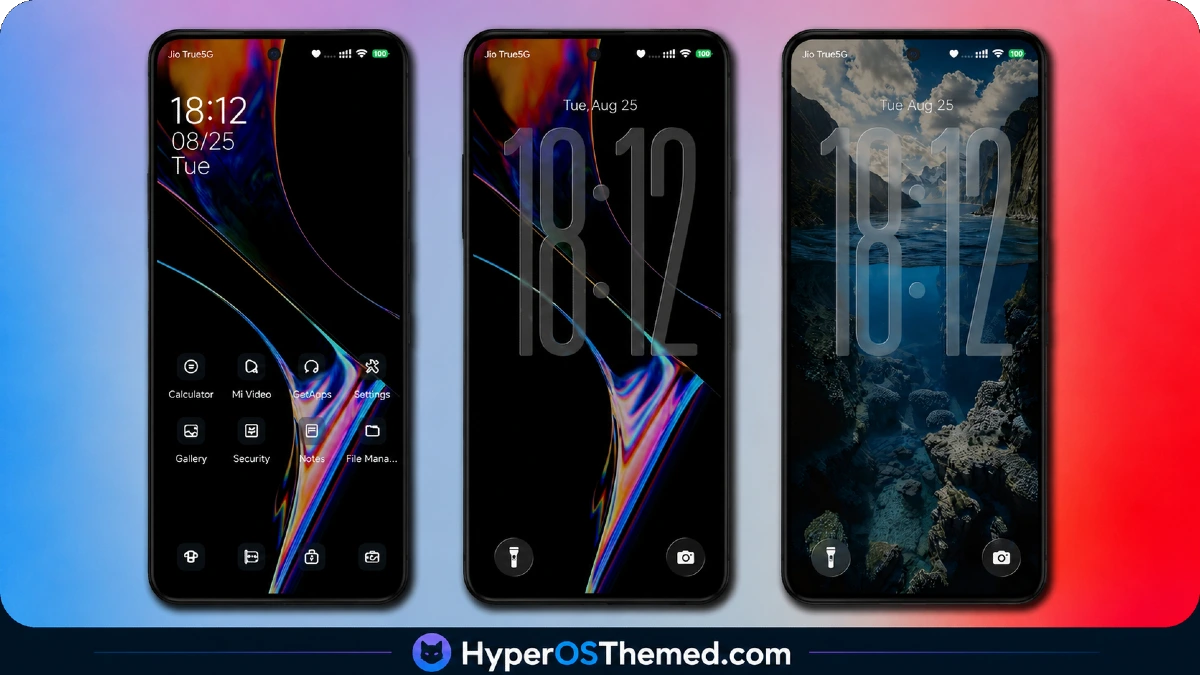
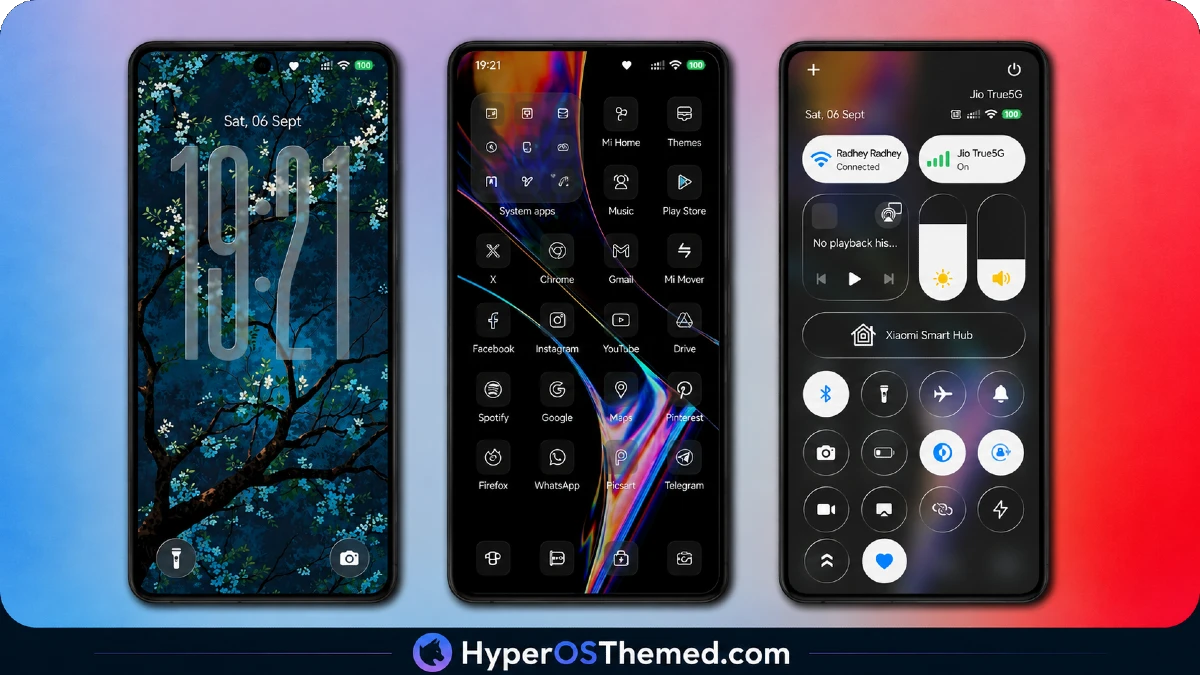
The frosted-glass clock is the visual anchor here, taking on a genuinely different character depending on which wallpaper sits behind it, sharper and more crystalline against the holographic ink option, softer and warmer against the autumn leaves or cherry blossom scenes.
That range across four distinct moods within a single theme is unusual, most wallpaper-variety themes stick to one visual category, while Liquid Crystal moves between abstract, natural, and seasonal imagery without losing the connecting thread of that translucent clock design.
Liquid Crystal HyperOS Theme Details
| Detail | Info |
|---|---|
| Theme Name | Liquid Crystal |
| Designer | Ericson Padayao |
| Compatibility | HyperOS, HyperOS 2.0, HyperOS 3.0 |
| Region | Global |
| Features | Dark, Wallpapers, Dynamic Lock Screen, Glass |
| File Size | 56.22 MB |
Liquid Crystal HyperOS Theme Performance
Each documented gesture received individual testing on the POCO X6 rather than assuming the feature list was accurate by default, and all four, swipe-up unlock, double-tap wallpaper switching, press-and-hold flashlight, press-and-hold camera, triggered correctly and consistently across repeated attempts.
Battery drain came in modestly above baseline across normal use, reasonable given the frosted-glass rendering effect running continuously on the lock screen. Switching between wallpapers via the double-tap gesture introduced no visible lag, and the varying contrast levels across the different backgrounds never caused the clock to become hard to read.
Liquid Crystal HyperOS Theme’s Compatibility
Liquid Crystal HyperOS Theme supports HyperOS, HyperOS 2.0, and HyperOS 3.0, covering the current range of Xiaomi, Redmi, and POCO devices, and the POCO X6 ran it without stability issues throughout testing. Custom ROM users on Xiaomi.eu, MIUIRoom, or similar HyperOS-based builds should be able to import the MTZ file without major friction given the moderate file size.
Download Liquid Crystal HyperOS Theme
Use the Official Theme Store Link rather than a third-party mirror claiming to host the same file. Given how much of this theme’s appeal depends on the specific gesture controls functioning correctly, swipe-up unlock, double-tap switching, press-and-hold shortcuts, an incomplete or altered reupload from an unofficial source risks breaking exactly the features that make this theme worth downloading in the first place.
Note: If the Official Theme Store Link doesn’t redirect properly, try opening the page in Chrome or the default Xiaomi browser, since other browsers may not handle the redirect correctly.
Steps to Apply Liquid Crystal HyperOS Theme
- Open the Theme Store Link given above on your Xiaomi / REDMI / POCO device
- This will redirect you to Theme Store.
- Download and install the theme
- Tap on Apply
- Customize specific elements (icons, lock screen, status bar) if needed
- Reboot your device (optional for full effect)
What Makes Liquid Crystal Worth Considering
- Frosted-glass clock adapts its visual weight across four distinctly different wallpaper moods
- Double-tap wallpaper switching works reliably without needing to open a separate settings menu
- Press-and-hold shortcuts for flashlight and camera add genuine lock screen function
- Swipe-up unlock gesture registers consistently rather than requiring repeated attempts
- Wallpaper variety spans abstract, natural, and seasonal imagery rather than one repeated theme
Final Verdict
Liquid Crystal backs up its detailed gesture-control claims with features that actually function as documented, every interaction listed in the designer’s notes, swipe-up unlock, double-tap switching, press-and-hold shortcuts- worked correctly and consistently on a POCO X6 throughout testing.
The frosted-glass clock design holds together remarkably well across four visually distinct wallpaper moods, giving the theme more range than most single-aesthetic dark themes attempt. For anyone wanting a dynamic lock screen with genuine built-in interactivity rather than a static image and a clock, it’s one of the more functionally complete options currently available.
You may also like:
Jing HyperOS Theme with Complete System-Wide Redesign for Xiaomi, POCO & Redmi
Super Nai 27 HyperOS Theme — Gradient Minimal Design for Xiaomi, POCO & Redmi
MS M1 HyperOS Theme with iOS 27 Lock Screen and Super Capsule for Xiaomi, POCO & Redmi
Liquid Glass HyperOS Theme for Xiaomi, POCO and REDMI Phones
