
Hello, my Xiaomi Lover Friend. I spotted VK Anime HyperOS Theme while browsing through a Telegram channel dedicated to HyperOS themes, and the silhouette figure set against a glowing red grid stopped my scroll immediately since most anime-inspired themes I’ve tried lean more cartoonish than cinematic.
I installed it on my POCO X6 the same evening, mainly curious whether the dark, dramatic aesthetic promised in the description would actually hold up in daily use or just look good as a static wallpaper.
VK Anime HyperOS Theme Features
- Silhouette Wallpaper with Red Grid: The default wallpaper features a striking figure silhouette set against a glowing red grid pattern, giving it a genuinely cinematic quality rather than the typical character art most anime themes rely on. It looked sharp on my POCO X6’s display even at lower brightness, with the red grid staying vivid without washing out.
- Bold Lock Screen Typography: The lock screen clock uses large, confident text that stands out clearly against the dark wallpaper without feeling cluttered. It’s a similar approach to a few other bold-typography themes I’ve tested, and it worked well here paired with the red and black color scheme.
- Authentic iOS-Style Control Centre: Pulling down the control center gives a clean, dark panel closely styled after iOS’s actual layout rather than a generic HyperOS quick settings grid. Toggles stayed responsive when I tested rapid switching between Wi-Fi and Bluetooth during setup.
- iOS-Style Settings Menu: Beyond the control center, the Settings app carries the same iOS-inspired styling, keeping things visually consistent rather than mixing design languages between system apps. It’s a detail that a lot of anime or gaming-themed skins tend to skip in favour of flashier home screen elements.
- Red-Black Icon Accent: Icons stick to a black base with red accent detailing that ties back into the wallpaper’s grid pattern. Coverage across my most used apps was solid, though a couple of niche apps kept their default icons and stood out against the red-black set.
- Dynamic Lock Screen: The lock screen isn’t fully static, shifting subtly depending on how it’s configured. It added a bit of movement to what would otherwise be a purely image-based lock screen, though the effect is more subtle than dramatic.
VK Anime HyperOS Theme Preview
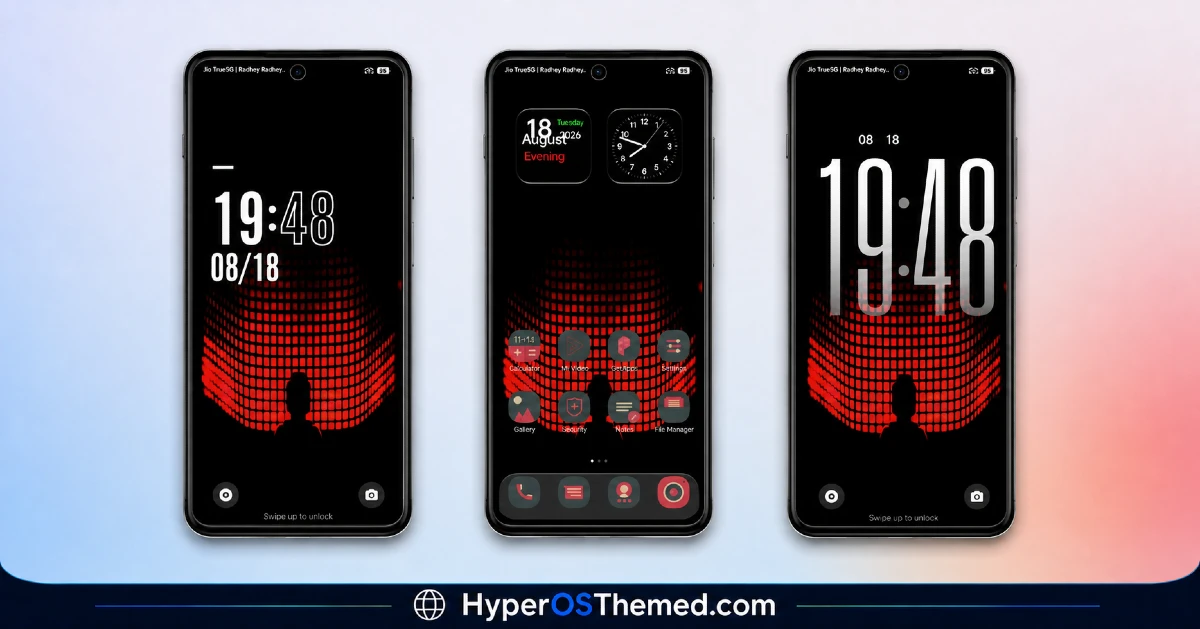
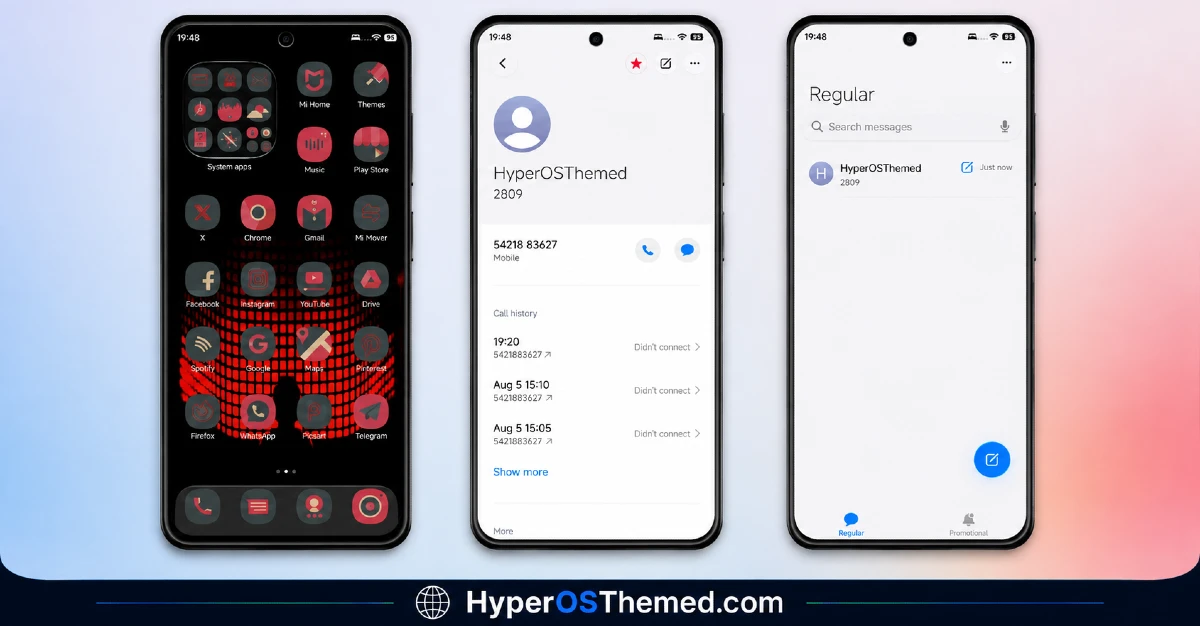
The visual identity is dark and dramatic, built around a silhouette figure glowing against a red grid backdrop that gives the whole setup a cinematic, almost sci-fi anime feel. Black dominates the system interface with red used sparingly as an accent in icons and lock screen elements, keeping the palette focused rather than overwhelming. It reads as moody and deliberate rather than cartoonish, closer to what you’d expect from a stylized anime poster than a typical character-focused phone theme.
VK Anime Theme Details
| Detail | Info |
|---|---|
| Theme Name | VK Anime |
| Designer | VK |
| Compatibility | HyperOS, HyperOS 2.0, HyperOS 3.0 |
| Features | Anime, iOS Style, Black, Red, Cool, Dynamic Lock Screen |
| File Size | 23.74 MB |
VK Anime Theme Performance
I ran VK Anime on a POCO X6 running HyperOS 3.0, through daily use including gaming, video streaming, and regular browsing to check for slowdown. Given the moderate 23.74 MB file size, performance stayed smooth throughout, with no lag in home screen transitions or app drawer scrolling. Battery drain stayed close to my usual baseline, maybe a percent or two higher, which is reasonable given the dynamic lock screen isn’t running constant heavy animation. The main annoyance was the couple of niche app icons that never picked up the red-black styling, which stood out slightly whenever I opened the drawer.
Compatibility
VK Anime HyperOS Theme supports HyperOS, HyperOS 2.0, and HyperOS 3.0, covering a wide range of current Xiaomi, Redmi, and POCO devices. I tested it on a POCO X6 running HyperOS 3.0 without any stability issues. It is not built for MIUI 12, 13, or 14, so applying it on older firmware isn’t recommended.
Custom ROM users on Xiaomi.eu or similar HyperOS-based builds should be able to import the MTZ file without much trouble given the moderate file size, though results may vary slightly depending on how closely the ROM matches stock HyperOS system UI.
Copyright notice from the designer: “All themes, icons, wallpapers, previews, and other content shared by VK Themes are protected by copyright. Copying, re-uploading, editing and redistributing, or publishing on other channels or websites without permission is strictly prohibited. Please share the official channel link instead of reposting files: https://t.me/vkmiuithemes. © VK Themes. All Rights Reserved.”
Get VK Anime Theme
Download the VK Anime HyperOS Theme via the official Xiaomi Theme Store link, rather than from third-party APK sites or unofficial file hosts claiming to offer the same theme. Given the designer’s explicit copyright notice against redistribution, sticking to the official Theme Store also respects that request while keeping your installation clean and free of bundled adware or unnecessary permissions.
Note: If the Official Theme Store Link doesn’t redirect properly, try opening the page in Chrome or the default Xiaomi browser, since other browsers may not handle the redirect correctly.
How to Apply VK Anime HyperOS Theme
Follow the steps below to apply the theme:
- Open the Theme Store Link given above on your Xiaomi / REDMI / POCO device
- This will redirect you to Theme Store.
- Download and install the theme
- Tap on Apply
- Customize specific elements (icons, lock screen, status bar) if needed
- Reboot your device (optional for full effect)
Why Choose VK Anime HyperOS Theme?
- The silhouette and red grid wallpaper gives it a cinematic look distinct from typical anime themes
- iOS-style Control Center and Settings feel authentic rather than a rough visual copy
- Bold lock screen typography stays readable against the dark, detailed background
- Red-black icon accent keeps the color scheme focused instead of scattered
- Actively maintained with a clear official channel for genuine downloads and updates
Conclusion
Testing VK Anime HyperOS Theme on my POCO X6 turned out to be a genuinely striking experience for anyone wanting something darker and more cinematic than typical anime-inspired themes.
The couple of unthemed niche app icons were a small but noticeable gap, and the dynamic lock screen effect is more subtle than dramatic if you’re expecting heavy animation.
Compared to other anime or dark-themed options I’ve tried, this one commits more fully to a mood and aesthetic instead of relying on character art alone. If you want a moody, cinematic black and red setup, it’s worth trying.
You may also like:
Green HOS3 HyperOS Theme for Xiaomi, POCO and REDMI Phones
Floating Stone HyperOS Theme for Xiaomi, Redmi and POCO
Blackness HyperOS Theme: A Dark iOS-Style Look for Xiaomi, POCO & Redmi
