
Black themes are easy to make and hard to make well. Anyone can darken a background, but getting the icons, lock screen, and overall feel to actually look premium instead of just dim takes more effort. HyperH3 HyperOS Theme, designed by Ali.ZR, is one of the ones that pulls it off. It sticks to a clean black icon style, adds a dynamic lock screen to keep things from feeling static, and stays consistent enough across the interface that it genuinely reads as a premium theme rather than a quick color swap.
What You Get With HyperH3 HyperOS Theme
- Premium Black Icon Set: The icons follow a sleek, uniform black design that looks sharp on AMOLED screens and gives the whole home screen a more polished, put together feel.
- Dynamic Lock Screen: Instead of a plain, unmoving image, the lock screen brings a bit of motion into the mix, making that first glance at your phone feel a little more alive.
- Cool, Modern Aesthetic: The overall styling leans into a clean, modern look rather than anything busy or overdesigned, which is part of what keeps it feeling premium.
- Reworked Status Bar: The status bar is redesigned to match the theme’s black aesthetic, so nothing feels like an untouched leftover from the stock HyperOS interface.
- Stylish Always-on Display: The AOD carries the same dark, minimal design as the rest of the theme, so it holds up even when your screen is mostly resting.
HyperH3 HyperOS Theme Preview
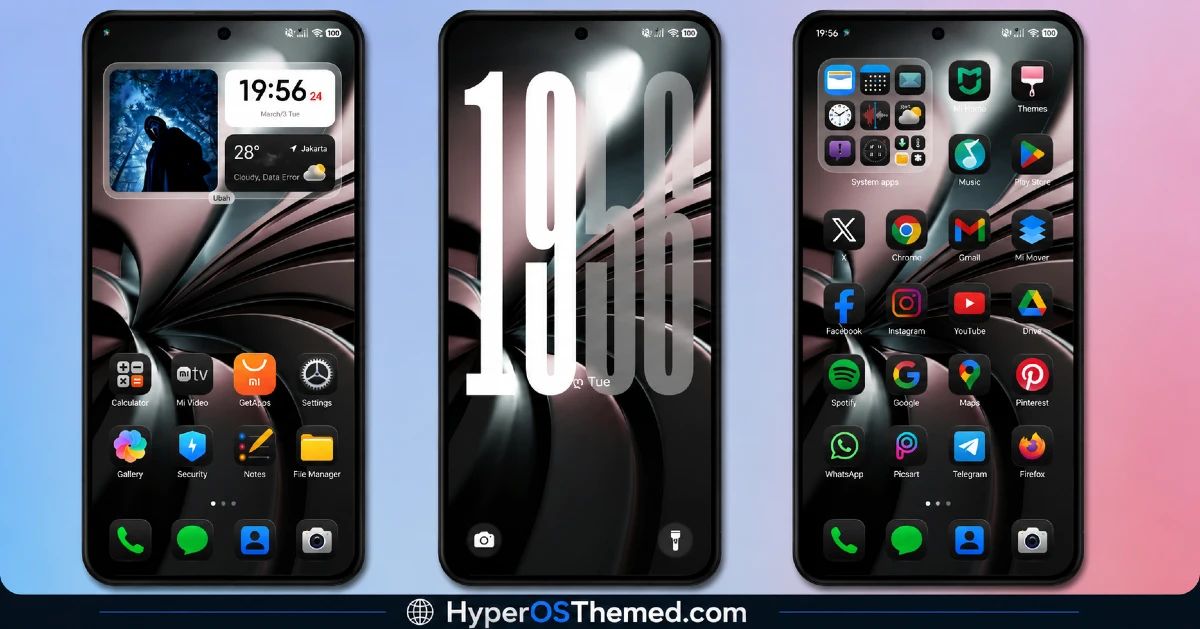
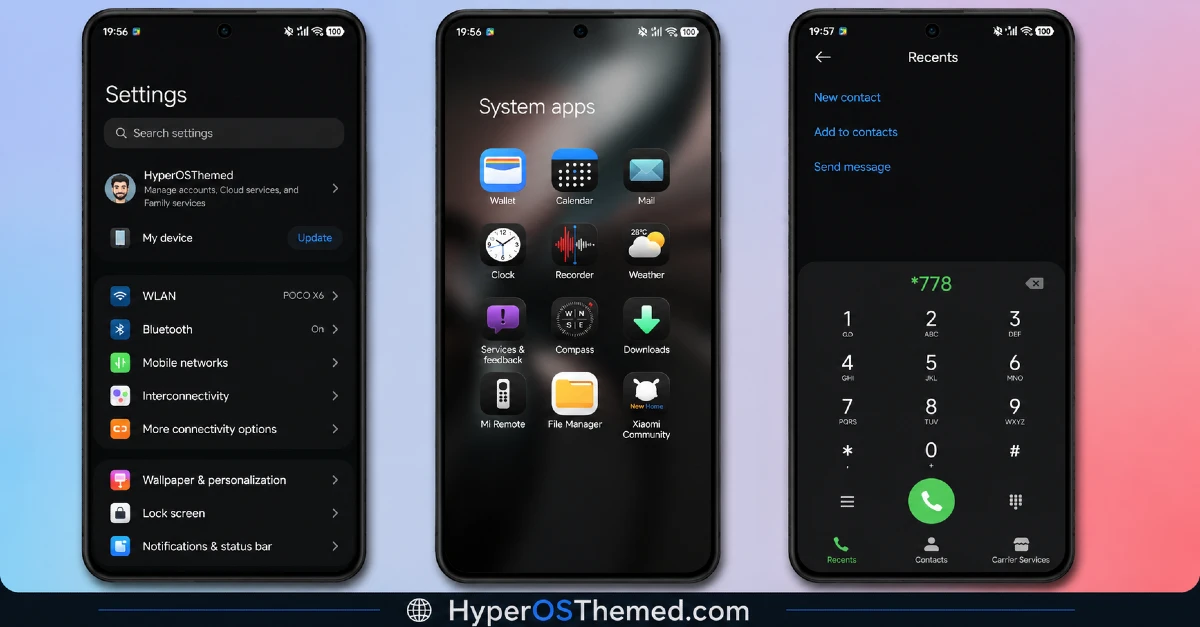
HyperH3 HyperOS Theme Information
| Detail | Info |
|---|---|
| Theme Name | HyperH3 HyperOS Theme |
| File Size | 30.92 MB |
| Created By | Ali.ZR |
| Server Region | Global |
| Compatiblity | HyperOS, HyperOS 2.0, HyperOS 3.0 |
| Style | Premium, Dynamic Lock Screen, Cool, Black |
Getting the Theme
Installing HyperH3 HyperOS Theme on Stock HyperOS or MIUI (Official ROM Users)
If your phone is running the official Global Stable build of HyperOS or MIUI, follow these steps.
- Open this page using the Firefox browser on your phone.
- Tap the official Theme Store link in the download section above.
- You’ll land on a Xiaomi theme page written in Chinese, that’s normal. Tap the three dots in the top right corner and choose “Open in app.”
- This hands off to your Themes Store app, where the download starts automatically.
- Once it finishes downloading, tap Apply.
Heads up: If the Theme Store link doesn’t open properly, try switching to Chrome or your phone’s default Xiaomi browser. Some third party browsers block this redirect.
Installing HyperH3 HyperOS Theme on Custom ROM
Running a custom build like Xiaomi.eu, MIUIRoom, or another MIUI or HyperOS based ROM? Sideload the file manually instead.
- Download the .mtz file from the link above.
- Open the Theme Store app and go to the Themes tab.
- Scroll to the bottom and tap Import.
- Select the .mtz file you just downloaded.
- Tap Apply.
Tip: Restart your phone after applying the theme. If any icon, wallpaper, or lock screen element looks slightly off right after applying, a quick restart almost always fixes it. This theme has been tested and applies cleanly with no reported issues.
Final Thoughts
HyperH3 HyperOS Theme is a good example of a black theme done right. The icon set stays sleek without feeling repetitive, and the dynamic lock screen keeps the whole experience from feeling too flat. At just under 31 MB, it is a light download that still delivers a genuinely premium looking result. If a clean, dark aesthetic is what you are after for your Xiaomi, Redmi, or POCO phone, this one is worth setting up.
You may also like:
- OX BM HyperOS Theme with Premium Wallpapers, 3D Depth, Customizable, Black icons
- RAIMU JAN GATHEL HyperOS Theme with Premium Dark Yellow One UI Theme
- Shadowed Gleam MIUI Theme Best for POCO, Redmi and Xiaomi Phones
- Liquid Glass HyperOS Theme with Dialer, Settings, Messages, and Control Centre
- WEWE GOMBEL HyperOS Theme For Xiaomi, Redmi & POCO
