
PlayBR77 keeps things simple with the description here, just “Hyperos Themer,” but DwBlinOS3 speaks for itself once you actually see it running. After testing it out, I think this is a genuinely solid pick for anyone who wants a bit of color back on their phone without going overboard.
Why the Gradient Approach Works with DwBlinOS3 HyperOS Theme
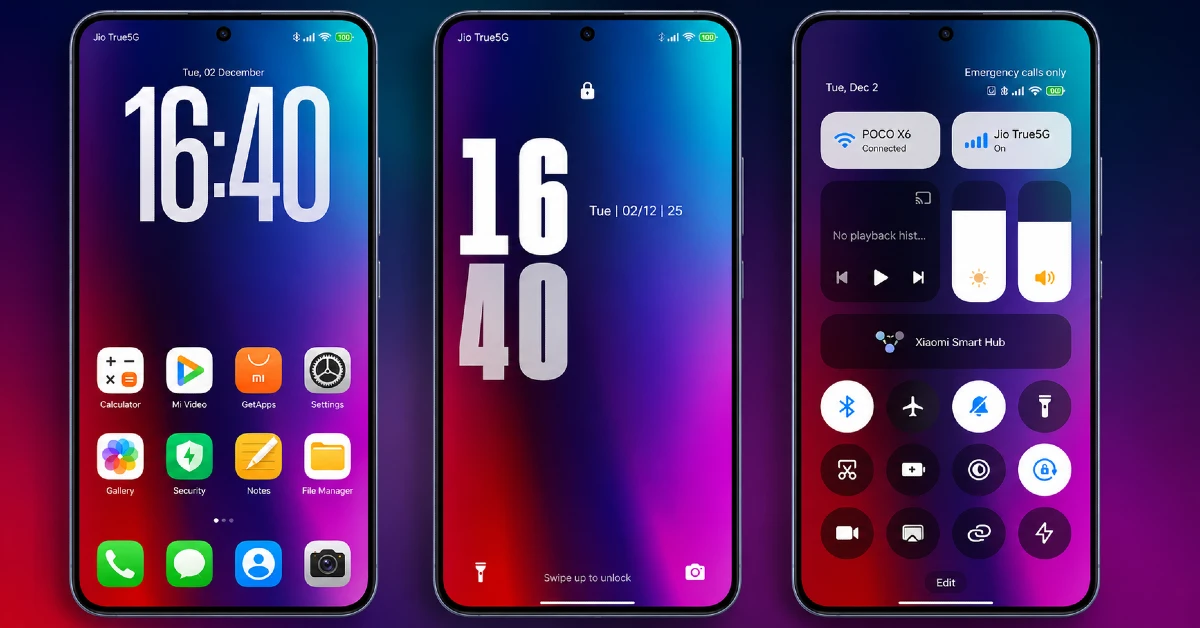
A lot of themes either go fully dark or fully bright, DwBlinOS3 takes the middle path with color blending that feels genuinely dynamic. It’s not loud in the way a single bold color choice might be, instead it shifts and flows, giving the whole interface a bit of visual energy without tipping into overwhelming.
Who Should Try DwBlinOS3 HyperOS Theme
If you want something colorful and a little different from the usual dark or minimal theme crowd, DwBlinOS3 HyperOS Theme is worth a look on your Xiaomi, Redmi, or POCO device. It’s compatible with HyperOS and HyperOS 2.0, completely free, and light on storage at just over 12 MB.
What Makes DwBlinOS3 HyperOS Theme Worth Trying
- Gradient color scheme throughout — Rather than sticking to a single flat tone, this theme blends colors smoothly across the wallpaper and interface, giving it a soft, flowing look instead of harsh, blocky sections.
- Dynamic lock screen — Your lock screen isn’t a static image sitting there day after day, there’s actual movement built in, making the moment you unlock your phone feel a bit more alive.
- Freshly designed icon set — Every icon here has clearly been redesigned rather than lightly recolored, keeping your home screen feeling consistent and intentional.
- New status bar and Always-on Display — Small details, but ones that carry the same color and gradient identity through to the parts of your phone you glance at throughout the day.
DwBlinOS3 HyperOS Theme Preview
DwBlinOS3 HyperOS Theme Details
| Detail | Info |
|---|---|
| Theme Name | DwBlinOS3 |
| File Size | 12.57 MB |
| Designer | PlayBR77 |
| Region/Server | Global |
| Compatibility | HyperOS, HyperOS 2.0 |
| Features | Gradient Colors, Dynamic Lock Screen, New Icons |
Getting the Theme
How to install DwBlinOS3 HyperOS Theme on Global Stable ROM
If your device is running the standard HyperOS or MIUI Global stable build, here’s how to install it:
- Open this page using the Firefox browser, since it handles the redirect best.
- Tap the Official Theme Store Link above.
- The page will open in Chinese, which is expected. Tap the three dots in the top right corner and select “Open in app.”
- This opens the Theme Store app, where the download will begin.
- Once it’s downloaded, tap Apply.
If the Official Theme Store Link doesn’t open properly, switch to Chrome or your phone’s default browser. Some third party browsers don’t handle this redirect correctly.
How to install DwBlinOS3 HyperOS Theme on Custom ROMs
Running a custom build like Xiaomi.eu, MIUIRoom, or similar? Here’s the manual install method using the mtz file:
- Download the DwBlinOS3 mtz file from the link above.
- Open the Theme Store app and go to the Themes section.
- Scroll to the bottom and tap Import.
- Select the downloaded mtz file.
- Tap Apply.
One thing worth remembering: restart your device if anything looks slightly off after applying. A quick reboot usually clears it up right away. I tested this theme myself, and it ran smoothly with no issues at all.
Final Thoughts
DwBlinOS3 HyperOS Theme brings a nice splash of color back to your phone without going overboard, the gradient work and dynamic lock screen give it a bit of personality that a lot of plain dark themes lack. If you’ve been wanting something a little brighter and more colorful for your Xiaomi, Redmi, or POCO device, this one’s worth the quick download.
You may also like:
