
Red and black is a combination that’s easy to get wrong, too much red and it looks aggressive, too little and it’s just another dark theme, but Crimson Obsidian HyperOS Theme threads that needle by treating red purely as an accent rather than a dominant color.
Designed by SabriTN, it uses dramatic light-streak wallpapers cutting across an obsidian-black base, with every toggle, control and icon picking up a matching crimson glow. At 34.99 MB, it’s a mid-sized download for Xiaomi, Redmi and POCO devices, compatible across HyperOS, HyperOS 2.0 and HyperOS 3.0.
Crimson Obsidian Theme Xiaomi Key Features
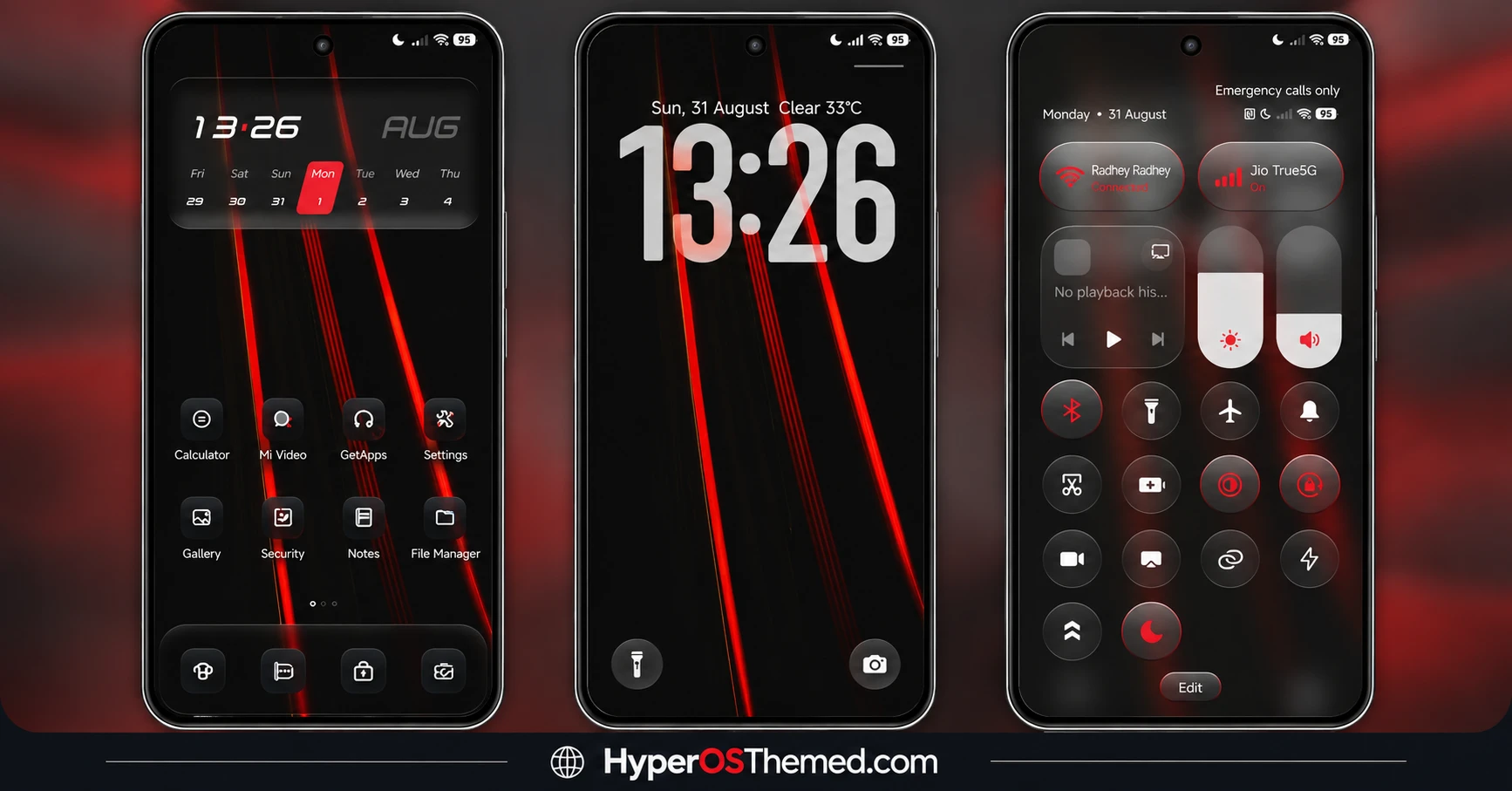
- Dramatic Light-Streak Wallpapers: The signature visual here is a set of wallpapers featuring red light streaks slashing across a black backdrop, giving the theme real movement and energy rather than sitting flat. It’s a striking enough effect that it works as a genuine centerpiece rather than a background afterthought.
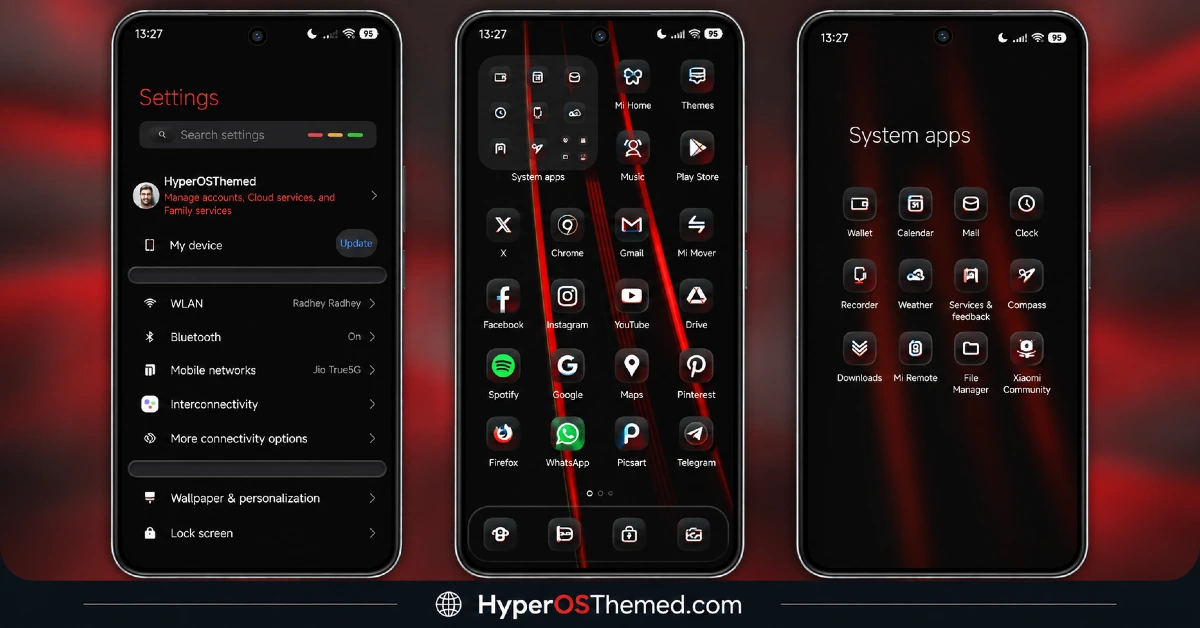
- Matching Crimson Accent System: Every control, toggle and icon carries the same red glow rather than mixing in unrelated colors elsewhere in the interface. That consistency is really what sells the “luxury” framing, nothing here feels like it was designed separately and bolted on later.
- Obsidian-Black Base Palette: The core color scheme stays a deep, near-black throughout, giving the crimson accents somewhere dark enough to actually stand out against. It also means the theme should pair well with AMOLED displays given how much of the interface stays genuinely black rather than dark grey.
- Coordinated Icon Design: Icons are styled with the same red-on-black treatment running through the rest of the theme, so the home screen doesn’t end up with a mismatched grid of leftover default colors. Everything reads as part of one deliberate visual statement.
- Broad HyperOS Compatibility:Crimson Obsidian HyperOS Theme covers HyperOS, HyperOS 2.0 and HyperOS 3.0, which is wider reach than a lot of themes chasing this kind of dramatic visual effect manage. That’s a meaningful plus if you’re not on the very latest HyperOS build yet.
- Reasonable File Size for the Visual Impact: At just under 35 MB, it’s not among the lightest themes out there, but it’s far from the heaviest either, especially considering how much detail goes into rendering the light-streak effect convincingly across multiple wallpapers.
- Global Availability: Unlike some themes that get stuck with China-only store listings and the access headaches that come with that, Crimson Obsidian is registered as Global, so most users shouldn’t run into the region-specific link issues that occasionally crop up with other releases.
Crimson Obsidian HyperOS Theme Preview
The screenshots below show the red light-streak wallpapers, the crimson-accented toggles and how the coordinated icon set looks once the theme is applied. Since the light-streak effect is really the whole point here, it’s worth taking a proper look at the preview to see how the red catches against the black base.
Crimson Obsidian HyperOS Theme Details
| Attribute | Details |
|---|---|
| Availability | Free, via Xiaomi Theme Store |
| Supported Devices | Xiaomi, Redmi and POCO phones running HyperOS |
| Theme Name | Crimson Obsidian |
| Designer | SabriTN |
| Region | Global |
| Compatibility OS | HyperOS, HyperOS 2.0 and HyperOS 3.0 |
| Features | Light-streak wallpapers, crimson accent system, obsidian-black base, coordinated icon design |
| File Size | 34.99 MB |
Crimson Obsidian HyperOS Theme Xiaomi Compatibility
Crimson Obsidian supports HyperOS, HyperOS 2.0 and HyperOS 3.0, giving it solid reach across Xiaomi, Redmi and POCO devices running any of those versions. Being listed under the Global region rather than China means most users should be able to access the official store link without the redirect issues that sometimes affect region-locked themes.
Custom ROM users on setups like Xiaomi EU ROM or MIUIRoom can still install the theme manually through the MTZ file, and since the design leans on color and contrast rather than heavy transparency or 3D rendering, compatibility tends to be fairly consistent across different devices. As with most themes touching icons and toggles system-wide, restarting the device after installation is worth doing if anything looks slightly off on the first try.
Get Crimson Obsidian HyperOS Theme
Download Crimson Obsidian only through the official Theme Store link rather than random third-party file hosts or unofficial APK uploads. Files from outside verified channels are hard to confirm as unaltered and may not match what SabriTN actually released. Sticking to the official Theme Store link keeps the installed version consistent with the intended design and ensures any future updates remain accessible.
How to Apply Crimson Obsidian HyperOS Theme
Follow the steps below to apply the theme:
- Open the Theme Store link given above on your Xiaomi, Redmi or POCO device.
- This will redirect you to the Theme Store.
- Download and install the theme.
- Tap on Apply.
- Customize specific elements such as icons, lock screen or status bar if needed.
- Reboot your device for the full effect, though this step is optional.
Note: If the Official Theme Store link doesn’t open properly, try switching to Chrome or your device’s default Xiaomi browser, since other browsers have occasionally caused issues with this kind of direct link. If you’re on MIUI 14 specifically, there’s a separate video walkthrough worth following instead of the standard steps. This theme has been checked across its supported HyperOS versions without any major issues turning up, but if anything still looks overlapped or fails to display correctly, restarting the device usually clears it up, and leaving a comment with the details helps if the problem persists.
Installing Crimson Obsidian HyperOS Theme on Custom ROM Devices
Devices running MIUI 11 through 14 or HyperOS based Custom ROMs such as Xiaomi EU ROM or MIUIRoom aren’t able to use the direct Theme Store link, so the MTZ file needs to be brought in manually instead. Here’s how that works:
- Grab the MTZ file for Crimson Obsidian from the download section.
- Open the Theme Store app.
- Go into the Themes tab.
- Scroll down to find the Import option, then tap it.
- Use the file manager to locate the downloaded .mtz file.
- Wait for the import process to finish.
- Tap the theme once it appears in the list to apply it.
Why Choose Crimson Obsidian HyperOS Theme?
- Genuine visual drama — the light-streak effect gives real energy rather than a flat dark palette.
- Disciplined color use — red stays an accent throughout instead of overwhelming the design.
- AMOLED-friendly base — the near-black palette should suit OLED displays well.
- Fully coordinated system — icons, toggles and wallpaper all commit to the same visual language.
- Wide HyperOS support — works across HyperOS, HyperOS 2.0 and HyperOS 3.0.
- Global store listing — fewer regional access headaches compared to China-only releases.
- Free official download — no cost involved through a legitimate Theme Store link.
Conclusion
Crimson Obsidian HyperOS Theme earns its “luxury” label by keeping its red accents disciplined against a genuinely deep black base, rather than tipping into something gaudy or overdone. The broad HyperOS compatibility and straightforward Global availability make it an easy one to try without extra hoops to jump through. For Xiaomi, Redmi and POCO users who want their device to feel a bit more powerful and refined, Crimson Obsidian is well worth trying.
You may also like:
OX Colours HyperOS Theme – Vibrant Customizable Wallpapers for Xiaomi, POCO, Redmi
Codename G26 HyperOS Theme with Super Depth of Field iOS Style for Xiaomi, POCO, Redmi
Black OX HyperOS Theme with Premium 3D Business Look for Xiaomi, POCO, Redmi
NothingOS HyperOS Theme – Get Nothing Phone-Inspired Look for Xiaomi, POCO, Redmi
TRX HyperOS Theme iOS Style Playful 3D Cartoon Numerals for Xiaomi, POCO, Redmi
OX MU1 HyperOS Theme with Immersive 3D Depth Wallpapers for Xiaomi, POCO, Redmi
