
There’s a wallpaper in VK Black Glass🖤 HyperOS Theme that stops you for a second, a floating window and staircase set against open sky, the kind of surreal 3D art you’d expect on a gallery wall rather than a phone screen. VK builds the rest of the theme around that one image, pairing it with a fully blacked-out icon set and clean, minimal typography so nothing competes with the artwork for attention. It’s a smaller download too, just 18.11 MB, which is refreshingly light for a theme this visually considered. Built for Xiaomi, Redmi and POCO devices, it covers HyperOS, HyperOS 2.0 and HyperOS 3.0.
VK Black Glass🖤 HyperOS Theme Features
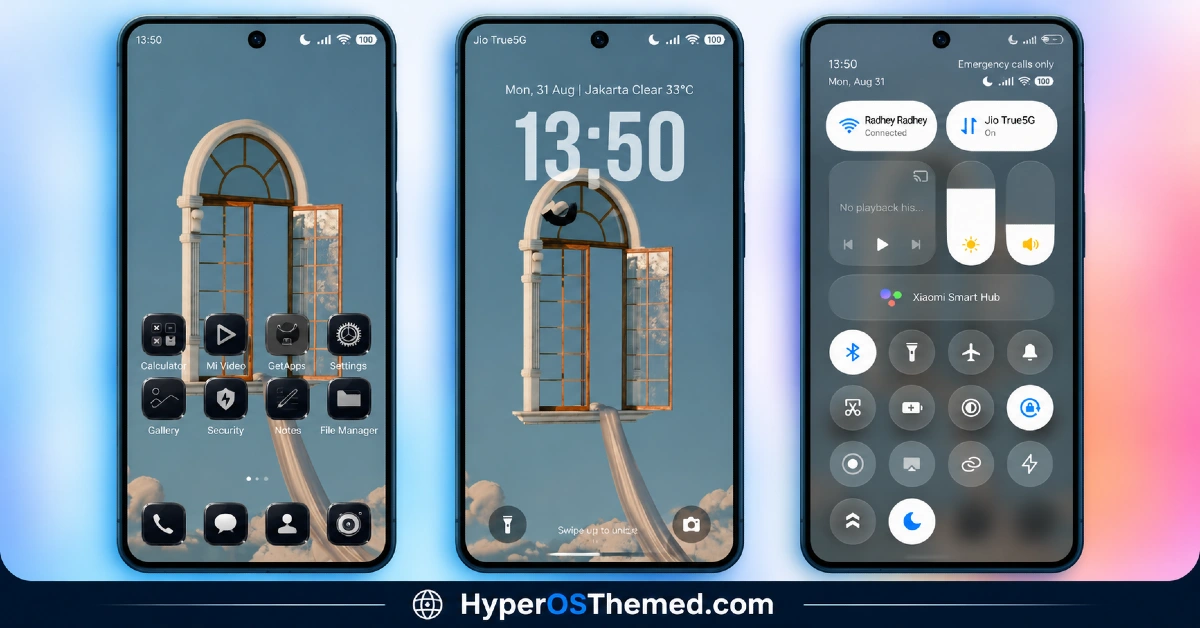
- Surreal 3D Wallpaper: The centerpiece is a striking 3D artwork depicting a floating window and staircase against open sky, giving the whole theme an artistic, almost dreamlike quality. It’s the kind of wallpaper that works as a genuine focal point rather than a generic background filler.
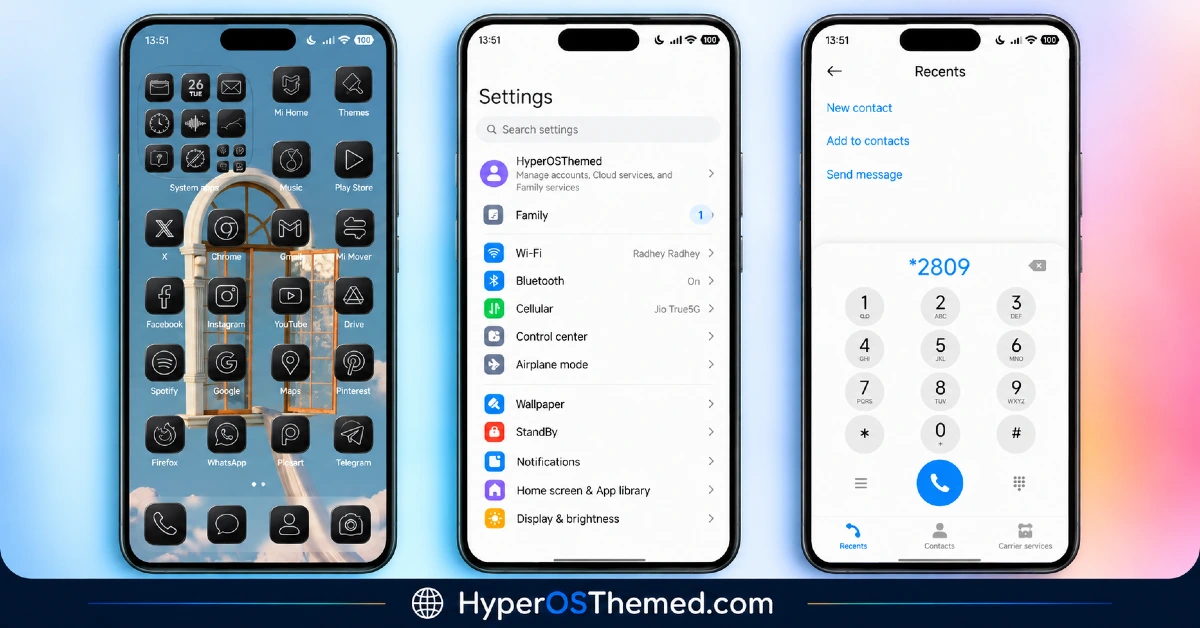
- Fully Blacked-Out Icon Set: Icons are redesigned into a completely black finish, keeping visual attention on the wallpaper rather than competing with colorful app icons. This uniform approach gives the home screen a distinctly gallery-like, curated feel.
- Clean Minimal Typography: Text elements across the interface follow a simple, understated style that matches the overall restrained aesthetic. Nothing here shouts for attention, which fits the artistic direction the theme is clearly going for.
- Cohesive Dark UI: Beyond just icons and wallpaper, the broader interface maintains a consistent dark color scheme throughout. This helps avoid the jarring shift some themes have between a stylized home screen and an untouched, brighter settings menu.
- Compact File Size: At 18.11 MB, VK Black Glass🖤 is noticeably lighter than most themes attempting this level of visual polish. It’s a quick download and installs without much fuss, even on a slower connection.
- Artistic, Understated Design Philosophy: Rather than packing in animations or heavy customization options, this theme commits to a single strong visual idea and executes it cleanly. It’s a good fit for anyone who wants their phone to feel considered rather than busy.
VK Black Glass🖤 HyperOS Theme Preview
The screenshots below show the surreal 3D wallpaper, the blacked-out icon set and how the overall dark UI comes together once the theme is applied. Since so much of this theme’s appeal rests on that one striking wallpaper, it’s worth taking a proper look at the preview before deciding if the artistic direction suits your taste.
VK Black Glass🖤 Theme Details
| Attribute | Details |
|---|---|
| Availability | Free, via Xiaomi Theme Store |
| Supported Devices | Xiaomi, Redmi and POCO phones running HyperOS |
| Theme Name | VK Black Glass🖤 |
| Designer | VK |
| Compatibility OS | HyperOS, HyperOS 2.0 and HyperOS 3.0 |
| Features | Surreal 3D wallpaper, fully black icon set, clean typography, cohesive dark UI |
| File Size | 18.11 MB |
VK Black Glass🖤 HyperOS Theme Compatibility
VK Black Glass🖤 HyperOS Theme supports HyperOS, HyperOS 2.0 and HyperOS 3.0, giving it solid reach across Xiaomi, Redmi and POCO devices running any of those versions. Given the compact file size, there’s relatively little to go wrong during installation compared to heavier, effect-laden themes, though it’s still worth restarting the device afterward if anything looks slightly off.
Custom ROM users on setups like Xiaomi EU ROM or MIUIRoom can still install the theme manually through the MTZ file, and since the design here leans minimal rather than relying on transparency or 3D rendering tricks, compatibility issues tend to be less common than with more visually complex themes.
Get VK Black Glass🖤 HyperOS Theme
Download VK Black Glass🖤 only through the official Theme Store link rather than unofficial file-sharing sites or random APK uploads. This theme is also copyright protected by its designer, so beyond the usual safety concerns with third-party files, redistributing or re-uploading it elsewhere isn’t permitted either. Sticking to the official source respects the designer’s work while making sure the version installed matches what was actually released.
How to Apply VK Black Glass🖤 Xiaomi Theme
Follow the steps below to apply the theme:
- Open the Theme Store link given above on your Xiaomi, Redmi or POCO device.
- This will redirect you to the Theme Store.
- Download and install the theme.
- Tap on Apply.
- Customize specific elements such as icons, lock screen or status bar if needed.
- Reboot your device for the full effect, though this step is optional.
Note: If anything looks overlapped or doesn’t display correctly right after installing, restarting the device usually clears it up without further steps. This theme has been checked across its supported HyperOS versions without any major issues turning up. Still, if something looks off on a specific device once it’s applied, leaving a comment with the details helps get it looked into.
Installing VK Black Glass🖤 Theme on Custom ROM Devices
Devices running MIUI 11 through 14 or HyperOS based Custom ROMs such as Xiaomi EU ROM or MIUIRoom aren’t able to use the direct Theme Store link, so the MTZ file needs to be brought in manually instead. Here’s how that works:
- Grab the MTZ file for VK Black Glass🖤 from the download section.
- Open the Theme Store app.
- Go into the Themes tab.
- Scroll down to find the Import option, then tap it.
- Use the file manager to locate the downloaded .mtz file.
- Wait for the import process to finish.
- Tap the theme once it appears in the list to apply it.
Why Choose VK Black Glass🖤 Theme?
- Genuinely striking wallpaper — surreal 3D artwork that works as a real focal point, not filler.
- Fully coordinated black icons — nothing pulls attention away from the wallpaper’s artistic detail.
- Extremely lightweight — 18.11 MB is small for a theme with this much visual character.
- Clean, gallery-like feel — minimal typography keeps the whole interface feeling curated.
- Broad HyperOS compatibility — works across HyperOS, HyperOS 2.0 and HyperOS 3.0.
- Simple, low-risk installation — minimal effects mean fewer compatibility quirks.
- Designer-protected content — active copyright notice signals an original, maintained theme.
- Free official download — no cost involved through a legitimate Theme Store link.
Conclusion
VK Black Glass🖤 HyperOS Theme proves a theme doesn’t need dozens of features to feel worth downloading, one genuinely striking wallpaper, paired with disciplined black icons and clean typography, does more here than most heavily loaded theme packs manage. The small file size makes it an easy, low-commitment theme to try. For Xiaomi, Redmi and POCO users who want something artistic and understated rather than loud, VK Black Glass🖤 is well worth a look.
You may also like:
VKOX HyperOS Theme for Xiaomi, POCO and REDMI Phones
JellyB HyperOS Theme with Dark Sea Colour Palette for Xiaomi, POCO and REDMI Phones
Gaze of Night HyperOS Theme with Premium Black for Xiaomi, POCO and REDMI Phones
Tokio HyperOS Theme for Xiaomi, POCO and REDMI Phones
HyperV3 Theme with Glossy Black Icons and Dynamic Lock Screen for HyperOS
