
Hey POCO Owners, if you’re drawn to that sophisticated, almost architectural look rather than bright colors and gradients, OX G4 HyperOS Theme is worth putting on your radar. Designed by OXFURY, it combines a monochrome glassmorphism style with dark, rock-inspired wallpapers and translucent UI elements running throughout the interface.
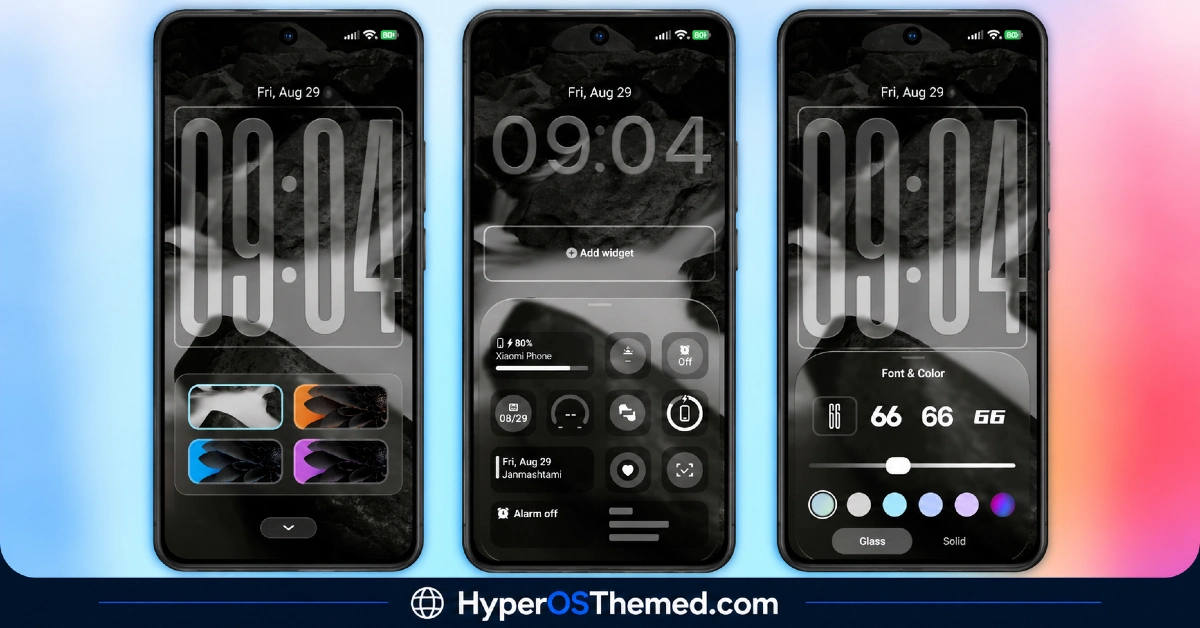
The lock screen clock is fully customizable, letting you adjust font, color, size and even switch between a glass or solid style depending on preference. At 36.4 MB and compatible with HyperOS 2 and HyperOS 3, it’s a reasonably sized download for how much visual customization it packs in.
OX G4 Theme Features
- Dark Rock-Inspired Wallpaper Collection: OX G4 HyperOS Theme includes a set of black-and-white wallpapers with a textured, rock-like aesthetic rather than the usual gradients or nature photography seen in most themes. Several presets with different accent colors are included, giving a bit of variety without straying from the overall monochrome direction.
- Fully Customizable Lock-Screen Clock: The lock screen clock supports adjustments to font, color, size and style, including the option to switch between a glass or solid appearance. This level of granular control goes well beyond the fixed clock designs most HyperOS themes ship with.
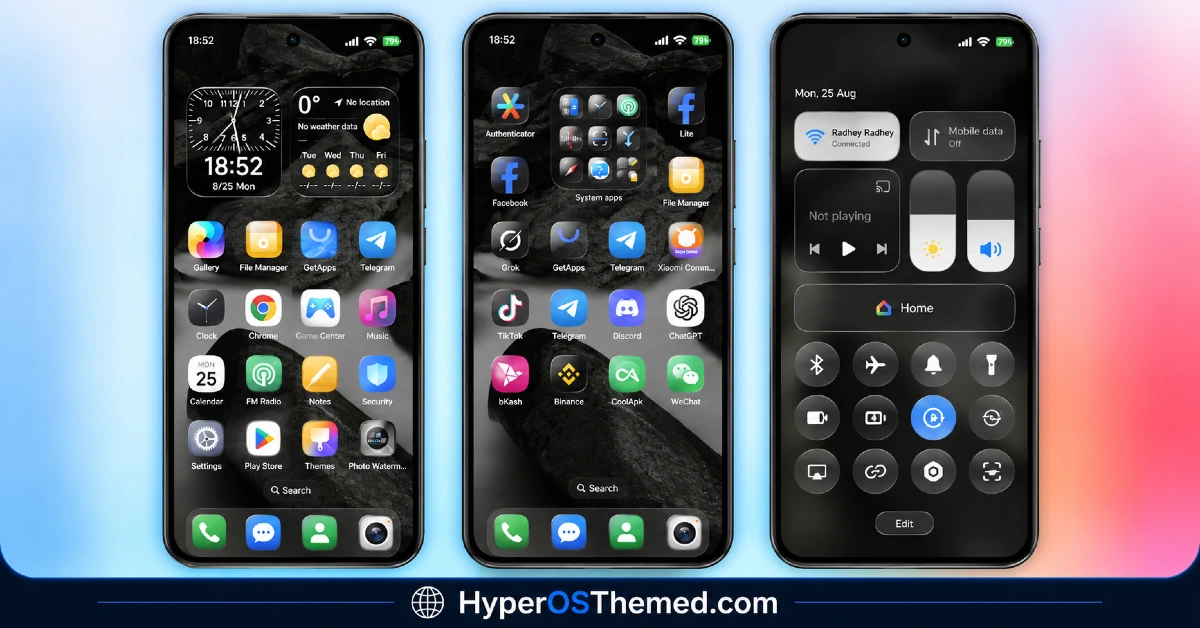
- Translucent Glass-Style Icons: App icons use a glass effect while still retaining each app’s original color scheme underneath the transparency. This creates a interesting balance where icons stay recognizable at a glance despite the translucent treatment applied over them.
- Glass Widget Set: Widgets for weather, calendar, battery and general system information all follow the same glass styling as the rest of the theme. Having this many widget types included means less need to hunt down third-party widget apps to fill out the home screen.
- Customizable Lock-Screen Widget Panel: Beyond just the clock, the lock screen widget panel itself can be adjusted to fit different layouts and preferences. This adds a practical layer of personalization on top of the purely visual glass effects.
- Transparent Control Centre: The control centre picks up the same translucent, glass-inspired treatment seen across the rest of the theme rather than sticking with a solid background. It keeps the whole system feeling visually connected instead of the control centre standing apart from the lock screen and icons.
OX G4 HyperOS Theme Preview
The screenshots below show the dark rock wallpaper collection, the customizable glass clock and how the translucent icons and control centre look once the theme is applied. Since so much of this theme’s appeal comes down to the interplay between transparency and the dark color palette, it’s worth looking closely at the preview to judge whether the monochrome glass aesthetic fits your taste.
OX G4 HyperOS Theme Details
| Attribute | Details |
|---|---|
| Availability | Free, via Xiaomi Theme Store |
| Supported Devices | Xiaomi, Redmi and POCO phones running HyperOS |
| Theme Name | OX G4 |
| Designer | oxfury |
| Compatibility OS | HyperOS 2 and HyperOS 3 |
| Features | Dark rock wallpapers, customizable glass clock, translucent icons, glass widget set, customizable widget panel, transparent Control Centre |
| File Size | 36.4 MB |
OX G4 HyperOS Theme Compatibility
OX G4 is built for HyperOS 2 and HyperOS 3, covering a solid range of Xiaomi, Redmi and POCO devices running either version. Since the theme relies on layered transparency and glass effects throughout, older or lower-powered devices may render some of the translucent widgets and control centre with slightly less smoothness compared to current flagship hardware.
Custom ROM users can still bring the theme in manually through the MTZ file, though the customizable clock rendering and glass widget effects may behave a bit differently outside the official global stable ROM. As with most themes touching the lock screen and control centre, restarting the device after installation is a sensible first step if anything looks visually off.
Get OX G4 HyperOS Theme
Download OX G4 Xiaomi HyperOS Theme only through the official Theme Store link rather than random third-party file hosts or unofficial APK uploads. Files sourced outside verified channels are difficult to confirm as unaltered and may not match what OXFURY actually released. Sticking to the official Theme Store link keeps the installed version consistent with the intended design and ensures future updates remain accessible.
How to Apply OX G4 HyperOS Theme
Follow the steps below to apply the theme:
- Open the Theme Store link given above on your Xiaomi, Redmi or POCO device.
- This will redirect you to the Theme Store.
- Download and install the theme.
- Tap on Apply.
- Customize specific elements such as icons, lock screen or status bar if needed.
- Reboot your device for the full effect, though this step is optional.
Note: If any part of the interface looks overlapped or fails to display properly right after installing, restarting the device usually clears it up. This theme has been checked for smooth performance on its supported HyperOS versions without any major issues turning up. Still, if something looks off on a specific device once it’s applied, leaving a comment with the details helps get it looked into.
Installing OX G4 HyperOS Theme on Custom ROM Devices
Devices running a Custom ROM aren’t able to use the direct Theme Store link, so the MTZ file needs to be brought in manually through the Theme Store app instead. Here’s how that works:
- Grab the MTZ file for OX G4 from the download section.
- Open the Theme Store app.
- Go into the Themes tab.
- Scroll down to find the Import option, then tap it.
- Use the file manager to locate the downloaded .mtz file.
- Wait for the import process to finish.
- Tap the theme once it appears in the list to apply it.
Why Choose OX G4 HyperOS Theme?
- Distinct monochrome aesthetic — dark rock wallpapers offer a sophisticated look most themes don’t attempt.
- Deep clock customization — adjustable font, color, size and glass or solid style options for the lock screen clock.
- Color-retentive glass icons — translucent effect applied while keeping each icon’s original color recognizable.
- Comprehensive widget coverage — weather, calendar, battery and system info widgets all included in matching glass style.
- Adjustable lock-screen layout — widget panel customization adds functional flexibility beyond visuals alone.
- Matching transparent Control Centre — keeps the whole system visually unified rather than icons standing apart.
- Reasonable file size — 36.4 MB keeps the download manageable given the customization depth included.
- Free official download — no cost involved and distributed through a legitimate Theme Store link.
Conclusion
OX G4 MIUI Theme stands out for how much genuine customization it offers within a disciplined monochrome and glass aesthetic, rather than relying on bold colors to make an impression. The adjustable clock, widget panel and consistently translucent styling across icons and the control centre give it a level of polish and flexibility that’s hard to find in a single free theme. For Xiaomi, Redmi and POCO users drawn to a darker, more premium glass-style look, OX G4 is well worth trying.
You may also like:
TNV-4 Theme with Transparent White Icons and a Clean, Minimal Design for HyperOS
Vibria HyperOS Theme: Customizable Glass Clock, Nature Wallpapers, Liquid Glass UI
Poo-Black HyperOS Theme with Premium Dynamic 3D Lock Screen for Xiaomi, POCO and REDMI Phones
LIUI Extreme HyperOS Theme for Xiaomi, POCO and REDMI Phones
Translucent HyperOS Theme with iOS-Inspired Glass Effect for Xiaomi, POCO and REDMI Phones
