
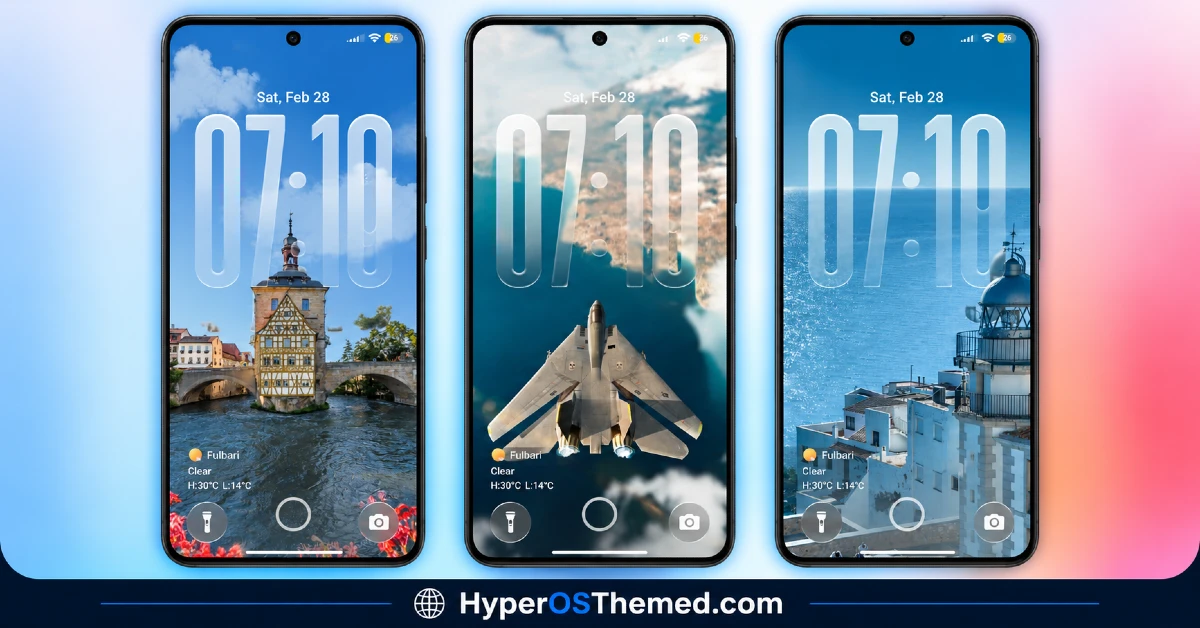
Hey Xiaomi Fans, if you’ve ever tilted your phone just to watch a lock screen shift and shimmer, AP26 Grating 3D Glass HyperOS Theme Glass is built exactly for that kind of moment. This HyperOS theme, designed by 池雨, centers around a grating-style lock screen effect that creates a genuine 3D visual illusion as you move your device, paired with high-quality wallpapers ranging from ocean views to aircraft scenes and city landscapes.
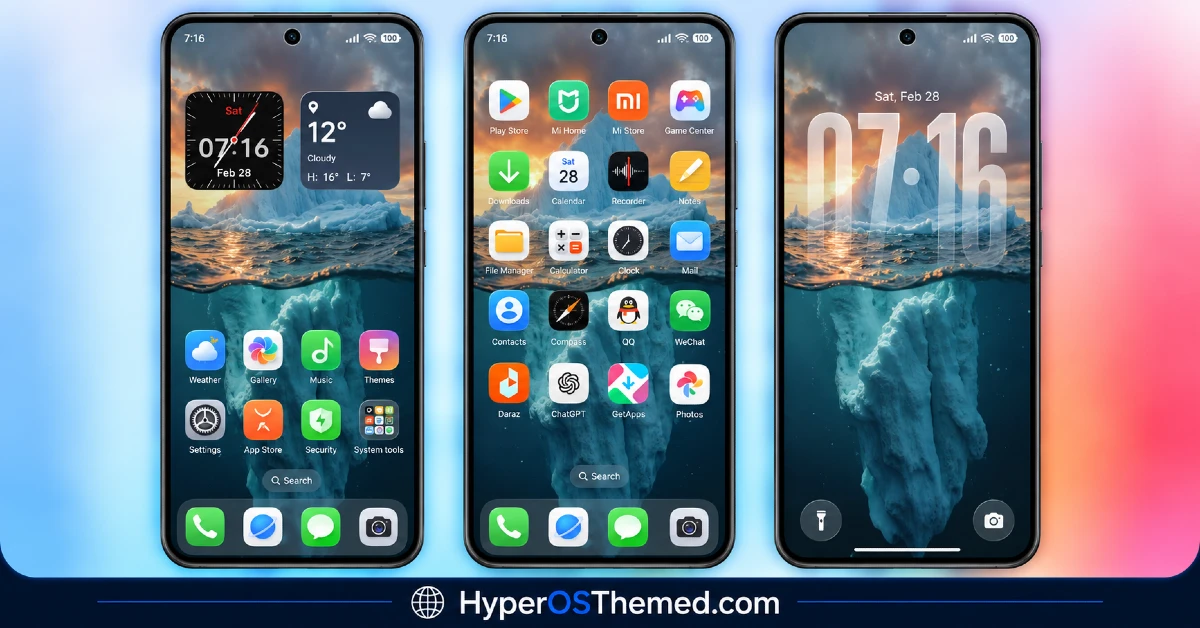
The home screen keeps things a bit calmer with clean, colorful stock-style icons and smooth widgets that blend into the background imagery rather than fighting with it. At 83 MB and compatible with HyperOS and MIUI, it’s a fairly substantial download, largely due to the detail packed into the grating animation and wallpaper collection.
AP26 Grating 3D Glass HyperOS Theme Features
- 3D Grating Lock Screen Effect: The defining feature here is the grating-style animation on the lock screen, which creates a layered, almost holographic illusion of depth as the device moves. This kind of motion-based visual effect is uncommon among HyperOS themes and is clearly the centerpiece of the whole package.
- High-Quality HD Wallpapers: The included wallpaper set leans cinematic, featuring ocean views, aircraft scenes and city landscape photography rather than abstract patterns or gradients. Having this level of photographic detail built directly into the theme adds to the premium feel without needing to source separate wallpapers.
- Clean, Colorful Stock-Style Icons: Unlike the dramatic lock screen, the home screen icons stick to a more familiar, colorful stock-style design rather than anything overly stylized. This contrast makes the lock screen feel cinematic while keeping the daily-use home screen easy to navigate.
- Stylish Clock Widgets: The theme includes clock widgets designed to complement the wallpaper choices rather than sitting as a generic overlay. They tie into the overall polished aesthetic without pulling focus from the lock screen’s main visual effect.
- Minimal Home Screen Layout: Despite the visual intensity of the lock screen, the home screen itself keeps a clean and minimal layout, letting the wallpapers and icons breathe rather than feeling crowded. This balance helps the theme stay usable for daily navigation rather than becoming a novelty that’s tiring to look at.
- Lightweight Performance Despite Visual Complexity: Even with the added 3D lock screen animation, the theme is built to run without noticeably affecting system performance. Given how demanding motion-based effects can be, this is a meaningful detail for anyone concerned about lag or battery impact.
AP26 Grating 3D Glass HyperOS Theme Preview
The screenshots below show the 3D grating lock screen effect, the cinematic wallpaper collection and how the clean stock-style icons look on the home screen once applied. Since the whole appeal of the grating effect depends on motion, the preview only captures part of the experience, actually applying the theme is the best way to see how it responds as you move the device.
AP26 Grating 3D Glass Theme Details
| Attribute | Details |
|---|---|
| Availability | Free, via Xiaomi Theme Store |
| Supported Devices | Xiaomi, Redmi and POCO phones running HyperOS |
| Theme Name | AP26 Grating 3D Glass |
| Designer | 池雨 |
| Compatibility OS | HyperOS and MIUI |
| Features | 3D grating lock screen effect, HD cinematic wallpapers, stock-style icons, stylish clock widgets, minimal home screen layout |
| File Size | 83 MB |
AP26 Grating 3D Glass Theme Compatibility
AP26 Grating 3D Glass works across both HyperOS and MIUI, giving it reach across a wide range of Xiaomi, Redmi and POCO devices rather than being locked to just the newest HyperOS builds. Since the lock screen relies on motion-based rendering to create its 3D grating illusion, results may look slightly less fluid on older or lower-powered devices compared to current flagship hardware.
The original listing for this theme also notes it in Chinese region branding, so some UI text or store presentation may appear in Chinese before the theme is fully applied and localized. As with most themes modifying the lock screen, restarting the device after installation is a sensible first step if icons or UI elements don’t display correctly right away.
Get AP26 Grating 3D Glass Theme
Download AP26 Grating 3D Glass only through the official Theme Store link rather than random third-party file hosts or unofficial APK uploads. Files sourced outside verified channels are difficult to confirm as unaltered and may not match what the designer actually released. Sticking to the official Theme Store link keeps the installed version consistent with the intended design and ensures future updates remain accessible.
How to Apply AP26 Grating 3D Glass Theme
Follow the steps below to apply the theme:
- Open the Theme Store link given above on your Xiaomi, Redmi or POCO device.
- This will redirect you to the Theme Store.
- Download and install the theme.
- Tap on Apply.
- Customize specific elements such as icons, lock screen or status bar if needed.
- Reboot your device for the full effect, though this step is optional.
Note: If icons or other UI elements appear incorrectly right after installing, restarting the device is usually enough to sort things out. This theme has been checked for smooth application on its supported HyperOS and MIUI versions without any major issues turning up. Still, if something looks off on a specific device once it’s applied, leaving a comment with the details helps get it looked into.
Installing AP26 Grating 3D Glass on Custom ROM Devices
Devices running a Custom ROM such as Xiaomi EU ROM, MIUIRoom or other HyperOS/MIUI based builds aren’t able to use the direct Theme Store link, so the MTZ file needs to be brought in manually instead. Here’s how that works:
- Grab the MTZ file for the theme from the download section.
- Open the Theme Store app.
- Go into the Themes tab.
- Scroll down to find the Import option, then tap it.
- Use the file manager to locate the downloaded .mtz file.
- Wait for the import process to finish.
- Tap the theme once it appears in the list to apply it.
If the official Theme Store link doesn’t open properly on a device, the theme can also be applied through a backup restore method instead. This involves downloading the theme backup file, heading into phone Settings, then About Phone and Backup & Restore, selecting local backup storage, and replacing the existing themes backup folder with the downloaded file before restoring it through the Themes app.
Why Choose AP26 Grating 3D Glass Theme?
- Genuine motion-based 3D effect — the grating lock screen animation offers something most flat or static themes can’t match.
- Cinematic wallpaper collection — ocean, aircraft and city landscape shots add a premium visual touch.
- Balanced design approach — dramatic lock screen paired with a clean, minimal home screen for everyday usability.
- Lightweight despite visual complexity — built to avoid noticeable performance impact even with the added animation.
- Broad OS compatibility — works across both HyperOS and MIUI rather than a single version.
- Coordinated clock widgets — visual elements tie in with the wallpaper choices instead of feeling generic.
- Free official download — no cost involved and distributed through a legitimate Theme Store link.
- Backup installation option available — an alternative method exists if the standard Theme Store link doesn’t work.
Conclusion
AP26 Grating 3D Glass earns its premium reputation through a lock screen effect that genuinely stands apart from the usual flat or blurred designs, backed by a cinematic wallpaper set that makes the whole experience feel more polished. The clean, minimal home screen keeps daily use practical even with such a dramatic lock screen centerpiece. For Xiaomi, Redmi and POCO users who want something visually striking without sacrificing everyday usability, AP26 Grating 3D Glass is well worth trying.
You may also like:
TNV-4 Theme with Transparent White Icons and a Clean, Minimal Design for HyperOS
Vibria HyperOS Theme: Customizable Glass Clock, Nature Wallpapers, Liquid Glass UI
Poo-Black HyperOS Theme with Premium Dynamic 3D Lock Screen for Xiaomi, POCO and REDMI Phones
LIUI Extreme HyperOS Theme for Xiaomi, POCO and REDMI Phones
