
VK has two gradient-style releases on the Theme Store right now, VVKOS HyperOS Theme For Xiaomi, POCO & Redmiand this one, Blue Bloom, and they’re easy to mix up if you’re browsing quickly. VKOS leans into a broader multi-tone gradient palette, while Blue Bloom narrows that down to a specific blue-dominant color range across its wallpapers and accent colors. Both share the same designer’s approach to matching icon tones with the background, but the color direction is different enough that they end up feeling like separate themes rather than variations of one.
VK Blue Bloom HyperOS Theme is built for devices on HyperOS and comes in at 11.34 MB, noticeably smaller than VKOS’s 24.29 MB package, likely because the icon set and wallpaper options here are more tightly scoped.
VK Blue Bloom Theme Features
1. Expanded Icon Library: The theme includes a large custom icon set covering system apps along with a wide range of third-party apps. Shape and spacing stay consistent across the set, which keeps the home screen from looking like a mix of themed and default icons.
2. Blue-Dominant Gradient Wallpapers: Wallpapers use a blue-toned gradient rather than the broader multi-color gradient range seen in some of VK’s other releases. The narrower color range makes it easier to match accent colors across the icon set and system UI without clashing tones.
3. Accent Color Matching: Colors carry consistently from the wallpaper into the icon pack and system accents, avoiding the mismatched look that happens when a theme’s icon tones don’t line up with its background. This is the main design idea the whole theme is built around.
4. Simplified Control Center Layout: The Control Center panel is restyled to match the blue gradient palette, with toggle spacing adjusted from the stock HyperOS layout. The panel stays easy to navigate despite the visual changes.
5. Streamlined Lock Screen: The lock screen keeps a minimal layout, prioritizing clock and notification readability over decorative elements. This follows a similar design direction to VK’s other themes, favoring function over heavy ornamentation.
6. Cross-Device Consistency: The theme is built to look and perform the same way across Xiaomi, Redmi, and Poco devices running HyperOS, rather than being optimized for one specific device line.
VK Blue Bloom HyperOS Theme Preview
Picture a blue gradient running through the wallpaper set, with icons and UI accents pulling from the same color range so nothing clashes against the background. The tone stays cooler and calmer than a typical multi-color gradient theme, closer to a single mood than a rainbow effect.
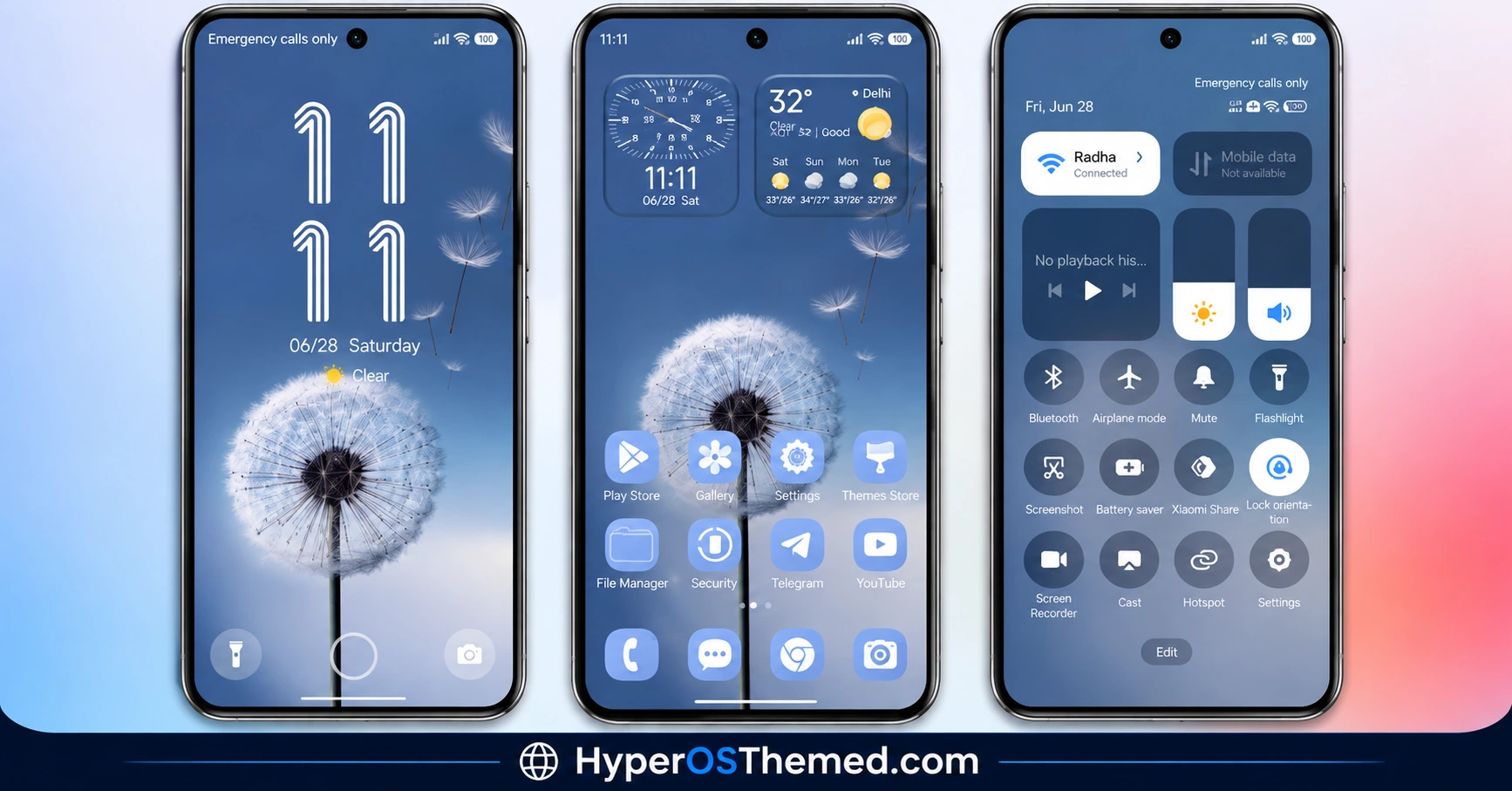
VK Blue Bloom HyperOS Theme Overview
| Attribute | Details |
|---|---|
| Availability | Free, via Xiaomi Theme Store or MTZ file |
| Supported Devices | Xiaomi, Redmi and POCO phones running HyperOS |
| Theme Name | VK Blue Bloom |
| Designer | VK |
| Region | Global |
| Compatibility OS | HyperOS |
| Features | Expanded icon library, blue gradient wallpapers, accent color matching, simplified Control Center, streamlined lock screen |
| File Size | 11.34 MB |
Get VK Blue Bloom HyperOS Theme
Download it through the official Xiaomi Theme Store link above, or grab the MTZ file directly if the Theme Store link doesn’t open on your device. The source notes this theme was tested on HyperOS without errors, though it flags that version mismatches between different MIUI and HyperOS builds have occasionally caused lock screen errors or bootloops with themes like this, so it’s worth confirming your software version first.
VK Blue Bloom HyperOS Theme Compatibility
VK Blue Bloom HyperOS Theme runs on Xiaomi, Redmi, and Poco devices on HyperOS and has been reported to work without issues on that build. Behavior can vary slightly across different MIUI and HyperOS versions since theming engines differ between builds, so if something looks off after installing, checking your exact software version is the first thing worth doing. At 11.34 MB, the file itself installs quickly regardless of device storage.
How to Apply VK Blue Bloom HyperOS Theme
- Open the Theme Store link given above on your Xiaomi, Redmi, or Poco device.
- This will redirect you to the Theme Store.
- Download and install the theme.
- Tap on Apply.
- Customize specific elements such as icons, lock screen, or wallpaper if needed.
- Reboot your device if you notice any display issues after applying, though this step is optional.
Why Choose VK Blue Bloom HyperOS Theme?
- Focused blue gradient palette – a narrower, calmer color range than VK’s broader multi-tone gradient themes.
- Large icon library – covers both system apps and a wide range of third-party apps with consistent shape and spacing.
- Tight accent color matching – wallpaper, icons, and UI tones are built to align rather than clash.
- Compact file size – at 11.34 MB, it’s one of the smaller downloads in VK’s theme lineup.
- Minimal lock screen – prioritizes clock and notification clarity over decorative extras.
- Cross-device consistency – built to look and run the same across Xiaomi, Redmi, and Poco hardware.
- Free official download – available through the Theme Store or a verified MTZ file link.
Conclusion
VK Blue Bloom HyperOS Theme works best thought of as the more focused sibling to VKOS, same designer, same color-matching philosophy, but narrowed down to a single blue gradient instead of a broader palette. That focus shows up in the smaller 11.34 MB file size too. The accent matching between wallpaper and icons is the strongest part of the design, and the lock screen stays out of the way rather than competing for attention.
The one thing worth checking first is your exact HyperOS version, since the source material flags that mismatched builds have caused lock screen errors with themes in this family before. If you want a calmer, single-tone gradient look rather than a multi-color one, VK Blue Bloom is the smaller, more targeted pick between the two.
Also Check These Themes:
- Hyper Grayish 3 HyperOS Theme For Xiaomi, Redmi and POCO
- Mamba BiZ 3 HyperOS Theme with Obsidian Business and Translucent Control Center
- Sky Suhel HyperOS Theme with Dynamic Lock Screen for Xiaomi, POCO, Redmi
- Better HyperOS Theme for Xiaomi, POCO, Redmi
- Twilight HyperOS Theme with Minimalist Dark Wallpapers for Xiaomi, Redmi and POCO
- VKOS HyperOS Theme For Xiaomi, POCO & Redmi
