
I stumbled onto ItapasV15 HyperOS Theme while looking through the Theme Store’s abstract category, mostly out of boredom with the usual glass and minimal black themes I keep cycling through. The purple and black combination in the preview looked different enough from anything else I’d tried, so I downloaded it onto my POCO X6 that same night. I ran it as my daily theme for nine days to see if the abstract style translated well into actual use rather than just looking good in a thumbnail.
ItapasV15 HyperOS Theme Features
Abstract Wallpaper Design
The default wallpaper uses flowing abstract shapes in purple and black rather than a photo or gradient. It has a slightly artistic, almost painted quality that held up well as a backdrop even with a full row of icons over it on my home screen.
Purple and Black Color Scheme
The palette stays consistent between purple accents and black backgrounds across most of the interface. It’s a combination I hadn’t seen much of on other HyperOS themes I’ve tested, and it gave the whole setup a distinct identity rather than blending into the usual black or white options.
Themed Icon Set
Icons follow the same purple and black tone, keeping visual consistency across the home screen and app drawer. Coverage was reasonably solid, though a couple of niche apps I use for local services kept their default icons and stood out against the purple-tinted set.
Simple, Uncluttered Layout
Beyond the color and wallpaper work, the theme doesn’t overload the interface with extra widgets or transparency effects. It’s a fairly straightforward setup once installed, which some users will like and others might find a little plain for an “abstract” themed product.
Lightweight Package Size
At 12.54 MB, the theme installed in well under a minute on my Redmi. It’s noticeably smaller than more elaborate glass or wallpaper-pack themes I’ve used, since it’s really the color scheme and single wallpaper doing most of the visual work.
ItapasV15 HyperOS Theme Preview
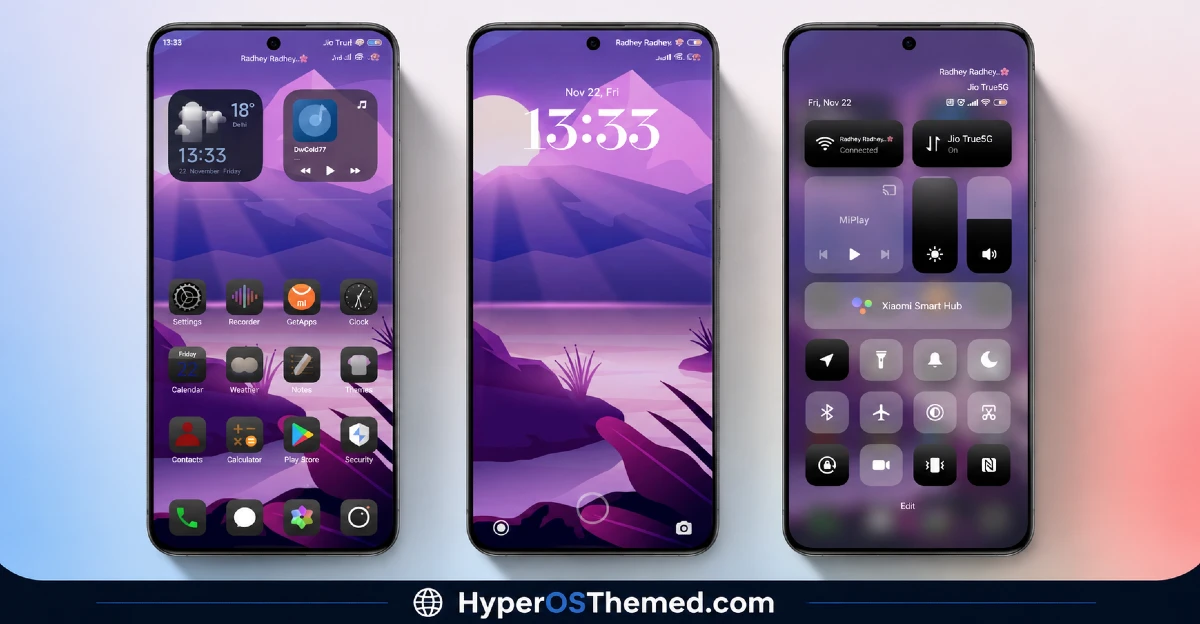
The visual identity is built around abstract purple shapes set against black backgrounds, giving the home and lock screens a moody, artistic quality without relying on photography or elaborate texture work. Icons pick up the same purple undertone, keeping the overall look cohesive rather than mismatched. It leans more toward a stylized art piece than a typical utility theme, though it doesn’t go so far into decoration that it becomes hard to use day to day.
ItapasV15 HyperOS Theme Details
| Detail | Info |
|---|---|
| Theme Name | ItapasV15 |
| Designer | DwPlay77 |
| Compatibility | HyperOS |
| Features | Abstract, Purple, Black |
| File Size | 12.54 MB |
ItapasV15 HyperOS Theme Performance
I tested ItapasV15 HyperOS Theme on a POCO X6 running HyperOS on my phone, through regular daily use including messaging, social media, and a few gaming sessions. Given the compact file size, I didn’t expect any performance issues, and I didn’t run into any during the test period.
Battery life stayed close to my stock theme baseline, within a percent or two over a full day, which makes sense given there’s no animated wallpaper or heavy transparency work involved. The main annoyance was the couple of local service app icons that never picked up the purple styling, which made them stand out a bit awkwardly whenever I opened the app drawer.
Compatibility
ItapasV15 HyperOS Theme is listed as compatible with HyperOS generally, without a specific split between HyperOS 2.0 and HyperOS 3.0 support. I tested it on a POCO X6 without running into problems, though since the designer doesn’t break down version-specific compatibility, results on the newest HyperOS 3.0 builds may vary slightly, particularly around icon theming. It is not intended for MIUI 12, 13, or 14 devices, so applying it outside of HyperOS isn’t recommended. Custom ROM users on Xiaomi.eu or similar HyperOS-based builds should be able to import the MTZ file without much trouble given the modest file size.
Get ItapasV15 HyperOS Theme
DownloadItapasV15 HyperOS Theme through the official Xiaomi Theme Store link rather than third-party file hosts or unofficial APK sites offering the same theme. Sideloaded theme installers from unverified sources are a common way people end up with unnecessary permissions or bundled software on their phone, so sticking with the official Theme Store keeps installation clean.
Note: If the Official Theme Store Link doesn’t redirect properly, try opening the page in Chrome or the default Xiaomi browser, since other browsers may not handle the redirect correctly.
How to Apply ItapasV15 HyperOS Theme
Follow the steps below to apply the theme:
- Open the Theme Store Link given above on your Xiaomi / REDMI / POCO device
- This will redirect you to Theme Store.
- Download and install the theme
- Tap on Apply
- Customize specific elements (icons, lock screen, status bar) if needed
- Reboot your device (optional for full effect)
Why Choose ItapasV15 HyperOS Theme?
- The purple and black abstract palette stands out from the usual black or white theme options
- Icon set stays visually consistent with the wallpaper’s color scheme across most apps
- Compact 12.54 MB file size means quick installs even on slower connections
- No measurable battery drain based on real testing.
- Distinct artistic style without being so busy it gets in the way of daily use
Conclusion
After using this theme on my POCO X6, ItapasV15 HyperOS Theme held up as a genuinely different visual option compared to the usual dark or glass themes I keep cycling through. It’s not a heavily featured theme with lock screen customization or AOD options, and the handful of icons that never matched the purple tone were a small but noticeable gap. Compared to other abstract or color-focused themes I’ve tried, though, this one’s purple and black combination feels more distinct and less like a generic recolor. If you want something with a bit more personality than plain black or white, it’s worth a try.
You may also like:
XurupitaV1 HyperOS Theme for Xiaomi, POCO and REDMI Phones
Ungu Hitam HyperOS Theme for Xiaomi, POCO & Redmi
Rhodiumm HyperOS Theme: Get a Minimal Look for Xiaomi, Redmi & POCO
