
I picked up Rhodiumm HyperOS Theme after getting tired of themes that try to do too much at once. My POCO X6 had been running a heavily decorated glass theme for weeks, and I wanted something plain enough actually to use for work without the interface competing for attention.
A quick search on the Theme Store brought this one up under new releases, so I installed it that same day and kept it running for two days straight to see how a “minimal” theme actually holds up beyond the icon pack.
Rhodiumm HyperOS Theme Features
System-Wide Consistency
The theme touches nearly every part of the interface, including Settings, the notification panel, dialer, and messaging app. I didn’t run into any screen that still looked like stock HyperOS after applying it, which isn’t always the case with themes that only bother with the home screen.
Redesigned Icon Pack
The icons use simple, rounded shapes with a restrained color palette rather than anything flashy. Coverage across my most used apps was solid, though I noticed two food delivery apps kept their original icons, which broke the uniform look slightly.
Cleaner Status Bar and Control Center
Quick settings toggles got more breathing room between them compared to stock HyperOS, and text labels were easier to read at a glance. I specifically tested this while adjusting brightness and toggling Bluetooth quickly, and nothing felt cramped or misaligned.
Simplified Lock Screen
The lock screen strips things down to just the clock and notification previews with no extra widgets cluttering the space. It loads fast and stayed legible in direct sunlight during a few outdoor tests on my POCO X6.
Reorganized Settings Menu
Settings options are grouped more logically than stock HyperOS, and the spacing between sections made scrolling through menus feel less cramped. It’s a small change, but one I actually noticed while adjusting network settings a few times during testing.
Light Animation Touches
There are small transition animations when switching between home screens and opening the app drawer. They’re subtle rather than showy, and I didn’t notice any dropped frames or stutter while testing on the X6’s mid-range chipset.
Rhodiumm HyperOS Theme Preview
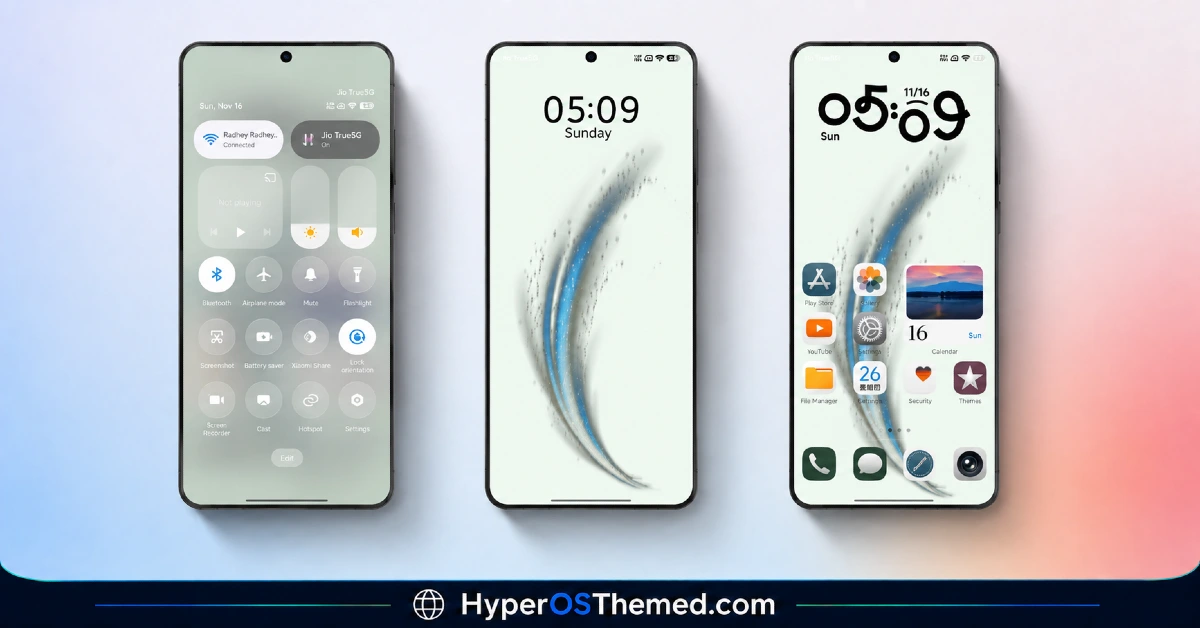
The visual style keeps things restrained, with a balanced mix of light and dark tones and no heavy gradients or transparency effects anywhere in the interface. Icons stay simple and rounded rather than decorative, which keeps the home screen looking tidy even with several rows of apps installed.
It reads more like a professional utility skin than a themed aesthetic, closer to what you’d expect from a productivity-focused phone setup than a showcase piece.
Rhodiumm HyperOS Theme Details
| Detail | Info |
|---|---|
| Theme Name | Rhodiumm |
| Designer | Mydul |
| Compatibility | HyperOS, HyperOS 2, HyperOS 3 |
| Features | Minimal, Redesigned Icons, Clean UI |
| File Size | Not listed by designer |
Rhodiumm HyperOS Theme Performance
I ran Rhodiumm HyperOS Theme on a POCO X6 running HyperOS 2 for two days, through regular daily use covering messaging, browsing, and a few gaming sessions to check for any slowdown. Given how light the theme feels visually, I wasn’t surprised that performance stayed smooth throughout, with no lag opening the app drawer or switching between home screens.
Battery drain was nearly identical to my stock theme baseline, within a percent or two over a full day, which tracks with the lack of transparency effects or animated wallpapers. The only minor issue I ran into was the two food delivery app icons reverting to default, which meant occasionally hunting for them visually since they no longer matched the rest of the grid.
Rhodiumm HyperOS Theme Compatibility
Rhodiumm HyperOS Theme supports HyperOS 2 and HyperOS 3, covering most current Xiaomi, Redmi, and POCO devices running those versions. I tested it specifically on a POCO X6 running HyperOS 2 and had no stability issues over the two day period.
The designer notes that some UI elements may vary slightly depending on device model and system version, which lines up with the couple of icon inconsistencies I ran into during testing. It is not built for MIUI 12, 13, or 14, so applying it on older firmware isn’t recommended. Custom ROM users on Xiaomi.eu or similar HyperOS-based builds should be able to import the theme without major issues, though results may vary slightly depending on how closely the ROM follows stock HyperOS behavior.
Get Rhodiumm HyperOS Theme
Download Rhodiumm HyperOS Theme through the official Xiaomi Theme Store link rather than third-party APK sites or file-sharing forums claiming to host the same theme. Sideloaded theme files from unverified sources are a common way people end up with unnecessary permissions or bundled junk on their phone, so the official Theme Store route is the safer option even for a straightforward theme like this one.
Note: If the Official Theme Store Link doesn’t redirect properly, try opening the page in Chrome or the default Xiaomi browser, since other browsers may not handle the redirect correctly.
How to Apply Rhodiumm HyperOS Theme
Follow the steps below to apply the theme:
- Open the Theme Store Link given above on your Xiaomi / REDMI / POCO device
- This will redirect you to Theme Store.
- Download and install the theme
- Tap on Apply
- Customize specific elements (icons, lock screen, status bar) if needed
- Reboot your device (optional for full effect)
Why Choose Rhodiumm HyperOS Theme?
- Touches nearly every system app, not just the home screen and lock screen
- Icon pack keeps a clean, professional look without unnecessary decoration
- Settings menu reorganization genuinely makes navigation faster
- No measurable battery impact based on real testing over two days
- Works well as a daily driver theme for anyone who wants function over flash
Conclusion
After two days on my POCO X6, Rhodiumm HyperOS Theme turned out to be exactly the kind of low-distraction theme I was looking for after weeks of running something more decorative. It’s not going to turn heads the way a glass or gradient theme might, and the handful of mismatched food delivery icons was a small but real annoyance.
Compared to other minimal themes I’ve tried, though, this one goes further by actually cleaning up Settings and the control center rather than just swapping icons. If you want a theme that stays out of your way and just works, it’s a solid pick.
