
Some themes try to win you over in the first five seconds with a dramatic wallpaper or an unusual animation. FrostedRealm HyperOS Theme Xiaomi takes the opposite approach entirely, it’s the kind of theme that grows on you gradually, once you notice how little friction there is in actually using the thing day to day.
Designed by Eleven, it borrows a subtle frosted, liquid-glass touch alongside design cues that lean toward OxygenOS’s clean, understated style rather than anything flashy or HyperOS-default. Built for Xiaomi, Redmi and POCO devices running HyperOS 2 or HyperOS 3, it’s less about reinventing the interface and more about quietly refining what’s already there.
FrostedRealm Key Features
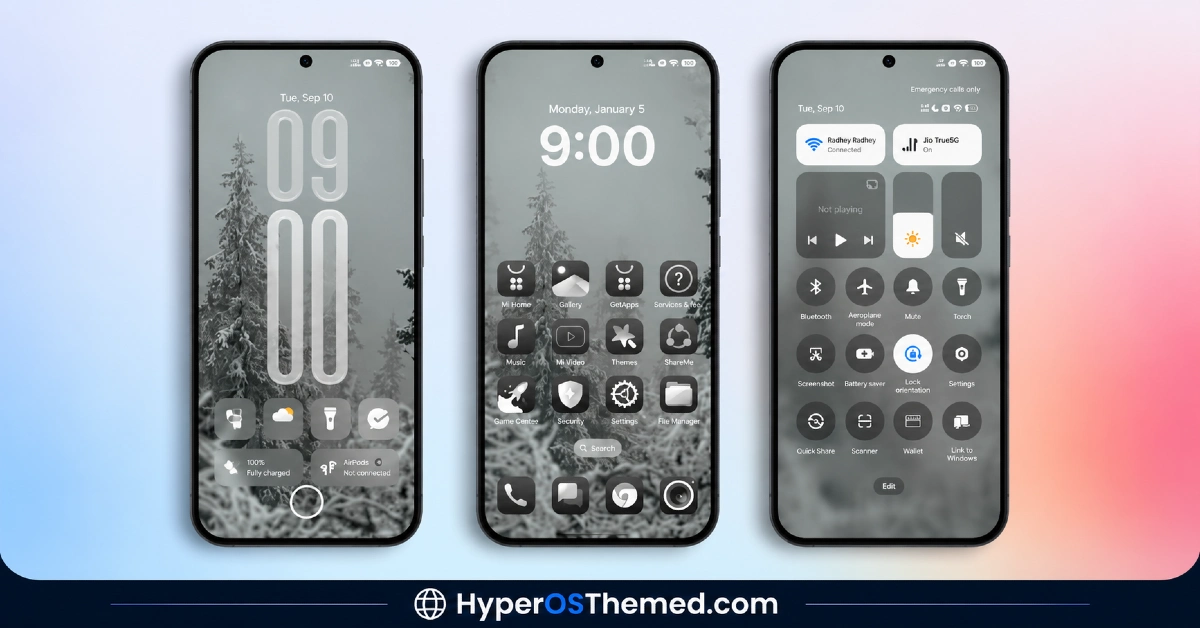
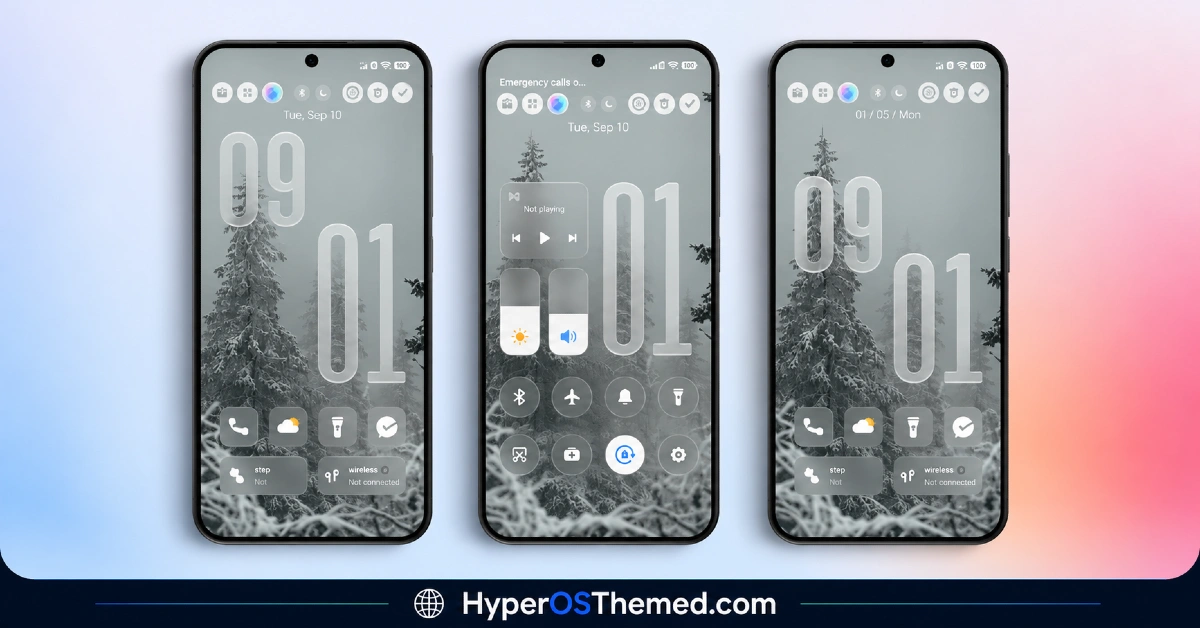
- Clean, Organized Lock Screen: The lock screen keeps things simple and well-spaced rather than cramming in extra widgets or decoration for the sake of it. It’s a calmer starting point than the default HyperOS lock screen without feeling stripped down or unfinished.
- Consistent Icon Treatment: Icons across the system get a more uniform look, which matters more than it sounds, mismatched icon styles are one of the quickest ways a theme starts to feel unfinished. Here, everything reads as part of the same design decision rather than a patchwork of different sources.
- Frosted Glass Visual Touches: In line with its Liquid Glass tagging, FrostedRealm HyperOS Theme Xiaomi works subtle frosted, translucent elements into the interface rather than committing to heavy transparency everywhere. It’s restrained enough that it adds texture without making text or icons harder to read.
- OxygenOS-Inspired Calm: The overall visual language draws from OxygenOS’s understated aesthetic rather than anything loud or HyperOS-native. If you’ve used a OnePlus device before, some of that same quiet, considered feel should be recognizable here.
- No Noticeable Performance Impact: Animations stay smooth and app switching remains quick even on mid-range hardware, which is genuinely worth calling out since heavier visual themes sometimes introduce lag that isn’t obvious until you’ve been using them for a few days. This one’s built to hold up for regular daily use, not just a quick demo.
- Refined Status Bar and Control Center: Status bar icons get a cleaner look, and the Control Center picks up matching color tones rather than sticking with the default flat panel. These are small details, but they’re the kind that make the whole system feel considered rather than randomly assembled.
- System-Wide Visual Consistency: Whether you’re in Settings, checking notifications, or just unlocking the phone, the visual style stays the same throughout. That consistency is really the theme’s strongest selling point, nothing here feels like a leftover default sitting next to a themed element.
FrostedRealm HyperOS Theme Preview
The screenshots below show the clean lock screen layout, the consistent icon treatment and how the frosted Control Center and status bar look once the theme is applied. Since FrostedRealm’s appeal is more about overall polish than one standout feature, it’s worth looking through the full preview set to get a feel for the calmer, OxygenOS-inspired tone.
FrostedRealm HyperOS Theme Overview
| Attribute | Details |
|---|---|
| Availability | Free, via Xiaomi Theme Store |
| Supported Devices | Xiaomi, Redmi and POCO phones running HyperOS |
| Theme Name | FrostedRealm |
| Designer | Eleven |
| Compatibility OS | HyperOS 2 and HyperOS 3 |
| Features | Clean lock screen, consistent icon treatment, frosted glass touches, OxygenOS-inspired calm, refined status bar and Control Center |
| File Size | Not specified by designer |
FrostedRealm Xiaomi Theme Compatibility
FrostedRealm supports both HyperOS 2 and HyperOS 3, giving it reach across a good range of current Xiaomi, Redmi and POCO devices. Since the theme is built around subtle, restrained effects rather than heavy transparency or 3D rendering, it tends to stay lightweight and shouldn’t strain performance even on mid-range hardware, that was actually one of the more consistently praised points about it during testing. Custom ROM users can typically install it manually through the Theme Store app’s import option, and given the understated design approach, compatibility issues tend to be less common than with more effect-heavy themes.
Get FrostedRealm HyperOS Theme
Download FrostedRealm HyperOS Theme only through the official Theme Store link rather than random third-party file hosts or unofficial APK uploads. Files sourced outside verified channels are difficult to confirm as unaltered and may not reflect what Eleven actually released. Sticking to the official Theme Store link keeps the installed version consistent with the intended design and ensures any future updates remain accessible.
How to Apply FrostedRealm Theme
Follow the steps below to apply the theme:
- Open the Theme Store link given above on your Xiaomi, Redmi or POCO device.
- This will redirect you to the Theme Store.
- Download and install the theme.
- Tap on Apply.
- Customize specific elements such as icons, lock screen or status bar if needed.
- Reboot your device for the full effect, though this step is optional.
Note: If anything looks overlapped or doesn’t display correctly right after installing, restarting the device usually clears it up without further steps. This theme has been checked across its supported HyperOS versions without any major issues turning up. Still, if something looks off on a specific device once it’s applied, leaving a comment with the details helps get it looked into.
Installing FrostedRealm HyperOS Theme on Custom ROM Devices
Devices running a Custom ROM aren’t able to use the direct Theme Store link, so the MTZ file needs to be brought in manually through the Theme Store app instead. Here’s how that works:
- Grab the MTZ file for FrostedRealm from the download section.
- Open the Theme Store app.
- Go into the Themes tab.
- Scroll down to find the Import option, then tap it.
- Use the file manager to locate the downloaded .mtz file.
- Wait for the import process to finish.
- Tap the theme once it appears in the list to apply it.
Why Choose FrostedRealm HyperOS Theme Theme?
- Genuinely calm design — nothing feels overdone or visually loud, unusual for a theme in this category.
- OxygenOS-inspired restraint — a distinct alternative to the typical HyperOS-native or iOS-clone aesthetic.
- Subtle frosted glass detailing — texture and depth without sacrificing readability.
- No performance trade-off — smooth animations and quick app switching even on mid-range devices.
- System-wide consistency — the same visual language carries through every screen, not just the home screen.
- Free official download — no cost involved through a legitimate Theme Store link.
- Dual HyperOS version support — works across both HyperOS 2 and HyperOS 3.
Conclusion
FrostedRealm HyperOS Theme doesn’t chase attention the way a lot of HyperOS themes do, and that’s really the point, it’s built for people who want their phone to feel more refined without turning every screen into a showcase. The OxygenOS-inspired calm and consistent frosted detailing hold up well across daily use, and the lack of any real performance hit makes it an easy one to keep installed long-term. For Xiaomi, Redmi and POCO users who want clean over flashy, FrostedRealm is well worth trying.
You may also like:
TNV1 HyperOS Theme with Feature-Rich Lock Screen for Xiaomi, POCO, Redmi
Captain Cook Super 3D HyperOS Theme with Complete iOS Style & Depth Effects for Xiaomi, POCO, Redmi
Purple G HyperOS Theme with Dark Mode Gradient & Depth Effect for Xiaomi, POCO, Redmi
Lake Frame HyperOS Theme with Gradient Icons For Xiaomi, POCO, Redmi
OX F3 V2 HyperOS Theme with Cartoon One UI Style with Dynamic Lock Screen for Xiaomi, POCO, Redmi
