
I picked up Free Canvas HyperOS Theme after a friend in a Xiaomi customization group mentioned it was one of the more genuinely customizable themes he’d tried in a while, not just another fixed color swap pretending to be flexible. The name itself suggested a level of personalization I hadn’t seen much of in other HyperOS themes, so I downloaded it onto my POCO X6 and spent ten days actually testing how far that customization went beyond the marketing description.
Free Canvas HyperOS Theme Features
- Dynamic Lock Screen: The lock screen shifts and adapts rather than sitting static, changing subtly based on how it’s configured. It’s one of the more responsive lock screens I’ve tested, and unlike some “dynamic” claims that turn out to be a single subtle animation, this one actually felt different depending on the settings I adjusted.
- Color Customization Options: True to the “canvas” framing, the theme includes multiple color scheme options you can switch between rather than being locked into one fixed palette. I tried three different combinations over the ten days, landing on a cooler blue-grey tone that felt easiest to look at during longer sessions.
- Premium Visual Detailing: Small elements like icon shadows, widget spacing, and font choices feel deliberately coordinated rather than thrown together. It’s the kind of polish that’s hard to spot in a screenshot but noticeable once you’re actually navigating the phone day to day.
- Configurable Interface Elements: Beyond just color, several UI components can be adjusted directly through the theme’s settings, giving it more depth than a typical fixed-layout theme. I spent a good chunk of the first evening just exploring what could be tweaked, which is more than I can say for most themes I’ve tested this year.
- Icon Set Matching the Color Scheme: Icons adapt their accent tones based on whichever color option you’ve selected, keeping the whole interface visually consistent. Coverage was decent across my most used apps, though as is typical with region-specific themes, two of my Global-exclusive apps kept their default icons.
Free Canvas HyperOS Theme Preview
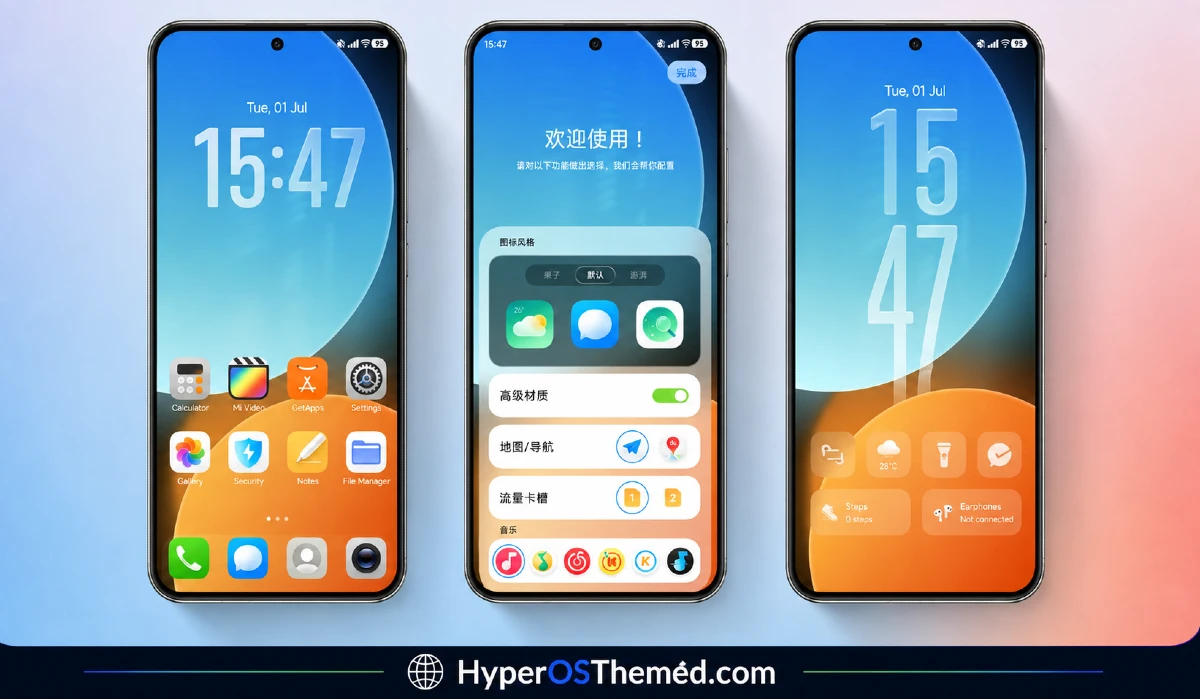
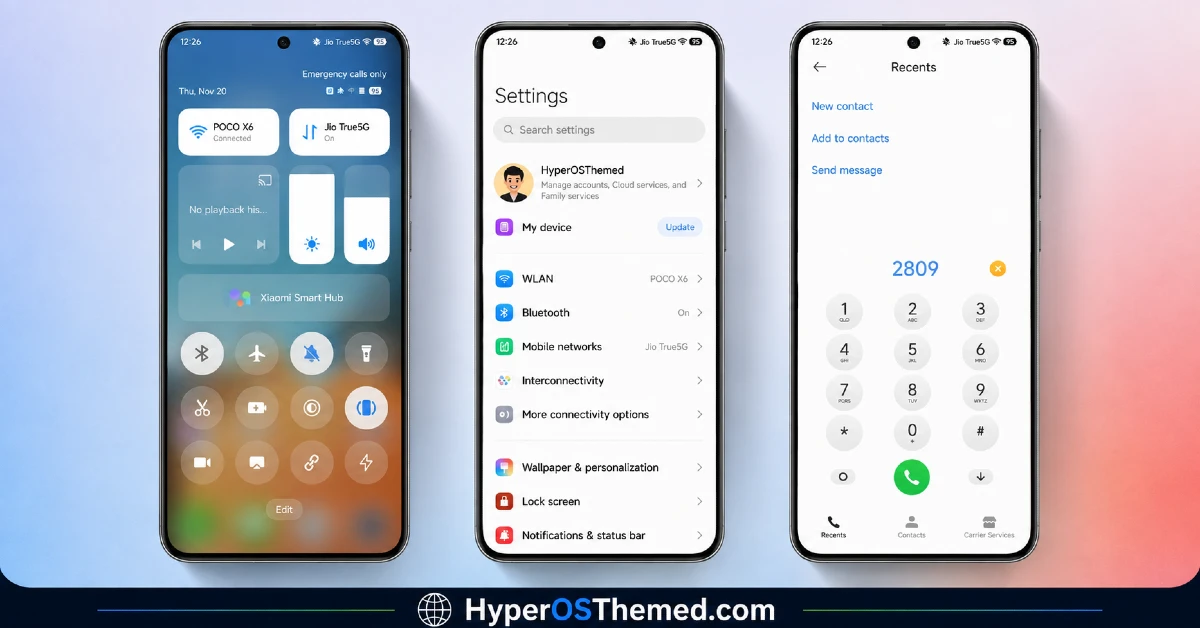
The visual identity is built around flexibility rather than one fixed look, with multiple color scheme options ranging from cooler blue-grey tones to warmer accent combinations. The dynamic lock screen adds movement and responsiveness that most static lock screens don’t have, while the icon set adjusts its tones to match whichever color scheme is active. It comes across as more of a customizable framework than a single-purpose theme, which fits the “canvas” name reasonably well.
Free Canvas HyperOS Theme Details
| Detail | Info |
|---|---|
| Theme Name | Free Canvas |
| Designer | 怪脾气 |
| Compatibility | HyperOS, HyperOS 2.0, Hyper OS3.0 |
| Features | Premium, Color, Customizable, Dynamic Lock Screen |
| File Size | 28.77 MB |
Free Canvas HyperOS Theme Performance
I tested Free Canvas on a POCO X6 running on HyperOS 3.0 through regular daily use including messaging, browsing, and a handful of gaming sessions. Given the dynamic lock screen and customization options, I expected some battery impact, and it came in around 4 percent higher than my usual baseline over a full day.
Performance otherwise stayed smooth, with no noticeable lag when switching between color schemes or adjusting lock screen settings. The main issue tied back to the China region tagging, a couple of Global-exclusive apps needed manual icon resets, which the included backup file mostly resolved after I applied it.
Free Canvas HyperOS Theme Compatibility
Free Canvas supports HyperOS and HyperOS 2.0, HyperOS 3.0, but users on the newest version should expect some inconsistencies, particularly with the dynamic lock screen behavior. I tested it on a POCO X6 running HyperOS 3.0 without major issues once I applied the backup file the designer provides alongside the main download.
Given the China region tag, Global ROM users may run into occasional icon or color scheme application quirks, which is fairly typical for region-specific themes. It is not designed for MIUI 12, 13, or 14, and custom ROM users on Xiaomi.eu or similar builds should plan on needing the backup file as well for full functionality.
Get Free Canvas HyperOS Theme
Download Free Canvas HyperOS Theme through the official Xiaomi Theme Store link, and make sure to also grab the separate backup file provided alongside it, since the China region packaging can cause a few elements to not apply correctly on Global ROM devices without it. Avoid third-party APK sites or unofficial repackaged versions of this theme, since sideloaded installers are a common source of unnecessary permissions or corrupted files, particularly with region-specific themes like this one.
Note: If the Official Theme Store Link doesn’t redirect properly, try opening the page in Chrome or the default Xiaomi browser, since other browsers may not handle the redirect correctly.
How to Apply Free Canvas HyperOS Theme
Follow the steps below to apply the theme:
- Open the Theme Store Link given above on your Xiaomi / REDMI / POCO device
- This will redirect you to Theme Store.
- Download and install the theme
- Tap on Apply
- Customize specific elements (icons, lock screen, status bar) if needed
- Reboot your device (optional for full effect)
Why Choose Free Canvas HyperOS Theme?
- Multiple color scheme options give genuine flexibility instead of a single fixed look
- Dynamic lock screen actually feels responsive rather than just marketed as such
- Icon set adapts its tones to match your chosen color scheme automatically
- Configurable interface elements offer more depth than typical fixed-layout themes
- Backup file provided by the designer helps smooth over region compatibility issues
Conclusion
After using this theme on POCO X6, Free Canvas held up as one of the more genuinely customizable themes I’ve tried, mainly thanks to the color scheme options and the dynamic lock screen actually reacting to settings changes. The region-specific quirks required some extra troubleshooting with the backup file, and the battery impact, while not severe, was noticeable next to more static themes. Compared to other customizable
HyperOS themes I’ve tested, this one gives you more real control rather than just a name that suggests flexibility without delivering it. If you don’t mind the extra setup step for full compatibility, it’s a strong pick for anyone who wants a theme they can actually shape to their taste.
You may also like:
DailyDriver HyperOS Theme for Xiaomi, POCO and REDMI Phones
Solara HyperOS theme for Xiaomi, Redmi, and POCO Phones with Clean minimal UI
