
Some themes announce themselves loudly with a single dramatic wallpaper, others earn their “premium” label the slower way, through consistency across every corner of the phone. BUSD HyperOS Theme falls into that second category, designed by maidul as a fresh, elegant package that reaches well beyond the home screen into the control center, status bar, dialer, settings, messages and even the file manager. At 23.25 MB, it’s a genuinely lightweight download for Xiaomi, Redmi and POCO devices running HyperOS, distributed globally through the official Theme Store.
BUSD HyperOS Theme Key Features
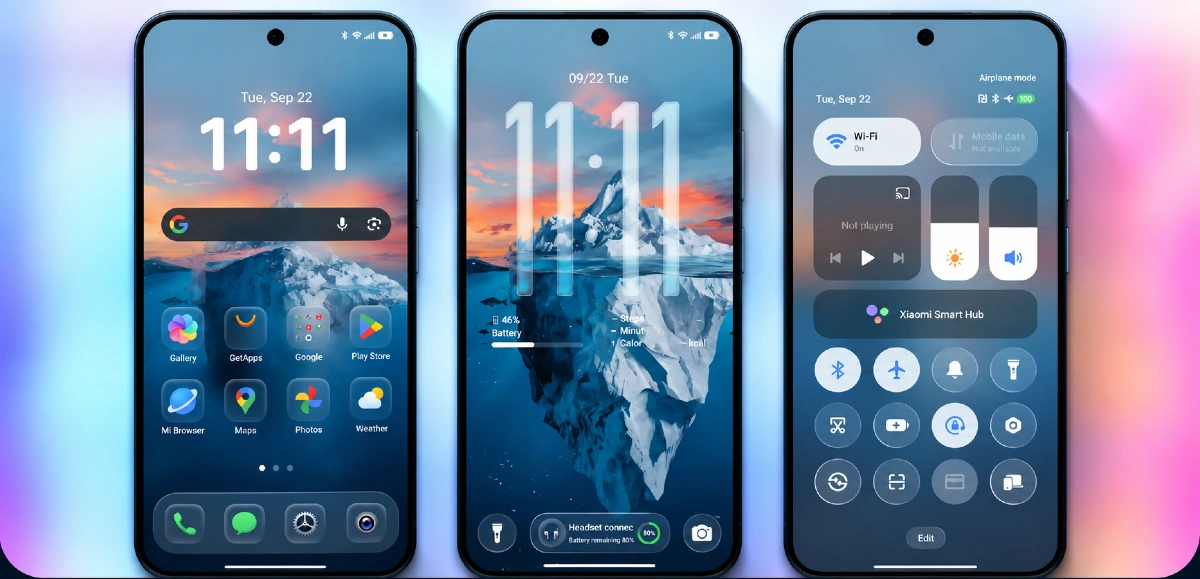
- Clean and Elegant Visual Style: BUSD sticks to a restrained, polished aesthetic rather than loud colors or heavy effects, aiming for a look that reads as premium through consistency rather than one standout gimmick.
- HyperOS-Matched Control Center: The control center is themed to align with the rest of the UI, keeping the quick settings panel visually consistent rather than leaving it as a leftover default.
- Well-Crafted Icon Pack: Icons are custom designed rather than a quick recolor job, contributing to the overall premium feel the theme is going for across the home screen.
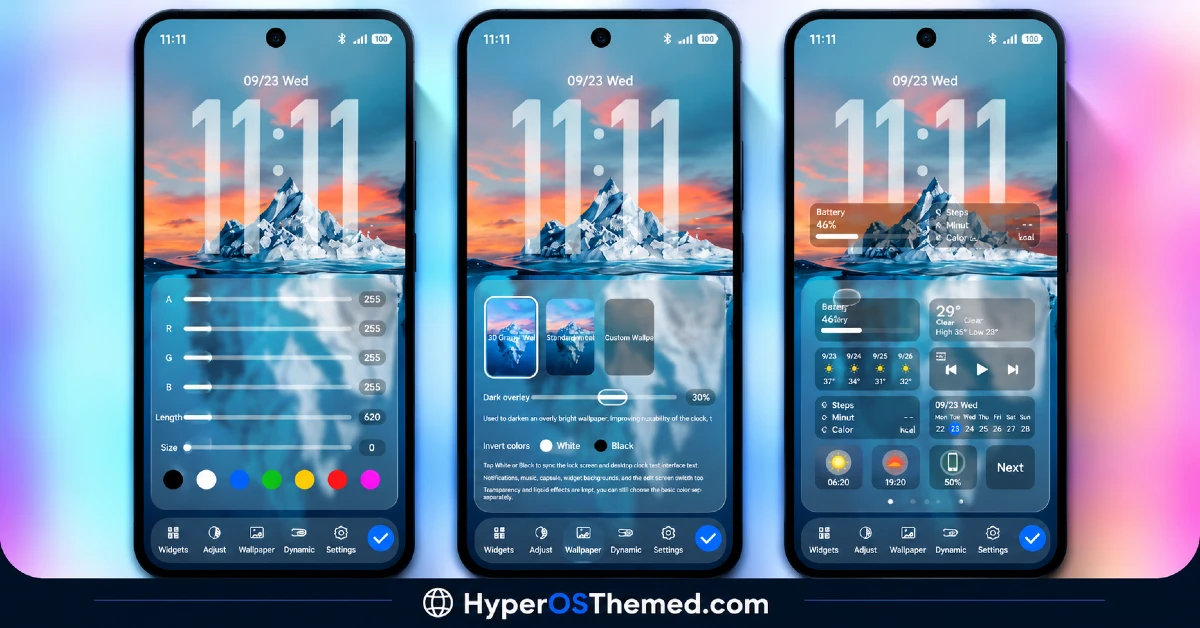
- Custom Lock Screen Design: The lock screen comes with its own distinct features and layout, giving the unlock experience some personality separate from the home screen redesign.
- Partial System App Theming: Beyond the home screen, apps like the phone dialer, settings, messages and file manager pick up partial theming, so the device feels more cohesive rather than a themed launcher sitting next to untouched system apps.
- Amazing Wallpaper Selection: The included wallpaper work complements the overall theme design rather than being an afterthought slapped on separately.
- Genuinely Compact File Size: At 23.25 MB, BUSD stays light despite touching this many system areas, from the lock screen down to the file manager. It downloads quickly regardless of connection speed.
BUSD HyperOS Theme Preview
The screenshots below show the custom lock screen design, the well-crafted icon pack and how the matched control center looks once the theme is applied. Since BUSD’s appeal comes down to consistency across the whole system rather than one dramatic feature, it’s worth looking through the full preview to appreciate how the pieces fit together.
BUSD HyperOS Theme Overview
| Attribute | Details |
|---|---|
| Availability | Free, via Xiaomi Theme Store |
| Supported Devices | Xiaomi, Redmi and POCO phones running HyperOS |
| Theme Name | BUSD |
| Designer | maidul |
| Region | Global |
| Compatibility OS | HyperOS |
| Features | Clean minimal design, matched Control Center, custom icon pack, custom lock screen, partial system app theming |
| File Size | 23.25 MB |
BUSD Theme Compatibility
BUSD is built for HyperOS and works across Xiaomi, Redmi and POCO devices, though it’s worth knowing the theme may behave a little differently depending on the exact HyperOS version installed, since testing has mainly confirmed smooth performance on the version it was primarily built for.
Given the compact file size and the theme’s reliance on color and layout rather than heavy transparency or 3D effects, most users shouldn’t run into major compatibility issues even across slightly different HyperOS builds. Custom ROM users can still install manually through the MTZ file, and as with most themes touching the lock screen and system apps, a restart after installation is a sensible first step if anything looks slightly off.
Get BUSD Theme
Download BUSD HyperOS Theme Xiaomi only through the official Theme Store link or the direct MTZ file rather than random third-party file hosts or unofficial APK uploads. Files sourced outside verified channels are difficult to confirm as unaltered and may not reflect the version maidul actually released. Sticking to the official links keeps the installed version consistent with the intended design and ensures any future updates remain accessible.
How to Apply BUSD HyperOS Theme
Follow the steps below to apply the theme:
- Open the Theme Store link given above on your Xiaomi, Redmi or POCO device.
- This will redirect you to the Theme Store.
- Download and install the theme.
- Tap on Apply.
- Customize specific elements such as icons, lock screen or status bar if needed.
- Reboot your device for the full effect, though this step is optional.
Note: If anything looks overlapped or doesn’t display correctly right after installing, restarting the device usually clears it up without further steps. This theme has been tested and works without issues on most HyperOS versions, though behavior can vary slightly depending on the specific build installed. If something still looks off on a particular device, leaving a comment with the details helps get it looked into.
Installing BUSD HyperOS Theme on Custom ROM Devices
Devices running a Custom ROM aren’t able to use the direct Theme Store link, so the MTZ file needs to be brought in manually through the Theme Store app instead. Here’s how that works:
- Grab the MTZ file for BUSD from the download section.
- Open the Theme Store app.
- Go into the Themes tab.
- Scroll down to find the Import option, then tap it.
- Use the file manager to locate the downloaded .mtz file.
- Wait for the import process to finish.
- Tap the theme once it appears in the list to apply it.
Why Choose BUSD HyperOS Theme?
- Genuinely well-crafted icons — custom designed rather than a simple recolor of stock assets.
- System app coverage beyond the home screen — dialer, settings, messages and file manager all get partial theming.
- Matched Control Center design — quick settings stay visually consistent with the rest of the UI.
- Distinct custom lock screen — its own layout and features, not a leftover default.
- Extremely light file size — 23.25 MB is small given how many areas this theme touches.
- Clean, premium feel — restraint and consistency rather than one loud visual gimmick.
- Free official download — no cost involved through a legitimate Theme Store link.
Conclusion
BUSD HyperOS Theme earns its premium reputation through consistency rather than any single dramatic feature, the custom lock screen, matched control center and well-crafted icons all clearly work from the same design decision. Its small file size makes it an easy, low-risk theme to try despite touching so much of the system. For Xiaomi, Redmi and POCO users who want a clean, cohesive HyperOS look without a heavy download, BUSD HyperOS Theme is well worth trying.
Also Check These Themes:
- RS1 HyperOS Theme with Dynamic Depth Wallpapers and a Feature-Rich Lock Screen Customizer
- Aquarel HyperOS Theme with Aquatic Glassmorphism Look for Xiaomi, POCO, Redmi
- AJ Pink HyperOS Theme For Xiaomi, POCO and Redmi Phones
- OX BM HyperOS Theme with Premium Wallpapers, 3D Depth, Customizable,Black icons
- Bodrex-3 HyperOS Theme: Bright, Minimal HyperOS Theme
