
Pooxel HyperOS Theme is a Premium theme for Xiaomi, Redmi and POCO devices designed by Eto’mox, built around a simple, Pixel-inspired aesthetic that brings a Google-style look to Xiaomi’s interface. Instead of heavy customization or bold color palettes, this one keeps things minimal and clean, closer to what you’d expect from stock Android on a Pixel device rather than the usual HyperOS design language.
At just 9.46 MB, it’s one of the lightest HyperOS themes around, making it a quick download and install for anyone curious to try it. It’s compatible with HyperOS and HyperOS 2.0, so it covers a reasonable range of devices without stretching into the newest builds.
Pooxel HyperOS Theme Features
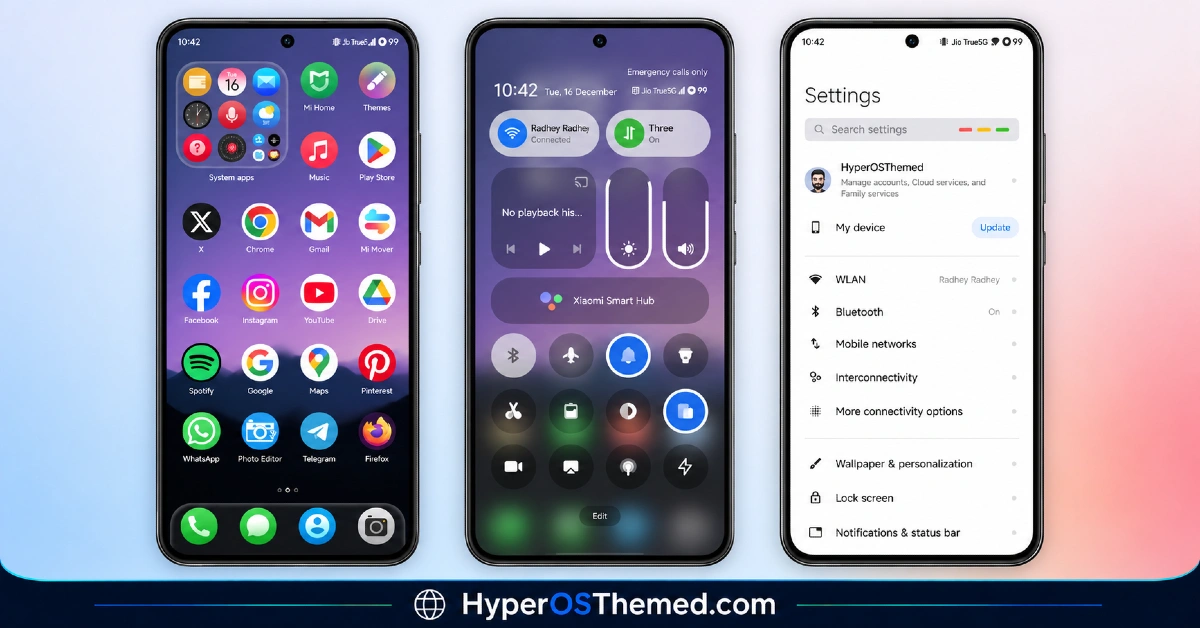
- Pixel-Inspired Icon Design: Pooxel HyperOS Theme redesigns system and popular app icons to resemble the simpler, flatter icon style associated with Google’s Pixel devices. This gives Xiaomi and Redmi phones a noticeably different look from the default HyperOS icon set, closer to stock Android than MIUI-style theming.
- Minimal, Clean Interface: The overall design leans into simplicity, avoiding heavy decoration or busy visual elements across menus and system panels. This kind of stripped-down approach tends to suit users who prefer function over flashy customization.
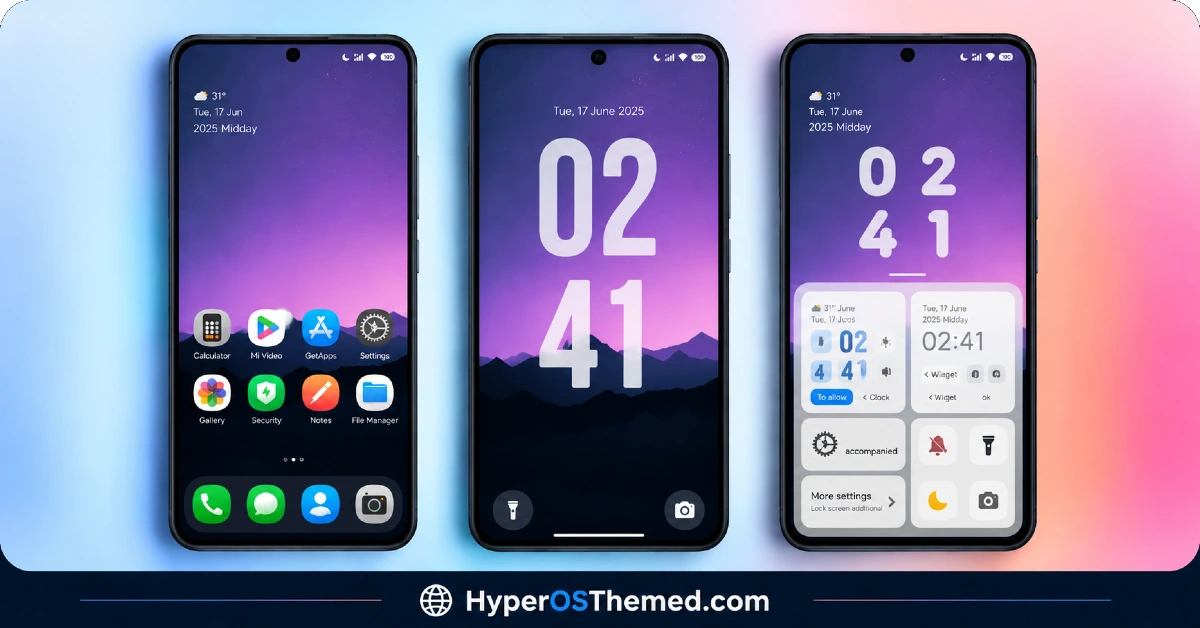
- Dynamic Lock Screen: The lock screen incorporates a bit of movement rather than sticking to a completely static layout, adding some personality without breaking from the overall minimal theme. It’s a small but noticeable touch compared to the plain default HyperOS lock screen.
- Extremely Compact File Size: At under 10 MB, Pooxel is significantly lighter than most HyperOS themes, many of which run well past 30 or 50 MB. This makes it one of the fastest themes to download and apply, especially useful on slower connections or devices low on storage.
- Google-Style Visual Language: Beyond just the icons, the overall color choices and layout style borrow from Google’s design approach rather than Xiaomi’s usual visual identity. This makes Pooxel a good fit for anyone who’s used a Pixel phone before and wants a similar feel on their Xiaomi device.
- Simple Wallpaper Selection: The included wallpapers match the minimal theme rather than going for anything bold or attention-grabbing. Given the small file size, the wallpaper selection is understandably limited compared to larger theme packages.
Pooxel HyperOS Theme Preview
The screenshots below show the Pixel-style icon redesign, the minimal interface and how the dynamic lock screen looks once the theme is applied. Since this theme’s whole appeal is its clean, understated look, seeing it in action gives a better sense of the style than a description alone.
Pooxel HyperOS Theme Details
| Attribute | Details |
|---|---|
| Availability | Free, via Xiaomi Theme Store |
| Supported Devices | Xiaomi, Redmi and POCO phones running HyperOS |
| Theme Name | Pooxel |
| Designer | Eto’mox |
| Compatibility OS | HyperOS, HyperOS2.0 and HyperOS 2.0 |
| Features | Pixel-inspired icons, minimal interface, dynamic lock screen, Google-style visual language |
| File Size | 9.46 MB |
Pooxel HyperOS Theme Compatibility
Pooxel supports HyperOS and HyperOS 2.0, which covers a solid range of Xiaomi, Redmi and POCO devices, though it doesn’t currently extend official support to HyperOS 3.0. Given the compact file size, there’s less to go wrong during installation compared to heavier themes, but it’s still worth restarting the device afterward if anything looks slightly off.
Custom ROM users on setups like Xiaomi EU ROM or MIUIRoom can install the theme manually through the MTZ file, and given how minimal the visual changes are, compatibility issues tend to be less common than with themes that modify transparency or 3D effects. Anyone on HyperOS 3.0 specifically should keep in mind that this theme wasn’t built with that version in focus, so results may vary until an updated release is available.
Get Pooxel HyperOS Theme
Download Pooxel HyperOS Theme only through the official Theme Store link rather than random third-party file hosts or unofficial APK uploads. Files sourced outside verified channels are difficult to confirm as unaltered and may not reflect what the designer actually released. Sticking to the official Theme Store link keeps the installed version consistent with the intended design and ensures any future updates remain accessible.
How to Apply Pooxel HyperOS Theme
Follow the steps below to apply the theme:
- Open the Theme Store link given above on your Xiaomi, Redmi or POCO device.
- This will redirect you to the Theme Store.
- Download and install the theme.
- Tap on Apply.
- Customize specific elements such as icons, lock screen or status bar if needed.
- Reboot your device for the full effect, though this step is optional.
Note: If anything looks overlapped or doesn’t display correctly right after installing, restarting the device usually clears it up without further steps. This theme has been checked on its supported HyperOS versions without any major issues turning up. Still, if something looks off on a specific device once it’s applied, leaving a comment with the details helps get it looked into.
Installing Pooxel HyperOS Theme on Custom ROM Devices
Devices running MIUI 11 through 14 or HyperOS based Custom ROMs such as Xiaomi EU ROM or MIUIRoom aren’t able to use the direct Theme Store link, so the MTZ file needs to be brought in manually instead. Here’s how that works:
- Grab the MTZ file for Pooxel from the download section.
- Open the Theme Store app.
- Go into the Themes tab.
- Scroll down to find the Import option, then tap it.
- Use the file manager to locate the downloaded .mtz file.
- Wait for the import process to finish.
- Tap the theme once it appears in the list to apply it.
Why Choose Pooxel HyperOS Theme?
- Genuine Pixel-style look — icons and layout borrow directly from Google’s design language rather than typical MIUI styling.
- Extremely lightweight — under 10 MB makes it one of the fastest themes to download and install.
- Clean, distraction-free interface — minimal design keeps menus simple and easy to navigate.
- Dynamic lock screen touch — adds subtle movement without overcomplicating the minimal aesthetic.
- Good fit for Pixel fans — ideal for anyone who’s used a Pixel device and wants a similar feel on Xiaomi.
- Low storage impact — the small file size makes it easy to try without worrying about space.
- Free official download — no cost involved through the legitimate Theme Store link.
- Straightforward installation — fewer visual effects mean fewer chances for installation quirks.
Conclusion
Pooxel HyperOS Theme is a refreshing change of pace from the more elaborate, effect-heavy HyperOS themes out there, offering a clean Pixel-inspired look in an unusually small package. It doesn’t officially support HyperOS 3.0 yet, and the wallpaper selection is understandably limited given the file size, but neither issue takes away from what it does well. For Xiaomi, Redmi and POCO users who want a simple, Google-style interface without the usual theme bloat, Pooxel Xiaomi Theme is well worth the quick download.
You may also like:
VK Blue HyperOS Theme for Xiaomi, POCO and REDMI Phones
ProjectX HyperOS Theme for Xiaomi, POCO and REDMI Phones
BNB HyperOS Theme with colourful icons and 3D depth-of-field effects for Xiaomi, Redmi and POCO
Diamond.V2 HyperOS Theme with Complete iOS-Inspired Theme for Xiaomi, POCO and REDMI Phones
