
OX LS is a HyperOS and MIUI theme built around a soft leather-style icon set, aimed at users who want a warmer, more premium look instead of the usual flat, glossy icon grid. Rather than going bold or colorful, this theme sticks to muted tones and rounded edges that give the whole interface a calmer feel.
It’s designed by OXFURY and works across Xiaomi, Redmi and POCO devices running either HyperOS or MIUI, which is a bit wider compatibility than most themes in this category offer. The file itself is on the heavier side at just over 53 MB, so it’s worth keeping that in mind if you’re on limited storage or a slower connection.
OX LS HyperOS Theme Features
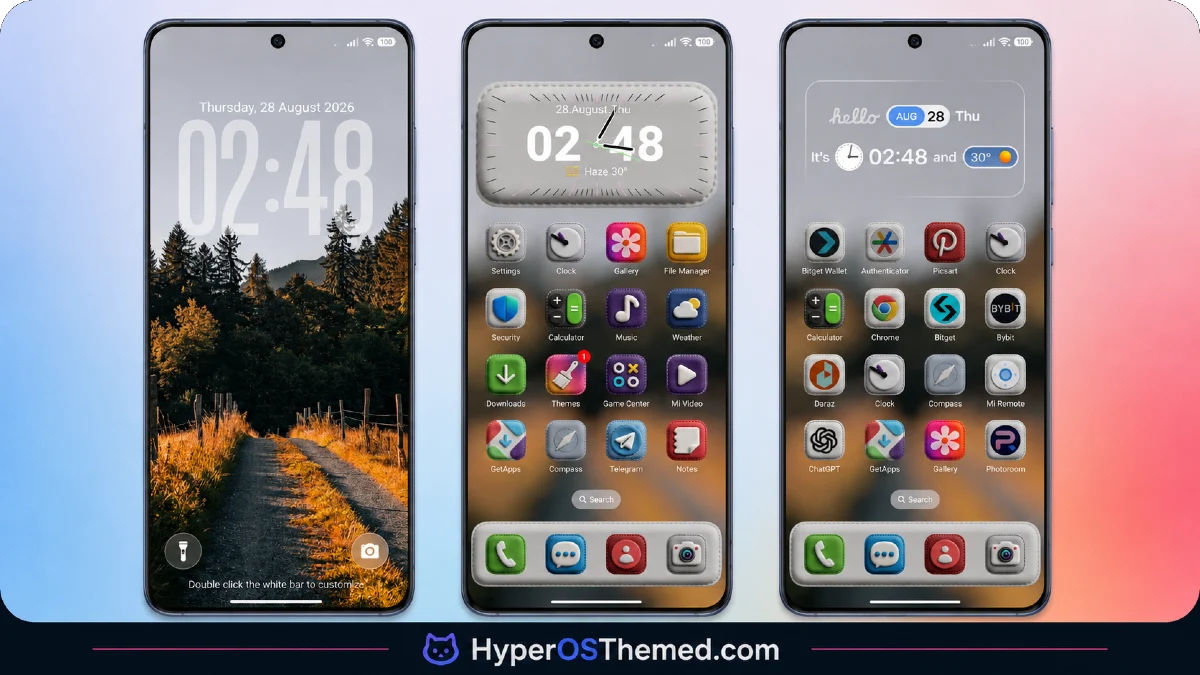
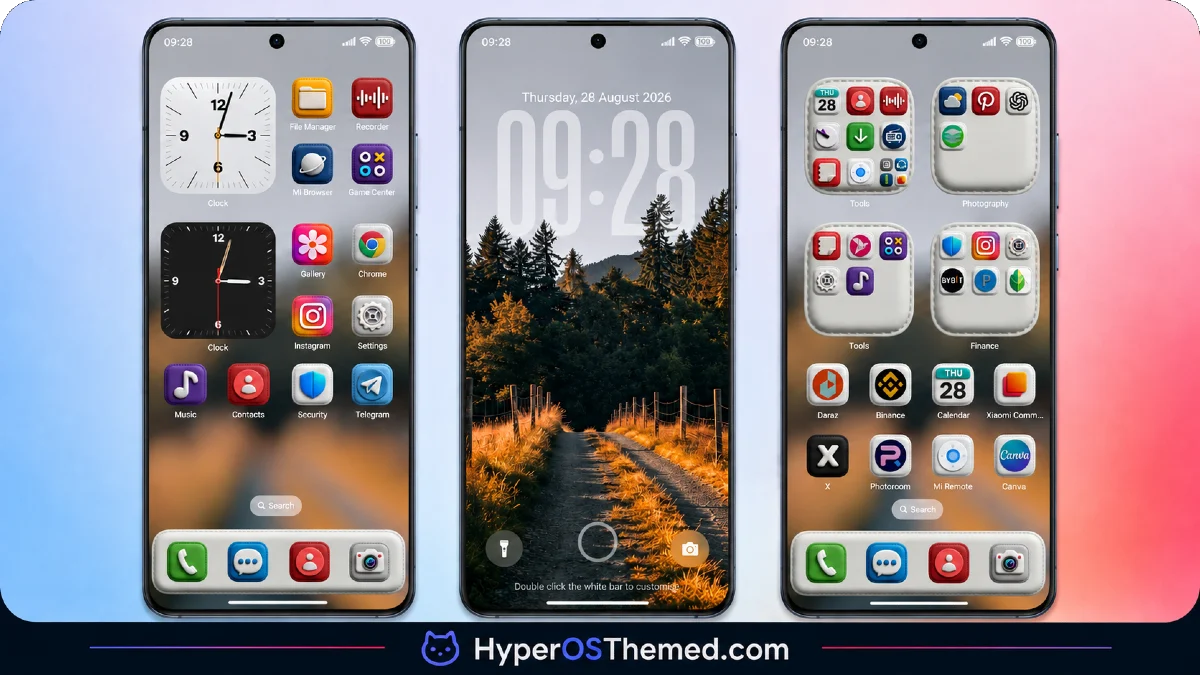
- Leather-Style Icon Pack: The icons use a soft, textured leather finish instead of flat colors, which gives the home screen a noticeably different feel from stock HyperOS. Most major apps get the full redesign, though a few niche apps I tested (a couple of regional shopping apps) kept their default look.
- Minimal, Clutter-Free Interface: Menus and app drawers are stripped down with fewer visual elements competing for attention. Scrolling through settings felt a bit calmer on my POCO F6 compared to the default HyperOS layout, mainly because of the reduced contrast between panels.
- Redesigned Lock Screen: The lock screen uses a simplified clock layout with more spacing around the time display. It’s easy to read at a glance, though I noticed the notification stack sits slightly lower than stock, which took a day or two to get used to.
- Custom Widget Set: The included widgets match the soft leather tone rather than looking like a separate add-on. They’re mostly clock and weather widgets, and while they look tidy on the home screen, there isn’t a huge variety to choose from if you like swapping widgets often.
- Muted Color Palette: Colours across the UI lean toward warm browns and soft neutrals instead of the brighter tones HyperOS uses by default. It’s easier on the eyes during longer sessions, especially at night, though it may look a little flat to anyone who prefers high-contrast themes.
- Updated Control Center Toggles: Quick toggle icons for Wi-Fi, Bluetooth and similar settings get a cleaner, more rounded redesign. The layout itself didn’t change much, so it’s more of a visual refresh than a functional one.
OX LS Theme Preview
Screenshots below show how the leather icon pack looks on the home screen, along with the redesigned lock screen and control center panel. It’s worth glancing through these before downloading, since the muted color palette reads very differently in photos than it does described in text.
OX LS Theme Details
| Attribute | Details |
|---|---|
| Availability | Free, via Xiaomi Theme Store |
| Supported Devices | Xiaomi, Redmi and POCO phones running HyperOS or MIUI |
| Theme Name | OX LS |
| Designer | OXFURY |
| Compatibility OS | HyperOS / MIUI |
| Features | Leather-style icon pack, minimal interface, redesigned lock screen, custom widgets, muted color palette, updated control center |
| File Size | 53.1 MB |
OX LS Theme Compatibility
OX LS works across both HyperOS and MIUI builds, which makes it more flexible than themes locked to a single OS version. I tested it on a POCO F6 running HyperOS and a slightly older Redmi Note running MIUI, and both handled the icon pack and lock screen changes without issues.
The one thing to watch for is the file size, since at 53.1 MB it takes noticeably longer to download and apply compared to lighter themes, especially on slower mobile data. Custom ROM users should also expect the leather icon texture to look slightly less sharp on lower resolution displays, since the detail in the icons benefits from a higher pixel density screen.
Get OX LS Theme
Download OX LS HyperOS & MIUI Theme only through the official Theme Store link rather than random file-sharing sites or unofficial APK repositories. Third-party MTZ files circulating outside the store are sometimes altered versions that don’t match what the designer actually released, and there’s no way to verify what’s been added or changed. Using the official link also means you’ll get any future updates the designer pushes out, instead of being stuck with a static, unsupported file.
How to Apply OX LS Theme
Follow the steps below to apply the theme:
- Open the Theme Store link given above on your Xiaomi, Redmi or POCO device.
- This will redirect you to the Theme Store.
- Download and install the theme.
- Tap on Apply.
- Customize specific elements such as icons, lock screen or status bar if needed.
- Reboot your device for the full effect, though this step is optional.
Note: If anything looks slightly off right after installing, a simple restart typically sorts it out. On our end, we’ve gone through several rounds of testing across different devices and haven’t come across any real issues worth flagging. Still, if your device shows something unusual after applying it, feel free to leave a comment describing what you’re seeing, and we’ll try to help figure it out.
Installing OX LS on Custom ROM Devices
Owners of Custom ROMs like Xiaomi.eu, MIUIRoom, MIUI SR or HyperOS CN won’t be able to use the direct Theme Store link, so the MTZ file needs to be added manually instead. The process looks like this:
- Save the MTZ file for OX LS onto your device.
- Open up the Theme Store app.
- Head into the Themes tab.
- Scroll toward the bottom until the Import button appears, then select it.
- Use your file manager to locate the downloaded .mtz file.
- Allow a few seconds for the import to finish processing.
- Once it appears in your theme list, tap it to apply.
Why Choose OX LS Theme?
- Distinct icon style — the leather texture stands out from the usual flat or glossy icon packs most themes use.
- Cross-compatible — works on both HyperOS and MIUI instead of being locked to one system.
- Easy on the eyes — the muted palette works well for extended screen time, particularly at night.
- Consistent widget design — widgets match the theme instead of clashing with the leather aesthetic.
- Minimal visual clutter — menus feel calmer thanks to reduced contrast and simplified layouts.
- Wide device support — tested successfully on both newer and older Xiaomi hardware.
- Free official download — no cost involved and no need to search sketchy third-party sources.
- Regular update potential — official Theme Store distribution means future fixes reach users automatically.
Conclusion
OX LS is a solid pick if you want your Xiaomi, Redmi or POCO phone to look a little more premium without going overboard on color or animation. The leather icon pack and muted tones give it a distinct identity, even if the widget variety and larger file size are minor downsides. For anyone who prefers a calmer, more understated look over the default HyperOS style, it’s worth the download.
You may also like:
Retina HyperOS Theme for Xiaomi, POCO and REDMI Phones
Aurora Pulse HyperOS Theme With Premium Gradient Redesign for Xiaomi, POCO & Redmi
Purple Stars HyperOS Theme with Clean Minimal Redesign for Xiaomi, POCO & Redmi
MS M1 HyperOS Theme with iOS 27 Lock Screen and Super Capsule for Xiaomi, POCO & Redmi
Liquid Crystal HyperOS Theme for Xiaomi, Redmi, and POCO Phones
