
Retina HyperOS Theme is a HyperOS 3.0 theme built around a darker, more subdued visual style for Xiaomi, Redmi and POCO devices. Instead of the usual bright icon grid and light control panels, this theme leans into a moody dark aesthetic that carries across the icons, lock screen and system apps. It’s aimed at users who keep Dark Mode on most of the time and want their whole interface to actually match that choice, rather than having a few dark corners next to bright default menus. The theme is available for free through the official Xiaomi Theme Store, and it comes in at a fairly light file size for what it changes.
Retina HyperOS Theme Features
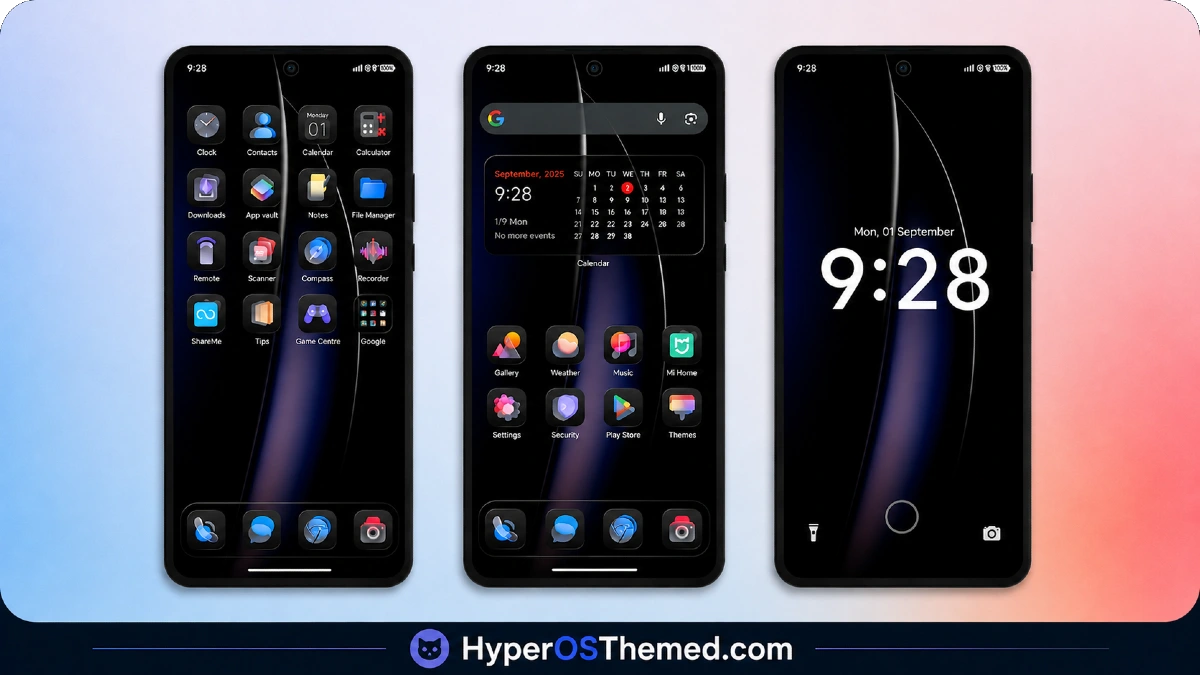
- Dark Icon Pack: Retina replaces the majority of stock and popular third-party app icons with a matte, dark-toned redesign. The icon shapes stay fairly close to the original outlines, so the layout still feels familiar even with the new color treatment. A small number of less common apps keep their default icons since not every app is covered.
- Custom Lock Screen Layout: The lock screen gets a slightly repositioned clock and a thin separator line above the notification area. The overall look feels less cluttered than the stock HyperOS lock screen, and the dark background keeps the time and notifications easy to read without much glare.
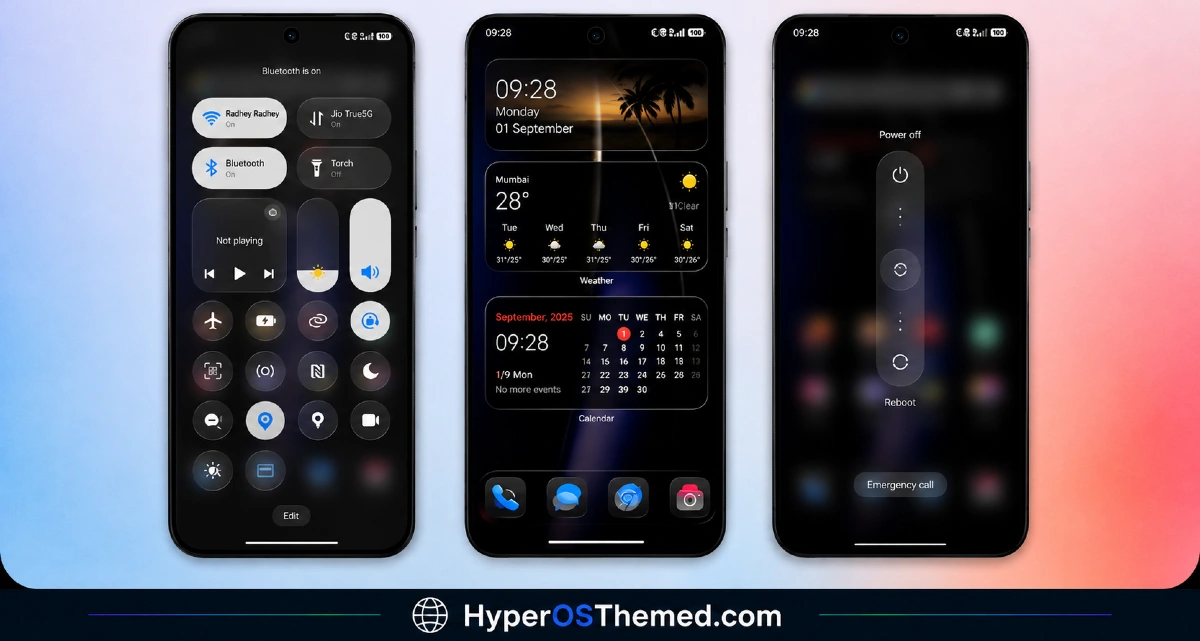
- Redesigned Control Center: Quick settings tiles get darker backgrounds and slightly bolder icons for toggles like Wi-Fi, Bluetooth and Flashlight. The spacing between tiles is a touch wider too, which makes the panel feel a bit less cramped compared to the default layout.
- Dark Dialer and Messages UI: Both the phone dialer and messaging app are restyled to match the rest of the theme, with rounded contact avatars and darker call log backgrounds. This keeps the whole interface consistent instead of switching back to a bright screen the moment you open a call log.
- Depth Wallpaper Option: The theme includes a wallpaper with a subtle depth effect that shifts slightly with the phone’s motion sensor. It’s a nice touch on the lock screen, though it’s more of a visual extra than something that changes daily use in any real way.
- Built for Dark Mode: Retina is designed specifically to work alongside system Dark Mode rather than as a standalone light or hybrid theme. Applying it without Dark Mode turned on can leave some panels looking a little mismatched, so it’s worth switching that setting on first.
Retina HyperOS Theme Preview
Before installing, it helps to see how Retina actually looks once it’s applied. The screenshots below show the dark icon layout, the redesigned lock screen and the updated control center panel, so you can get a feel for the overall tone before committing to the download.
Retina HyperOS Theme Overview
| Attribute | Details |
|---|---|
| Availability | Free, via Xiaomi Theme Store |
| Supported Devices | Xiaomi, Redmi and POCO phones running HyperOS |
| Theme Name | Retina |
| Designer | Alimun |
| Compatible OS | HyperOS 3.0 |
| Features | Dark icon pack, custom lock screen, redesigned control center, dark dialer and messages UI, depth wallpaper |
| File Size | 10.3 MB |
Retina HyperOS Theme Compatibility
Retina is designed for HyperOS 3.0 and works across Xiaomi, Redmi and POCO devices running that version. Since it’s built around a dark visual language, results may look inconsistent on older HyperOS builds where some of the redesigned panels aren’t fully supported.
Custom ROM users on builds like Xiaomi.eu, MIUIRoom or HyperOS CN can still install it manually through the MTZ file, though a few UI elements may not render exactly as intended outside the official global stable ROM. The main limitation worth knowing about is that this theme is meant to pair with Dark Mode, so anyone who prefers switching between light and dark throughout the day may notice a few icons or menus that don’t quite match in Light Mode.
Get Retina HyperOS Theme
Retina should only be downloaded through the official Xiaomi Theme Store link rather than random third-party APK or MTZ sharing sites. Files from unofficial sources are sometimes altered or bundled with extra software you didn’t ask for, and there’s no guarantee they match the version the designer actually published. Sticking to the Theme Store also means any future updates or bug fixes reach your device automatically.
How to Apply Retina HyperOS Theme
Follow the steps below to apply the theme:
- Open the Theme Store link given above on your Xiaomi, Redmi or POCO device.
- This will redirect you to the Theme Store.
- Download and install the theme.
- Tap on Apply.
- Customize specific elements such as icons, lock screen or status bar if needed.
- Reboot your device for the full effect, though this step is optional.
Note: In case anything looks off right after applying the theme, a quick restart usually clears it up. We’ve gone through this theme carefully on our end and haven’t run into any real problems during testing, so most setups should apply it without trouble. That said, if something still doesn’t look right on your device, drop a comment below and we’ll get back to you as quickly as we can.
Installing Retina HyperOS Theme on Custom ROM Devices
If your phone is running a Custom ROM such as Xiaomi.eu, MIUIRoom, MIUI SR or HyperOS CN, the regular Theme Store link won’t apply the theme automatically, so you’ll need to bring in the MTZ file yourself. Here’s how that process works:
- Grab the MTZ file for the theme first.
- Launch the Theme Store app on your phone.
- Go into the Themes section.
- Keep scrolling down until the Import option shows up, then tap it.
- Browse through your file manager and find the saved .mtz file.
- Give it a moment to finish importing, after which the theme should show up in your list.
- Tap on it from there to apply it to your device.
Why Choose Retina HyperOS Theme?
- Consistent dark styling — the dark treatment runs across icons, dialer and messages instead of stopping at the wallpaper.
- Lightweight file size — at 10.3 MB it installs quickly without eating into storage.
- Simple, familiar icon layout — icon shapes stay close to stock, so navigation doesn’t feel unfamiliar.
- Cleaner lock screen — the reworked clock position and divider line reduce visual clutter.
- Depth wallpaper as a bonus — a small extra touch for anyone who likes subtle motion effects.
- Wider control center spacing — toggles feel a little easier to tap accurately.
- Free through an official channel — no cost and no need to search third-party sites.
- Good match for Dark Mode users — built specifically for people who already keep their phone in Dark Mode.
Conclusion
Retina HyperOS Theme is a straightforward dark theme for anyone using a Xiaomi, Redmi or POCO phone with HyperOS 3.0, focused mainly on consistency rather than flashy extras. It won’t suit users who switch between Light and Dark Mode often, since the design is clearly built around the darker setting. For those who keep Dark Mode on by default though, it’s a small, free way to make the whole interface feel a bit more put together.
You may also like:
Aurora Pulse HyperOS Theme With Premium Gradient Redesign for Xiaomi, POCO & Redmi
Purple Stars HyperOS Theme with Clean Minimal Redesign for Xiaomi, POCO & Redmi
MS M1 HyperOS Theme with iOS 27 Lock Screen and Super Capsule for Xiaomi, POCO & Redmi
Liquid Crystal HyperOS Theme for Xiaomi, Redmi, and POCO Phones
Jing HyperOS Theme with Complete System-Wide Redesign for Xiaomi, POCO & Redmi
