
Super Nai 27 HyperOS Theme stands out for two reasons that don’t usually appear together in the same theme, an unusually small 66 MB file size and no listing on the official Xiaomi Theme Store, requiring a direct MTZ download instead. The theme’s own source material also carries a specific warning about lockscreen errors potentially causing a bootloop on certain HyperOS or MIUI versions, which is a caution most theme descriptions never mention. Between the tiny file size, the store absence, and that bootloop warning, testing this one properly on a POCO X6 mattered more than usual before recommending it.
The core pitch centers on a gradient color palette combined with a clean, uncluttered layout, positioned as a hybrid between iOS-inspired aesthetics and standard MIUI design flexibility. With hundreds of new icons promised alongside wallpaper, Control Center, and lock screen changes, the goal here was confirming whether a file this small could actually deliver on that breadth of changes, and whether the bootloop warning turned out to be a real concern during installation.
Super Nai 27 HyperOS Theme Features
- Gradient Wallpaper Collection: The wallpapers use a clean gradient color palette rather than photography-based imagery, producing a distinct, consistent look across the lock screen and home screen. Accent colors throughout the rest of the UI pull from that same gradient palette, keeping the visual language unified rather than mismatched between the wallpaper and system elements.
- Hundreds of Custom Icons: The icon pack covers a notably wide range of apps, giving the home screen and app drawer a premium, consistent look rather than reverting to default icons for anything beyond the most common apps. This breadth is unusual given the theme’s small overall file size.
- Redesigned Control Centre: Quick settings and toggles pick up matching visual treatment tied to the theme’s gradient identity, rather than being left with stock HyperOS styling while only the home screen changes. Testing rapid toggling showed the panel staying responsive despite the visual overhaul.
- Clean, Uncluttered Lock Screen: The lock screen design prioritizes simplicity and organization over decorative elements, reducing visual clutter and making it easier to access what’s needed without extra navigation. This restrained approach is where the source material’s bootloop warning applies most directly, since lock screen elements are historically the more fragile part of MTZ theme packages.
- Universal HyperOS Compatibility: Rather than targeting a specific HyperOS version, Super Nai 27 is built to apply consistently across Xiaomi, POCO, and Redmi devices running HyperOS broadly. This wider compatibility net trades some of the version-specific polish seen in themes like TradM or MS M1 for broader device reach.
- Compact 66 MB File Size: At just 66 MB, this is one of the smallest full-featured themes tested, covering icons, wallpaper, Control Center, and lock screen changes in a fraction of the space larger premium themes require. Installation on the POCO X6 was close to instant given the minimal file size.
Super Nai 27 HyperOS Theme Preview
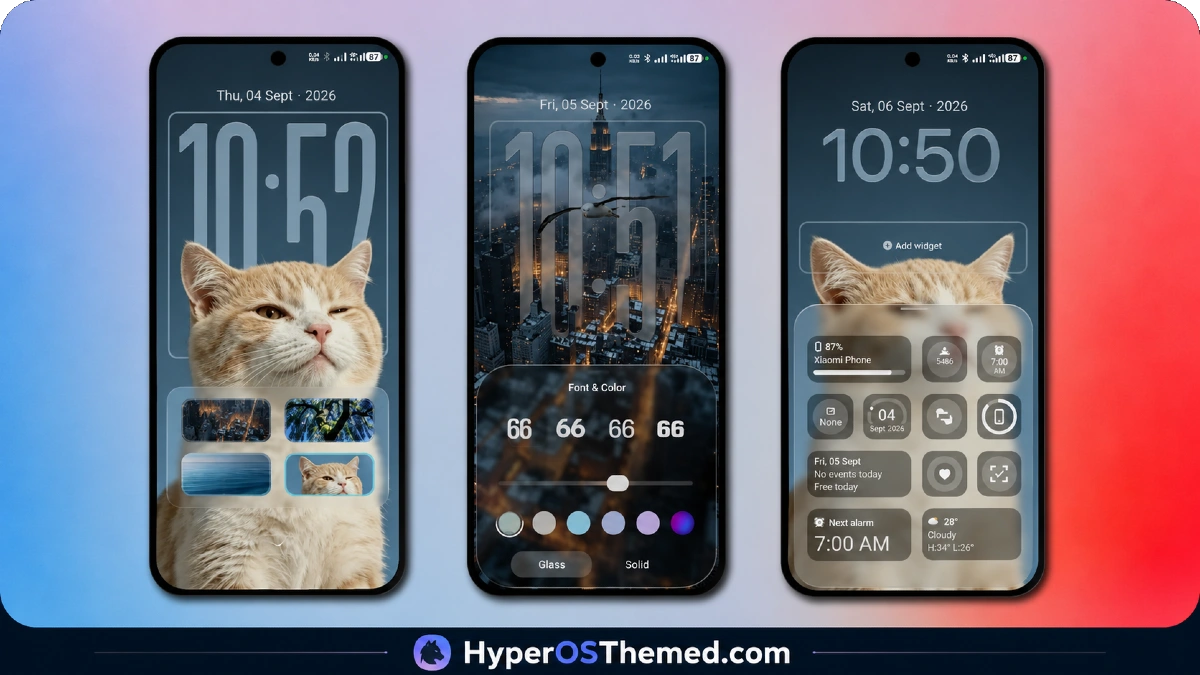
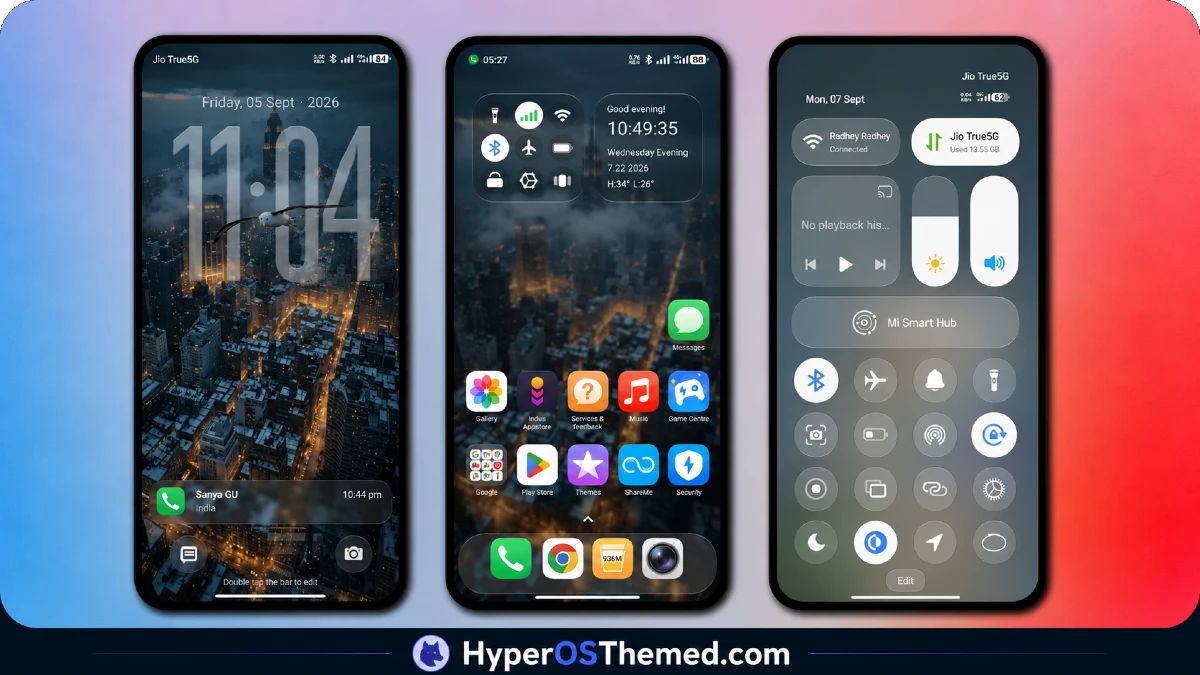
Gradient tones carry the visual identity throughout, with wallpaper colors extending into icon accents and system UI elements for a genuinely unified look rather than a wallpaper sitting disconnected from everything around it.
The overall composition stays clean and restrained, avoiding the visual noise that busier premium themes sometimes introduce, while still covering enough ground across icons and system menus to feel complete rather than sparse. It reads as deliberately minimal rather than underdeveloped, a harder balance to strike in a file this small.
Super Nai 27 HyperOS Theme Details
| Detail | Info |
|---|---|
| Theme Name | Super Nai 27 |
| Designer | Guffy |
| Compatibility | HyperOS |
| Region | Global |
| File Size | 66 MB |
| Store Availability | Not available on Theme Store, direct MTZ download only |
Why to Choose Super Nai 27 HyperOS Theme
Given the source material’s specific warning about lockscreen-related bootloop risk on certain versions, the lock screen received particularly close attention during testing on the POCO X6, and it applied without triggering any restart loop or stability issue throughout the test period. Battery drain stayed close to baseline across normal use, which tracks given the compact file size and lack of heavy animation work. Icon rendering stayed sharp across the wide coverage promised, and the Control Center redesign remained responsive under repeated toggling despite the gradient styling applied throughout.
Compatibility Notes
Super Nai 27 HyperOS Theme lists broad HyperOS compatibility rather than targeting a specific version number, and the POCO X6 ran it without stability issues during testing. The source material explicitly notes that behavior may differ across different MIUI and HyperOS versions, with lock screen elements specifically flagged as a potential bootloop risk on certain builds, so users on less common firmware combinations should proceed with some caution and be prepared to report issues if the lock screen misbehaves. Since this theme isn’t listed on the official Theme Store, standard Theme Store import steps don’t apply here, and installation depends entirely on the direct MTZ download method.
Download Super Nai 27 HyperOS Theme
Because Super Nai 27 HyperOS Theme isn’t available through the official Xiaomi Theme Store, the MTZ file must be downloaded directly from the source link provided.
Given the explicit bootloop warning tied to lock screen elements on certain HyperOS and MIUI versions, backing up your current theme settings before applying this one is a reasonable precaution, particularly if you’re on a less common firmware build rather than a standard current HyperOS release.
Steps to Apply the Theme
- Download the Super Nai 27 MTZ file directly from the provided link, since it isn’t available through the Theme Store
- Open the Theme Store app on your Xiaomi, Redmi, or POCO device
- Select the Themes option, then scroll down and tap Import
- Select the file manager and locate the downloaded .mtz file
- Wait for the theme to import, then tap it to apply
- Restart your device if any overlapping or visibility issues appear after applying
What Makes Super Nai 27 HyperOS Theme Worth Considering
- Delivers icons, wallpaper, Control Center, and lock screen changes in just 66 MB
- Gradient palette stays consistent across wallpaper, icons, and system accents
- Broad HyperOS compatibility rather than being locked to one specific version
- Lock screen applied without triggering the bootloop issue flagged in the source warning during testing
- Clean, distraction-reduced layout suited to daily productivity use rather than pure decoration
Final Verdict
Super Nai 27 HyperOS Theme packs a surprising amount of visual consistency into a 66 MB file, and the gradient-driven design holds together across icons, wallpaper, and system menus better than its small size might suggest. The lack of Theme Store availability and the explicit bootloop warning around lock screen elements are worth taking seriously, especially for anyone on less common firmware, though the theme applied cleanly without issue on a POCO X6 throughout testing. For users specifically wanting a lightweight, gradient-based minimal theme and comfortable with a direct MTZ install, it delivers real value in a notably small package.
You may also like:
MS M1 HyperOS Theme with iOS 27 Lock Screen and Super Capsule for Xiaomi, POCO & Redmi
Liquid Glass HyperOS Theme for Xiaomi, POCO and REDMI Phones
Edge HyperOS Theme Xiaomi With Minimalist Mountain Silhouette Design for HyperOS
TronM HyperOS Theme with Vibrant Orange Neon Design for Xiaomi & Redmi
