
Seeing “V2” in the name made me wonder what the original Valence V2 HyperOS Theme looked like and whether this update actually fixed anything worth knowing about, so I went in more curious about the iteration than the theme itself. I couldn’t track down much on the first version, but I installed V2 on my POCO X6 anyway to judge it on its own terms rather than as a sequel to something I never got to compare it against.
Valence V2 HyperOS Theme Features
- System-Wide Consistency: The theme extends into Settings, the notification panel, dialer, and messaging app rather than stopping at the home screen. Checking through each menu for something the theme missed, I came up empty, which suggests whatever changed between versions, this coverage held up.
- Redesigned Icon Pack: Icons keep to minimalistic shapes with a balanced palette that stays legible in both light and dark modes. Most of my regularly used apps picked up the new icons cleanly, though a rideshare app and a local news app kept their defaults throughout testing.
- Enhanced Status Bar and Control Centre: Quick settings toggles get noticeably more spacing than stock HyperOS provides, with cleaner, more legible icons and labels. Testing rapid toggles on Wi-Fi and mobile data a few times showed no lag or misalignment.
- Lock Screen Improvements: The layout simplifies down to a clear time display and notification visibility without extra elements crowding the space. Font choices held up for readability even glancing at it quickly outdoors.
- Refined Settings Interface: Options are grouped more sensibly than the stock menu, and the spacing changes genuinely made scrolling through settings feel less tedious. I noticed this most while digging through display and connectivity settings a few times.
- Smooth Animations: Subtle animation touches show up switching between home screens and opening the app drawer. They’re understated rather than showy, and nothing stuttered on the X6’s hardware during testing.
Valence V2 HyperOS Theme Preview
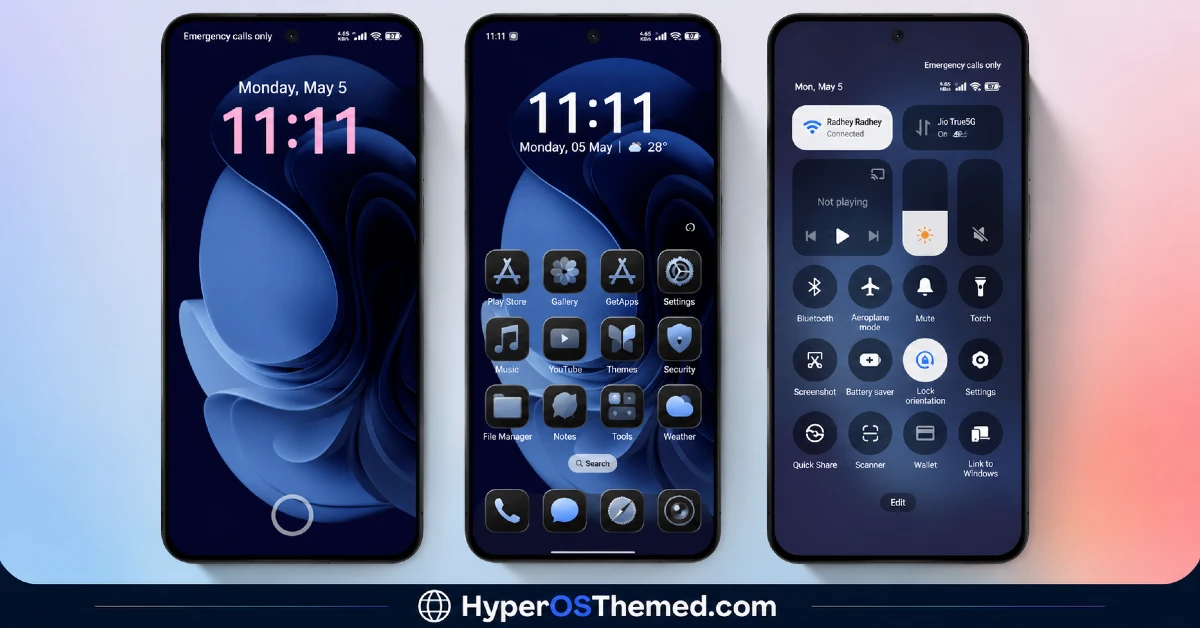
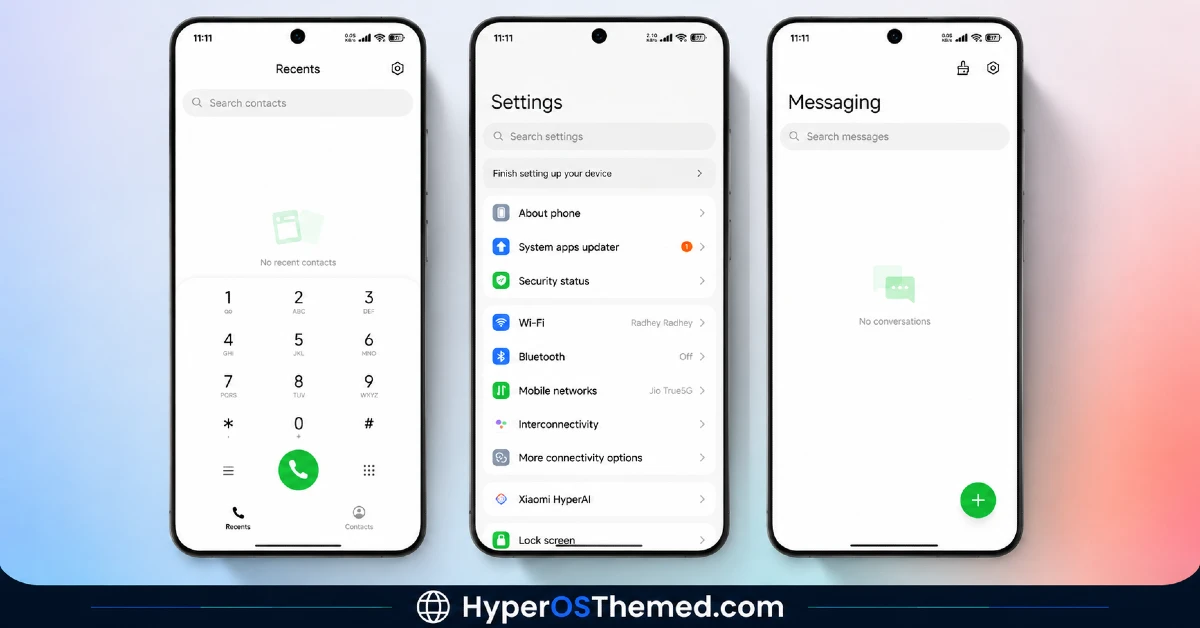
The visual style stays restrained and balanced, mixing light and dark tones without leaning on gradients, transparency, or any decorative flourishes. Icons keep a simple, rounded shape rather than anything elaborate, which keeps a full app grid looking orderly rather than busy. Whatever the original Valence looked like, this version reads as a professional, distraction-free setup rather than anything experimental or flashy.
Valence V2 HyperOS Theme Details
| Detail | Info |
|---|---|
| Theme Name | Valence V2 |
| Designer | Eleven |
| Compatibility | HyperOS 2, HyperOS 3 |
| Features | Minimal, Redesigned Icons, Clean UI |
| File Size | Not listed by designer |
Valence V2 HyperOS Theme Performance
I ran this through regular daily use on the POCO X6 with HyperOS 2, covering messaging, browsing, and a handful of gaming sessions to check for slowdown. Performance stayed smooth throughout, no lag in the app drawer, no delayed transitions switching between home screens. Battery drain sat within a percent or two of my stock baseline, which tracks given the lack of transparency effects or animated wallpapers. The recurring annoyance was the two unthemed app icons standing out every time I scrolled past them in the drawer.
Valence V2 HyperOS Theme Compatibility
Valence V2 supports HyperOS 2 and HyperOS 3, covering most current Xiaomi, Redmi, and POCO devices. I tested it on a POCO X6 with HyperOS 2 without any stability issues. The designer notes some UI elements may shift slightly depending on device model and system version, which lines up with the couple of icon inconsistencies I ran into. It’s not built for MIUI 12, 13, or 14, so older firmware isn’t recommended. Xiaomi.eu and similar custom ROM users should be able to import it without major issues, though results may vary a bit depending on how closely the ROM tracks stock HyperOS.
Get Valence V2 HyperOS Theme
Download the Valence V2 HyperOS Theme through the official Xiaomi Theme Store link rather than third-party APK sites or file-sharing forums claiming to offer the same file. Sideloaded installers from unverified sources are a common way people end up with unnecessary permissions or bundled junk, so sticking with the official route is worth it even for a straightforward theme like this.
Note: If the Official Theme Store Link doesn’t redirect properly, try opening the page in Chrome or the default Xiaomi browser, since other browsers may not handle the redirect correctly.
How to Apply Valence V2 HyperOS Theme
Follow the steps below to apply the theme:
- Open the Theme Store Link given above on your Xiaomi / REDMI / POCO device
- This will redirect you to Theme Store.
- Download and install the theme
- Tap on Apply
- Customize specific elements (icons, lock screen, status bar) if needed
- Reboot your device (optional for full effect)
Why Choose Valence V2 HyperOS Theme?
- Applies consistently across nearly every system app, not just the home screen
- Icon pack stays clean and professional without unnecessary decoration
- Settings reorganization genuinely speeds up navigating menus
- No measurable battery cost based on real use
- A dependable minimal option regardless of what changed since the first version
Conclusion
Not having the original Valence to compare against made this harder to judge as an “update,” but taken on its own, V2 held up as a solid, low-distraction theme on my POCO X6. It’s not going to turn heads next to anything more visually ambitious, and the two icons that never got themed were a small but persistent gap.
Compared to other minimal HyperOS themes I’ve tested, this one earns its keep through genuine system-wide consistency rather than anything tied to whatever came before it. If a clean, dependable setup is what you’re after, it’s a solid pick regardless of the version number.
You may also like:
Blue Nocturne HyperOS Theme for Xiaomi, POCO and Redmi Phones
OX GR1 HyperOS Theme: A Dark Red Anime Look for Xiaomi, POCO & Redmi
HyperBlue HyperOS Theme for Xiaomi, POCO and REDMI Phones
Guofeng 18 HyperOS Theme for Xiaomi, POCO and REDMI Phones with iOS-Styled
