
Getting Guofeng 18 HyperOS Theme wasn’t as simple as tapping a Theme Store link, since this one’s exclusive to the China Theme Store and only reaches Global devices through a backup file. That extra hoop made me curious whether the theme itself justified the hassle, so I went through the whole backup and restore process on my POCO X6 to find out.
Guofeng 18 HyperOS Theme Features
- Custom Lock Screen: The lock screen carries genuine animation rather than sitting static, with built-in shortcuts for music, flashlight, and notifications right on the display. Having quick access to the flashlight toggle directly from the lock screen turned out more useful day to day than I expected from what looked like a purely cosmetic feature.
- Modified Control Center: Toggles for brightness, Wi-Fi, and other quick settings got a redesign paired with smoother animation than stock HyperOS offers. Testing rapid switches between Wi-Fi and Bluetooth showed no lag or visual stutter despite the added animation work.
- Themed Icon Set: Icons follow a flat, uniform design language that gives the home screen a cohesive, premium feel rather than a mismatched assortment of styles. Coverage across my commonly used apps was solid, though a couple of region-specific apps kept their default icons, which tends to happen with China-region themes on Global devices.
- Dialer and Messaging UI: Both apps get a minimalist reskin that adapts properly between dark and light modes rather than being locked to one appearance. Switching my system theme between light and dark during testing showed both apps adjusting correctly without any visual breakage.
- System App Reskin: Settings, File Manager, and Calculator all pick up a matching visual tone rather than sticking out as untouched stock apps. This is the detail that separates a genuinely complete theme from a home-screen-only reskin, and Guofeng 18 handled it consistently across every system app I checked.
- Fluid Animations: Scrolling and general system transitions carry noticeably smoother motion throughout, adding polish without feeling like it’s slowing anything down. This held up fine even during heavier multitasking on the X6.
Guofeng 18 HyperOS Theme Preview
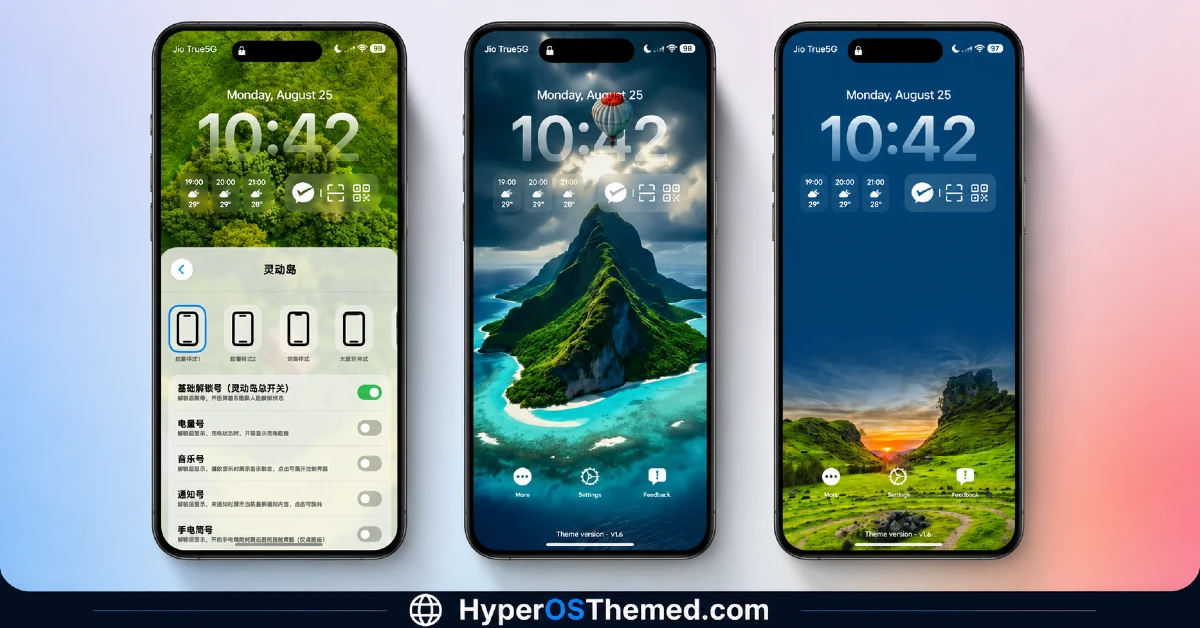
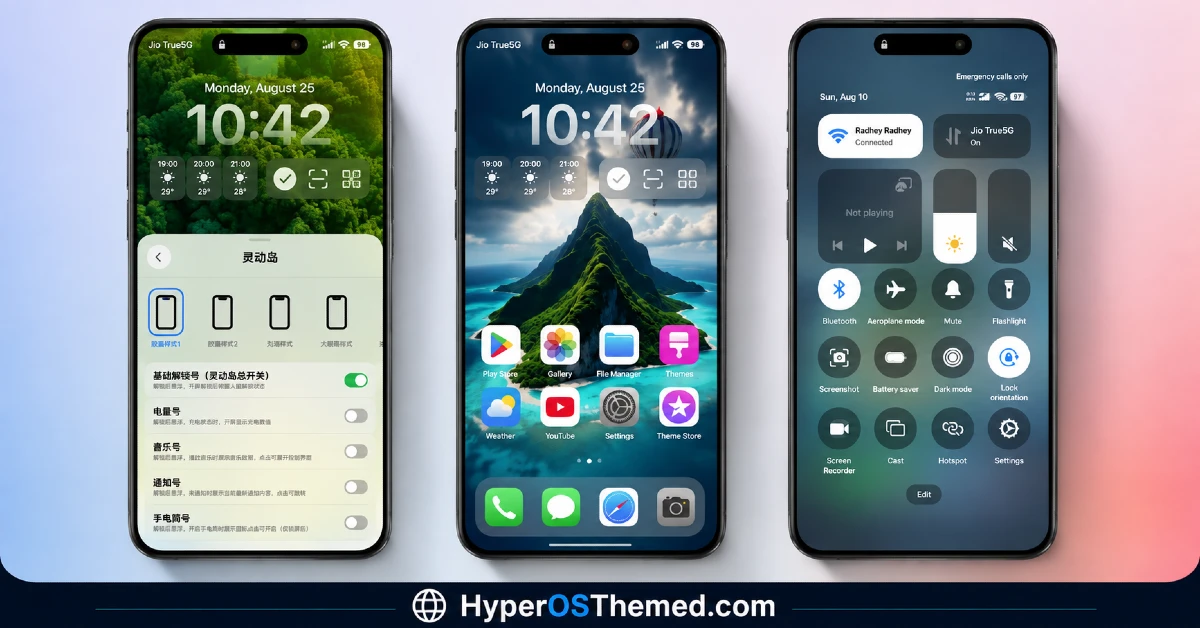
The visual identity leans into a vibrant yet controlled aesthetic, with flat, uniform icons giving the home screen a premium, cohesive look rather than anything cluttered. The animated lock screen adds real visual interest without tipping into excess, and the consistent reskinning across system apps keeps the whole experience feeling deliberate rather than piecemeal. It comes across as more polished than most free themes, which tracks given the scale of the 99.7 MB package.
Guofeng 18 HyperOS Theme Details
| Detail | Info |
|---|---|
| Theme Name | Guofeng 18 |
| Designer | Zhou Fan |
| Compatibility | HyperOS, HyperOS 2, HyperOS 3 |
| Features | Minimal, Themed Icons, Animated Lock Screen |
| File Size | 99.7 MB |
Guofeng 18 Theme Performance
I used Guofeng 18 HyperOS Theme on a POCO X6 through daily use including messaging, browsing, and gaming sessions to check how the animation-heavy design held up. Given the large file size and the amount of fluid animation baked in, I expected some lag, but scrolling and transitions stayed smooth throughout testing.
Battery drain came in a bit higher than my usual baseline, which lines up with the animated lock screen and Control Center running more actively than a typical static theme. The main hiccup wasn’t really the theme itself but the install process, the backup and restore method took noticeably longer and required more careful steps than a standard Theme Store download.
Guofeng 18 HyperOS Theme’s Compatibility
Guofeng 18 HyperOS Theme lists support for HyperOS, HyperOS 2, and HyperOS 3, covering a wide range of current Xiaomi, Redmi, and POCO devices. I tested it on a POCO X6 without major issues, though the couple of region-specific icons that didn’t take properly are a fairly predictable side effect of installing a China-region theme on a Global ROM.
It’s not intended for MIUI-only devices predating HyperOS, so applying it outside of HyperOS isn’t recommended. Custom ROM users should be able to follow the same backup restore method, though given how manual the process is, expect it to take longer than a typical MTZ import regardless of which ROM you’re running.
Get Guofeng 18 HyperOS Theme
Since Guofeng 18 HyperOS Theme isn’t available through the standard Global Theme Store, getting it requires the backup file method shared through Telegram rather than a direct in-app download. If you do have access to the China Theme Store on your device, downloading directly from there and supporting the original designer is the better route.
Avoid grabbing repackaged versions from random third-party sites claiming to offer the same file, since backup files from unverified sources are harder to confirm as unmodified compared to a standard MTZ download.
How to Apply Guofeng 18 HyperOS Theme
Because this theme requires the backup restore method rather than a direct Theme Store install, follow these steps carefully:
- Download the Guofeng 18 backup file from the link provided
- Go to Settings > About Phone > Backup & Restore > Mobile Device, enter your lock screen password, uncheck all options, then open Other System App Data
- Scroll down and select only the Themes app, then tap Backup to generate a current backup file
- Open File Manager > MIUI > backup > AllBackup, open the latest backup folder, and replace the existing file with the one you downloaded, making sure to replace rather than copy-paste it
- Go back to Backup & Restore, tap Restore, select the theme backup, and tap Restore again
- Open the Themes app, go to My Account > Themes, find the restored theme, and tap Apply
If the theme doesn’t apply fully on the first try, restarting your device or reapplying it usually resolves the issue.
Why Choose Guofeng 18 HyperOS Theme?
- Animated lock screen with functional shortcuts goes beyond typical decorative lock screens
- System app reskinning reaches Settings, File Manager, and Calculator, not just the home screen
- Dialer and messaging UI adapt properly between light and dark modes
- Fluid animations add genuine polish without noticeably hurting performance
- Detailed enough to feel like a premium theme despite requiring a manual install
Conclusion
Getting Guofeng 18 HyperOS Theme running on my POCO X6 took more patience than a typical theme install, but the animated lock screen and thorough system app reskinning made the backup and restore process feel worthwhile in the end. The couple of unthemed region-specific icons were a minor but expected side effect of the China-region packaging, and the manual install process isn’t for anyone looking for a quick one-tap download.
Compared to other theme store exclusives I’ve come across, Guofeng 18 delivers enough genuine polish and system-wide consistency to justify the extra install effort. If you don’t mind the backup method, it’s one of the more complete themes available right now.
You may also like:
Bintang HyperOS Theme for Xiaomi, POCO and Redmi Phones
Green HOS3 HyperOS Theme for Xiaomi, POCO and REDMI Phones
Floating Stone HyperOS Theme for Xiaomi, Redmi and POCO
Blackness HyperOS Theme: A Dark iOS-Style Look for Xiaomi, POCO & Redmi
Xeon Slay HyperOS Theme for Xiaomi, Redmi and POCO
Neon Orbit HyperOS Theme with A Clean Minimal Look for Xiaomi, POCO & Redmi
