
I’d already tried VK Anime a while back and came away impressed, so when OX GR1 HyperOS Theme popped up promising a similar dark red anime aesthetic, I wanted to see how the two compared rather than just taking the description at face value. I put it on my POCO X6 mainly to test it directly against that earlier theme instead of judging it in isolation.
OX GR1 HyperOS Theme Features
- Dark Red Anime Aesthetic: The overall color scheme leans into deep reds against black, giving it a moody, intense look rather than anything soft or pastel. Compared to VK Anime’s silhouette-and-grid approach, this one feels more saturated and aggressive in tone, which fits the “gaming-inspired” framing in the description.
- Bold Dynamic Clock System: The clock doesn’t sit static, shifting depending on how it’s configured through the theme’s settings. It added a bit of visual movement that kept the lock screen from feeling flat, similar in spirit to other dynamic lock screens I’ve tested but with its own distinct red-toned execution here.
- Custom Dark Icon Pack: Icons stick to a dark base with red accent detailing that ties into the broader color scheme. Coverage across my commonly used apps was solid, though a couple of niche apps kept their default icons and stood out against the otherwise uniform set.
- Gaming-Inspired Control Centre: Pulling down the control center gives a sharper, high-contrast panel that feels more aggressive than a typical soft glass or minimal design. Toggles stayed responsive when I tested rapid switching between Wi-Fi and Bluetooth, matching the snappy feel the gaming framing suggests.
- Sleek Gray Modifications: Gray tones show up as a secondary accent throughout the interface, breaking up what could otherwise be an overwhelming red-and-black combination. It’s a small detail, but it kept the overall look from feeling too heavy or monotone.
OX GR1 HyperOS Theme Preview
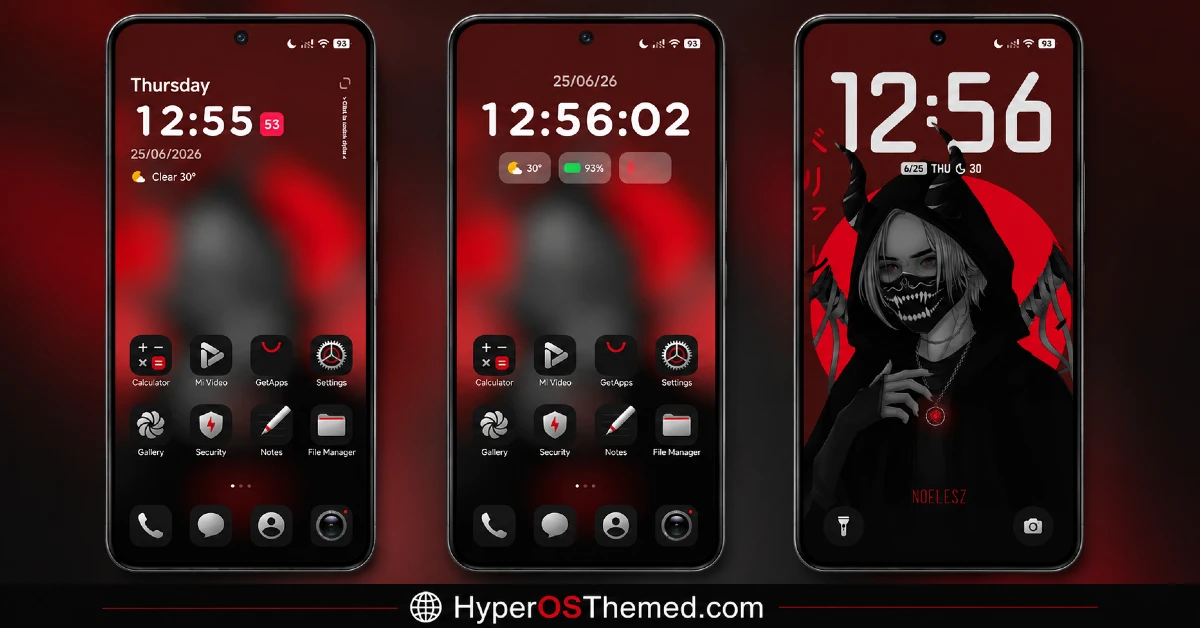
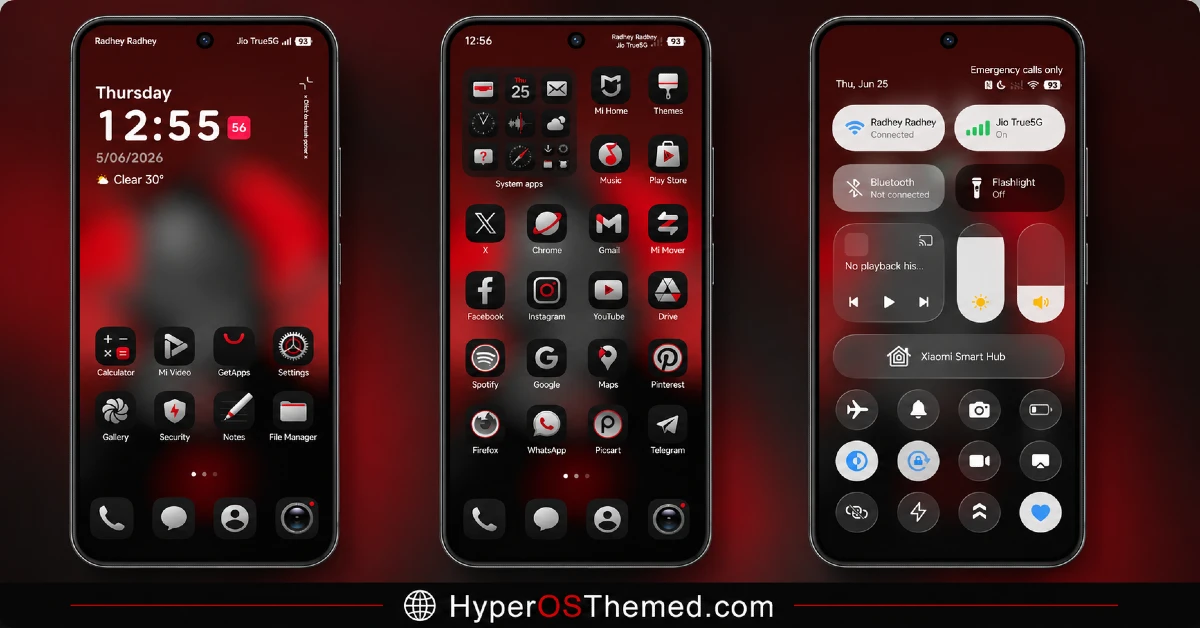
The visual identity is intense and saturated, built around deep reds against black with gray worked in to keep the palette from tipping into visual overload.
It leans harder into a gaming aesthetic than a typical anime character-focused theme, favoring bold contrast and sharp menus over softer illustration-style art.
Compared to other anime-inspired dark themes I’ve tested, this one reads as more aggressive and less cinematic, closer to a gaming HUD than a moody poster.
OX GR1 HyperOS Theme Details
| Detail | Info |
|---|---|
| Theme Name | OX GR1 |
| Designer | oxfury 0.2 |
| Compatibility | HyperOS, HyperOS 2.0, HyperOS 3.0 |
| Features | Dark, Color, Black, Red, Gray, Anime |
| File Size | 17.62 MB |
OX GR1 HyperOS Theme Performance
I installed OX GR1 HyperOS Theme on a POCO X6 through daily use covering gaming, messaging, and regular browsing, given how directly the theme markets itself around a gaming-inspired look.
Performance stayed smooth throughout, with no lag in the app drawer or control center despite the dynamic clock and high-contrast menu rendering.
Battery drain sat close to my usual baseline, maybe a percent higher, which is reasonable given the dynamic clock isn’t running constant heavy animation. The one recurring annoyance was the couple of niche app icons that never picked up the red and dark styling, standing out a bit whenever I opened the drawer.
OX GR1 HyperOS Theme’s Compatibility
OX GR1 supports HyperOS, HyperOS 2.0, and HyperOS 3.0, covering a wide range of current Xiaomi, Redmi, and POCO devices. I tested it on a POCO X6 without any stability issues.
It’s not built for MIUI 12, 13, or 14, so applying it on older firmware isn’t recommended. Custom ROM users on Xiaomi.eu or similar HyperOS-based builds should be able to import the MTZ file without much trouble given the moderate file size and straightforward dark color scheme.
Copyright notice from the designers: “This theme is fully designed and developed by me and masuod (with some resources from other creators). Please do not copy, re-upload, or modify any part of this theme without permission. Any unauthorized use will be reported to Xiaomi for copyright violation. Respect the creator’s effort, make your own original work.” Feedback and updates can be reached through their listed Telegram channels.
Get OX GR1 HyperOS Theme
Download OX GR1 through the official Xiaomi Theme Store link rather than third-party APK sites or unofficial file hosts claiming to offer the same theme. Given the designers’ explicit copyright notice against unauthorized redistribution, sticking to the official Theme Store also respects that request while keeping your installation clean and free of bundled adware or unnecessary permissions.
Note: If the Official Theme Store Link doesn’t redirect properly, try opening the page in Chrome or the default Xiaomi browser, since other browsers may not handle the redirect correctly.
How to Apply OX GR1 HyperOS Theme
Follow the steps below to apply the theme:
- Open the Theme Store Link given above on your Xiaomi / REDMI / POCO device
- This will redirect you to Theme Store.
- Download and install the theme
- Tap on Apply
- Customize specific elements (icons, lock screen, status bar) if needed
- Reboot your device (optional for full effect)
Why Choose OX GR1 HyperOS Theme?
- The dark red and black palette feels more intense and gaming-oriented than typical anime themes
- Dynamic clock system adds real movement instead of a static lock screen
- Gray accents help balance what could otherwise be an overwhelming red-black combination
- Control Center styling feels sharp and responsive, matching its gaming-inspired framing
- Actively credited and maintained by two named designers with clear feedback channels
Conclusion
Testing OX GR1 HyperOS Theme alongside my memory of VK Anime on the same POCO X6 made the comparison genuinely interesting, since both chase a dark, moody aesthetic but land in different places; this one trades cinematic subtlety for a harder, more gaming-focused edge.
The couple of unthemed niche icons were a small but consistent gap, and the intense red-black combination won’t suit anyone wanting something more restrained. Compared to other anime or gaming-inspired dark themes I’ve tried, OX GR1 commits fully to its aggressive aesthetic rather than softening it for broader appeal. If that’s the mood you’re after, it delivers convincingly.
You may also like:
HyperBlue HyperOS Theme for Xiaomi, POCO and REDMI Phones
Guofeng 18 HyperOS Theme for Xiaomi, POCO and REDMI Phones with iOS-Styled
Bintang HyperOS Theme for Xiaomi, POCO and Redmi Phones
Green HOS3 HyperOS Theme for Xiaomi, POCO and REDMI Phones
Floating Stone HyperOS Theme for Xiaomi, Redmi and POCO
Blackness HyperOS Theme: A Dark iOS-Style Look for Xiaomi, POCO & Redmi
