
I’d been running a fairly cluttered wallpaper-heavy theme for a while and hit that point where I just wanted to strip everything back down. Bintang HyperOS theme showed up near the top of the Theme Store’s minimal filter, and the name alone (Indonesian for “star,” though there’s nothing star-related in the actual design) made me curious enough to grab it. I put it on my POCO X6 mainly to reset my home screen rather than expecting anything groundbreaking.
Bintang HyperOS theme Features
- System-Wide Consistency Settings, the notification panel, dialer, and messaging app all pick up the same visual treatment rather than the theme stopping at the home screen. Digging through several menus looking for a spot it missed, I genuinely couldn’t find one.
- Redesigned Icon Pack Icons keep to minimalistic shapes with a balanced palette that reads clearly in both light and dark modes. Most apps I use daily got themed properly, though a ride-hailing app and a regional news app held onto their default icons.
- Enhanced Status Bar and Control Center Toggles in the quick settings panel have more room to breathe than stock HyperOS gives them, and text labels are easier to make out at a glance. I ran a few rapid toggle tests on Wi-Fi and mobile data and nothing lagged or shifted awkwardly.
- Lock Screen Improvements The layout simplifies down to a clear time display and notification visibility without extra clutter fighting for space. Font choices held up well for readability, even glancing at it quickly while walking outside.
- Refined Settings Interface Options are grouped more sensibly than the stock menu, with consistent spacing that actually makes scrolling through settings feel less like a chore. This was the change I noticed most, since I dig through connectivity settings fairly often.
- Smooth Animations Subtle animation touches show up when switching home screens and opening the app drawer. They add a bit of visual fluidity without ever slowing down responsiveness on the X6.
Bintang HyperOS theme Preview
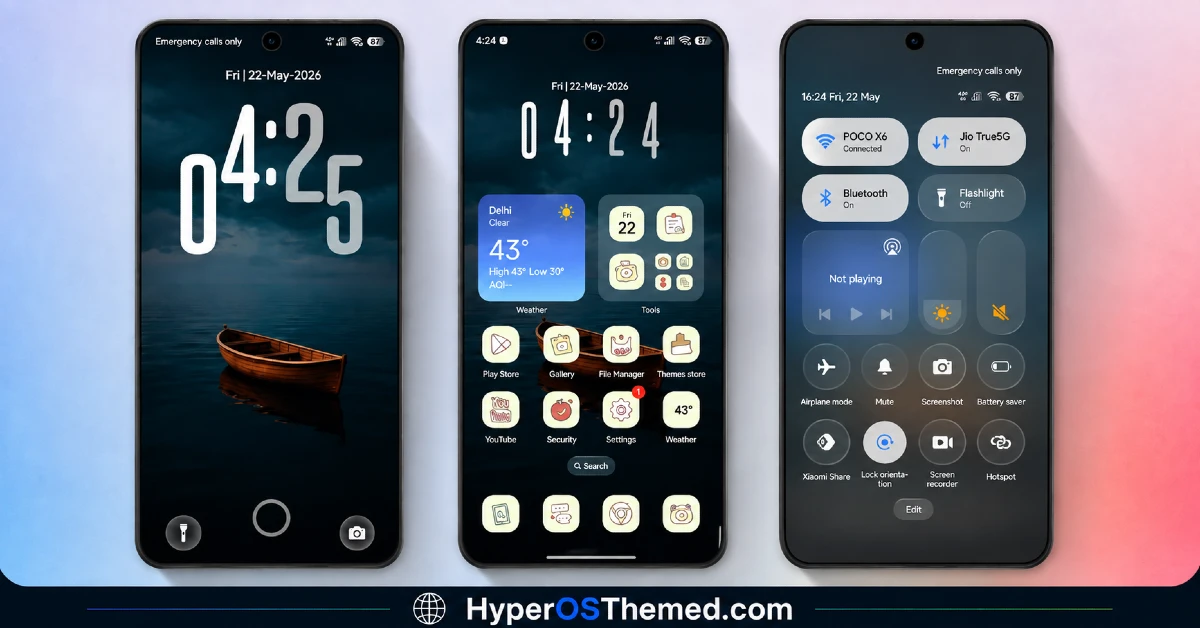
The look stays balanced and understated, mixing light and dark tones without leaning on gradients, transparency, or any decorative flourishes. Icons are simple and rounded, which keeps a full grid of apps looking orderly rather than busy. It comes across as built for actual daily use rather than for screenshots, which is exactly what I was after when I installed it.
Bintang HyperOS theme Details
| Detail | Info |
|---|---|
| Theme Name | Bintang |
| Designer | Eto’o |
| Compatibility | HyperOS 2, HyperOS 3 |
| Features | Minimal, Redesigned Icons, Clean UI |
| File Size | Not listed by designer |
Bintang HyperOS theme Performance
Running Bintang HyperOS theme through a mix of messaging, browsing, and some gaming sessions on the POCO X6 with HyperOS 3, I didn’t notice any dips in responsiveness anywhere in the interface. App drawer loading and home screen switching both stayed smooth start to finish.
Battery use landed within a percent or two of my usual stock baseline, unsurprising given there’s no transparency or animated wallpaper draining anything extra. The only recurring annoyance was scanning past the two unthemed icons every time I opened the drawer, since they broke the visual consistency of everything around them.
Bintang HyperOS theme Compatibility
Bintang supports HyperOS 2 and HyperOS 3, putting it in reach of most current Xiaomi, Redmi, and POCO devices. I ran it on a POCO X6 with HyperOS 2 without any stability problems.
The designer notes that some UI elements can shift slightly by device model and system version, which aligns with the two icons that didn’t apply the theme properly. It’s not built for MIUI 12, 13, or 14, so older firmware should be avoided. Xiaomi.eu and similar custom ROM users should be able to import it without much trouble, though results may vary a bit depending on how closely the ROM mirrors stock HyperOS.
Get Bintang HyperOS theme
Grab Bintang through the official Xiaomi Theme Store link rather than any third-party APK sites or file-sharing forums claiming to host the same file.
Sideloaded installers from unverified sources are a common way people end up with unnecessary permissions or bundled junk, so the official route is worth the extra step even for a theme this straightforward.
Note: If the Official Theme Store Link doesn’t redirect properly, try opening the page in Chrome or the default Xiaomi browser, since other browsers may not handle the redirect correctly.
How to Apply Bintang HyperOS theme
Follow the steps below to apply the theme:
- Open the Theme Store Link given above on your Xiaomi / REDMI / POCO device
- This will redirect you to Theme Store.
- Download and install the theme
- Tap on Apply
- Customize specific elements (icons, lock screen, status bar) if needed
- Reboot your device (optional for full effect)
Why Choose Bintang HyperOS Theme?
- Applies consistently across nearly every system app, not just the home screen
- Icon pack keeps things clean without unnecessary visual noise
- Settings reorganization genuinely speeds up navigating menus
- No measurable battery cost based on real use
- A dependable reset option for anyone tired of a cluttered theme
Conclusion
Bintang HyperOS theme did exactly what I needed it to do on my POCO X6, giving my home screen a clean reset without introducing anything flashy or distracting. It’s not the kind of theme that’ll impress anyone scrolling through screenshots, and the two icons that stayed unthemed were a small but persistent annoyance throughout.
Compared to other minimal HyperOS themes I’ve tested, this one earns points for actually following through on Settings and Control Center consistency rather than stopping at the icon pack. If a clutter-free reset is what you’re after, it’s a solid, low-effort choice.
You may also like:
Green HOS3 HyperOS Theme for Xiaomi, POCO and REDMI Phones
Floating Stone HyperOS Theme for Xiaomi, Redmi and POCO
Blackness HyperOS Theme: A Dark iOS-Style Look for Xiaomi, POCO & Redmi
Xeon Slay HyperOS Theme for Xiaomi, Redmi and POCO
Dark Duo HyperOS Theme with A Clean Business Dark Look for Xiaomi, POCO & Redmi
Farcasters HyperOS Theme for Xiaomi, POCO and REDMI Phones: Full Review
