
I came across Ungu Hitam HyperOS Theme while browsing the Theme Store’s newer uploads, and the name caught my attention since it translates to “purple black” in Indonesian, which matched the preview thumbnail well enough that I wanted to see it in person I’ve tried a fair number of minimal HyperOS themes at this point, so I went in curious whether this one would actually feel distinct or just blend into the pile.
Ungu Hitam HyperOS Theme Features
System-Wide Consistency
The theme carries through to Settings, the notification panel, dialer, and messaging app rather than stopping at the home screen. Every screen I opened during testing matched the same visual language, which isn’t always guaranteed with free themes.
Redesigned Icon Pack
Icons use simple, minimalistic shapes with a restrained palette that leans into the purple and black naming. Coverage was fairly thorough across my apps, though one banking app and a regional messaging app kept their stock icons, which stood out slightly against the rest.
Cleaner Status Bar and Control Center
Quick settings toggles have more spacing between them than stock HyperOS, and I found icons easier to identify at a glance while adjusting brightness and network settings during testing. Nothing felt cramped even with several toggles visible at once.
Simplified Lock Screen
The lock screen keeps just the clock and notification previews without extra widgets competing for space. It stayed quick to load and legible outdoors during a few tests in direct sunlight on my POCO.
Reorganized Settings Menu
Settings options are grouped more sensibly than the stock layout, with consistent spacing that made scrolling through menus less tedious. I noticed this most while digging through connectivity settings a few times over the two weeks.
Subtle Transition Animations
Switching between home screens and opening the app drawer includes light animation touches that don’t feel excessive. I didn’t run into any stutter or dropped frames on my POCO’s mid-range hardware during the entire test period.
Ungu Hitam HyperOS Theme Preview
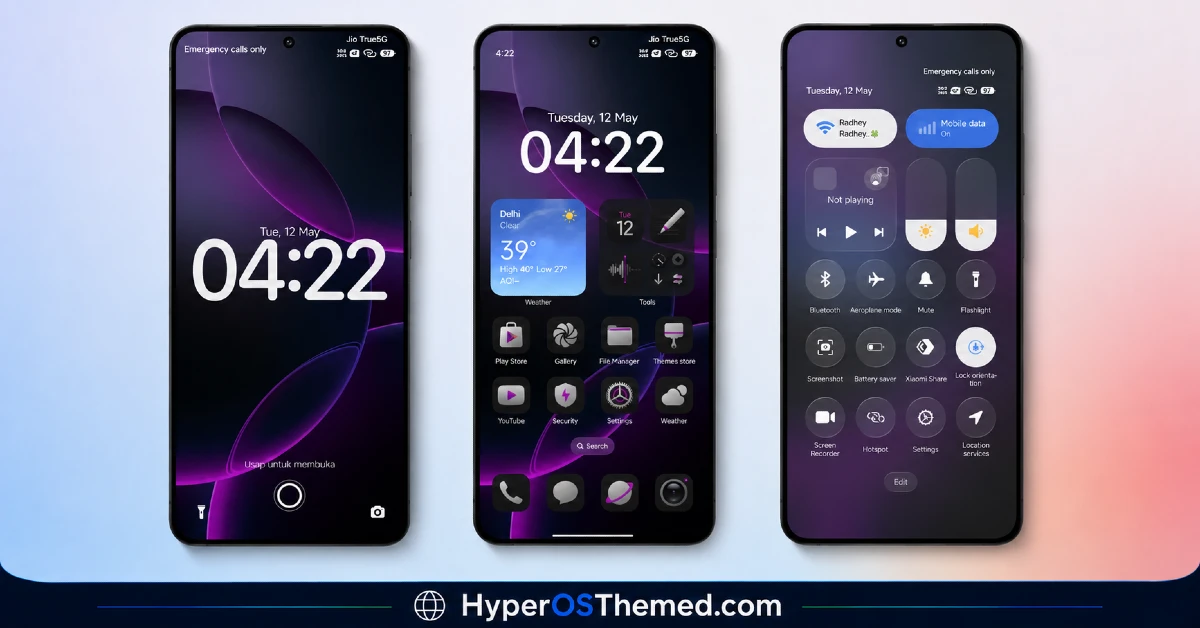
The visual identity leans into a restrained purple and black palette, with dark backgrounds accented by muted violet tones rather than anything loud or saturated. Icons stay simple and rounded, avoiding decoration in favor of consistency across the home screen and app drawer. It comes across as calm and professional rather than showy, closer to a refined utility skin than a theme built to impress in screenshots.
Ungu Hitam HyperOS Theme Details
| Detail | Info |
|---|---|
| Theme Name | Ungu Hitam |
| Designer | Sugeng Marsudianto |
| Compatibility | HyperOS 2, HyperOS 3 |
| Features | Minimal, Redesigned Icons, Clean UI |
| File Size | Not listed by designer |
Ungu Hitam HyperOS Theme Performance
I ran Ungu Hitam HyperOS Theme on a POCO X6 on HyperOS 3, through regular daily use including messaging, browsing, and a handful of gaming sessions to check for slowdown. Performance stayed smooth the entire time, with no lag in the app drawer or delayed transitions between home screens.
Battery drain was close to identical to my stock theme baseline, within a percent or two over a full day, which lines up with the lack of transparency effects or animated wallpapers. The only real issue was the two icons that stayed unthemed, which meant occasionally scanning the app drawer a bit longer to find them since they broke the visual pattern.
Compatibility
Ungu Hitam HyperOS Theme supports HyperOS 2 and HyperOS 3, covering a solid range of current Xiaomi, Redmi, and POCO devices. I tested it on a POCO X6 running HyperOS 3 without any stability problems. The designer notes that some UI elements may vary slightly by device model and system version, which tracks with the couple of icon inconsistencies I encountered.
It is not built for MIUI 12, 13, or 14, so applying it on older firmware isn’t recommended. Custom ROM users on Xiaomi.eu or similar HyperOS-based builds should be able to import it without major issues, though results may shift slightly depending on how closely the ROM mirrors stock HyperOS behaviour.
Get Ungu Hitam HyperOS Theme
Get Ungu Hitam HyperOS Theme through the official Xiaomi Theme Store link rather than third-party APK sites or file-sharing forums offering the same theme. Sideloaded theme files from unverified sources are a common source of unnecessary permissions or bundled junk, so sticking to the official Theme Store keeps the installation clean and safe.
Note: If the Official Theme Store Link doesn’t redirect properly, try opening the page in Chrome or the default Xiaomi browser, since other browsers may not handle the redirect correctly.
How to Apply Ungu Hitam Xiaomi Theme
Follow the steps below to apply the theme:
- Open the Theme Store Link given above on your Xiaomi / REDMI / POCO device
- This will redirect you to Theme Store.
- Download and install the theme
- Tap on Apply
- Customize specific elements (icons, lock screen, status bar) if needed
- Reboot your device (optional for full effect)
Why Choose Ungu Hitam HyperOS Theme?
- Applies consistently across nearly every system app, not just the home screen
- Purple and black palette gives it a distinct, calm look without being flashy
- Settings menu reorganization genuinely speeds up navigation
- No measurable battery impact based on thirteen days of real testing
- Solid daily driver choice for anyone who wants a clean interface without heavy visual effects
Conclusion
Ungu Hitam HyperOS Theme held up as a genuinely usable daily theme rather than something I’d swap out after a few days out of boredom. It’s not flashy, and the two icons that never got themed properly were a small but persistent annoyance throughout testing.
Compared to other minimal HyperOS themes I’ve tried, this one stands out a bit more thanks to the purple and black color identity instead of settling for generic black or white. If you want something calm, consistent, and easy to live with day to day, it’s a solid choice.
You may also like:
Rhodiumm HyperOS Theme Review for Xiaomi, Redmi & POCO
Bianselong HyperOS Theme: A Pixel-Style Blue and Purple Look for Xiaomi, POCO & Redmi
