
Something is exciting about a designer’s first attempt at a new platform, and mydul’s debut HyperOS 3 release, Solana HyperOS Theme, is genuinely impressive for a first try. After spending time with it, I think this one deserves attention not just for its bold visuals, but for how much control it hands back to the person actually using it.
What Makes Solana HyperOS Theme Worth Trying
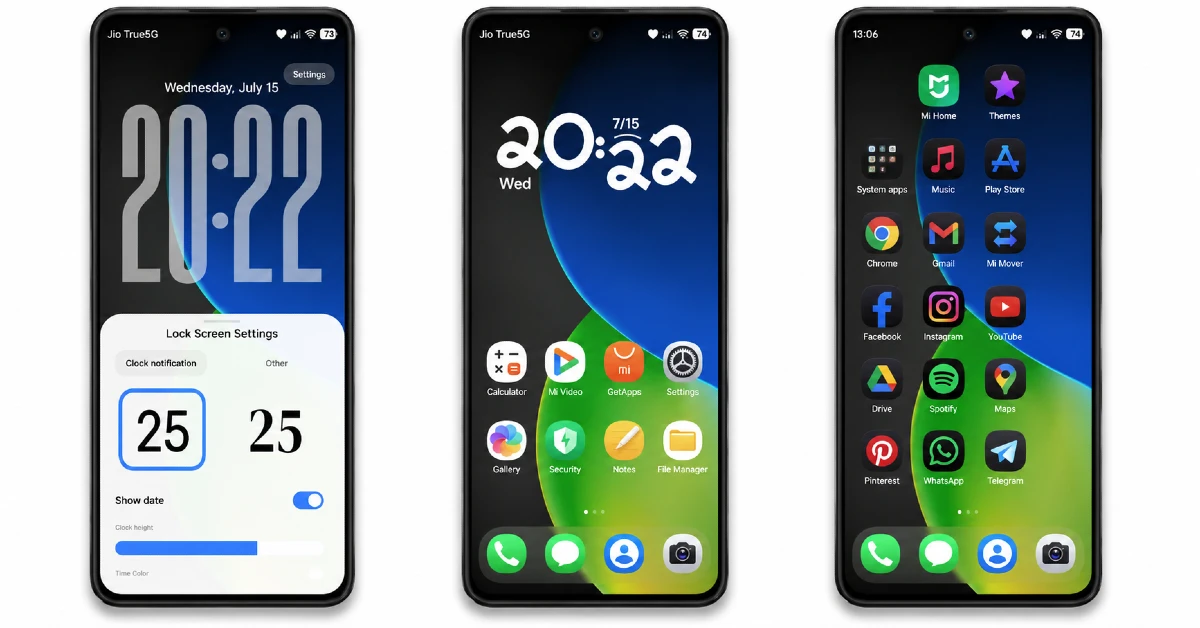
The moment you unlock your phone, Solana HyperOS Theme makes its case with a green and blue gradient abstract wallpaper that feels genuinely energetic rather than loud. It’s the kind of background that sets an upbeat tone for the whole interface without tipping into overwhelming.
- Dynamic 3D lock screen clock — The oversized clock isn’t just for show, it comes with real settings to adjust height, color, and notification style, so you’re shaping the lock screen to fit your own taste instead of settling for one fixed layout.
- Green and blue gradient wallpaper — A fresh, abstract design that carries its energy consistently across every screen, never feeling repetitive or flat.
- Smooth rounded icons — Soft, consistent shapes that pair nicely with the vibrant wallpaper, giving the whole home screen a cohesive, polished feel.
- Clean light UI — Despite the bold color palette, the overall interface stays light and easy to navigate, striking a nice balance between vibrant and usable.
- Full customization control — Between the adjustable lock screen settings and the overall theme flexibility, Solana feels less like a fixed package and more like a starting point you can shape yourself.
Solana HyperOS Theme Preview
Why Solana HyperOS Theme Stands Out
A lot of first themes play it safe, minimal changes, low risk design choices. Solana does the opposite. mydul went bold with color and gave users real customization tools right out of the gate, which is a confident move for a debut release. It shows in the final result too, nothing here feels tentative or half finished.
Support Built Into the Release
mydul runs a Telegram channel specifically for feedback and updates, if anything doesn’t work quite right, you can flag it there and get help quickly. It’s also where future premium themes from this designer will be shared, worth following if Solana convinces you.
Who Should Try Solana HyperOS Theme
If you want a theme with genuine personality and the flexibility to adjust it to your own taste, Solana is a strong pick for your Xiaomi, Redmi, or POCO device. It’s compatible with HyperOS, HyperOS 2.0, and HyperOS 3.0, and completely free.
Solana HyperOS Theme Details
| Detail | Info |
|---|---|
| Theme Name | Solana |
| File Size | 26.40 MB |
| Designer | mydul |
| Region/Server | Global |
| Compatibility | HyperOS, HyperOS 2.0, HyperOS 3.0 |
| Features | Dynamic Lock Screen, 3D Design, Abstract Wallpaper, Rounded Icons |
The designer mentioned this is their first HyperOS 3 theme, and shared a Telegram channel for support and future releases: t.me/HyperosSignals
Getting the Theme
Installing Solana HyperOS Theme on Global Stable ROM
If your device is running the standard HyperOS or MIUI Global stable build, here’s how to install it:
- Open this page using the Firefox browser, since it handles the redirect best.
- Tap the Official Theme Store Link above.
- The page will open in Chinese, which is expected. Tap the three dots in the top right corner and select “Open in app.”
- This opens the Theme Store app, where the download will begin.
- Once it’s downloaded, tap Apply.
If the Official Theme Store Link doesn’t open properly, switch to Chrome or your phone’s default browser. Some third party browsers don’t handle this redirect correctly.
Installing Solana HyperOS Theme on Custom ROMs
Running a custom build like Xiaomi.eu, MIUIRoom, or similar? Here’s the manual install method using the mtz file:
- Download the Solana mtz file from the link above.
- Open the Theme Store app and go to the Themes section.
- Scroll to the bottom and tap Import.
- Select the downloaded mtz file.
- Tap Apply.
One thing worth remembering: restart your device if anything looks slightly off after applying. A quick reboot usually clears it up right away. I tested this theme myself, and it ran smoothly with no issues at all.
Final Thoughts
Solana is a genuinely confident debut, bold colors, real customization tools, and a level of polish that doesn’t feel like a first attempt. mydul clearly put real thought into giving users control rather than just a fixed look to accept or reject. If you want a vibrant theme that adapts to you, this one’s absolutely worth downloading.
You may also like:
- Nothing Theme for HyperOS with AchromaticUI that Brings Monochrome Look
- Premium Streetlight HyperOS Theme for Xiaomi, Redmi and POCO
- WEWE GOMBEL HyperOS Theme For Xiaomi, Redmi & POCO
- BrS v9 MIUI Theme For POCO, Redmi and Xiaomi Devices
- OX B1 HyperOS Theme with Premium Blue Glass Theme For Xiaomi, POCO & Redmi
