
Cold Heart HyperOS Theme is an anime-inspired theme designed by Acapella for Xiaomi, Redmi and POCO devices. Its design combines character artwork with different lock screen clock layouts, coordinated app icons and a customised Control Centre.
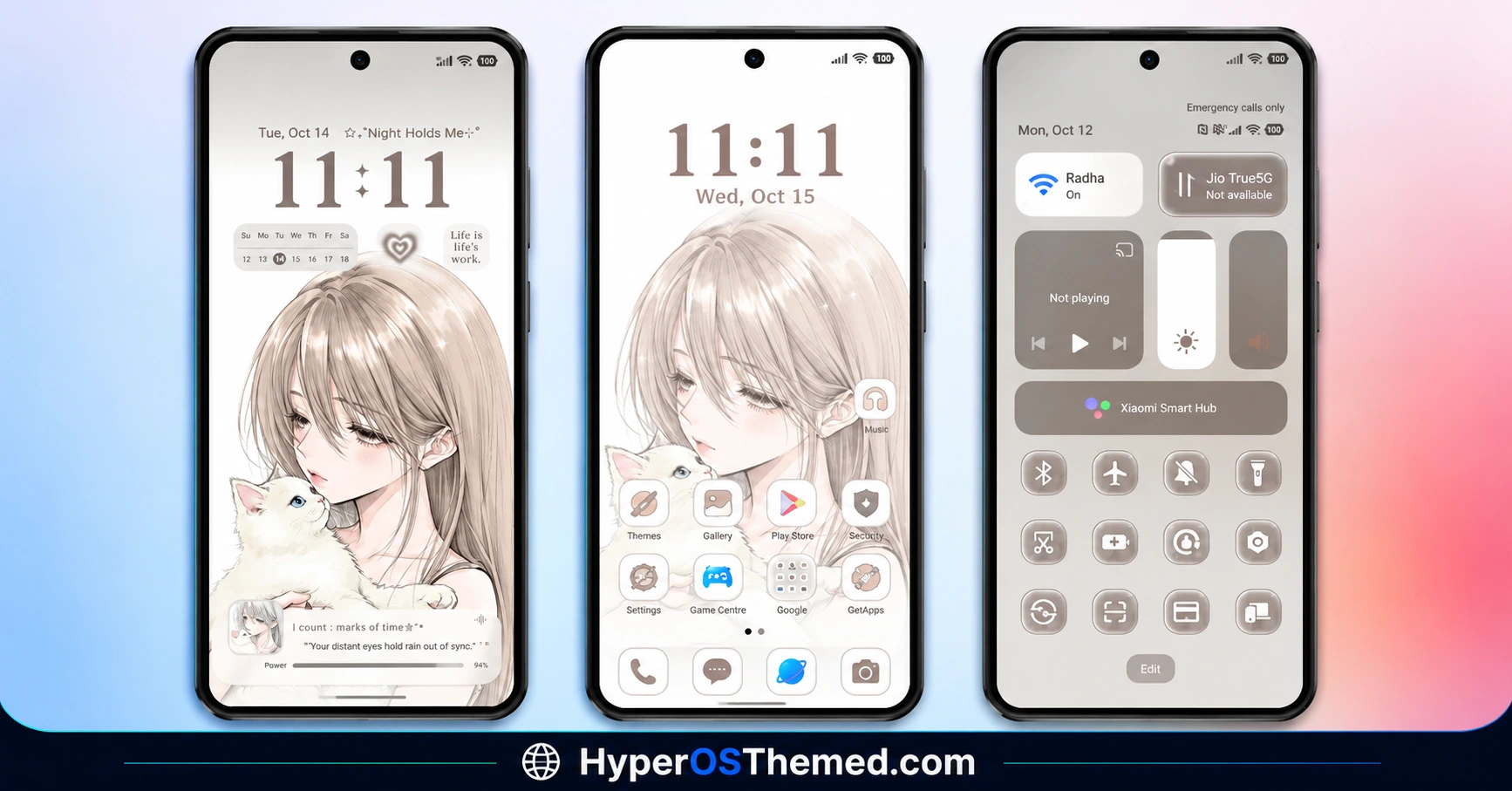
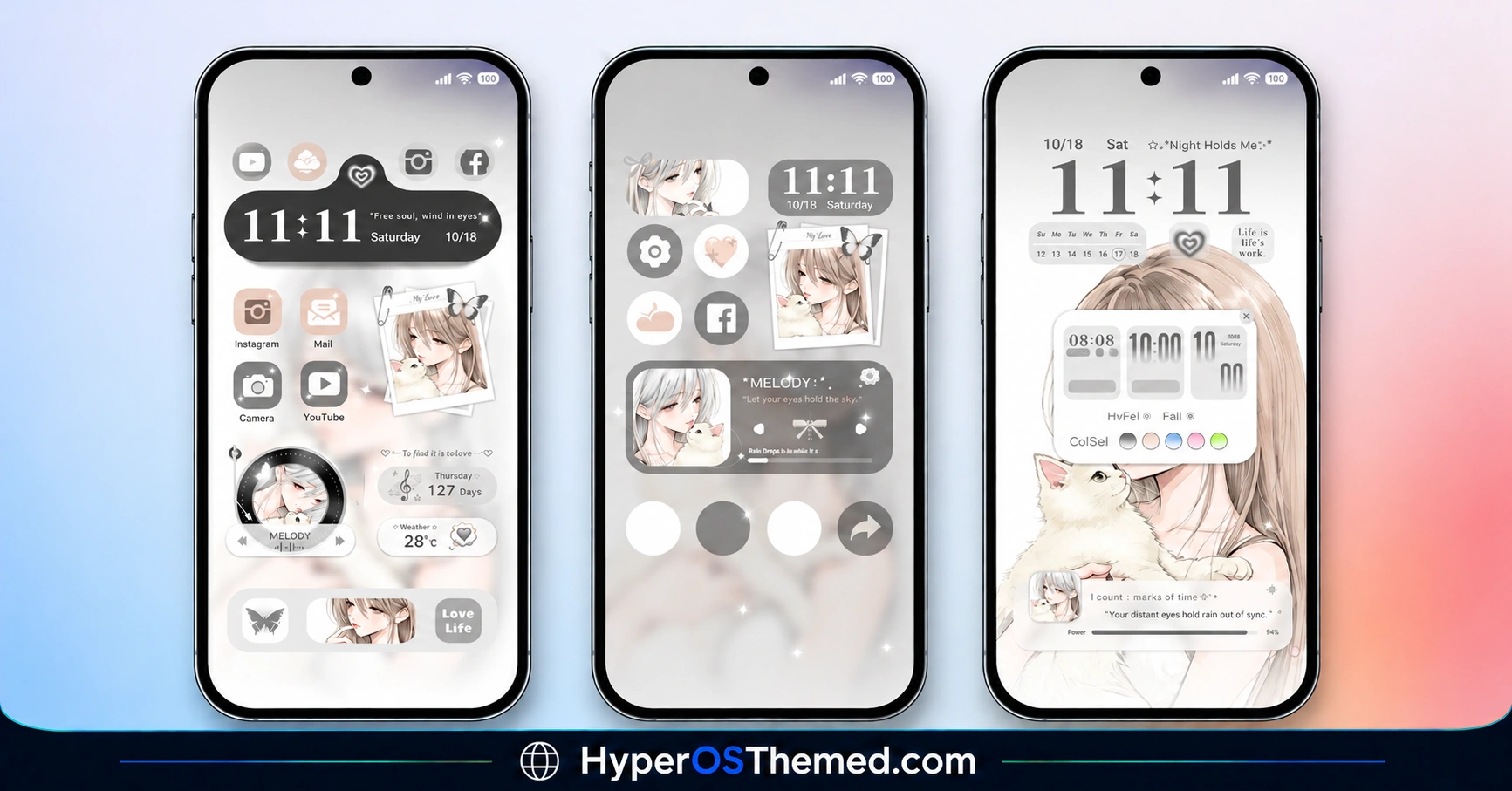
The supplied screenshots show several variations, including pale backgrounds, large digital and minimalist clocks, compact information cards, and a dark lock screen featuring a circular anime portrait. These visual elements give Cold Heart HyperOS Theme a distinctive illustrated style, with both light and dark appearances represented in the previews.
Cold Heart HyperOS Theme Key Features
Anime Character Wallpapers
Anime artwork is the central visual element of Cold Heart HyperOS Theme. The supplied previews feature a light-haired character against pale backgrounds, with the illustration positioned differently across the showcased lock screens. This allows the clock and other interface elements to sit alongside the artwork rather than covering the entire illustration.
Multiple Lock Screen Clock Designs
The screenshots show several clock styles, including large minimalist numerals, conventional digital time displays and layouts with smaller information elements. Some designs give the clock most of the available space, while others combine it with the anime artwork and compact interface cards. The previews establish that multiple layouts are showcased, although the exact switching method is not confirmed.
Light-Coloured Interface Styling
Several screens use white, light grey and muted beige tones. These colours complement the anime illustrations and keep the clock, icons and information cards visually distinct. The pale styling is particularly noticeable in the lock screen and home screen previews.
Dark Anime Lock Screen
One of the supplied previews uses a dark background with a circular portrait of the anime character and a centrally positioned clock. This provides a different appearance from the lighter layouts while retaining the theme’s illustrated identity. The screenshot confirms the dark design, but does not establish whether it is controlled by an automatic dark mode or selected separately.
Customised App Icon Layout
The home screen previews display rounded icons arranged alongside small image tiles and other compact interface elements. The arrangement gives the screen a more visual, card-based appearance than a conventional grid of app shortcuts. The screenshots show the layout and icon styling, although the exact treatment of every third-party application is not independently confirmed.
Redesigned Control Centre
Cold Heart HyperOS Theme’s Control Centre preview features rounded rectangular controls, brightness and volume sliders, and circular quick-setting icons on a muted grey background. The controls use a restrained colour palette that complements the theme’s other screens. The supplied image confirms this visual arrangement, while the exact behaviour of individual controls remains dependent on the device’s software.
Compact Widgets and Information Elements
Several previews combine clock displays with small information blocks and image-based cards. These elements create a layered appearance, particularly on the home screen layouts where icons and artwork appear together. The precise functions and customisation options of these elements are not confirmed by the supplied material.
Different Colour Treatments
Although pale colours dominate most of the previews, another layout introduces green accents around the clock and interface elements. The darker lock screen provides an additional contrast to the light designs. These variations give the showcased theme more visual range than a single fixed wallpaper and colour combination.
Cold Heart HyperOS Theme Preview
The Cold Heart HyperOS Theme previews show nine screen designs across the three supplied images. The collection includes anime lock screens with different clock arrangements, home screens combining icons and image tiles, a grey Control Centre, a dark portrait-based layout and a green-accented clock design. Together, these screenshots highlight the theme’s focus on illustrated backgrounds and varied interface compositions.
Cold Heart HyperOS Theme Overview
| Attribute | Details |
|---|---|
| Availability | official Store |
| Supported Devices | Xiaomi, Redmi and POCO devices |
| Theme Name | Cold Heart |
| Designer | Acapella |
| Region | Global |
| Compatibility OS | HyperOS |
| Features | Anime artwork, varied clock layouts, light and dark designs, customised icon arrangement and redesigned Control Centre |
| File Size | 55.49 MB |
| Format | MTZ |
Get Cold Heart Theme
Cold Heart Compatibility
The reference lists Cold Heart HyperOS Theme for Xiaomi, Redmi and POCO devices running HyperOS, including HyperOS 1.0 and newer updates. However, this listing does not independently establish compatibility with every device or later HyperOS release. The availability of individual theme components can vary depending on the phone model, system version, region and installed Themes app. Before importing the MTZ package, check that your device supports local theme imports.
How to Install Cold Heart HyperOS Theme on Global Stable ROM
- Click on the “OFFICIAL THEME STORE LINK” button above.
- When prompted, select the Themes app to continue to open the link.
- You will be redirected to the theme’s page in the Xiaomi Theme Store.
- Tap Download, wait for the download to finish, and then tap Apply to activate the theme.
Why Choose Cold Heart HyperOS Theme?
- Anime character artwork featured across multiple screen designs.
- Different lock screen clock arrangements, including large and minimalist displays.
- Light-coloured layouts using white, grey and muted beige tones.
- A dark lock screen with a circular anime portrait.
- A customised Control Centre with rounded controls and sliders.
- Home screen previews combining app icons, artwork and compact information cards.
- A green-accented layout that provides a visual alternative to the predominantly pale designs.
Conclusion
Cold Heart is an anime-inspired HyperOS theme by Acapella that combines character artwork with varied clock layouts and coordinated interface styling. Its supplied previews show pale home and lock screens, a darker portrait-based design, a green-accented clock and a redesigned Control Centre.
The 55.49 MB MTZ package provides an installation option for devices that support local theme imports. Compatibility with individual HyperOS versions should be checked before installation, as the reference does not independently verify every supported device. For users who prefer anime illustrations and multiple visual layouts, Cold Heart offers a distinctive alternative to standard HyperOS styling.
Also Check These Themes:
- Grade H3 HyperOS 3.0 Theme For Xiaomi, Redmi & POCO
- Aquora HyperOS Theme with 18 Wallpapers, Glass Icons for Xiaomi, Redmi and POCO
- Snow Peak HyperOS Theme with Dynamic Lock Screen, GIF Effects and Custom Widgets
- Cool OS Raster Wallpaper HyperOS Theme For Xiaomi, Redmi and POCO
- ColorV16 HyperOS Theme with Dark AMOLED UI, Neon Clock and Circular Icons
- Liquid Beauty X HyperOS Theme with Liquid Wallpapers For Xiaomi, Redmi and POCO
