
Liquid Beauty X HyperOS Theme is a liquid inspired theme for Xiaomi, Redmi and POCO smartphones. It combines blue, cyan and teal wallpapers with custom icons, redesigned lock screen layouts, translucent interface elements and matching folder designs.
Liquid Beauty X theme focuses on a water inspired visual style with layered backgrounds and depth effects. Along with the wallpaper and icon changes, Liquid Beauty X also provides several lock screen clock layouts and is available in both backup and MTZ formats for compatible devices.
Liquid Beauty X Features
- Liquid Inspired Wallpapers: The theme uses blue, cyan and teal backgrounds with layered visual effects. The wallpapers give the home screen a water inspired appearance and provide a consistent background for the customised icons and widgets.
- Custom Two Tone Icons: Liquid Beauty X replaces the standard icon appearance with a two tone design. The icons use a combination of simple shapes and additional shading to create more depth while keeping familiar applications recognisable.
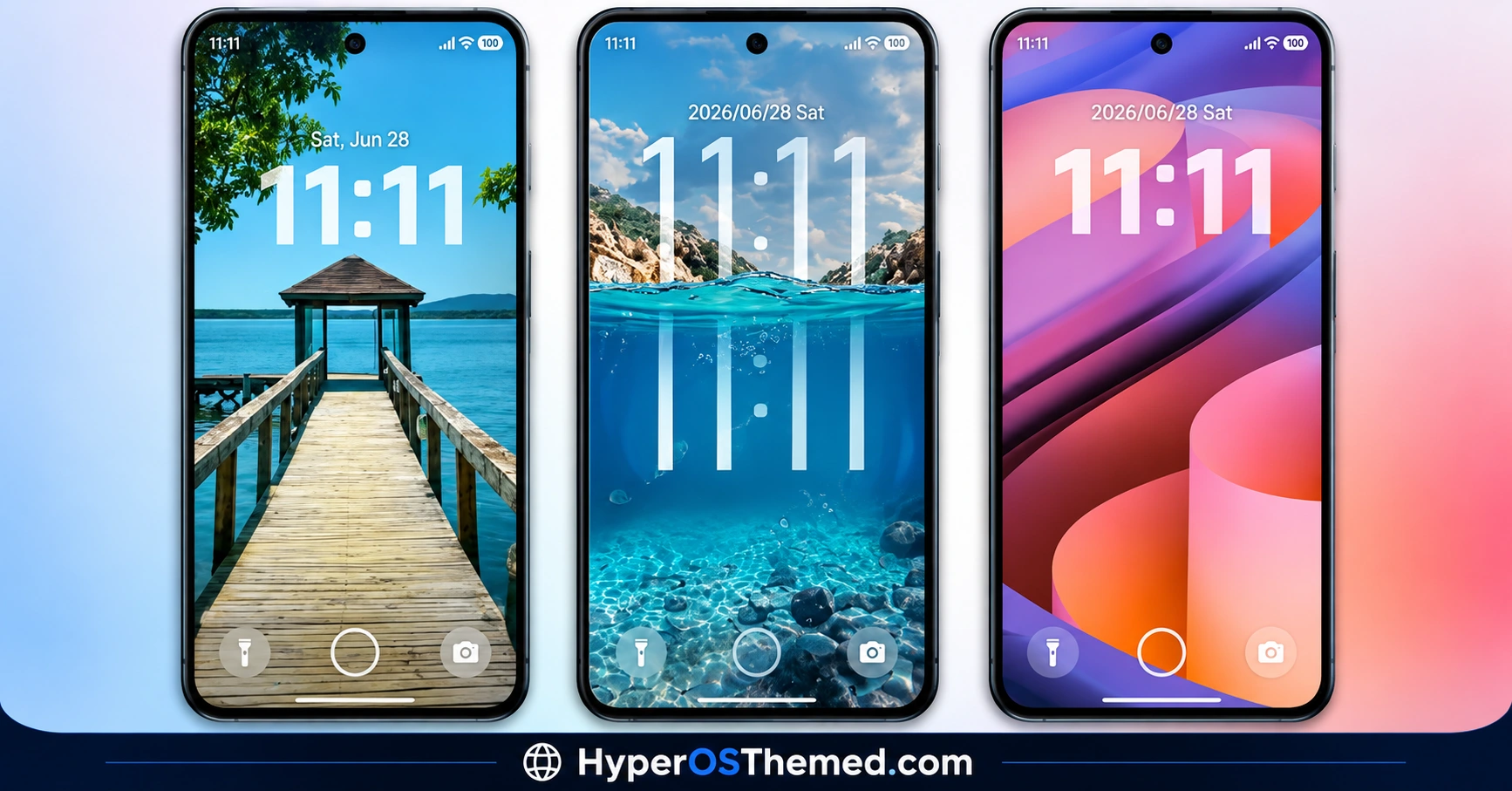
- Three Lock Screen Clock Styles: The lock screen includes three clock layouts with different visual approaches. Users can choose between a digital clock, an analogue style and a more minimal hour focused design.
- Translucent Interface Elements: Selected system interface components use a translucent, frosted appearance. This allows parts of the wallpaper to remain visible behind the interface instead of using completely opaque panels.
- Custom Folder Appearance: Folders are styled to match the theme’s icon design and overall liquid aesthetic. This prevents the folders from looking disconnected from the customised application icons.
- Custom Lock Screen Controls: The lock screen design includes areas for notifications, music controls and the camera shortcut. These controls use semi-transparent visual elements that follow the same design language as the rest of the lock screen.
- Liquid Style Visual Effects: The theme incorporates depth and motion based visual effects into selected interface elements. These effects are intended to complement the water inspired wallpapers rather than simply changing the colour of the standard HyperOS interface.
- Backup and MTZ Versions: Liquid Beauty X is available in backup and MTZ formats. The appropriate format depends on the software environment and installation method supported by the Xiaomi, Redmi or POCO device.
- Blue and Cyan Colour Palette: The main colour scheme stays within cool blue, cyan and teal tones. This gives the theme a consistent appearance across the wallpaper, icons and translucent interface components.
Liquid Beauty X Preview
The Liquid Beauty X preview features deep blue, cyan and teal shades combined with water inspired backgrounds and depth effects. Translucent interface panels add a glass like appearance, while the customised icons and lock screen maintain the same cool colour palette. The overall design is more detailed than a basic icon and wallpaper theme, with several interface elements receiving visual changes.
Liquid Beauty X Overview
| Attribute | Details |
|---|---|
| Availability | Free, via Xiaomi Theme Store or MTZ file |
| Supported Devices | Xiaomi, Redmi and POCO phones running compatible HyperOS or MIUI versions |
| Theme Name | Liquid Beauty X |
| Designer | 老男孩DESIGN |
| Region | Global |
| Compatibility OS | HyperOS and compatible MIUI based systems |
| Features | Liquid wallpapers, two tone icons, custom lock screen, translucent UI, custom folders and visual effects |
| File Size | 64.8 MB |
The available theme information lists 老男孩DESIGN as the designer, with a package size of approximately 64.8 MB. The theme is distributed in backup and MTZ formats and is listed for HyperOS and MIUI based Xiaomi, Redmi and POCO devices.
Get Liquid Beauty X Theme
You can download Liquid Beauty X through the official Theme Store link or via the MTZ file when MTZ installation is supported. The official Theme Store option is the preferred method for compatible Global Stable ROM devices, while the MTZ package can be used on supported Custom ROM installations.
Liquid Beauty X Compatibility
Liquid Beauty X is designed for Xiaomi, Redmi and POCO smartphones running compatible HyperOS or MIUI based software. Compatibility can vary between Global ROM, China ROM and Custom ROM builds because Theme Store features and theme importing options are not identical across every software version. The backup and MTZ formats also have different installation requirements, so the appropriate package should be selected according to the ROM installed on the device.
How to Install Liquid Beauty X on Global Stable ROM
For devices using the official Global Stable ROM, the theme can be installed through the Xiaomi Theme Store using the official theme link.
- Open the Download Links section and locate the Official Theme Store Link for Liquid Beauty X.
- Tap the link and allow your phone to open the associated application.
- Select the Themes app when your device asks which application should handle the link.
- The Liquid Beauty X page will then open inside the Xiaomi Theme Store.
- Tap Download and wait for the theme to be installed.
- Once the download is complete, select Apply to activate Liquid Beauty X.
Using the official Theme Store route is the simplest option for supported Global Stable ROM devices because the theme is handled directly through Xiaomi’s theme system.
How to Install Liquid Beauty X on Custom ROMs
Devices running compatible Custom ROMs such as Xiaomi.eu, MIUIRoom, MIUI SR or HyperOS CN can use the MTZ version of Liquid Beauty X. The available options may differ slightly depending on the ROM and Theme Store version.
- Download the Liquid Beauty X MTZ file from the Above section.
- Open the Themes application on your Xiaomi, Redmi or POCO phone.
- Enter the Themes section and look for the Import option.
- Tap Import to begin adding the downloaded theme package.
- When the file manager opens, navigate to the folder containing the
.mtzfile. - Select the Liquid Beauty X MTZ package and allow the Themes app to process it.
- Once the import is completed, the theme should appear in your available themes.
- Open Liquid Beauty X and tap Apply to activate it.
- If some elements do not appear immediately, restarting the device can help the Theme Store reload the theme resources.
If the MTZ file cannot be imported, check that the file is intact and that the installed ROM and Theme Store version support third-party MTZ themes. Some Custom ROM builds may use a different Theme Store interface or restrict certain theme components.
Why Choose Liquid Beauty X?
- Liquid inspired wallpapers with blue, cyan and teal colour combinations.
- Custom two tone icons designed around the theme’s water inspired appearance.
- Three different lock screen clock designs.
- Translucent and frosted interface elements.
- Custom folder styling that matches the icon set.
- Lock screen controls for notifications, music and camera access.
- Backup and MTZ versions for different installation environments.
- Designed for Xiaomi, Redmi and POCO devices running compatible software.
Conclusion
Liquid Beauty X provides a complete liquid inspired visual redesign for compatible Xiaomi, Redmi and POCO smartphones. Its main elements include depth based wallpapers, two tone icons, custom lock screen layouts, translucent interface components and matching folder designs.
The blue and cyan colour palette keeps the different parts of the interface visually consistent. Multiple lock screen styles also give users more control over the appearance of the device.
The theme is particularly suited to users who prefer water inspired wallpapers, glass effects and noticeable interface customisation rather than a simple wallpaper and icon change. With both backup and MTZ versions available, Liquid Beauty X can be installed through different methods depending on the device’s ROM and Theme Store support.
Also Check These Themes:
- Gass BiZ 3 HyperOS Theme For Xiaomi, Redmi and POCO
- VK Blue Bloom HyperOS Theme With Blue Gradient Wallpapers For Xiaomi, Redmi and POCO
- Hyper Grayish 3 HyperOS Theme For Xiaomi, Redmi and POCO
- Mamba BiZ 3 HyperOS Theme with Obsidian Business and Translucent Control Center
- Sky Suhel HyperOS Theme with Dynamic Lock Screen for Xiaomi, POCO, Redmi
- Better HyperOS Theme for Xiaomi, POCO, Redmi
