
Most dark themes go for moody or dramatic, but Black OX HyperOS Theme aims somewhere different, a sharp, professional look that wouldn’t feel out of place on a work phone.
Designed by oxfury 0.2 alongside masuod, it leans into a 3D premium aesthetic with a distinctly business-appropriate tone rather than the usual gamer-style neon or gothic dark themes. At a compact 16.96 MB, it’s a light download for Xiaomi, Redmi and POCO devices, built for HyperOS and HyperOS 2.0.
Black OX HyperOS Theme Key Features
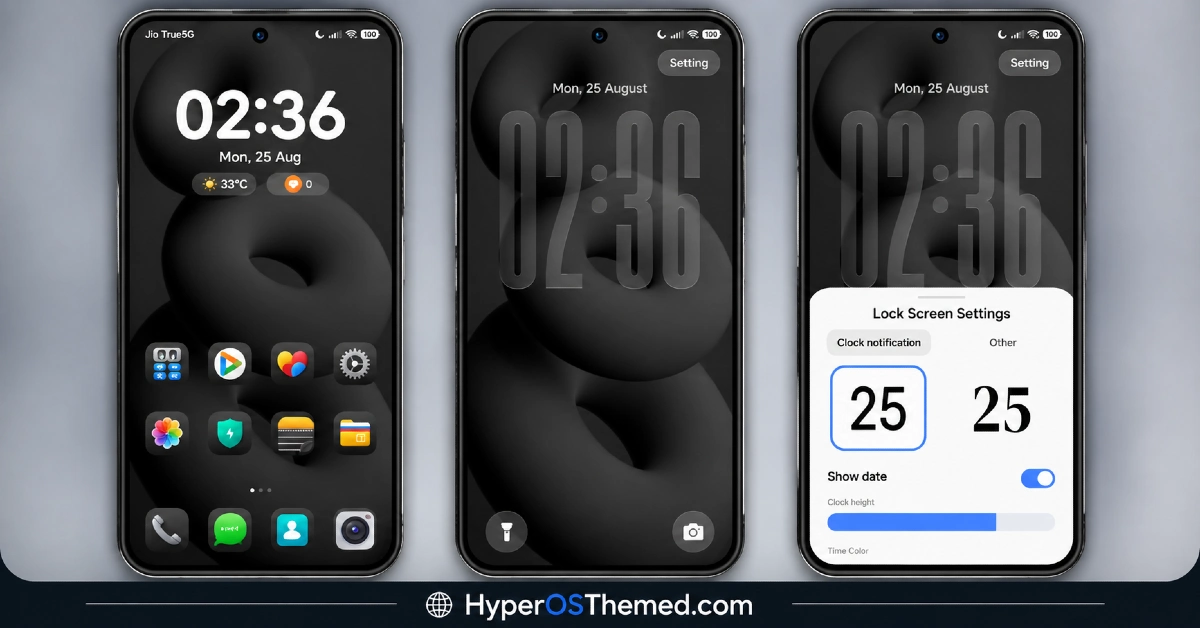
- Premium 3D Visual Style: Black OX HyperOS Theme uses 3D rendering techniques across its wallpapers and UI elements to give the interface genuine depth rather than sitting flat. This gives the theme a more considered, high-end feel compared to standard 2D icon packs.
- Business-Appropriate Aesthetic: Rather than leaning into flashy colors or playful design, the theme sticks to a restrained, professional tone throughout. This makes it a good fit for anyone who wants a phone that looks polished in a work setting rather than overtly gamer-styled.
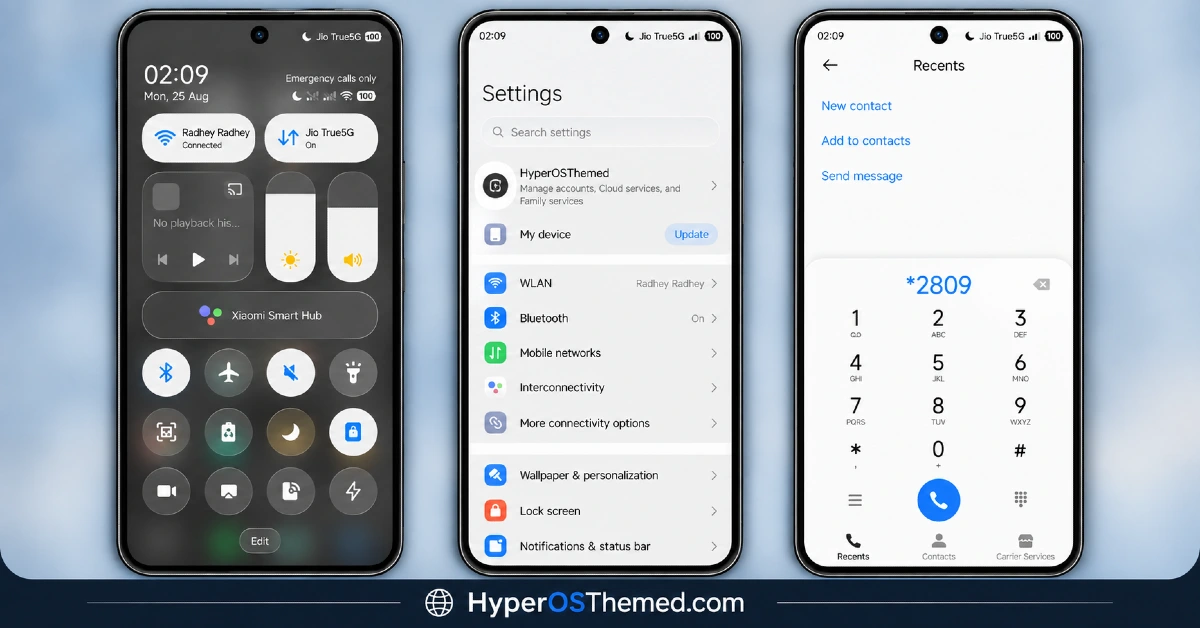
- Consistent Black Color Scheme: The dark palette runs uniformly across icons, wallpaper and UI accents rather than mixing in unrelated bright colors. This consistency helps the theme feel deliberate and put-together rather than randomly assembled.
- Compact, Efficient File Size: At 16.96 MB, Black OX HyperOS Theme is noticeably light for a theme built around 3D visual effects, which often come with heavier file sizes. This makes it a quick, low-commitment download for anyone curious to try it.
Black OX HyperOS Theme Preview
The screenshots below show the 3D premium wallpaper style and how the black color scheme carries across icons and system elements once the theme is applied. Since the “business” framing here comes down to subtle restraint rather than one flashy feature, it’s worth looking at the full preview set to get a proper sense of the tone.
Black OX HyperOS Theme Details
| Attribute | Details |
|---|---|
| Availability | Free, via Xiaomi Theme Store |
| Supported Devices | Xiaomi, Redmi and POCO phones running HyperOS |
| Theme Name | Black OX |
| Designer | oxfury 0.2 (with masuod) |
| Compatibility OS | HyperOS and HyperOS 2.0 |
| Features | Premium 3D visual style, business-appropriate aesthetic, consistent black color scheme |
| File Size | 16.96 MB |
Black OX HyperOS Theme Compatibility
Black OX HyperOS Theme supports HyperOS and HyperOS 2.0, covering a solid range of Xiaomi, Redmi and POCO devices, though it doesn’t currently extend official support to HyperOS 3.0. Since the theme relies on 3D rendering for its premium look, older or lower-powered devices may display some elements with slightly less sharpness compared to current flagship hardware.
Custom ROM users on setups like Xiaomi EU ROM or MIUIRoom can still install the theme manually through the MTZ file, and given the theme’s restrained design, compatibility issues tend to be less likely than with more effect-heavy themes. Anyone specifically on HyperOS 3.0 should keep in mind this theme wasn’t built with that version in focus, so results may vary until support is extended.
Get Black OX HyperOS Theme
Download Black OX only through the official Theme Store link rather than random third-party file hosts or unofficial APK uploads. Files sourced outside verified channels are difficult to confirm as unaltered and may not reflect what oxfury 0.2 and masuod actually released. Sticking to the official Theme Store link keeps the installed version consistent with the intended design and ensures any future updates remain accessible.
Important notice from the designers: Black OX is fully designed and developed by oxfury 0.2 and masuod, with some resources sourced from other creators. The designers have specifically asked that no part of this theme be copied, re-uploaded, or modified without permission, noting that unauthorized use will be reported to Xiaomi as a copyright violation. Anyone with feedback or questions can reach the designers directly through their listed Telegram channels. This is a genuine copyright request worth respecting given the original work that went into the theme’s 3D visual style.
How to Apply Black OX Xiaomi Theme
Follow the steps below to apply the theme:
- Open the Theme Store link given above on your Xiaomi, Redmi or POCO device.
- This will redirect you to the Theme Store.
- Download and install the theme.
- Tap on Apply.
- Customize specific elements such as icons, lock screen or status bar if needed.
- Reboot your device for the full effect, though this step is optional.
Note: If anything looks overlapped or doesn’t display correctly right after installing, restarting the device usually clears it up without further steps. This theme has been checked on its supported HyperOS versions without any major issues turning up. Still, if something looks off on a specific device once it’s applied, leaving a comment with the details helps get it looked into.
Installing Black OX HyperOS Theme on Custom ROM Devices
Devices running MIUI 11 through 14 or HyperOS based Custom ROMs such as Xiaomi EU ROM or MIUIRoom aren’t able to use the direct Theme Store link, so the MTZ file needs to be brought in manually instead. Here’s how that works:
- Grab the MTZ file for Black OX from the download section.
- Open the Theme Store app.
- Go into the Themes tab.
- Scroll down to find the Import option, then tap it.
- Use the file manager to locate the downloaded .mtz file.
- Wait for the import process to finish.
- Tap the theme once it appears in the list to apply it.
Why Choose Black OX HyperOS Theme?
- Genuine 3D depth — wallpaper and UI elements use real dimensional rendering, not a flat dark palette.
- Professional, business-ready look — restrained design suits work settings better than flashy alternatives.
- Lightweight for its style — 16.96 MB is compact given the 3D visual effects included.
- Consistent color execution — black tones stay uniform across icons and UI rather than feeling mismatched.
- Straightforward installation — the restrained design tends to mean fewer compatibility quirks.
- Free official download — no cost involved through a legitimate Theme Store link.
- Actively maintained by designers — direct Telegram channels available for feedback and support.
- Original, protected work — clear copyright notice reflects genuine design effort behind the theme.
Conclusion
Black OX HyperOS Theme carves out a niche most HyperOS themes don’t bother with, a genuinely premium, business-appropriate dark aesthetic that leans on 3D depth rather than flashy colors or gimmicks to stand out. The compact file size makes it easy to try, and the designers’ active Telegram presence is a nice safety net if anything needs troubleshooting. For Xiaomi, Redmi and POCO users who want their device to look sharp and professional rather than loud, Black OX HyperOS Theme is well worth trying.
You may also like:
NothingOS HyperOS Theme – Get Nothing Phone-Inspired Look for Xiaomi, POCO, Redmi
TRX HyperOS Theme iOS Style Playful 3D Cartoon Numerals for Xiaomi, POCO, Redmi
OX MU1 HyperOS Theme with Immersive 3D Depth Wallpapers for Xiaomi, POCO, Redmi
Set Sail HyperOS Theme With Sea Widgets & Dialer Pad for Xiaomi, POCO, Redmi
Muses HyperOS Theme with Premium Icon Design for Xiaomi, POCO, Redmi
