
A nautical theme could easily go wrong, too literal, too gimmicky, but Set Sail HyperOS Theme keeps the sea concept mostly in the widgets and lets the rest of the design stay clean and usable. Designed by moscreen, it brings custom sea-themed widgets alongside a redesigned icon pack, a customized dialer pad and a refreshed lock screen for Xiaomi, Redmi and POCO devices.
What’s genuinely surprising here is the file size, at just 5.87 MB, it’s one of the lightest full-featured HyperOS themes around, especially considering it touches the Control Centre, Notification Panel and Settings as well. It’s compatible across HyperOS, HyperOS 2.0 and HyperOS 3.0, giving it solid reach.
Set Sail HyperOS Theme Key Features
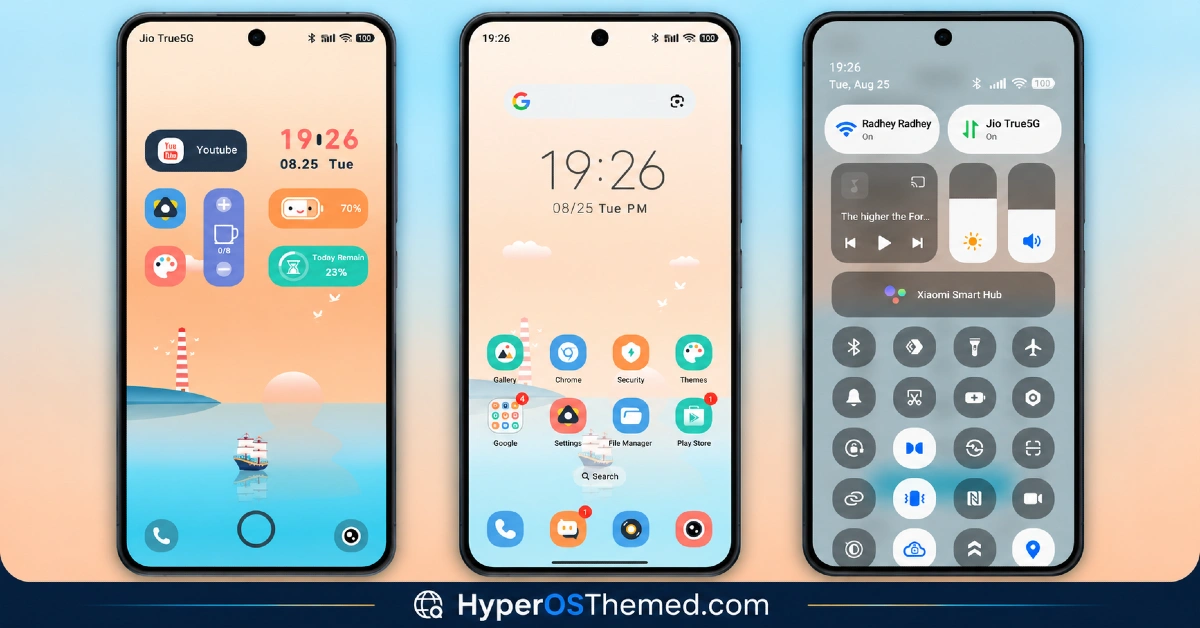
- Sea-Themed Widgets: Set Sail includes custom widgets built around a nautical, sea-inspired visual style rather than generic clock or weather displays. This gives the home screen a distinct personality that’s rare among HyperOS themes leaning into more conventional aesthetics.
- Refined Icon Pack: System and popular app icons get a redesigned, stylish finish that ties into the theme’s overall modern look. As with most icon packs, coverage tends to focus on commonly used apps, so a handful of less popular ones may retain their default look.
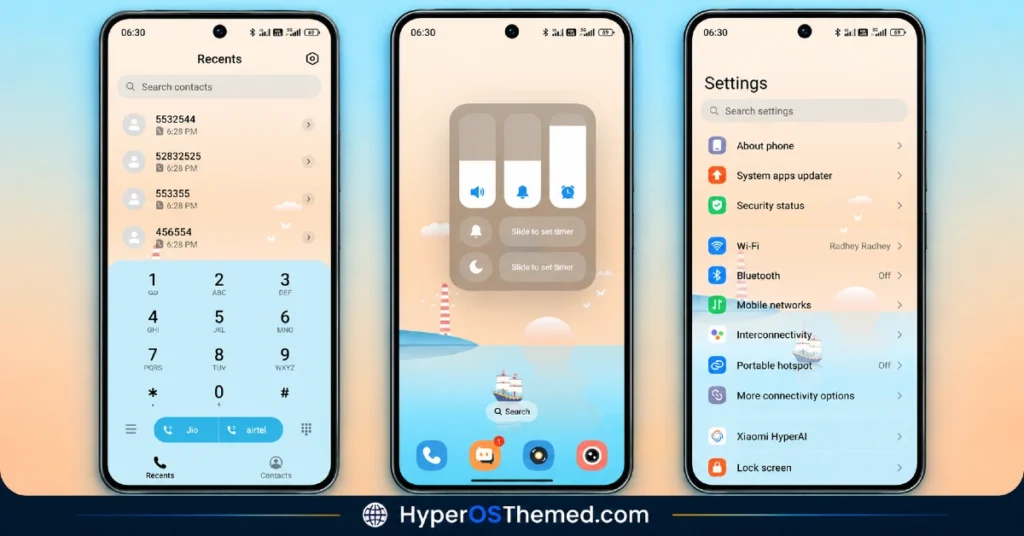
- Customized Dialer Pad: The dialer gets its own visual treatment, which is a detail many themes skip entirely in favor of focusing purely on the home screen and lock screen. It’s a small but appreciated touch for anyone who actually uses their phone to make calls.
- Beautifully Crafted Lock Screen
The lock screen is redesigned with smooth transitions and a more premium layout compared to the stock HyperOS default. It works alongside the sea widgets to give the whole unlock experience a cohesive, considered feel. - Redesigned Control Centre and Notification Panel
Beyond the home screen, the Control Centre and Notification Panel both get visual updates for a more polished, unified system experience. This kind of broader coverage helps the theme feel complete rather than limited to surface-level changes. - Remarkably Compact File Size
At just 5.87 MB, Set Sail is dramatically lighter than most themes offering this many customized elements. It’s an easy, near-instant download regardless of connection speed, which is unusual given how much ground it covers.
Set Sail HyperOS Theme Preview
The screenshots below show the sea-themed widgets, the redesigned icon pack and how the lock screen and dialer pad look once the theme is applied. Given how compact the file size is relative to what’s included, it’s worth browsing the preview to see just how much detail moscreen packed into so little space.
Set Sail Theme Details
| Attribute | Details |
|---|---|
| Availability | Free, via Xiaomi Theme Store |
| Supported Devices | Xiaomi, Redmi and POCO phones running HyperOS |
| Theme Name | Set Sail |
| Designer | moscreen |
| Compatibility OS | HyperOS, HyperOS 2.0 and HyperOS 3.0 |
| Features | Sea-themed widgets, refined icon pack, customized dialer pad, redesigned lock screen, updated Control Centre and Notification Panel |
| File Size | 5.87 MB |
Set Sail HyperOS Theme Compatibility
Set Sail Xiaomi Theme supports HyperOS, HyperOS 2.0 and HyperOS 3.0, giving it solid reach across Xiaomi, Redmi and POCO devices running any of those versions. Given how small the file size is relative to the number of elements it modifies, there’s generally less to go wrong during installation compared to heavier, effect-laden themes.
The theme also includes slide-down access to additional customization options, so it’s worth exploring those settings after applying to get the most out of the design. As with most themes touching the lock screen and dialer, a quick restart after installation is a sensible step if anything looks slightly off on the first try.
Get Set Sail HyperOS Theme
Download Set Sail only through the official Theme Store link or the direct MTZ file link rather than random third-party file hosts or unofficial APK uploads. Files sourced outside verified channels are difficult to confirm as unaltered and may not reflect what moscreen actually released. Sticking to the official Theme Store link keeps the installed version consistent with the intended design and ensures any future updates remain accessible.
How to Apply Set Sail HyperOS Theme
Follow the steps below to apply the theme:
- Open the Theme Store link given above on your Xiaomi, Redmi or POCO device.
- This will redirect you to the Theme Store.
- Download and install the theme.
- Tap on Apply.
- Customize specific elements such as icons, lock screen or status bar if needed.
- Reboot your device for the full effect, though this step is optional.
Note: If anything looks overlapped or doesn’t display correctly right after installing, restarting the device usually clears it up without further steps. Set Sail has been checked across its supported HyperOS versions without any major issues turning up. Still, if something looks off on a specific device once it’s applied, leaving a comment with the details helps get it looked into.
Installing Set Sail HyperOS Theme on Custom ROM Devices
Devices running a Custom ROM aren’t able to use the direct Theme Store link, so the MTZ file needs to be brought in manually through the Theme Store app instead. Here’s how that works:
- Grab the MTZ file for Set Sail from the download section.
- Open the Theme Store app.
- Go into the Themes tab.
- Scroll down to find the Import option, then tap it.
- Use the file manager to locate the downloaded .mtz file.
- Wait for the import process to finish.
- Tap the theme once it appears in the list to apply it.
Why Choose Set Sail HyperOS Theme?
- Distinctive sea-themed widgets — a nautical touch that stands out from generic clock and weather displays.
- Remarkably small file size — 5.87 MB is tiny given how much of the system this theme touches.
- Customized dialer pad — a detail many themes overlook entirely.
- Full system coverage — Control Centre, Notification Panel and Settings all get updated, not just the home screen.
- Polished lock screen — smooth transitions and refined layout beyond stock HyperOS.
- Broad HyperOS compatibility — works across HyperOS, HyperOS 2.0 and HyperOS 3.0.
- Quick, effortless installation — the tiny file size means near-instant downloads.
- Free official download — no cost involved and distributed through legitimate channels.
Conclusion
Set Sail HyperOS Theme manages something genuinely uncommon, a distinctive, themed visual identity packed into a file size a fraction of what most comparable themes require, without skimping on the dialer, Control Centre or Notification Panel along the way. The sea-inspired widgets give it real personality without tipping into gimmick territory. For Xiaomi, Redmi and POCO users who want a theme that’s both characterful and refreshingly lightweight, Set Sail is well worth trying.
You may also like:
Muses HyperOS Theme with Premium Icon Design for Xiaomi, POCO, Redmi
OX 3D1 HyperOS Theme with Liquid Glass Depth Effect for Xiaomi, POCO, Redmi
VKOX HyperOS Theme for Xiaomi, POCO and REDMI Phones
JellyB HyperOS Theme with Dark Sea Colour Palette for Xiaomi, POCO and REDMI Phones
Gaze of Night HyperOS Theme with Premium Black for Xiaomi, POCO and REDMI Phones
