
Clean, bright themes are common enough, but a lot of them stop at a white wallpaper and call it minimal. WhiteningStripsV1 HyperOS Theme and MIUI Theme go deeper, reaching into the dialer, settings menus and notification panel rather than leaving those areas looking like leftover stock HyperOS next to a themed home screen. It’s built for Xiaomi, Redmi and POCO devices running HyperOS, with the designer noting it’s optimized specifically for HyperOS and MIUI 12.5 and above.
WhiteningStripsV1 HyperOS Theme Key Features
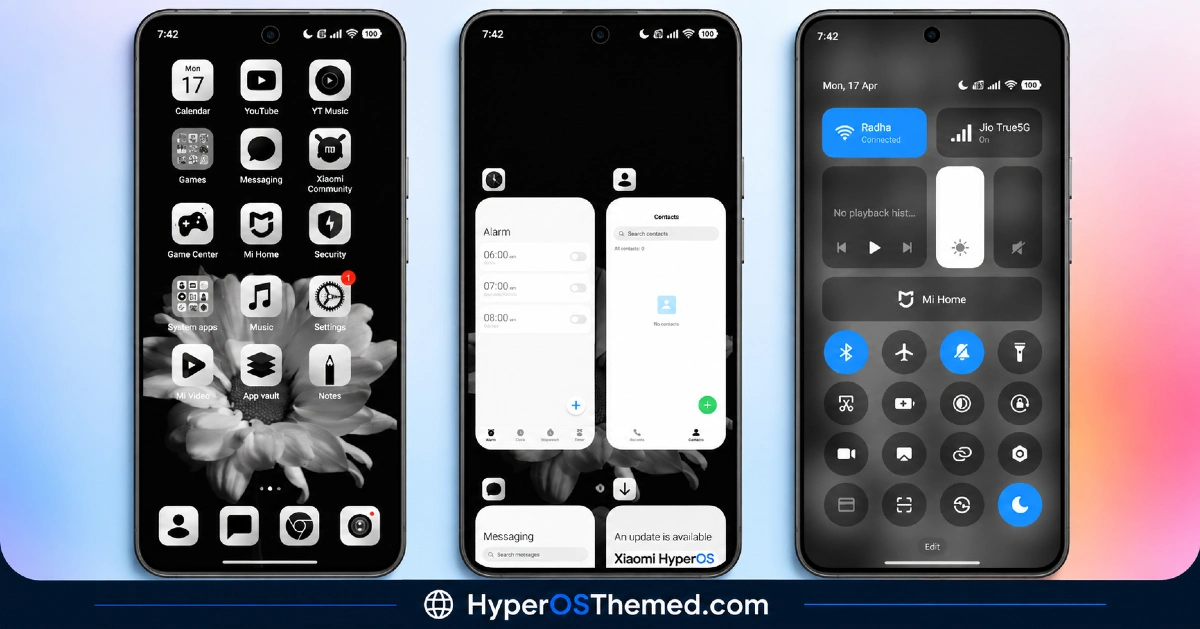
- Crystal Clear Custom Icons: The theme includes a full suite of custom-designed icons that stay sharp and consistent across apps rather than mixing styles. That consistency is really what keeps a bright, clean theme from looking flat or generic.
- Optimized Performance: WhiteningStripsV1 MIUI Theme is built to be lightweight and efficient, meant to avoid the lag some heavier visual themes introduce. That’s worth calling out specifically since a genuinely bright, detailed theme doesn’t always mean a heavy one.
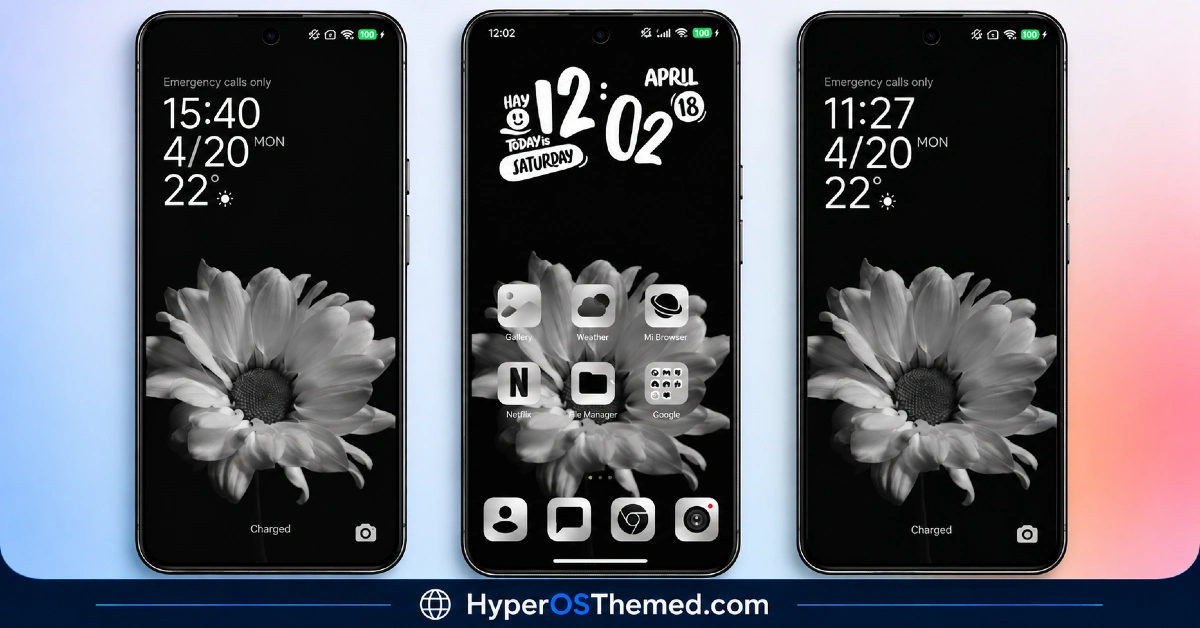
- Dynamic Lock Screen and Widgets: The lock screen includes interactive elements along with widgets designed to blend into the overall aesthetic rather than sitting as generic boxes on top of the wallpaper.
- Sleek Control Center and Notifications: Both the control center and notification panel get a redesign aimed at staying functional while looking visually consistent with the rest of the theme, rather than one area feeling more polished than the other.
- Deep System Integration: Beyond icons and the lock screen, settings menus and the dialer are meticulously themed too, so the whole experience feels cohesive rather than partially applied.
- Minimal Battery Impact: The theme uses optimized graphics and code specifically to avoid draining battery or affecting performance, according to the designer, which matters more with a bright, detail-heavy theme than a plain dark one.
WhiteningStripsV1 HyperOS Theme Preview
The screenshots below show the crystal clear icon set, the dynamic lock screen and how the sleek control center and deep system integration come together once the theme is applied. Since the appeal here is really about overall consistency rather than one standout feature, it’s worth looking through the full preview set.
WhiteningStripsV1 HyperOS Theme Overview
| Attribute | Details |
|---|---|
| Availability | Free, via Xiaomi Theme Store |
| Supported Devices | Xiaomi, Redmi and POCO phones running HyperOS |
| Theme Name | WhiteningStripsV1 |
| Compatibility OS | HyperOS (optimized for MIUI 12.5 and above) |
| Features | Crystal clear custom icons, dynamic lock screen and widgets, sleek Control Center and notifications, deep system integration |
| File Size | Not specified by designer |
WhiteningStripsV1 Theme Compatibility
WhiteningStripsV1 HyperOS Theme is primarily optimized for HyperOS and newer MIUI versions, MIUI 12.5 and above, for the best experience. It may apply on some older versions, but full compatibility and all features are only guaranteed on HyperOS and recent MIUI builds, so anyone on an older MIUI release should expect some elements to display differently.
The theme is designed to be lightweight, using optimized graphics and code to keep battery and performance impact minimal, so it shouldn’t slow the device down even with how much of the system it touches.
Get WhiteningStripsV1 HyperOS Theme
Download WhiteningStripsV1 HyperOS Theme Xiaomi only through the official Theme Store link or the direct MTZ file rather than random third-party file hosts or unofficial APK uploads. Files sourced outside verified channels are difficult to confirm as unaltered and may not reflect the version the designer actually released. Sticking to the official links keeps the installed version consistent with the intended design and ensures any future updates remain accessible.
How to Apply WhiteningStripsV1 HyperOS Theme
Follow the steps below to apply the theme:
- Open the Theme Store link given above on your Xiaomi, Redmi or POCO device.
- This will redirect you to the Theme Store.
- Download and install the theme.
- Tap on Apply.
- Customize specific elements such as icons, lock screen or status bar if needed.
- Reboot your device for the full effect, though this step is optional.
Note: If the Official Theme Store link doesn’t open properly, try switching to Chrome or your device’s default Xiaomi browser, since other browsers have been reported not to work reliably with this link, and it’s likely to open a Chinese-language theme page given the region listing..
Why Choose WhiteningStripsV1 HyperOS Theme?
- Genuinely consistent icon design — a full custom icon suite rather than a partial recolor job.
- Deep system-wide theming — dialer, settings and notifications all get the same visual treatment.
- Lightweight and efficient — built to avoid the lag heavier visual themes sometimes introduce.
- Interactive lock screen widgets — functional elements rather than purely decorative boxes.
- Minimal battery impact — optimized graphics and code designed to preserve performance.
- Free official download — no cost involved through a legitimate Theme Store link.
Conclusion
WhiteningStripsV1 HyperOS Theme backs up its clean, bright aesthetic with real system-wide consistency, reaching into the dialer and settings menus rather than stopping at the home screen, all while staying lightweight enough to avoid any real performance trade-off. For Xiaomi, Redmi and POCO users on HyperOS or MIUI 12.5 and above who want a fresh, modern look without sacrificing speed, WhiteningStripsV1 Xiaomi Theme is well worth trying.
You may also like:
iOS 26 HyperOS Theme with Premium iOS-Style Lock Look for Xiaomi, POCO, Redmi
Sakurafall HyperOS Theme with Best Dark iOS-Inspired Look for Xiaomi, POCO, Redmi
GeloBlackPlay HyperOS Theme with AMOLED Black & 3D Icons for Xiaomi, POCO, Redmi
Red Moon HyperOS Theme ~ Red-Toned Dark One UI Style for Xiaomi, POCO, Redmi
