
Most “AMOLED” themes stop at swapping the wallpaper to black and calling it done, but GeloBlackPlay HyperOS Theme pushes further with a full 3D icon set built specifically to pop against that deep black backdrop. Designed by PlayBR77, it keeps the whole package genuinely lightweight at 17.18 MB despite the added dimensional icon work, built for Xiaomi, Redmi and POCO devices covering HyperOS, HyperOS 2.0 and HyperOS 3.0.
GeloBlackPlay HyperOS Theme Features
- Deep AMOLED Black Base: The theme commits to a genuinely deep black throughout rather than a dark grey approximation, which pairs naturally with AMOLED displays where true black pixels can turn off entirely. That’s a real battery consideration on top of the visual choice.
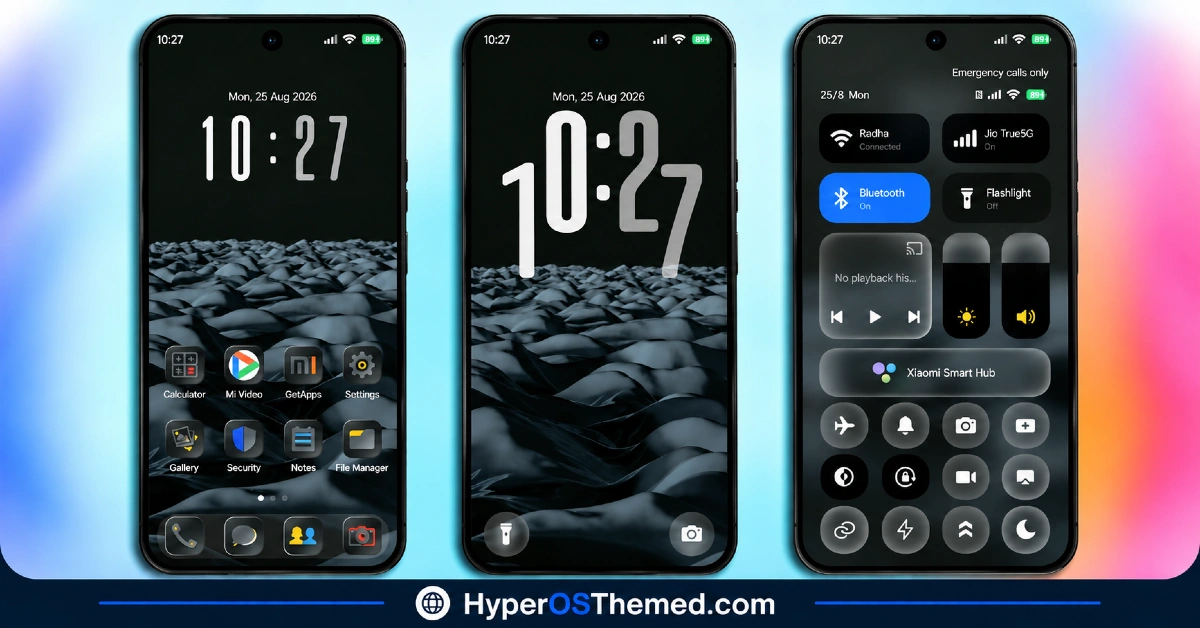
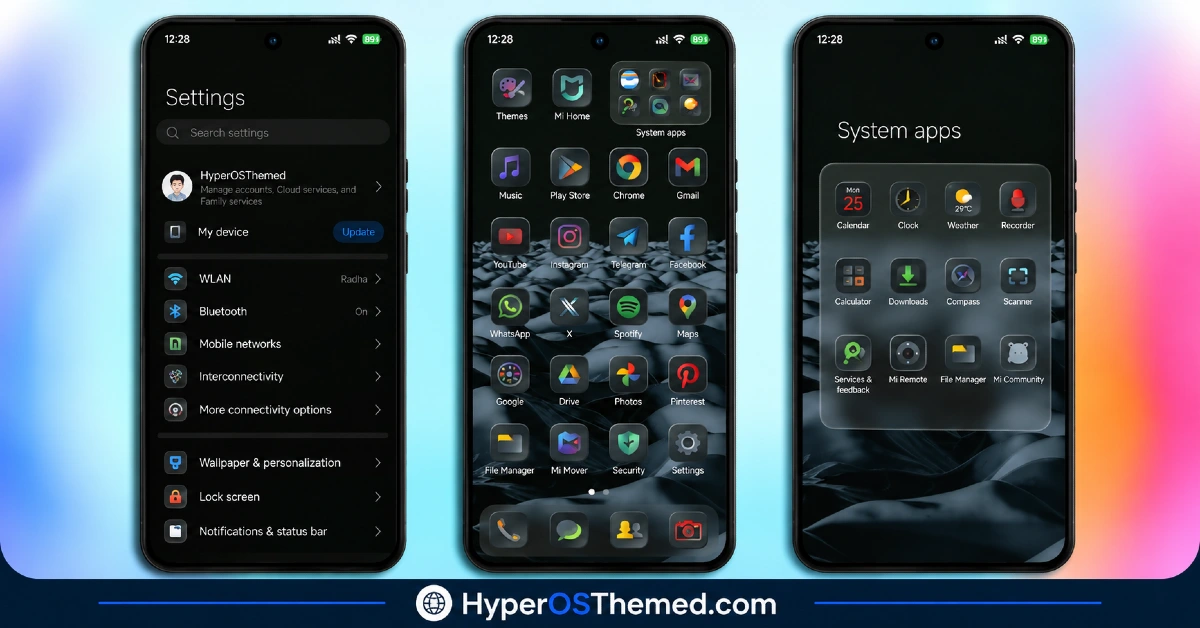
- 3D Icon Design: Icons use dimensional shading and depth rather than sitting as flat shapes on the home screen. That extra rendering work is what gives GeloBlackPlay its distinct identity compared to the many flat black icon packs already out there.
- Consistent Black-on-Black Aesthetic: The color palette stays disciplined, black carrying through wallpaper, icons and UI accents rather than mixing in unrelated bright tones. That consistency is really what makes a dark theme feel deliberate instead of just default-dark-mode-with-extra-steps.
- Genuinely Compact File Size: At 17.18 MB, GeloBlackPlay is notably light considering the 3D rendering work involved in the icon set. It downloads quickly and shouldn’t put much strain on storage even on older devices.
- Broad HyperOS Version Support: The theme covers HyperOS, HyperOS 2.0 and HyperOS 3.0, giving it solid reach across both newer and slightly older Xiaomi, Redmi and POCO devices rather than being locked to a single release.
GeloBlackPlay HyperOS Theme Preview
The screenshots below show the AMOLED black backdrop and how the 3D icon set reads against it once the theme is applied. Since the depth effect on the icons is the main draw here, it’s worth looking closely at the preview to judge how convincing that dimensional shading actually looks in practice.
GeloBlackPlay HyperOS Theme Overview
| Attribute | Details |
|---|---|
| Availability | Free, via Xiaomi Theme Store |
| Supported Devices | Xiaomi, Redmi and POCO phones running HyperOS |
| Theme Name | GeloBlackPlay |
| Designer | PlayBR77 |
| Region | Global |
| Compatibility OS | HyperOS, HyperOS 2.0 and HyperOS 3.0 |
| Features | AMOLED black base, 3D icon design, consistent black-on-black aesthetic |
| File Size | 17.18 MB |
GeloBlackPlay HyperOS Theme Compatibility
GeloBlackPlay HyperOS Theme supports HyperOS, HyperOS 2.0 and HyperOS 3.0, giving it solid reach across Xiaomi, Redmi and POCO devices running any of those versions. Given the compact file size and the theme’s reliance on color and shading rather than heavy transparency or animation, compatibility tends to stay consistent across a wide range of hardware.
Custom ROM users on setups like Xiaomi EU ROM or MIUIRoom can still install the theme manually through the MTZ file, and if you’re specifically on MIUI 14, there’s a separate video guide worth following instead of the standard steps.
Get GeloBlackPlay HyperOS Theme
Download GeloBlackPlay only through the official Theme Store link rather than random third-party file hosts or unofficial APK uploads. Files sourced outside verified channels are difficult to confirm as unaltered and may not reflect what PlayBR77 actually released. Sticking to the official Theme Store link keeps the installed version consistent with the intended design and ensures any future updates remain accessible.
How to Apply GeloBlackPlay HyperOS Theme
Follow the steps below to apply the theme:
- Open the Theme Store link given above on your Xiaomi, Redmi or POCO device.
- This will redirect you to the Theme Store.
- Download and install the theme.
- Tap on Apply.
- Customize specific elements such as icons, lock screen or status bar if needed.
- Reboot your device for the full effect, though this step is optional.
Note: If the Official Theme Store link doesn’t open properly, try switching to Chrome or your device’s default Xiaomi browser, since other browsers have been reported not to work reliably with this link. If anything looks overlapped or fails to display correctly right after installing, restarting the device usually clears it up. This theme has been tested without any major issues turning up, but if something still looks off on a specific device, leaving a comment with the details helps get it looked into.
Installing GeloBlackPlay Xiaomi Theme on Custom ROM Devices
Devices running MIUI 11 through 14 or HyperOS based Custom ROMs such as Xiaomi EU ROM or MIUIRoom aren’t able to use the direct Theme Store link, so the MTZ file needs to be brought in manually instead. Here’s how that works:
- Grab the MTZ file for GeloBlackPlay from the download section.
- Open the Theme Store app.
- Go into the Themes tab.
- Scroll down to find the Import option, then tap it.
- Use the file manager to locate the downloaded .mtz file.
- Wait for the import process to finish.
- Tap the theme once it appears in the list to apply it.
Why Choose GeloBlackPlay HyperOS Theme?
- Genuine 3D icon depth — dimensional shading that stands apart from flat black icon packs.
- True AMOLED optimization — real black backgrounds, not dark grey, help battery life on OLED screens.
- Disciplined black-on-black palette — no mismatched bright accents breaking the aesthetic.
- Extremely light file size — 17.18 MB is small given the 3D rendering work involved.
- Broad HyperOS compatibility — works across HyperOS, HyperOS 2.0 and HyperOS 3.0.
- Free official download — no cost involved through a legitimate Theme Store link.
Conclusion
GeloBlackPlay HyperOS Theme makes a strong case for itself with genuinely dimensional 3D icons rather than settling for a flat black recolor, all packed into a surprisingly light download. For Xiaomi, Redmi and POCO users who want an AMOLED-friendly dark theme with a bit more visual depth than usual, GeloBlackPlay HyperOS Theme is well worth trying.
You may also like:
Red Moon HyperOS Theme ~ Red-Toned Dark One UI Style for Xiaomi, POCO, Redmi
Default-3 HyperOS Theme with Blue Liquid Glass effect for Xiaomi, POCO, Redmi
FiftyK HyperOS Theme ~ iOS-Style Control with Floral Mediterranean Look for Xiaomi, POCO, Redmi
Grade A HyperOS Theme with Cyberpunk Red Neon AMOLED for Xiaomi, POCO, Redmi
