
The name TradFi HyperOS Theme immediately made me think of trading terminals and finance dashboards, so I went in expecting some kind of stock-ticker or chart-heavy aesthetic, which turned out to be completely wrong once I actually installed it on my POCO X6. There’s nothing finance-related about the visual design at all, it’s a straightforward dark theme, and the naming mismatch was enough of a curveball that I wanted to dig into why the Control Center specifically got singled out in the title.
TradFi HyperOS Theme Features
- Cool Dark Mode Control Centre: This is clearly the centerpiece feature, and it shows. The redesigned Control Center has a genuinely different layout from stock HyperOS, with toggle groupings that felt more deliberate rather than a generic grid reshuffled slightly.
- Full Lock Screen Customisation: Beyond a basic clock swap, the lock screen offers real styling options rather than one fixed layout. I went through a couple of the available configurations before landing on one that kept notification previews clear while still matching the dark aesthetic.
- Updated System App Icons: Icons throughout the interface carry a consistent, deliberately crafted look rather than a rough recolor of stock assets. Coverage across my regularly used apps was solid, though a couple of niche apps kept their default icons and stood out slightly against the rest.
- System-Wide UI Changes Dialer, Settings, and Messages all pick up matching dark styling instead of sticking out as untouched stock apps. This reach beyond the home screen is what makes the theme feel complete rather than partial.
- Dark Mode Dependency: As the download notes specify, this theme is built to be used with system Dark Mode enabled, and testing it without that setting on showed a few elements not rendering the way they’re clearly intended to. It’s a detail easy to skip past in the instructions but one that actually matters here.
- Large, Detail-Rich File Size: At 65.2 MB, this is a fairly substantial package, and that size shows up in how much of the Control Center and lock screen customization is actually built in rather than just visual dressing. Installation took a bit longer than smaller themes, which tracks given the scope.
TradFi HyperOS Theme Preview
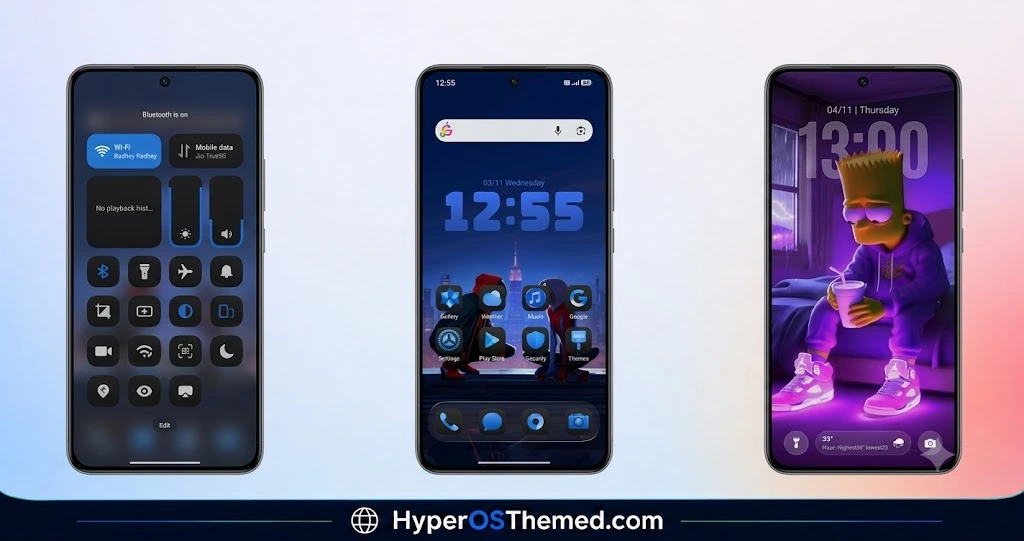
Despite the name, there’s nothing overtly finance-themed here visually, this is a cool-toned dark design with a heavy emphasis on the Control Center’s redesigned layout and spacing.
Icons and system apps carry consistent dark styling without leaning into gradients or decorative flourishes, keeping the overall look restrained and functional rather than flashy. It reads as a theme built around one strong feature, the Control Center, with everything else supporting that focus rather than competing for attention.
TradFi HyperOS Theme Details
| Detail | Info |
|---|---|
| Theme Name | TradFi |
| Designer | mydul |
| Compatibility | HyperOS |
| Features | Dark Mode, Control Center, Icons, Full UI Theming |
| File Size | 65.2 MB |
TradFi HyperOS Theme Performance
I ran TradFi HyperOS Theme on a POCO X6 through daily use covering messaging, browsing, and gaming sessions, with Dark Mode enabled as instructed throughout testing. Given the larger 65.2 MB file size, I expected some lag, but the app drawer and Control Center both stayed responsive without noticeable delay.
Battery drain came in a bit higher than my usual baseline, which is reasonable given how much of the interface, particularly the Control Center, relies on custom rendering rather than stock elements. The one hiccup traced directly back to skipping the Dark Mode requirement during an early test, once that was corrected everything rendered as intended.
TradFi HyperOS Theme’s Compatibility
TradFi is listed as compatible with HyperOS broadly, without a specific breakdown for HyperOS 2.0 or HyperOS 3.0 support. I tested it on a POCO X6 without running into major issues, though since the designer doesn’t specify version-level compatibility, results on the newest HyperOS 3.0 builds may vary slightly, particularly with Control Center rendering. It’s not intended for MIUI-only devices predating HyperOS.
Custom ROM users on Xiaomi.eu, MIUIRoom, or similar HyperOS-based builds should be able to import the MTZ file without major issues, provided Dark Mode is enabled first as specified.
Get TradFi HyperOS Theme
Download TradFi through the official Xiaomi Theme Store link rather than third-party APK sites or random file-sharing pages claiming to host the same theme. Given the file size and the amount of Control Center customization built in, downloading from unverified sources risks getting an incomplete or corrupted file, so sticking with the official Theme Store is the safer choice.
Note: Turn on Dark Mode and restart your device before applying this theme for it to render correctly. If the Official Theme Store Link doesn’t redirect properly, try opening the page in Chrome or the default Xiaomi browser, since other browsers may not handle the redirect correctly.
How to Apply TradFi HyperOS Theme
Follow the steps below to apply the theme:
- Open the Theme Store Link given above on your Xiaomi / REDMI / POCO device
- This will redirect you to Theme Store.
- Download and install the theme
- Tap on Apply
- Customize specific elements (icons, lock screen, status bar) if needed
- Reboot your device (optional for full effect)
Why Choose TradFi HyperOS Theme?
- Redesigned Control Center is genuinely more deliberate than a reshuffled stock layout
- System app reskinning reaches Dialer, Settings, and Messages, not just the home screen
- Lock screen offers real customization options instead of one fixed design
- Detailed enough to justify the larger file size rather than feeling padded
- From a designer with a track record of thorough, system-wide theming
Conclusion
TradFi HyperOS Theme turned out to be a solid dark theme on my POCO X6 once I actually followed the Dark Mode instruction properly, even if the name has nothing to do with what you actually get visually. The couple of unthemed niche app icons were a small but consistent gap, and the larger file size means a longer install than most themes I’ve tested.
Compared to other dark Control Center-focused themes I’ve tried, TradFi backs up its main feature with genuine system-wide consistency rather than treating the Control Center as the only highlight. If you’re after a cool, functional dark setup and don’t mind the odd naming choice, it’s worth trying.
You may also like:
Hoshyper HyperOS Theme with Dark iOS-Style Look for Xiaomi, POCO & Redmi
Blue Nocturne HyperOS Theme for Xiaomi, POCO and Redmi Phones
OX GR1 HyperOS Theme: A Dark Red Anime Look for Xiaomi, POCO & Redmi
HyperBlue HyperOS Theme for Xiaomi, POCO and REDMI Phones
Guofeng 18 HyperOS Theme for Xiaomi, POCO and REDMI Phones with iOS-Styled
