
I noticed OS27 Liquid Color HyperOS Theme on the Theme Store’s featured tab while looking for something more colorful than the black and glass themes I’d been cycling through for months.
The rainbow gradient wallpaper in the thumbnail looked genuinely different from the usual muted palettes most iOS-style themes stick to, so I downloaded it onto my POCO X6 that evening. I used it for ten days to see whether the color variety actually translated well in daily use or just looked good as a static preview.
OS27 Liquid Color HyperOS Theme Features
- Fluid Colorful Wallpaper Collection: The wallpaper pack ranges from deep purple and ocean blue tones to full rainbow gradients, all with a liquid, flowing quality rather than sharp geometric shapes. I switched between three of them over the ten days, and the purple and blue variants held up better for daily use since the rainbow one got a bit visually busy behind a full row of icons.
- Authentic Control Center Styling: Pulling down the control center gives you a layout that closely mirrors iOS’s actual Control Center design, with rounded toggle groupings rather than a generic grid. It felt genuinely different from the usual HyperOS quick settings panel, and toggles stayed responsive when I tested rapid switching between Wi-Fi and Bluetooth.
- Weather and Battery Widgets: The home screen includes dedicated weather and battery widgets styled to match the iOS aesthetic rather than relying on stock HyperOS widgets reskinned with new colors. Both updated reliably throughout testing without any lag or delayed refresh that I noticed.
- Multiple Color Options: Beyond the wallpaper variety, several UI elements let you pick between different accent color options rather than being locked into one scheme. I ended up sticking with the ocean blue variant since it felt easier to look at over long stretches compared to the more saturated rainbow option.
- iOS-Style Icon Set: Icons follow the familiar rounded square shape with clean detailing, consistent with the broader iOS aesthetic the theme is going for. Coverage across my apps was solid, though two apps tied to local services kept their default icons throughout the test period.
OS27 Liquid Color HyperOS Theme Preview
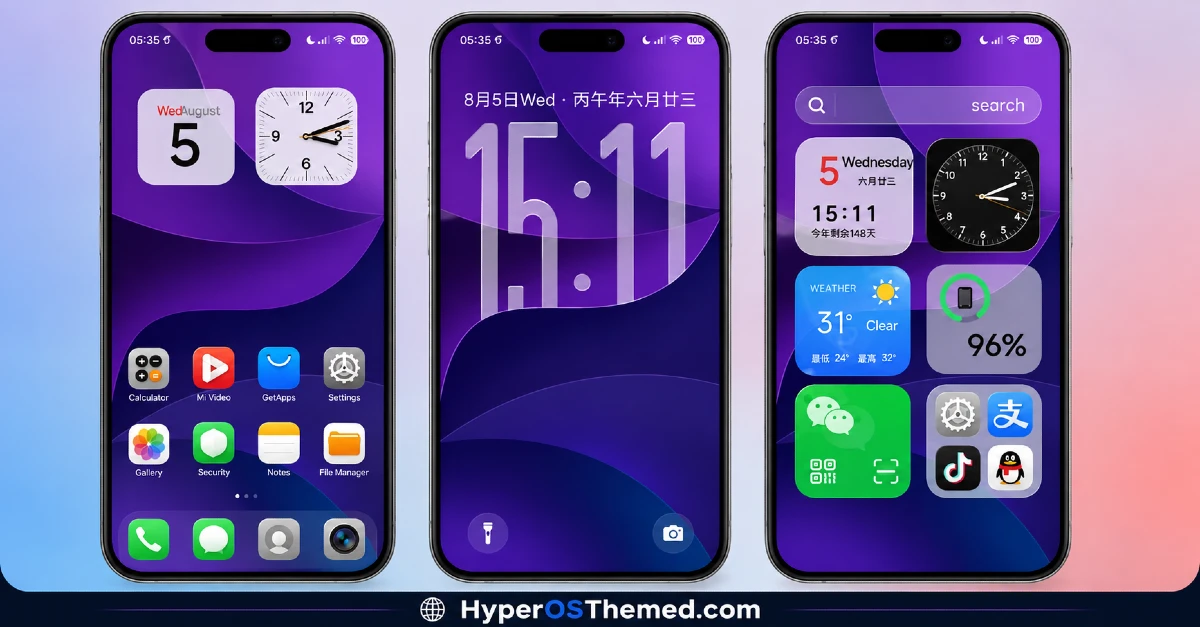
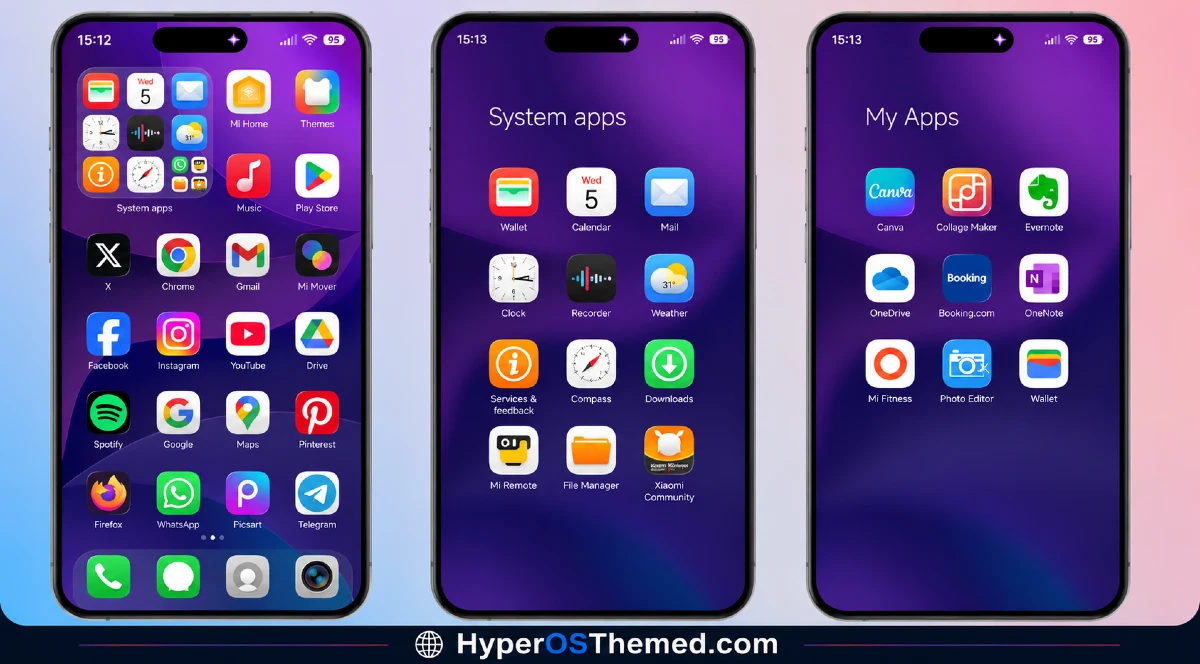
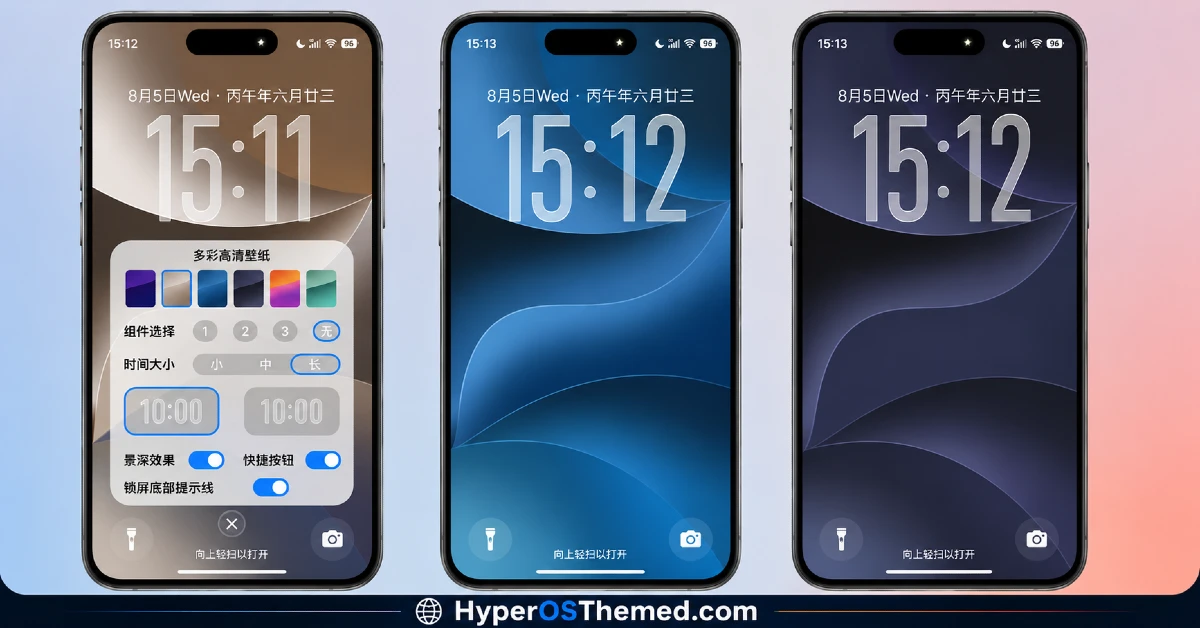
The visual identity is built around fluid, flowing color gradients that shift between deep purples, ocean blues, and full rainbow spectrums depending on which wallpaper you pick. Icons and widgets stay clean and rounded, keeping the interface from feeling cluttered even with such colorful backgrounds.
It leans into a genuinely vibrant, playful aesthetic rather than the muted or monochrome look most iOS-style themes default to, which makes it stand out immediately against darker or more restrained options.
OS27 Liquid Color Theme Details
| Detail | Info |
|---|---|
| Theme Name | OS27 Liquid Color |
| Designer | 夏落小娇 |
| Compatibility | HyperOS, HyperOS 2.0, HyperOS 3.0 |
| Features | Premium, Colorful, iOS Style, Widget, Wallpapers |
| File Size | 17.78 MB |
OS27 Liquid Color HyperOS Theme Performance
I tested OS27 Liquid Color HyperOS Theme on a POCO X6 running HyperOS 3.0 for ten days, through regular daily use including messaging, social media, and a few gaming sessions. Given the relatively compact 17.78 MB file size, installation was quick, well under a minute on my device.
Performance stayed smooth throughout testing, with no lag switching between wallpapers or opening the app drawer. Battery drain was close to my stock theme baseline, maybe a percent or two higher, which is reasonable given the widgets and Control Center styling running in the background. The main annoyance was that switching between the included color wallpaper options occasionally required a manual reboot to fully apply, otherwise remnants of the previous wallpaper lingered in the recent apps view.
OS27 Liquid Color HyperOS Theme Compatibility
OS27 Liquid Color HyperOS Theme supports HyperOS, HyperOS 2.0, and HyperOS 3.0, covering a broad range of current Xiaomi, Redmi, and POCO devices. I tested it on a POCO X6 running HyperOS 3.0 without major issues, aside from the wallpaper switching quirk mentioned above.
It is not built for MIUI 12, 13, or 14, so applying it outside of HyperOS isn’t recommended. Custom ROM users on Xiaomi.eu or similar HyperOS-based builds should be able to import the MTZ file without much trouble, and the designer also provides a separate backup file alongside the main download, which is worth grabbing in case any wallpaper or widget elements don’t apply cleanly on your specific device.
Get OS27 OS27 Liquid Color HyperOS Theme
Download OS27 Liquid Color HyperOS Theme through the official Xiaomi Theme Store rather than third-party APK sites or unofficial file hosts claiming to offer the same theme. The designer also includes a separate backup file alongside the main MTZ download, which is worth keeping in case any elements need to be reapplied manually. Avoid sideloaded theme installers from unverified sources, since they’re a common way people end up with unnecessary permissions or bundled software on their phone.
Note: If the Official Theme Store Link doesn’t redirect properly, try opening the page in Chrome or the default Xiaomi browser, since other browsers may not handle the redirect correctly.
How to Apply OS27 Liquid Color HyperOS Theme
Follow the steps below to apply the theme:
- Open the Theme Store Link given above on your Xiaomi / REDMI / POCO device
- This will redirect you to Theme Store.
- Download and install the theme
- Tap on Apply
- Customize specific elements (icons, lock screen, status bar) if needed
- Reboot your device (optional for full effect)
Why Choose OS27 Liquid Color HyperOS Theme?
- Wallpaper variety genuinely ranges from calm ocean tones to bold rainbow gradients, not just minor color shifts
- Control Center styling feels authentic rather than a rough reskin of the stock panel
- Compact 17.78 MB file size keeps installation fast despite the amount of visual detail
- Dedicated weather and battery widgets add function alongside the colorful aesthetic
- Backup file included by the designer helps resolve any wallpaper or widget application issues
Conclusion
After ten days on my POCO X6, OS27 Liquid Color HyperOS Theme turned out to be one of the more genuinely colorful themes I’ve tested this year without tipping into looking chaotic or overdone. The wallpaper-switching quirk that required an occasional reboot was a minor but recurring annoyance, and the rainbow variant in particular felt a bit much for daily use compared to the calmer colour options.
Compared to other iOS-style themes I’ve tried, though, this one commits to color in a way most competitors don’t, while still keeping the Control Center and widgets functional rather than purely decorative. If you want something vibrant without going full glass or neon, it’s a solid pick.
You may also like:
Codename X HyperOS Theme with Premium iOS-Style Look for Xiaomi & Redmi
Archon HyperOS Theme with Dark iOS-Style Look for Xiaomi, POCO & Redmi
