
I found Archon HyperOS Theme through a Telegram channel that regularly posts HyperOS theme previews, and the dark iOS-style dock in the screenshot looked cleaner than most of the iOS clones I’d tried before. Most of those end up feeling like a rough icon swap with none of the actual system-level polish, so I was curious whether this one went further. I installed it on my POCO X6 and used it as my daily theme To see how the dock and transparency features actually performed outside of a screenshot.
Archon HyperOS theme Features
- Textured Black Wallpaper: The default wallpaper isn’t flat black, it has a subtle texture and grain that gives it some visual depth without being distracting. It paired well with the icon set and didn’t wash out even with brightness turned down low at night.
- Authentic Dark iOS-Style Interface: Settings, Messages, and Contacts all get the dark iOS treatment, not just the home screen. This was the detail that actually impressed me, since a lot of “iOS style” themes I’ve tested stop at icons and leave the system apps looking like stock HyperOS underneath.
- Fully Adjustable Dock: The dock at the bottom of the home screen can be resized and repositioned through the theme’s customization menu. I shrank mine slightly to fit six apps instead of the default four, which worked smoothly and didn’t break the layout on my F5.
- Transparency Controls: There’s a dedicated slider for adjusting how transparent certain UI elements appear, rather than a fixed transparency level baked into the theme. I settled on a lighter transparency setting after the default felt slightly too see-through against busier wallpapers.
- Dynamic Wallpaper Settings: Beyond the static textured black wallpaper, there are settings to adjust how the wallpaper behaves during scrolling and unlocking. It’s a small touch, but one that added a bit of motion to what would otherwise be a static dark background.
- Premium Icon Set: The icon pack follows iOS’s rounded square shape with clean, minimal detailing inside each icon. Coverage was strong across my main apps, though two apps tied to regional services kept their original icons, which is fairly common at this point across most icon packs I’ve tested.
Archon HyperOS Theme Preview
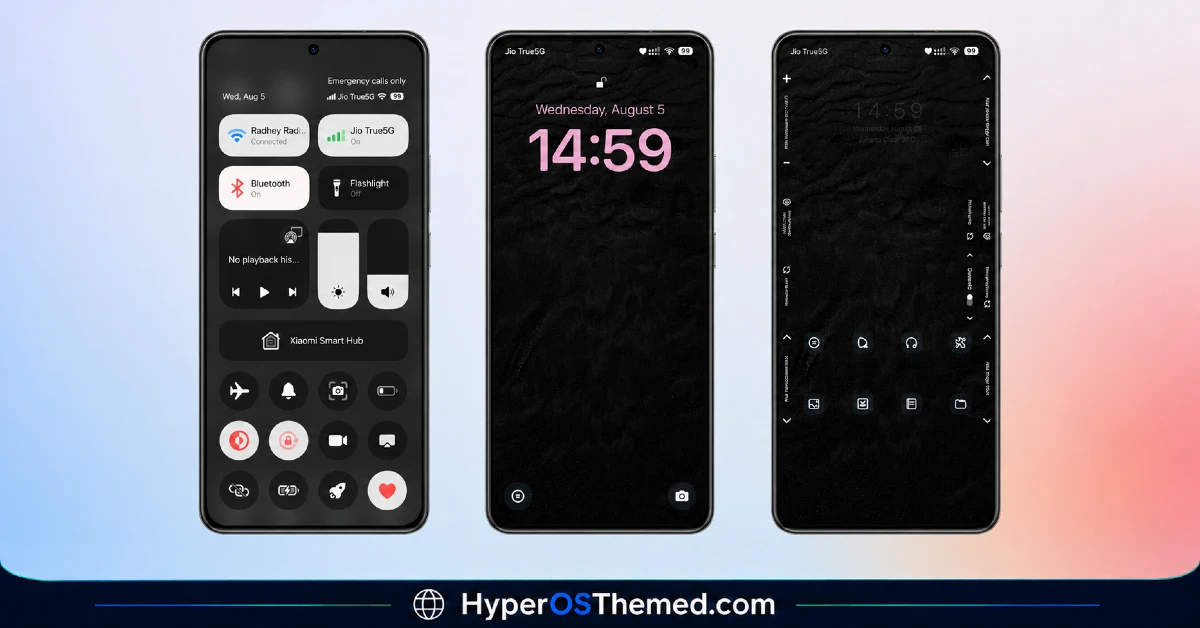
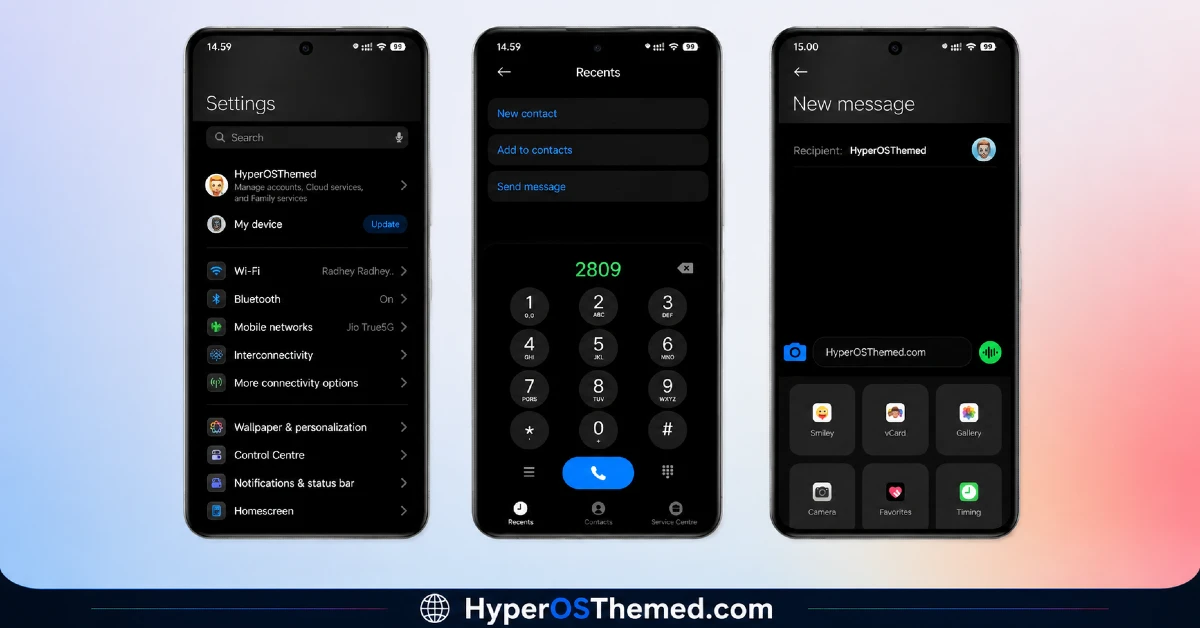
The visual style commits fully to a dark, textured black aesthetic with iOS-inspired rounded icons and a clean, minimal dock sitting at the bottom of the screen. There’s no color accent competing for attention, everything stays within shades of black and dark grey, giving it a restrained, premium feel rather than a flashy one. The adjustable dock and transparency settings add a bit of personalization on top of what’s otherwise a fairly disciplined, monochrome design.
Archon HyperOS Theme Details
| Detail | Info |
|---|---|
| Theme Name | Archon |
| Designer | ELEVEN |
| Compatibility | HyperOS, HyperOS 2.0, HyperOS 3.0 |
| Features | Premium, Dark, iOS Style, Widget |
| File Size | 34.43 MB |
Archon HyperOS Theme Performance
I ran Archon on a POCO X6 running HyperOS 3.0, through daily use covering messaging, gaming, and regular browsing. Given the moderate 34.43 MB file size, installation took a reasonable amount of time, nothing close to the larger themes I’ve tested but longer than the smaller icon-only packs.
Performance stayed smooth throughout, with no lag when adjusting dock size or transparency settings, and no dropped frames in home screen transitions. Battery drain came in about 2 percent higher than my usual stock baseline over a full day, which is minor and likely tied to the dynamic wallpaper behavior.
The one recurring issue was that my custom dock size occasionally reset to default after a software update check, requiring me to readjust it a couple of times over the two weeks.
Compatibility
Archon supports HyperOS, HyperOS 2.0, and HyperOS 3.0, covering a wide range of current Xiaomi, Redmi, and POCO devices. I tested it on a POCO X6 running HyperOS 3.0 without major issues beyond the dock reset mentioned above.
It is not built for MIUI 12, 13, or 14, so applying it on older firmware isn’t recommended and will likely cause layout problems with the dock and transparency features specifically.
Custom ROM users on Xiaomi.eu or similar HyperOS-based builds should be able to import the MTZ file without much trouble, though the dock customization and transparency controls may behave slightly differently depending on how closely the ROM follows stock HyperOS system UI.
Designer’s note: The theme description credits designer ELEVEN and links to their Telegram channel, @v4lentrixx, for updates and future releases.
Get Archon HyperOS Theme
Download Archon through the official Xiaomi Theme Store link rather than third-party APK sites or unofficial file hosts claiming to offer the same theme. Given the amount of customization built into this one, including the dock and transparency settings, downloading from unverified sources risks getting an incomplete or broken file, so sticking with the official Theme Store is the safer choice.
Note: If the Official Theme Store Link doesn’t redirect properly, try opening the page in Chrome or the default Xiaomi browser, since other browsers may not handle the redirect correctly.
How to Archon HyperOS Theme
Follow the steps below to apply the theme:
- Open the Theme Store Link given above on your Xiaomi / REDMI / POCO device
- This will redirect you to Theme Store.
- Download and install the theme
- Tap on Apply
- Customize specific elements (icons, lock screen, status bar) if needed
- Reboot your device (optional for full effect)
Why Choose Archon HyperOS Theme?
- Dark iOS styling extends to Settings, Messages, and Contacts, not just the home screen
- Adjustable dock size lets you fit more or fewer apps to match your habits
- Transparency controls give you actual customization instead of one fixed effect
- Textured black wallpaper adds subtle depth without sacrificing the minimal aesthetic
- Moderate file size keeps install times reasonable while still packing in real customization
Conclusion
After using this theme on my POCO X6, Archon HyperOS Theme stood out as one of the more genuinely customizable dark themes I’ve tested this year, mainly because of the adjustable dock and transparency sliders rather than just a fixed look. The occasional dock reset was a minor irritation, and I wouldn’t call the battery impact negligible, though it’s far from severe. Compared to other iOS-style themes I’ve tried, this one goes deeper into system apps and gives you actual controls instead of a static icon swap. If you want a dark, minimal setup with room to adjust things to your liking, it’s one of the better options I’ve come across.
You may also like:
ItapasV15 HyperOS Theme: An Abstract Purple-Black Look for Xiaomi & Redmi
