
The Luxury VK HyperOS Theme by VK offers a refreshed look for Xiaomi, Redmi and POCO smartphones. Its main features include a redesigned lock screen, a premium-style icon pack, multiple clock styles and a custom charging animation. These elements bring visual changes to everyday parts of the interface without replacing the phone’s operating system.
The lock screen is a central part of the design, with different clock layouts allowing users to personalise how the time appears. Custom app icons help create a more coordinated home screen, while the charging animation adds another visual detail when the phone is connected to power.
Luxury VK HyperOS Theme Key Highlights
1. Custom Lock Screen and Clock Styles
- Redesigned Lock Screen: Gives the screen a different appearance from the default HyperOS layout.
- Multiple Clock Styles: Choose from the available clock designs to personalise the time display.
- Flexible Visual Style: Different clock layouts let you adjust the look of the lock screen to match your preferences.
2. Premium-Style Icon Pack
- Custom App Icons: The theme includes a collection of redesigned icons for supported applications.
- Coordinated Home Screen: The icon pack helps create a more consistent visual appearance across the home screen.
- Distinctive Design: Custom icons provide an alternative to the standard HyperOS app appearance.
3. Custom Charging Animation
- Animated Charging Screen: A custom animation changes the visual presentation when the phone is connected to a charger.
- Additional Visual Detail: The charging effect complements the theme’s other customisation elements.
- Everyday Personalisation: Alongside the lock screen and icons, the animation adds another touch to the overall experience.
Luxury VK HyperOS Theme Preview
The Luxury VK HyperOS Theme focuses on three main areas: the lock screen, app icons and charging animation. Its clock options provide different ways to style the time display, while the custom icon pack gives supported apps a more coordinated appearance.
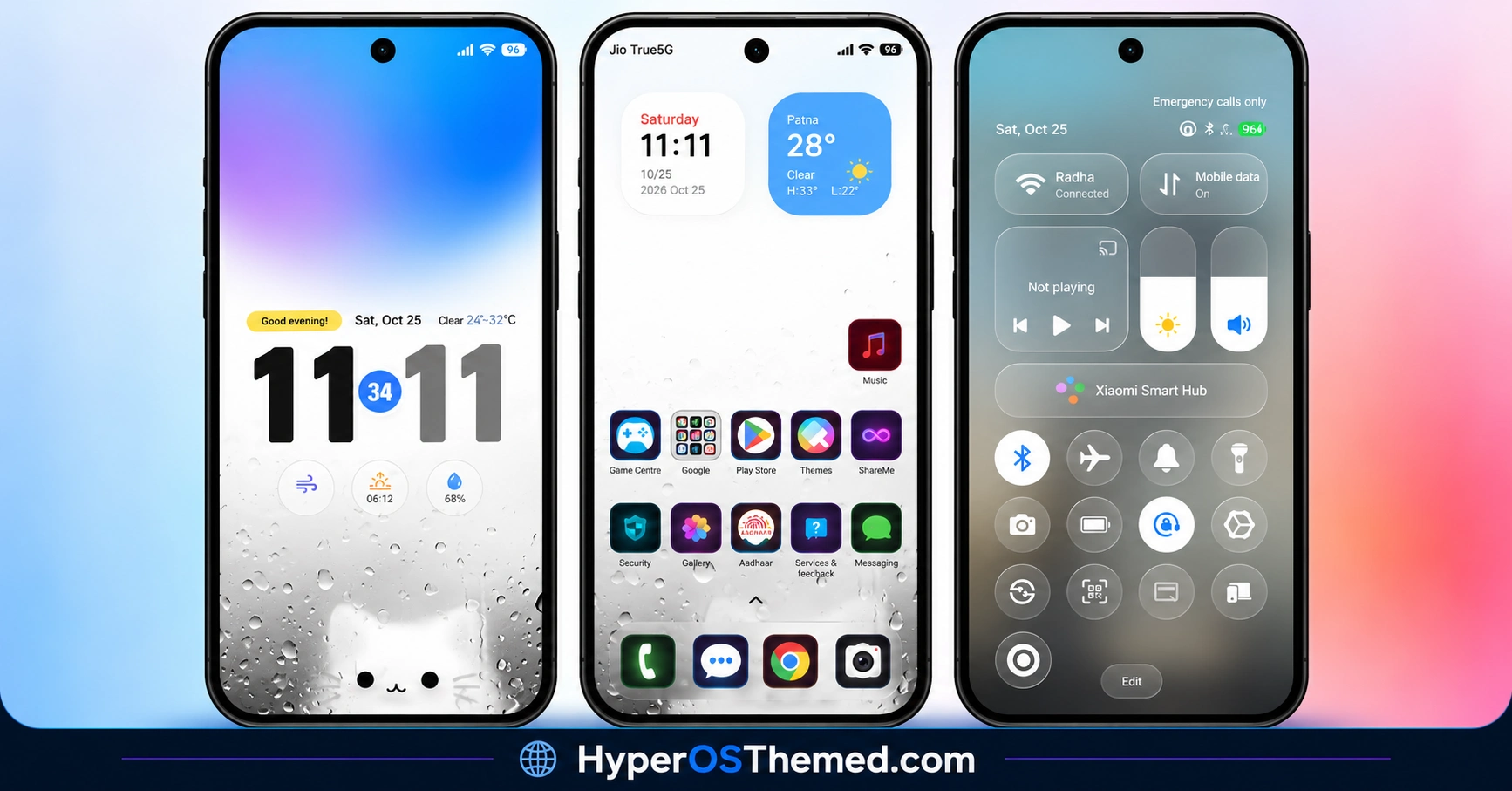
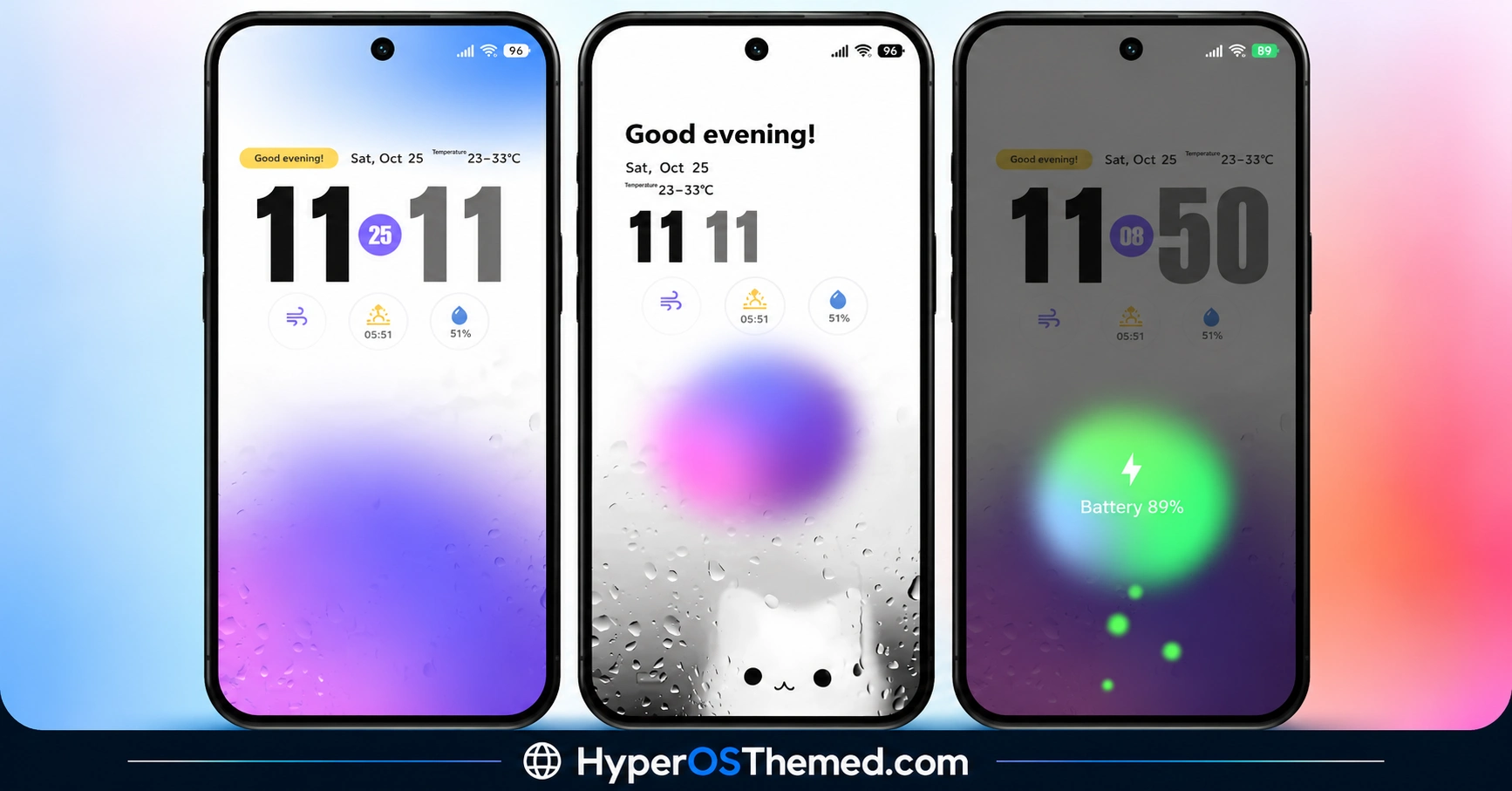
The charging animation adds a separate visual feature that becomes noticeable when the phone is plugged in. Together, these elements make Luxury VK worth considering for users who enjoy changing the appearance of their HyperOS device.
Luxury VK HyperOS Theme Overview
| Detail | Information |
|---|---|
| Theme Name | Luxury VK |
| Designer | VK |
| Availability | Official Xiaomi Theme Store listing |
| Region | Global |
| Supported Devices | Xiaomi, Redmi and POCO |
| Compatibility | HyperOS |
| Main Features | Custom lock screen, clock styles, premium-style icons and charging animation |
| File Size | 27.03 MB |
| Price | Free |
Get Luxury VK HyperOS Theme
Luxury VK is listed for the Global region, with a reported package size of 27.03 MB. The theme is associated with the official Xiaomi Theme Store, where availability may depend on your device and region.
Luxury VK HyperOS Theme Compatibility
Luxury VK HyperOS Theme is compatible with HyperOS. The available details do not independently confirm compatibility with HyperOS 2 or HyperOS 3, so check the listing on your device before applying it.
Individual features, particularly the charging animation and lock-screen elements, may vary depending on your phone model, system version and Themes app.
How to Install Luxury VK on Global Stable ROM
If your Xiaomi, Redmi or POCO smartphone runs a compatible Global Stable HyperOS ROM, follow these steps to install Luxury VK Xiaomi Theme through the official Xiaomi Theme Store.
- Click the OFFICIAL THEME STORE LINK button above.
- When prompted to choose an application, select the Themes app to open the link.
- You will be redirected to the Luxury VK HyperOS Theme page in the Xiaomi Theme Store.
- Tap Download and wait for the download to finish.
- Tap Apply to activate the theme on your device.
The official Theme Store URL was not supplied, so make sure you open the correct listing before downloading the theme.
Note: If the link opens in a browser instead, check whether the browser allows links to open in system applications. Restart your phone if you encounter display issues after applying the theme. If the problem persists, leave a comment describing your device and HyperOS version so others can help troubleshoot it.
Why Choose Luxury VK Theme?
- Custom lock screen: Change the appearance of one of the most frequently viewed screens.
- Multiple clock styles: Choose from the available layouts to personalise the time display.
- Premium-style icons: Give supported apps a coordinated visual appearance.
- Charging animation: Add a custom visual effect when connecting your phone to power.
- Global availability: The theme is listed for the Global region, subject to Theme Store availability.
Conclusion
The Luxury VK HyperOS Theme by VK combines a redesigned lock screen, multiple clock styles, custom app icons and a charging animation. These features offer several ways to personalise the appearance of a Xiaomi, Redmi or POCO smartphone. At 27.03 MB, the package makes it a theme to explore if you prefer visual customisation over the default interface.
Before installing it, check the official Theme Store listing to confirm compatibility with your system version. If you enjoy refreshing your phone’s appearance with new themes, Luxury VK is worth previewing.
You may also like:
Premium sk dark HyperOS Theme for Xiaomi, Redmi & POCO
S4u24 HyperOS Theme with Custom Lock Screen, Redesigned Icons and Control Centre
LINEA HyperOS Theme with Transparent Clock, Glass Icons and Dynamic Wallpapers
OX G6 HyperOS Theme with iOS-Style Glass UI for Xiaomi, Redmi & POCO
