
OX G6 HyperOS Theme is a glass-style theme designed for users who prefer translucent interface elements, flexible lock-screen customisation and a nature-inspired visual aesthetic. Released on 13 October 2026, it supports HyperOS 2 and HyperOS 3.
The theme focuses on personalisation rather than a single fixed layout. You can adjust the lock-screen clock’s position and size, customise its elements, and use multiple widgets. The glass-inspired design also extends to the home-screen widget, Control Centre and Settings interface, creating a consistent appearance throughout the system.
OX G6 Key Highlights
1. Customisable Lock Screen and Visual Effects
- Flexible Clock Placement: Position the lock-screen clock where you prefer and adjust its overall size, including the text size.
- Multiple Lock-Screen Widgets: Add widgets to customise the lock screen’s information and appearance.
- Depth and Gravity Effects: Add depth and gravity effects for a more layered lock screen.
- Customisable Elements: Adjust supported lock-screen elements to create a layout that suits your preferences.
2. Premium Glass Icons and Home Screen
- Glass-Style Widget: The home screen includes a glass-inspired widget with an adjustable size.
- Translucent Interface: Glass-like treatments carry across interface elements, creating visual consistency between different screens.
- Premium-Style Icons: The icon design complements the theme’s translucent aesthetic.
- Nature-Inspired Direction: The overall visual style combines a nature-inspired look with polished glass textures.
3. Glass Control Centre and Settings
- Eight Large Control Centre Tiles: The Control Centre features eight prominent glass-style tiles for a distinctive layout.
- Translucent Controls: Glass-inspired styling gives the Control Centre a cohesive appearance.
- Glass-Textured Settings: The Settings interface continues the same visual treatment, extending the theme beyond the home and lock screens.
OX G6 HyperOS Theme Preview
OX G6 combines a customisable lock screen with translucent system styling. Its adjustable clock and multiple widgets offer flexibility, while the depth and gravity effects add another layer to the lock-screen design.
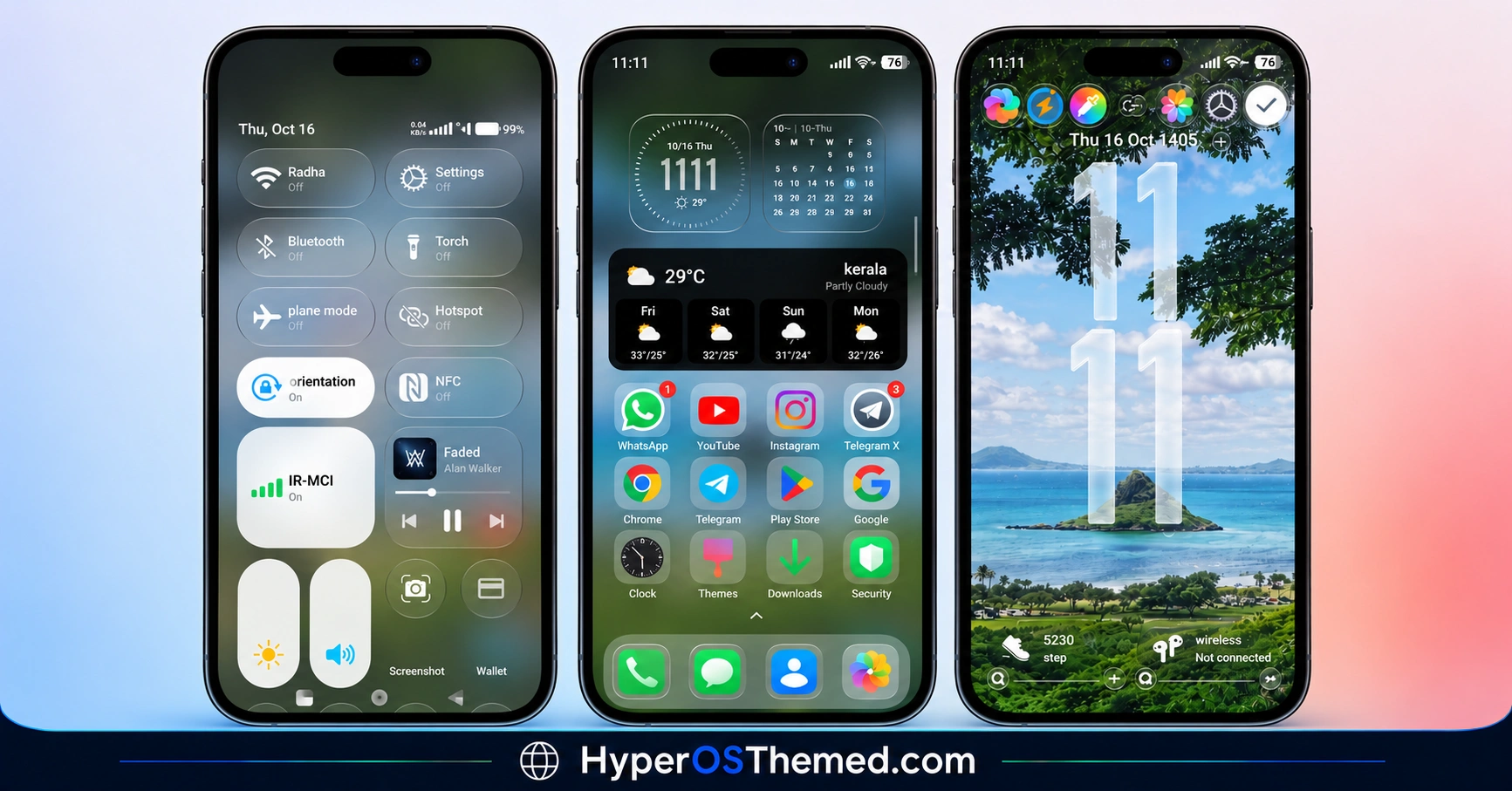
The home screen continues the glass aesthetic through a size-adjustable widget and premium-style icons. The eight large Control Centre tiles and glass-textured Settings screens complete the look, making OX G6 an option for users who want a coordinated interface rather than changes limited to wallpapers and icons.
OX G6 Theme Overview
| Detail | Information |
|---|---|
| Theme Name | OX G6 |
| Release Date | 13 October 2026 |
| Supported OS | HyperOS 2 and HyperOS 3 |
| Supported Devices | Xiaomi, Redmi and POCO devices running compatible versions |
| Theme Style | Nature-inspired premium glass UI |
| Main Features | Customisable lock screen, multiple widgets, depth and gravity effects, glass icons, Control Centre and Settings styling |
| Availability | Download source not provided |
| Designer | Oxfury |
| File Size | Not specified |
| Price | Free |
Get OX G6 HyperOS Theme
OX G6 is a premium glass-style theme for HyperOS 2 and HyperOS 3. You can Get this theme tgrough official Theme Store.
Before installing it, check the source of the theme and confirm that the package is compatible with your device and HyperOS version.
OX G6 HyperOS Theme Compatibility
OX G6 is compatible with HyperOS 2 and HyperOS 3. Compatibility with HyperOS 1 or other system versions has not been confirmed.
The availability of individual features may depend on your phone model, system version and Themes app. Check the theme listing or package details before applying it.
How to Install OX G6 HyperOS Theme on Global Stable ROM
If OX G6 is available through the official Xiaomi Theme Store for your device, follow these steps:
- Click the OFFICIAL THEME STORE LINK button above using your phone.
- When prompted to choose an application, select the Themes app to open the link.
- You will be redirected to OX G6’s page in the Xiaomi Theme Store.
- Tap Download and wait for the download to finish.
- Tap Apply to activate the theme on your device.
Note: If the link opens in a browser instead, check whether the browser allows links to open in system applications. Restart your phone if you encounter display issues after applying the theme. If the problem persists, leave a comment describing your device and HyperOS version so others can help troubleshoot it.
Why Choose OX G6 HyperOS Theme?
- Flexible lock-screen design: Adjust clock placement, sizing and supported elements.
- Layered visual effects: Use depth and gravity effects for a more distinctive lock screen.
- Consistent glass aesthetic: Match the home screen, icons, Control Centre and Settings.
- Prominent Control Centre layout: Eight large glass-style tiles create a distinctive system interface.
- HyperOS 2 and 3 support: Designed for users running either of these HyperOS versions.
Conclusion
OX G6 combines flexible lock-screen customisation with a premium glass-inspired interface. Its adjustable clock, multiple widgets and depth effects give users more control over the lock-screen layout.
The glass-style home-screen widget, premium icons and eight prominent Control Centre tiles extend the same design across the system. Its nature-inspired visual direction adds character without relying solely on wallpaper changes.
OX G6 is worth considering if you prefer a coordinated glass aesthetic on HyperOS 2 or HyperOS 3. Check the package source and compatibility details before installing it.
You may also like:
fulloful HyperOS Theme for Xiaomi and Redmi Phones
JellyB HyperOS Theme with Dark Sea Colour Palette for Xiaomi, POCO and REDMI Phones
Gaze of Night HyperOS Theme with Premium Black for Xiaomi, POCO and REDMI Phones
