
I keep coming back to themes that borrow from iOS design language, and the Lemon Bluery HyperOS theme is one of the more well executed takes on that idea I’ve tested recently. Designer MISANS clearly put thought into this one, and after running it on my own Xiaomi device for a few days, I think it earns a proper spot on the site.
What Caught My Attention
The first thing that stands out with Lemon Bluery HyperOS Theme is how confidently it commits to that iOS 26 inspired look. The icon set feels genuinely custom, not a rushed recolor of stock icons, and it carries that clean, rounded aesthetic that a lot of iOS style themes attempt but few actually nail. Paired with a redesigned lock screen, the whole front facing experience of your phone feels noticeably more premium than the default HyperOS interface.
What I appreciated most, though, is how far the redesign actually reaches. A lot of themes stop at the home screen and lock screen, leaving your Settings, Dialer, and Messages looking exactly like stock HyperOS. Lemon Bluery doesn’t do that; the same visual language carries through those apps too, so switching between screens never feels like you’ve suddenly landed back on an untouched part of your phone.
Why Lemon Bl uery HyperOS Theme Works So Well
The built-in wallpapers deserve a mention on their own; they’re genuinely well chosen, matching the overall tone of the theme rather than feeling like generic filler images tossed in to round out the package. Combined with the icon pack and lock screen work, everything ties together into something that feels considered rather than assembled in a hurry.
One small but important tip if you’re planning to install this: turn on Dark Mode before applying it, and restart your device afterwards. Skipping that step means you won’t see the theme exactly as MISANS designed it, so it’s worth the extra thirty seconds to do it properly.
Lemon Bluery HyperOS Theme Preview
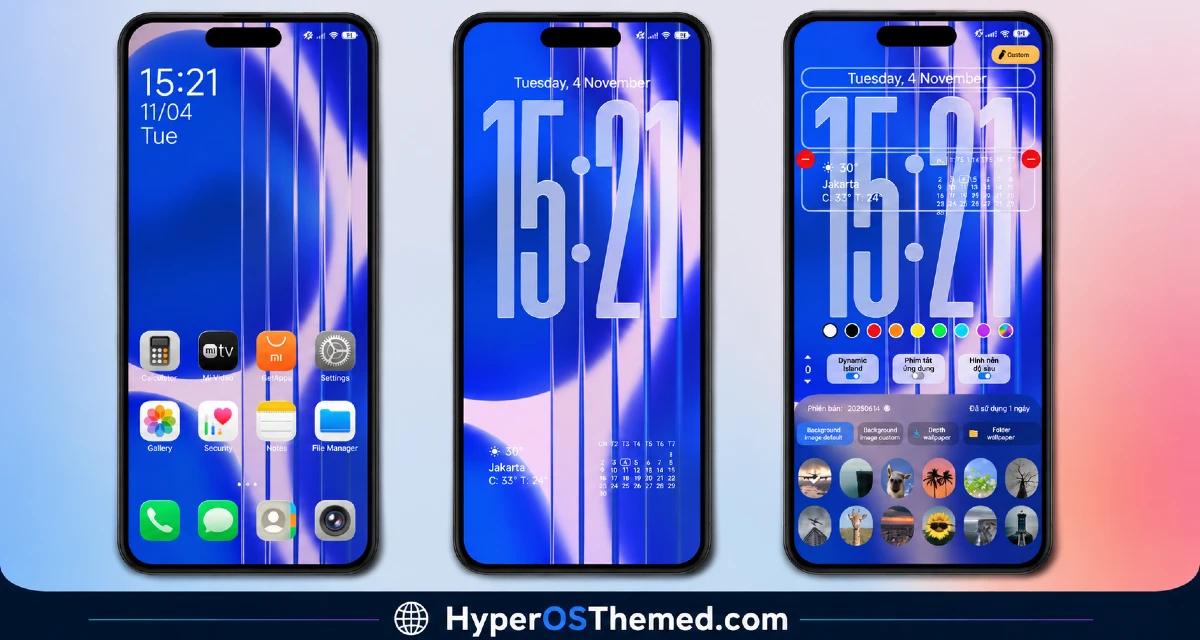
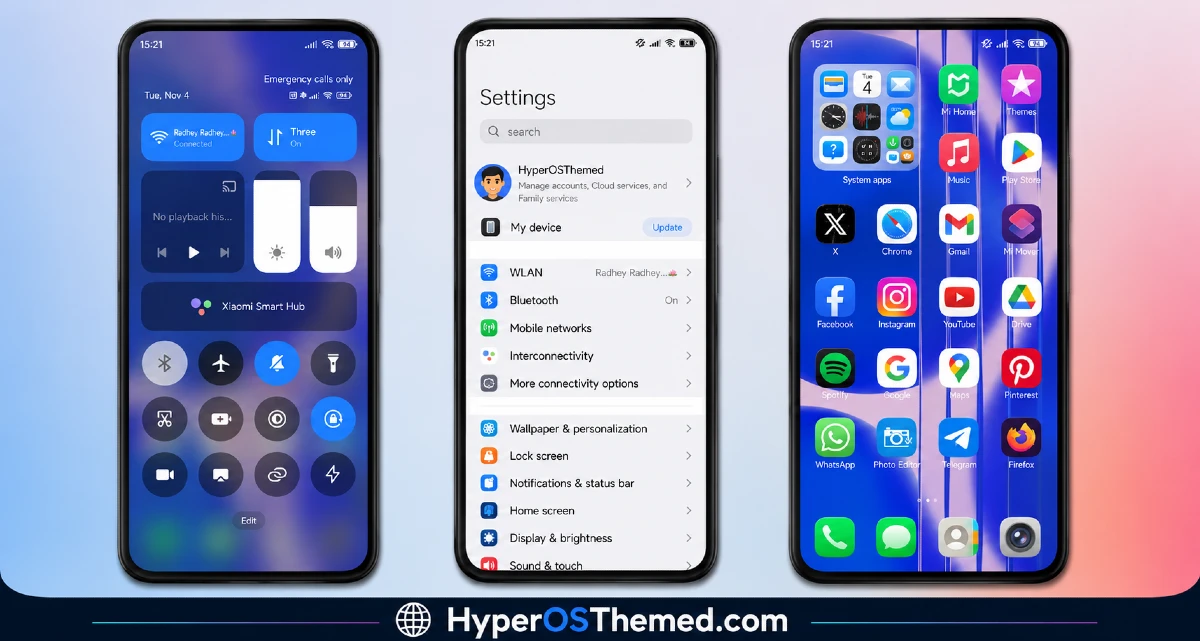
Who This Lemon Bluery HyperOS Theme Is For
If you’ve been wanting that clean, iPhone inspired look on your Xiaomi or Redmi device without giving up your current phone, the Lemon Bluery HyperOS theme is a strong pick. It’s free, it’s compatible with HyperOS, and the amount of polish packed into a 28.2 MB download is genuinely impressive.
Lemon Bluery HyperOS Theme Details
| Detail | Info |
|---|---|
| Theme Name | Lemon Bluery |
| File Size | 28.2 MB |
| Designer | MISANS |
| Compatibility | HyperOS, HyperOS 2.0 |
| Features | iOS 26 Style Icons, Custom Lock Screen, Built-in Wallpapers, System-Wide UI Changes |
A quick reminder before you install: enable Dark Mode first, then restart your device once the theme is applied. This theme is designed around dark mode specifically, so it won’t look right if you skip that step.
Getting the Theme
Installing on Global Stable ROM
If your device is running the standard HyperOS or MIUI Global stable build, here’s how to install it:
- Find the Official Theme Store Link in the download section and tap it.
- You’ll be prompted to choose which app to open the link with.
- Select the Themes app.
- This redirects you into the Theme Store, where the download begins.
- Download the theme and apply it.
One thing worth keeping in mind: restart your device if anything looks overlapped or glitchy after applying. A quick reboot usually clears it right up. This theme has been tested thoroughly and worked without any issues on my end.
Final Thoughts
The Lemon Bluery HyperOS theme is a genuinely solid choice if you want that iOS 26-inspired look done properly, custom icons, a distinct lock screen, and a redesign that actually reaches your Settings, Dialer, and Messages instead of stopping at the home screen. Just remember to switch on Dark Mode before applying it, and you’ll get the full experience MISANS intended. Give it a try and see how it transforms your device.
You May Also Like:
- Liuli OS 27 iOS 27 – Style Theme for POCO, Redmi & Xiaomi Devices
- Wonderful Mix v15 Theme Xiaomi For HyperOS And MIUI
- Shadowed Gleam MIUI Theme Best for POCO, Redmi and Xiaomi Phones
- Best HyperOS 3.0 Theme AS Neon Dark Mode For POCO, Xiaomi and Redmi Devices
- Luxurious O HyperOS Theme For POCO, Redmi and Xiaomi Devices
